
关于Pytorch的二维tensor的gather和scatter_操作用法分析
看得不明不白(我在下一篇中写了如何理解gather的用法)
gather是一个比较复杂的操作,对一个2维tensor,输出的每个元素如下:
out[i][j] = input[index[i][j]][j]  # dim=0

out[i][j] = input[i][index[i][j]]  # dim=1
二维tensor的gather操作
针对0轴

注意index此时的值
输入
index = t.LongTensor([[0,1,2,3]])

print("index = \n", index)      #index是2维

print("index的形状: ",index.shape)  #index形状是(1,4)
输出
index =

 tensor([[0, 1, 2, 3]])

index的形状:  torch.Size([1, 4])
分割线============
针对1轴
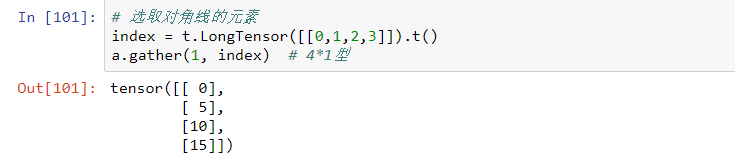
注意index此时的值
输入
index = t.LongTensor([[0,1,2,3]]).t()  #index是2维

print("index = \n", index)    #index形状是(4,1)

print("index的形状: ",index.shape)
输出
index =

 tensor([[0],

        [1],

        [2],

        [3]])

index的形状:  torch.Size([4, 1])
分割线===========
再来看看几个例子
注意index在以0轴和1轴为标准时的表达式是不一样的。
b.gather()中取0维时,输出的结果是行形式,取1维时,输出的结果是列形式。
- b是一个 $ 3\times4 $ 型的
>>> import torch as t

>>> b = t.arange(0,12).view(3,4)

>>> b

tensor([[ 0,  1,  2,  3],

        [ 4,  5,  6,  7],

        [ 8,  9, 10, 11]])

>>> index = t.LongTensor([[0,1,2]])

>>> index

tensor([[0, 1, 2]])

>>> b.gather(0,index)     #运行失败了

Traceback (most recent call last):

  File "<stdin>", line 1, in <module>

RuntimeError: Expected tensor [1 x 3], src [3 x 4] and index [1 x 3] to have the same size apart from dimension 0 at c:\new-builder_3\win-wheel\pytorch\aten\src\th\generic/THTensorMath.cpp:620

>>> index2 = t.LongTensor([[0,1,2]]).t()

>>> b.gather(1,index2)  #运行成功了

tensor([[ 0],

        [ 5],

        [10]])

>>> index3 = t.LongTensor([[0,1,2,3]]).t()

>>> b.gather(1,index3)  #运行失败了

Traceback (most recent call last):

  File "<stdin>", line 1, in <module>

RuntimeError: Expected tensor [4 x 1], src [3 x 4] and index [4 x 1] to have the same size apart from dimension 1 at c:\new-builder_3\win-wheel\pytorch\aten\src\th\generic/THTensorMath.cpp:620
- b是一个 $ 6\times6 $ 型的
>>> import torch as t

>>> b = t.arange(0,36).view(6,6)

>>> b

tensor([[ 0,  1,  2,  3,  4,  5],

        [ 6,  7,  8,  9, 10, 11],

        [12, 13, 14, 15, 16, 17],

        [18, 19, 20, 21, 22, 23],

        [24, 25, 26, 27, 28, 29],

        [30, 31, 32, 33, 34, 35]])

>>> index = t.LongTensor([[0,1,2,3,4,5,6]])

>>> b.gather(0,index)     #运行失败了

Traceback (most recent call last):

  File "<stdin>", line 1, in <module>

RuntimeError: Expected tensor [1 x 7], src [6 x 6] and index [1 x 7] to have the same size apart from dimension 0 at c:\new-builder_3\win-wheel\pytorch\aten\src\th\generic/THTensorMath.cpp:620

>>> index = t.LongTensor([[0,1,2,3,4,5]])

>>> b.gather(0,index)    #运行成功了

tensor([[ 0,  7, 14, 21, 28, 35]])

>>> b.gather(1,index)

Traceback (most recent call last):

  File "<stdin>", line 1, in <module>

RuntimeError: Expected tensor [1 x 6], src [6 x 6] and index [1 x 6] to have the same size apart from dimension 1 at c:\new-builder_3\win-wheel\pytorch\aten\src\th\generic/THTensorMath.cpp:620

>>> index2 = t.LongTensor([[0,1,2,3,4,5]]).t()

>>> b.gather(1,index2)     #运行成功了

tensor([[ 0],

        [ 7],

        [14],

        [21],

        [28],

        [35]])

>>> index3 = t.LongTensor([[0,1,2,3,4]]).t()

>>> b.gather(1,index3)

Traceback (most recent call last):

  File "<stdin>", line 1, in <module>

RuntimeError: Expected tensor [5 x 1], src [6 x 6] and index [5 x 1] to have the same size apart from dimension 1 at c:\new-builder_3\win-wheel\pytorch\aten\src\th\generic/THTensorMath.cpp:620

>>> index4 = t.LongTensor([[0,1,2,3,4]])

>>> b.gather(0,index4)

Traceback (most recent call last):

  File "<stdin>", line 1, in <module>

RuntimeError: Expected tensor [1 x 5], src [6 x 6] and index [1 x 5] to have the same size apart from dimension 0 at c:\new-builder_3\win-wheel\pytorch\aten\src\th\generic/THTensorMath.cpp:620
与gather相对应的逆操作是scatter_,gather把数据从input中按index取出,而scatter_是把取出的数据再放回去。注意scatter_函数是inplace操作。

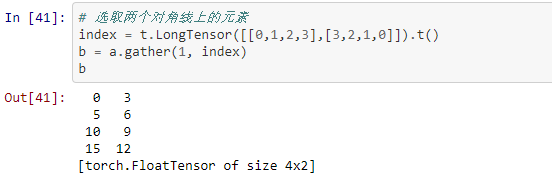
与gather相对应的逆操作是scatter_,gather把数据从input中按index取出,而scatter_是把取出的数据再放回去。注意scatter_函数是inplace操作。
out = input.gather(dim, index)

-->近似逆操作

out = Tensor()

out.scatter_(dim, index)
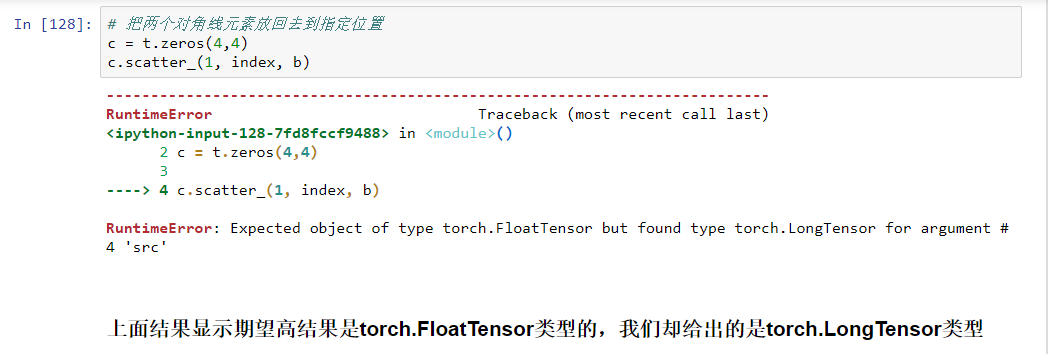
根据StackOverflow上的问题修改代码如下:
输入
# 把两个对角线元素放回去到指定位置

c = t.zeros(4,4)

c.scatter_(1, index, b.float())
输出
tensor([[ 0.,  0.,  0.,  3.],

        [ 0.,  5.,  6.,  0.],

        [ 0.,  9., 10.,  0.],

        [12.,  0.,  0., 15.]])
关于Pytorch的二维tensor的gather和scatter_操作用法分析的更多相关文章
- 2017.11.17 C++系列---用malloc动态给c++二维数组的申请与释放操作
方法一:利用二级指针申请一个二维数组. #include<stdio.h> #include<stdlib.h> int main() { int **a; //用二级指针动态 ...
- Pytorch学习笔记(二)——Tensor
一.对Tensor的操作 从接口的角度讲,对Tensor的操作可以分为两类: (1)torch.function (2)tensor.function 比如torch.sum(a, b)实际上和a.s ...
- Javascript生成二维码(QR)
网络上已经有非常多的二维码编码和解码工具和代码,很多都是服务器端的,也就是说需要一台服务器才能提供二维码的生成.本着对服务器性能的考虑,这种小事情都让服务器去做,感觉对不住服务器,尤其是对于大流量的网 ...
- 二维指针*(void **)的研究(uC/OS-II案例) 《转载》
uC/OS-II内存管理函数内最难理解的部分就是二维指针,本文以图文并茂的方式对二维指针进行了详细分析与讲解.看完本文,相信对C里面指针的概念又会有进一步的认识. 一.OSMemCreate( ) 函 ...
- Stars(二维树状数组)
Stars Time Limit: 5000/2000 MS (Java/Others) Memory Limit: 32768/65536 K (Java/Others) Total Submiss ...
- iOS原生实现二维码拉近放大
http://www.cocoachina.com/ios/20180416/23033.html 2018-04-16 15:34 编辑: yyuuzhu 分类:iOS开发 来源:程序鹅 8 300 ...
- Java打印M图形(二维数组)——(九)
对于平面图形输出集合图形与数字组合的,用二维数组.先在Excel表格中分析一下,找到简单的规律.二维数组的行数为行高,列数为最后一个数大小. 对于减小再增大再减小再增大的,可以用一个boolean标志 ...
- 混沌数学之二维logistic模型
上一节讲了logistic混沌模型,这一节对其扩充一下讲二维 Logistic映射.它起着从一维到高维的衔接作用,对二维映射中混沌现象的研究有助于认识和预测更复杂的高维动力系统的性态.通过构造一次藕合 ...
- UVa 11297 Census (二维线段树)
题意:给定上一个二维矩阵,有两种操作 第一种是修改 c x y val 把(x, y) 改成 val 第二种是查询 q x1 y1 x2 y2 查询这个矩形内的最大值和最小值. 析:二维线段树裸板. ...
随机推荐
- 从获取点击事件根元素谈 target和currentTarget
事情由来: 写了一个点击事件,想获取根元素,想的直接用current就行了,因为之前就是这么用的,但是之前的点击元素是没子元素的,current就是根元素,但是这次点击元素内部有子元素,current ...
- 一些常用的html css整理--文本长度截取
div+css设置列表div超出部分显示...(单行文本) width:200px; //指定宽度: overflow:hidden; //将超出内容隐藏 text-overflow:ellipsis ...
- PHP 获得域控内用户的计算机登录名
一个需求: 在域控范围获得访问用户的计算机名.方法: 1.测试软件环境: XAMPP Control Panel V3.2.1 , Apache version 2.4.7 2.Apache 2.2 ...
- recursion
w recursion nexttoken
- MySQL权限系统(二). MySQL提供的特权 Privileges Provided by MySQL
MySQL provides privileges that apply in different contexts and at different levels of operation: Adm ...
- python并发编程&多线程(一)
本篇理论居多,实际操作见: python并发编程&多线程(二) 一 什么是线程 在传统操作系统中,每个进程有一个地址空间,而且默认就有一个控制线程 线程顾名思义,就是一条流水线工作的过程,一 ...
- Python实现下载进度
# encoding:utf-8 import urllib import os def Schedule(a,b,c): ''''' a:已经下载的数据块 b:数据块的大小 c:远程文件的大小 '' ...
- Selenium chrome配置不加载图片
from selenium import webdriver chrome_options = webdriver.ChromeOptions() prefs = {"profile.man ...
- python3爬虫-分析Ajax,抓取今日头条街拍美图
# coding=utf-8 from urllib.parse import urlencode import requests from requests.exceptions import Re ...
- docker daemon.json 配置
下面是自己设置的 /etc/docker/daemon.json 文件中的配置案例 [root@master docker]# cat daemon.json { "registry-mir ...