
HoneyPy 模拟Nginx服务器脚本
HoneyPy是一个Python写的低交互式蜜罐,可以通过自定义Plugins的方式来配置不同的场景。这里是一个模拟Nginx空白页面的代码:
# Auth xiaoxiaoleo

# http://www.cnblogs.com/xiaoxiaoleo/

#

from twisted.internet import protocol, reactor, endpoints

from twisted.python import log

import uuid

import datetime

### START CUSTOM IMPORTS ###

############################

class Web(protocol.Protocol): ### Set custom protocol class name

	localhost   = None

	remote_host = None

	session     = None

	### START CUSTOM VARIABLES ###############################################################

	##########################################################################################

	# handle events

	def connectionMade(self):

		self.connect()

		### START CUSTOM CODE ####################################################################

		##########################################################################################

	def dataReceived(self, data):

		self.rx(data)

		### START CUSTOM CODE ####################################################################

                time_str = datetime.datetime.now().strftime('%d %b %Y %H:%M:%S')

		response = 'HTTP/1.1 200 OK\r\nServer: nginx/1.10.0 (CentOS)\r\nDate: ' + time_str +' GMT\r\nContent-Type: text/html\r\nLast-Modified: ' + time_str + ' GMT\r\nConnection: close\r\nETag: W/"583bbb00-264"\r\nContent-Length: 612\r\n'+"""

<!DOCTYPE html>

<html>

<head>

<title>Welcome to nginx!</title>

<style>

    body {

        width: 35em;

        margin: 0 auto;

        font-family: Tahoma, Verdana, Arial, sans-serif;

    }

</style>

</head>

<body>

<h1>Welcome to nginx!</h1>

<p>If you see this page, the nginx web server is successfully installed and

working. Further configuration is required.</p>

<p>For online documentation and support please refer to

<a href="http://nginx.org/">nginx.org</a>.<br/>

Commercial support is available at

<a href="http://nginx.com/">nginx.com</a>.</p>

<p><em>Thank you for using nginx.</em></p>

</body>

</html>

"""

		self.tx(response)

		##########################################################################################

	### START CUSTOM FUNCTIONS ###################################################################

	##############################################################################################

	def connect(self):

		self.local_host  = self.transport.getHost()

		self.remote_host = self.transport.getPeer()

		self.session     = uuid.uuid1()

		log.msg('%s %s CONNECT %s %s %s %s %s' % (self.session, self.remote_host.type, self.local_host.host, self.local_host.port, self.factory.name, self.remote_host.host, self.remote_host.port))

	def tx(self, data):

		log.msg('%s %s TX %s %s %s %s %s %s' % (self.session, self.remote_host.type, self.local_host.host, self.local_host.port, self.factory.name, self.remote_host.host, self.remote_host.port, data.encode("hex")))

		self.transport.write(data)

	def rx(self, data):

		log.msg('%s %s RX %s %s %s %s %s %s' % (self.session, self.remote_host.type, self.local_host.host, self.local_host.port, self.factory.name, self.remote_host.host, self.remote_host.port, data.encode("hex")))

class pluginFactory(protocol.Factory):

	protocol = Web ### Set protocol to custom protocol class name

	def __init__(self, name=None):

		self.name = name or 'HoneyPy'
效果:
HTTP header:
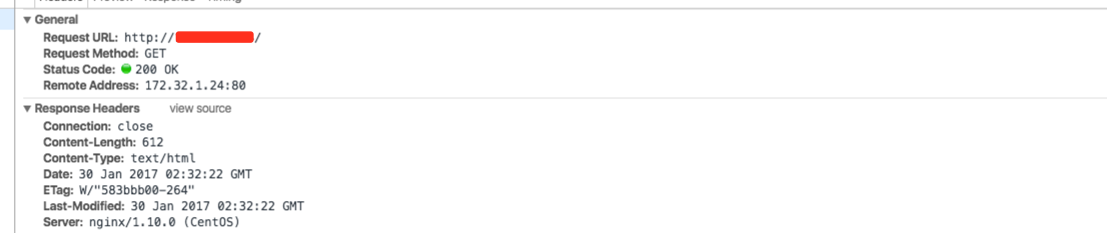
HTML:

脚本写得不够完美,对Etag和Last-Modified分析一下,蜜罐就露出马脚~
HoneyPy 模拟Nginx服务器脚本的更多相关文章
- nginx服务器是怎么执行php脚本的?
简单的说: fastCGI是nginx和php之间的一个通信接口,该接口实际处理过程通过启动php-fpm进程来解 析php脚本,即php-fpm相 当于一个动态应用服务器,从而实现nginx动态解析 ...
- 利用系统函数模拟实现nginx 系统脚本启动的特殊颜色专业效果
利用系统函数模拟实现nginx 系统脚本启动的特殊颜色专业效果/etc/init.d/nginxd {start/stop/restart/reload}利用if语句实现: ============= ...
- 06_Linux基础-NGINX和浏览器、网页的关系-云服务器ssh登陆-安装NGINX-上传网页-压缩命令-xz-gzip-bzip2-zip-tar-配置NGINX服务器支持下载功能-备份脚本
06_Linux基础-NGINX和浏览器.网页的关系-云服务器ssh登陆-安装NGINX-上传网页-压缩命令-xz-gzip-bzip2-zip-tar-配置NGINX服务器支持下载功能-备份脚本 一 ...
- linux软件管理之------编译安装nginx服务器并手动编写自动化运行脚本
红帽系列的 linux软件管理分为三类:1. rpm 安装软件.2. yum 安装软件.3. 源码包编译安装.前面两种会在相关专题给出详细讲解.源码包的编译安装是非常关键的,我们知道linux的相关版 ...
- Docker 使用入门,创建一个Nginx服务器
运行环境: MAC Docker 版本: Docker version 17.12.0-ce, build c97c6d6 一.启动Nginx 服务器 启动Nginx 服务器,并进入模拟终端 dock ...
- Nginx服务器性能优化与安全配置实践指南
转载自:https://www.bilibili.com/read/cv16151784?spm_id_from=333.999.0.0 1.引言 1.1 目的 为了更好的指导部署与测试艺术升系统ng ...
- nginx入门篇----nginx服务器基础配置
1.nginx.conf文件结构... #全局块 events{ ... } http #http块{ ...
- Nginx+Keepalived(带Nginx监控脚本)
转载于:http://www.itxuexiwang.com/a/liunxjishu/2016/0220/151.html?1456381460 Keepalived+ nginx的安装部署 主机: ...
- nginx服务器绑定域名和设置根目录的方法
nginx服务器绑定域名以及设置根目录非常方便,首先进入nginx安装目录,然后执行 vim conf/nginx.conf 打开nginx的配置文件,找到 server { ..... ..... ...
随机推荐
- Android TextView 单行文本的坑
这是android系统的一个bug,描述如下:https://code.google.com/p/android/issues/detail?id=33868 具体来说就是当一个TextView设置了 ...
- 27、理解js的继承机制(转载自阮一峰)
Javascript继承机制的设计思想 作者: 阮一峰 日期: 2011年6月 5日 我一直很难理解Javascript语言的继承机制. 它没有"子类"和"父类&qu ...
- hdu1506 Largest Rectangle in a Histogram
Problem Description A histogram is a polygon composed of a sequence of rectangles aligned at a commo ...
- json格式化显示样式js代码分享
最近开发中需要在页面展示json.特整理了下代码,送给大家,希望能帮到有同样需求的朋友们. 代码: <html> <script src="http://cdn.bootc ...
- LeetCode 206——反转链表
对单链表进行反转有迭代法和递归法两种. 1. 迭代法 迭代法从前往后遍历链表,定义三个指针分别指向相邻的三个结点,反转前两个结点,即让第二个结点指向第一个结点.然后依次往后移动指针,直到第二个结点为空 ...
- Structure From Motion(SFM,从运动恢复结构)
Structure From Motion(SFM,从运动恢复结构) 阅读相关文献: Wu et al. Multicore Bundle Adjustment Agarwal et. al. Bun ...
- picker组件,mode=date,苹果机年份从1开始
由于在IOS上复制图片不方便, 所以用了张别的网站的图 这是在没有设置value和start的情况下出现的,安卓机上显示是好的.尝试完网上相关说法, 发现都不中! 通过各种挣扎啊!~ 心里苦啊~ 复制 ...
- redis基础和通用key操作
redis是什么? redis开源的,构建于内存的数据结构的nosql数据库.常被用于数据存储,缓存处理和消息处理. redis的优势? 1.极高的读写能力 2.丰富的数据类型 3.原子性操作 4.支 ...
- flask - 1
from flask import Flask app = Flask(__name__) @app.route('/') def hello_world(): return 'Hello, Worl ...
- DFS做题小结
一.深入理解DFS 采用递归写法 深度优先,思路就是沿着一条路一直走,直到走到死胡同,原路返回,返回到有多条道路的地方换其他路走.直到这条支路全部都访问过了,按照原路返回,回到起点,如果起点还有别的支 ...