
Vue nodejs商城项目-登录模块
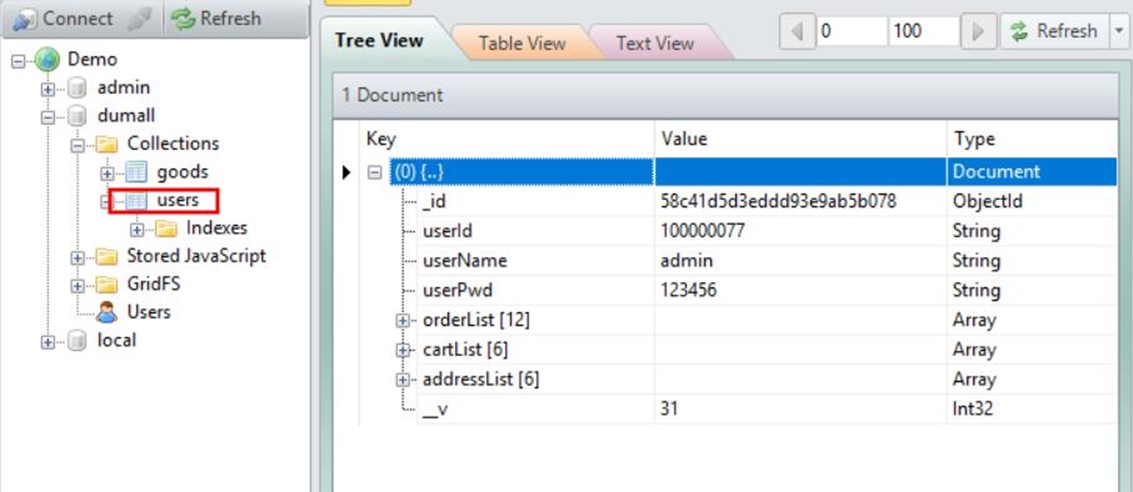
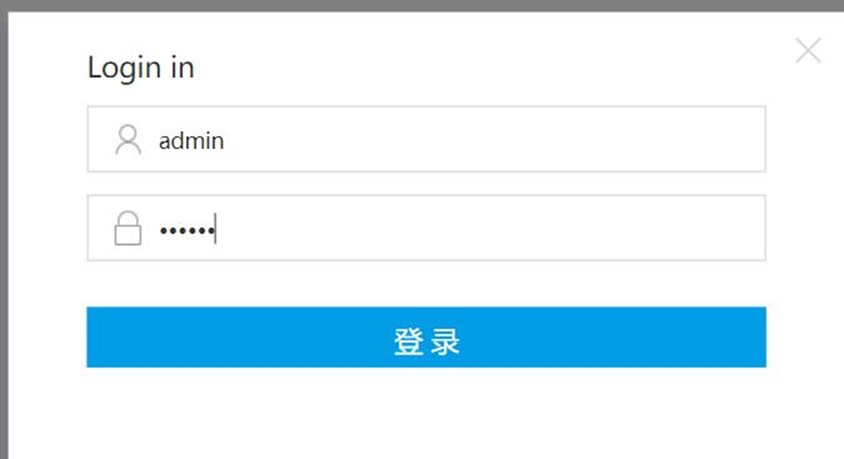
一、登录功能
后端server/routes/users.js
- var User = require('./../models/users.js');
- // 二级路由
- // 登录接口
- router.post("/login",function(req, res, next){
- // 获取参数
- var param = {
- userName:req.body.userName,
- userPwd:req.body.userPwd
- }
- User.findOne(param, function(err,doc){ // 根据用户名密码查找数据库
- if(err){
- res.json({
- status:"",
- msg:err.message
- })
- }else{
- if(doc){
- res.cookie("userId",doc.userId,{
- path:'/',
- maxAge:100*60*60
- });
- // res.cookie("userName",doc.userName,{
- // path:'/',
- // maxAge:1000*60*60
- // });
- // req.session.user = doc;
- res.json({
- status:"",
- msg:'',
- result:{
- userName:doc.userName
- }
- })
- }
- }
- })
- })
添加代理config/index.js
- proxyTable: {
- '/users/*':{ // users/路由的下一级路由
- target:'http://localhost:3000'
- }
- },
- 说明:如果是有三级路由,例'/users/cart/del',需要配置'/users/**';否则请求时会出现404错误。
前端NavHeader.vue
- methods:{
- login(){ // 点击登录
- console.log("userName:"+this.userName)
- if(!this.userName || !this.userPwd){
- this.errorTip = true;
- return
- }
- axios.post("/users/login",{
- userName:this.userName,
- userPwd:this.userPwd
- }).then((response)=>{
- let res = response.data;
- "){
- this.errorTip = false;
- this.loginModalFlag = false;
- this.nickName = res.result.userName;
- }else{
- this.errorTip = true;
- }
- })
- }
- }
二、登出功能
后端server/routes/users.j
- / 登出接口
- router.post("/logout",function(req,res,next){
- res.cookie("userId","",{
- path:"/",
- maxAge:-1 // 生命周期
- })
- res.json({
- status:"",
- msg:'',
- result:''
- })
- })
前端NavHeader.vue
- methods:{
- logOut(){ // 点击logout登出
- axios.post("/users/logout").then((response)=>{
- let res = response.data;
- "){
- this.nickName = '';
- }
- })
- }
- }
三、登录拦截功能
server/app.js
- // 捕获登录状态
- app.use(function(req,res,next){ // 进入路由之前优先进入function
- if(req.cookies.userId){ // 有cookies,说明已经登录
- next();
- }else{
- console.log("url:"+req.originalUrl);
- if(req.originalUrl =='/users/login' || req.originalUrl == '/users/logout' || req.originalUrl == '/goods/list'){ // 未登录时可以点击登录login登出logout和查看商品列表
- next();
- }else{
- res.json({
- status:'1001',
- msg:'当前未登录',
- result:''
- })
- }
- }
- })
四、校验登录
server/routes/users.js
- 登录接口添加userName的cookie
- res.cookie("userName",doc.userName,{
- path:'/',
- maxAge:1000*60*60
- });
- // 校验是否登录
- router.get("/checkLogin",function(req,res,next){
- if(req.cookies.userId){
- res.json({
- status:'0',
- msg:'',
- result:req.cookies.userName || ''
- });
- }else{
- res.json({
- status:'1',
- msg:'未登录',
- result:''
- })
- }
- })
src/components/NavHeader.vue
- mounted(){
- this.checkLogin();
- },
- methods:{
- checkLogin(){ // 检查是否登录
- axios.get("/users/checkLogin").then((response)=>{
- let res = response.data;
- if(res.status == '0'){
- this.nickName = res.result;
- }
- })
- }
- }
Vue nodejs商城项目-登录模块的更多相关文章
- Vue nodejs商城项目-项目概述
项目概况 用vue2.0 +node.js +MongonDB 做了一个商城系统 技术选型 Vue2.0+node.js+express+MongoDB+axios+vuex 构建工具 Webpack ...
- Vue nodejs商城项目- 前后端数据传递
.利用Mongoose查询MongoDB 通过mongoose插件可以简捷地从mondodb中获取数据,首先安装mongoose: cnpm install mongoose --save 使用m ...
- Vue nodejs商城项目-商品列表价格过滤和加入购物车功能
一.价格过滤功能 GoodsList.vue >>点击价格区间时发送请求 methods:{ getGoodsList(flag){ var param = { ...
- Vue nodejs商城项目-商品的分页、排序、筛选
.分页 ,要查第3页的数据,则跳过2*8条数据,然后返回8条数据. 在实现滚动加载时,页面刚一加载完成并不需要请求所有数据,当用户下拉到页面底部时,再去请求数据并拼接到商品数据列表中. 通过vue-i ...
- Vue nodejs商城项目-商品列表页面组件
data(){ return { goodsList:[], // 商品列表 priceFilter:[ // 价格区间数组 ...
- Vue nodejs商城项目-搭建express框架环境
1.express-project 搭建express框架环境 安装express generator生成器 通过生成器自动创建项目 配置分析 安装 cnpm i -g express-generat ...
- iOS不得姐项目--登录模块的布局,设置文本框占位文字颜色,自定义内部控件竖直排列的按钮
一.登录模块的布局 将一整部分切割成若干部分来完成,如图分成了三部分来完成 设置顶部状态栏为白色的方法 二.设置文本框占位文字颜色 <1>方法一与方法二实现原理是同一种,都是通过设置pla ...
- Vue nodejs商城-订单模块
一.订单列表渲染 新建OrderConfirm.vue订单确认页面,添加路由 src/router/index.js添加路由 import OrderConfirm from '@/views/Ord ...
- Vue nodejs商城-地址模块
一.地址列表渲染 ,则不可以点击. src/views/Cart.vue <a class="btn btn--red" v-bind:class="{'btn-- ...
随机推荐
- javascript模块化是什么及其优缺点介绍
模块化是一种将系统分离成独立功能部分的方法,可将系统分割成独立的功能部分,严格定义模块接口.模块间具有透明性 如今backbone.emberjs.spinejs.batmanjs 等MVC框架侵袭而 ...
- 1、Angular2 Component 组件
angular2借鉴了.http://www.cnblogs.com/lewis617/p/5191007.html 导入了自己的思维方式 1.基本属性 2.*语法与template标签 3.组件的嵌 ...
- linux服务器时间自动同步
最常用的是 rdate 服务 安装(centOs为例): yum install -y rdate 用法: rdate -s time-b.nist.gov 执行完以上方法时间就同步了.有的服务器隔一 ...
- 04.Continue,和三元表达式的学习
立即结束本次循环,判断循环条件,如果成立,则进入下一次循环,否则退出循环. 举例:运动员跑步喝水的例子 比如:我编写代码的时候,上个厕所,回来继续写代码 练习1: namespace _09.练习02 ...
- javascript实现数据结构与算法系列
1.线性表(Linear list) 线性表--简单示例及线性表的顺序表示和实现 线性表--线性链表(链式存储结构) 线性表的静态单链表存储结构 循环链表与双向链表 功能完整的线性链表 线性链表的例子 ...
- Android 实现电话录音(窃听)
配置文件 <?xml version="1.0" encoding="utf-8"?> <manifest xmlns:android=&qu ...
- MapReduce框架结构及代码示例
一个完整的 mapreduce 程序在分布式运行时有三类实例进程: 1.MRAppMaster:负责整个程序的过程调度及状态协调 2.MapTask:负责 map 阶段的整个数据处理流程 3.Redu ...
- centos下安装lnmp各个版本的几种方法
首先我们用一种yum的方法安装,我们需要rpm源 默认的版本太低了,手动安装有一些麻烦,想采用Yum安装的可以使用下面的方案: 1.检查当前安装的PHP包 yum list installed | g ...
- traceroute工具
traceroute是类Unix的命令工具,用于测试到网络上某台主机host的跳数以及延时情况.其运行原理是,通过发送指定TTL的UDP包给目的主机host,通过将TTL逐渐增大,就能收到一些ICMP ...
- Docker入门系列之一:在一个Docker容器里运行指定的web应用
实现题目描述的这个需求有很多种办法,作为入门,让我们从最简单的办法开始. 首先使用命令docker ps确保当前没有正在运行的Docker实例. 运行命令docker run -it nginx: 然 ...