
Spring Data学习(一):初识
前言
Spring Data是为了简化数据库的访问,支持关系数据库、非关系数据库、map-reduce框架和基于云的数据服务。
添加Spring Data
将SpringData添加进Spring Boot项目中。
配置pom.xml
<!--会下载所有Spring Data Jpa所需的依赖-->

<dependency>

    <groupId>org.springframework.boot</groupId>

    <artifactId>spring-boot-starter-data-jpa</artifactId>

</dependency>
配置数据库相关信息(application.properties)
配置数据库信息
# Mysql属性配置,Spring-boot系统配置

spring.datasource.url=jdbc:mysql://localhost:3306/test

spring.datasource.username=root

spring.datasource.password=123

spring.datasource.driver-class-name=com.mysql.jdbc.Driver
配置自动根据实体类在数据库创建表
# create----每次运行该程序,没有表格会新建表格,表内有数据会清空

# create-drop----每次程序结束的时候会清空表

# update----每次运行程序,没有表格会新建表格,表内有数据不会清空,只会更新

# validate----运行程序会校验数据与数据库的字段类型是否相同,不同会报错

spring.jpa.hibernate.ddl-auto=update

# 运行时数据SQL语句

spring.jpa.show-sql = true
创建User.java
说明:若是不填写各字段在数据库里的列名,Spring Data会自动根据字段名称创建。
package com.jc.springdata.dao;

import javax.persistence.*;

/**

 * Created by Administrator on 2018/7/31.

 */

@Entity  //表示是一个JPA实体类

@Table(name = "SBD_USER") //映射的表名称

public class User {

    @Id // 表示为ID

    @GeneratedValue(strategy = GenerationType.AUTO) //自动生成

    private Long id;

    @Column(length = 25)

    private String name;

    @Column(length = 20) //为设置数据库里的字段名称,Spring Data会自动根据实体类字段名称设置,默认为:birthy_day

    private String birthyDay;

    public User() {

    }

    public User(String name, String birthyDay) {

        this.name = name;

        this.birthyDay = birthyDay;

    }

    public Long getId() {

        return id;

    }

    public void setId(Long id) {

        this.id = id;

    }

    public String getName() {

        return name;

    }

    public void setName(String name) {

        this.name = name;

    }

    public String getBirthyDay() {

        return birthyDay;

    }

    public void setBirthyDay(String birthyDay) {

        this.birthyDay = birthyDay;

    }

    @Override

    public String toString() {

        return "User{" +

                "id=" + id +

                ", name='" + name + '\'' +

                ", birthyDay='" + birthyDay + '\'' +

                '}';

    }

}
ps:添加java实体类时,可以考虑使用lombok(https://www.cnblogs.com/wsygdb/p/9467690.html)
创建查询
下面就是见证Spring Data神奇的时候了,即:您不必编写存储库接口的实现。Spring Data JPA在运行应用程序时动态创建一个实现。
创建一个关于对User表的查询接口IUserRepository.java
import com.jc.springdata.dao.User;

import org.springframework.data.repository.CrudRepository;

import org.springframework.stereotype.Repository;

import java.util.List;

/**

 * Created by Administrator on 2018/8/2.<br/>

 * 特别说明:这正是Spring Data JPA如此强大的原因:您不必编写存储库接口的实现。Spring Data JPA在运行应用程序时动态创建一个实现。

 */

@Repository("userRepository")  //表明该类是用来执行与数据库相关的操作(即dao对象),并支持自动处理数据库操作产生的异常

public interface IUserRepository extends CrudRepository<User,Long> { // 参数1:表示数据表对应的实体类,参数2:主键的类型

    /**

     * 根据名称查找用户</>

     * @param name

     * @return

     */

    List<User> findByName(String name);

    /**

     * 根据生日查询对应的用户

     * @param birthyDay

     * @return

     */

    List<User> findByBirthyDay(String birthyDay);

}
测试
1) 创建UserCommandLineRunner.java,实现CommandLineRunner.java接口,用户在SpringBoot启动时运行
package com.jc.springdata.runner;

import com.jc.springdata.dao.User;

import com.jc.springdata.mgr.IUserRepository;

import org.slf4j.Logger;

import org.slf4j.LoggerFactory;

import org.springframework.beans.factory.annotation.Autowired;

import org.springframework.boot.CommandLineRunner;

import org.springframework.core.annotation.Order;

import org.springframework.stereotype.Component;

/**

 * Created by Administrator on 2018/8/3.

 */

@Order(value = 1) //系统启动的优先级

@Component

public class UserCommandLineRunner implements CommandLineRunner{

    private static final Logger LOG = LoggerFactory.getLogger(UserCommandLineRunner.class);

    @Autowired

    private IUserRepository userRepository;

    @Override

    public void run(String... args) throws Exception {

        LOG.info("---- start save ----");

        userRepository.save(new User("Tom","20150101"));

        userRepository.save(new User("Jack","20050101"));

        userRepository.save(new User("SuSan","20000101"));

        LOG.info("---- find all ----");

        Iterable<User> users = userRepository.findAll();

        for (User user: users) {

            LOG.info("user:{}",user);

        }

    }

}
2) 启动Spring Boot
再次启动SpringBoot,查看启动日志,发现系统有创建表的sql、查询等被执行的SQL:

这是系统查询
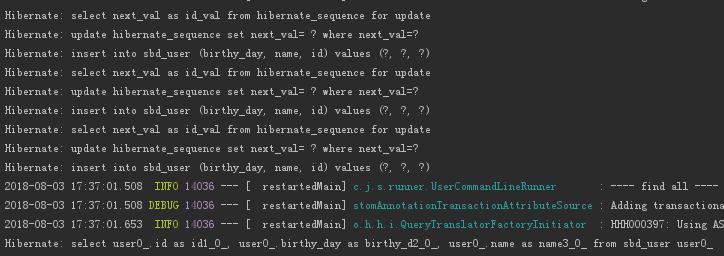
查看数据库,确实是自动创建了表,可以看到,由于我们未给各个字段设置数据库里的字段名,Spring Data自动根据实体类字段名设置了数据库里的字段名。

遇见问题处理
Failed to read Class-Path attribute from manifest of jar file:/../repository/org/jboss/jandex/2.0.3.Final/jandex-2.0.3.Final.jar
报错是在启动SpringBoot时出现的,直接导致系统不能启动。
具体报错信息
Exception in thread "main" java.lang.IllegalStateException: Failed to read Class-Path attribute from manifest of jar file:/xx/maven/repository/org/jboss/jandex/2.0.3.Final/jandex-2.0.3.Final.jar

	at org.springframework.boot.devtools.restart.ChangeableUrls.getUrlsFromClassPathOfJarManifestIfPossible(ChangeableUrls.java:132)

	at org.springframework.boot.devtools.restart.ChangeableUrls.fromClassLoader(ChangeableUrls.java:98)

	at org.springframework.boot.devtools.restart.DefaultRestartInitializer.getUrls(DefaultRestartInitializer.java:91)

	at org.springframework.boot.devtools.restart.DefaultRestartInitializer.getInitialUrls(DefaultRestartInitializer.java:55)

	at org.springframework.boot.devtools.restart.Restarter.<init>(Restarter.java:142)

	at org.springframework.boot.devtools.restart.Restarter.initialize(Restarter.java:556)

	at org.springframework.boot.devtools.restart.RestartApplicationListener.onApplicationStartingEvent(RestartApplicationListener.java:67)

	at org.springframework.boot.devtools.restart.RestartApplicationListener.onApplicationEvent(RestartApplicationListener.java:45)

	at org.springframework.context.event.SimpleApplicationEventMulticaster.doInvokeListener(SimpleApplicationEventMulticaster.java:172)

	at org.springframework.context.event.SimpleApplicationEventMulticaster.invokeListener(SimpleApplicationEventMulticaster.java:165)

	at org.springframework.context.event.SimpleApplicationEventMulticaster.multicastEvent(SimpleApplicationEventMulticaster.java:139)

	at org.springframework.context.event.SimpleApplicationEventMulticaster.multicastEvent(SimpleApplicationEventMulticaster.java:127)

	at org.springframework.boot.context.event.EventPublishingRunListener.starting(EventPublishingRunListener.java:68)

	at org.springframework.boot.SpringApplicationRunListeners.starting(SpringApplicationRunListeners.java:48)

	at org.springframework.boot.SpringApplication.run(SpringApplication.java:313)

	at org.springframework.boot.SpringApplication.run(SpringApplication.java:1255)

	at org.springframework.boot.SpringApplication.run(SpringApplication.java:1243)

	at com.jc.SpringbootdemoApplication.main(SpringbootdemoApplication.java:11)

Caused by: java.util.zip.ZipException: invalid LOC header (bad signature)

	at java.util.zip.ZipFile.read(Native Method)

	at java.util.zip.ZipFile.access$1400(ZipFile.java:60)

	at java.util.zip.ZipFile$ZipFileInputStream.read(ZipFile.java:717)

	at java.util.zip.ZipFile$ZipFileInflaterInputStream.fill(ZipFile.java:419)

	at java.util.zip.InflaterInputStream.read(InflaterInputStream.java:158)

	at sun.misc.IOUtils.readFully(IOUtils.java:65)

	at java.util.jar.JarFile.getBytes(JarFile.java:425)

	at java.util.jar.JarFile.getManifestFromReference(JarFile.java:193)

	at java.util.jar.JarFile.getManifest(JarFile.java:180)

	at org.springframework.boot.devtools.restart.ChangeableUrls.getUrlsFromManifestClassPathAttribute(ChangeableUrls.java:153)

	at org.springframework.boot.devtools.restart.ChangeableUrls.getUrlsFromClassPathOfJarManifestIfPossible(ChangeableUrls.java:129)

	... 17 more
原因分析
maven本地库中指定的jar文件有问题。
处理方法
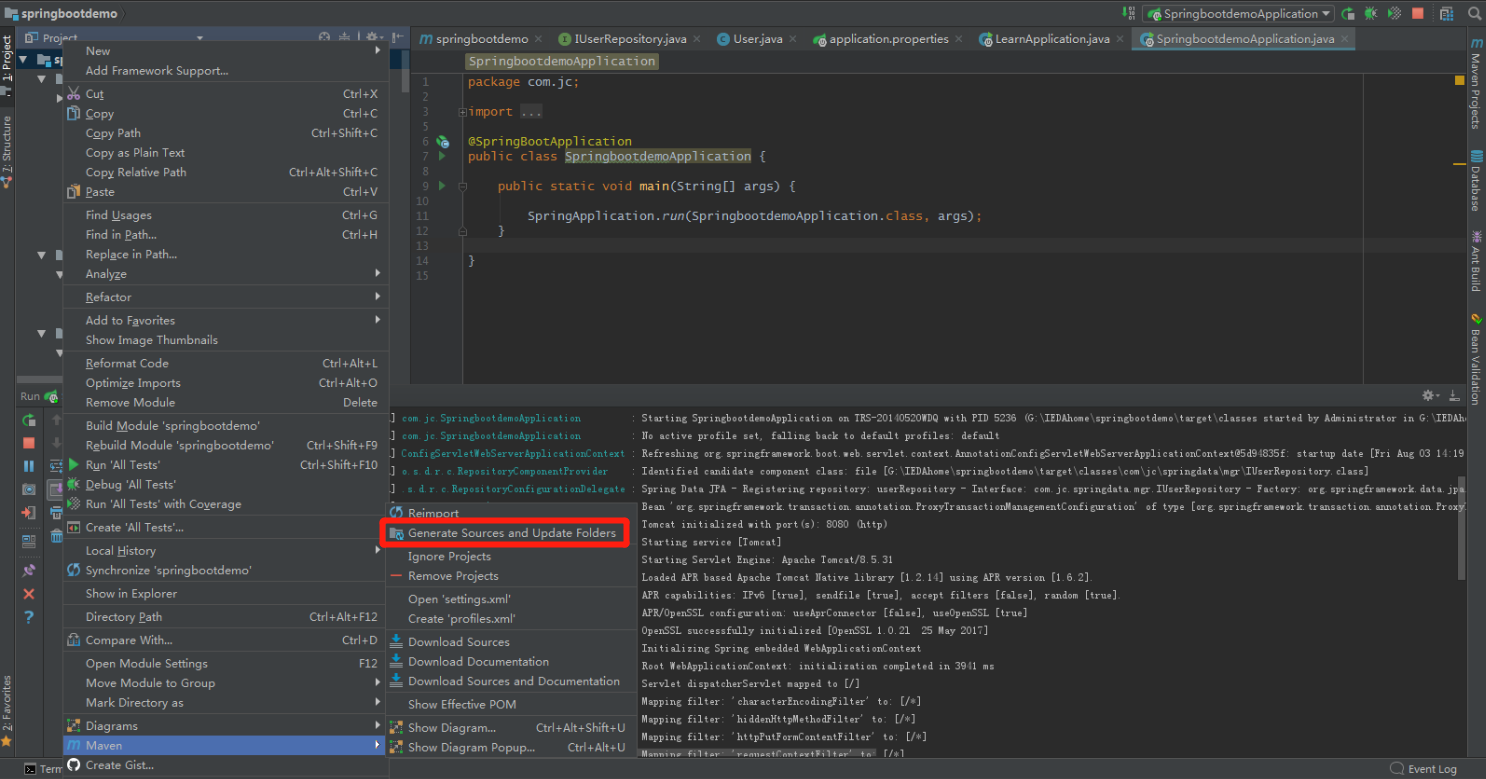
stap 1:删除指定目录内的jar文件(/xx/maven/repository/org/jboss/jandex/2.0.3.Final/jandex-2.0.3.Final.jar);
step 2:然后让Maven重新获取一次就行;
参考
官网说明:http://projects.spring.io/spring-data-jpa/
官网入门示例:https://spring.io/guides/gs/accessing-data-jpa/
Spring Data学习(一):初识的更多相关文章
- spring data学习
在Spring Data模块中定义依赖: <dependencies> <dependency> <groupId>org.springframework.data ...
- Spring Data学习中心
Spring Data 概览 Spring Data的使命是为数据访问提供熟悉且一致的基于Spring的编程模型,同时仍保留底层数据存储的特殊特性. 它使数据访问技术,关系数据库和非关系数据库,map ...
- JavaEE高级-Spring Data学习笔记
Spring Data概述 - Spring Data : Spring 的一个子项目.用于简化数据库访问,支持NoSQL 和 关系数据存储.其主要目标是使数据库的访问变得方便快捷. - Spring ...
- Spring基础学习(一)—初识Spring
一.Spring的使用 1.导入jar包 2.编写实体类 Person.java public class Person{ private String name; public void say() ...
- 1.1(Spring MVC学习笔记)初识SpringMVC及SpringMVC流程
一.Spring MVC Spring MVC是Spring提供的一个实现了web MVC设计模式的轻量级Web框架. Spring优点:网上有,此处不复述. 二.第一个Spring MVC 2.1首 ...
- 一步步学习 Spring Data 系列之JPA(一)
引入: Spring Data是SpringSource基金会下的一个用于简化数据库访问,并支持云服务的开源框架.其主要目标是使得数据库的访问变得方便快捷,并支持map-reduce框架和云计算数据服 ...
- 一步步学习 Spring Data 系列之JPA(二)
继上一篇文章对Spring Data JPA更深( )一步剖析. 上一篇只是简单的介绍了Spring Data JPA的简单使用,而往往在项目中这一点功能并不能满足我们的需求.这是当然的,在业务中查询 ...
- Spring Data JPA 学习记录1 -- 单向1:N关联的一些问题
开新坑 开新坑了(笑)....公司项目使用的是Spring Data JPA做持久化框架....学习了一段时间以后发现了一点值得注意的小问题.....与大家分享 主要是针对1:N单向关联产生的一系列问 ...
- spring data jpa入门学习
本文主要介绍下spring data jpa,主要聊聊为何要使用它进行开发以及它的基本使用.本文主要是入门介绍,并在最后会留下完整的demo供读者进行下载,从而了解并且开始使用spring data ...
随机推荐
- 纯 HTML5 APP与原生APP的差距在哪?
纯 HTML5 APP与原生APP的差距在哪? 写过一些纯H5的APP,虽然开发起来的确很快很舒服,但和原生比起来纯H5APP还是有很多问题,主要聚集在以下几个方面: 1.动画 动画有很多种,比如侧边 ...
- c# TCP高性能通信
开篇都是吹牛逼哈... 我原本打算使用dotnetty来解决传输问题,但是试了下没有成功,也没有找到相关问题解决方法,导出源码,好大啊.暂时不想研究,而且是.Net Core的.最后没有办法,就自己封 ...
- Angularjs基础(九)
AngularJS 应用应用程序讲解 实例: <html ng-app="myNoteApp"> <head> <meat charset=" ...
- ABAP术语-Business Object Builder
Business Object Builder 原文:http://www.cnblogs.com/qiangsheng/archive/2008/01/09/1031357.html Tool fo ...
- LeetCode 相交链表
基本思路 先计算出两个链表的长度 O(n) 将长的一个链表的指示指针移动到和短链表相同长度 O(n) 两个链表指示指针同时向前移动,直到二者相同或者NULL 代码实现 /** * Definition ...
- 使用Python对Csv文件操作
csv是Comma-Separated Values的缩写,是用文本文件形式储存的表格数据,比如如下的表格: 就可以存储为csv文件,文件内容是: No.,Name,Age,Score 1,mayi, ...
- JAVAOOP I/O
程序的主要任务就是操作数据,通过允许程序读取文件的内容或向文件写入数据,可以使程序应用更加广泛. I/O(input/output) 在不同操作系统之下,所占的字节数也不同,一般认为 8.1.1使用F ...
- SVN配置自启动-1053错误
主要内容:解决启动“配置的svn自启动服务”报1053错误 1. 环境: 系统: wind10 svn服务端版本: VisualSVN-Server-3.8.0-x64 2. 配置自启动 以管理员身份 ...
- FastDFS轻量级分布式文件系统部署
FastDFS介绍 FastDFS 是一个由 C 语言实现的开源轻量级分布式文件系统,作者余庆,支持 Linux.FreeBSD.AID 等 Unix 系统,解决了大数据存储和读写负载均衡等问题,适合 ...
- JavaSE 第二次学习随笔(三)
* 常见异常 * 数组越界异常 * 空指针异常 * * * 特点: 当程序出现异常的时候, 程序会打印异常信息并中断程序 * 所以当同时出现多个异常的时候只能执行第一个, 后边的用不到 * * 单异常 ...