
[TimLinux] PyQt5 安装部署
1. 依赖包
Click (7.0)

PyQt5 (5.11.2)

PyQt5-sip (4.19.12)

QScintilla (2.10.7)

pip (9.0.1)

pyqt5-tools (5.11.2.1.3rc8)  提供了QtDesigner.exe工具

python-dotenv (0.9.1)

setuptools (28.8.0)

sip (4.19.8)
这些依赖包都能够通过pip3 install *.whl 的包格式来安装。
1.1. 安装命令
PyQt5(不包含有 QtDesigner)
PS C:\Users\admin\Desktop> pip3 install PyQt5 -i https://pypi.douban.com/simple

Looking in indexes: https://pypi.douban.com/simple

Collecting PyQt5

  Downloading https://pypi.doubanio.com/packages/5d/85/d174a50e0d6b60aa9113f6a32afb31f2
  5345bec8584992af486235373252/PyQt5-5.11.2-5.11.1-cp35.cp36.cp37.cp38-none-win_amd64.whl (93.3MB)

    100% |████████████████████████████████| 93.4MB 1.1MB/s

Collecting PyQt5_sip<4.20,>=4.19.11 (from PyQt5)

  Downloading https://pypi.doubanio.com/packages/3f/4f/7b820770e6a8f8b83cacea561534e31c7
  8a74eeac0fb2f7618c835fa74c6/PyQt5_sip-4.19.12-cp36-none-win_amd64.whl (51kB)

    100% |████████████████████████████████| 61kB 1.6MB/s

Installing collected packages: PyQt5-sip, PyQt5

Successfully installed PyQt5-5.11.2 PyQt5-sip-4.19.12

PS C:\Users\admin\Desktop>
PyQt5-tools (包含有 QtDesigner)
PS C:\Users\admin\Desktop> pip3 install PyQt5-tools -i https://pypi.douban.com/simple

Looking in indexes: https://pypi.douban.com/simple

Collecting PyQt5-tools

  Downloading https://pypi.doubanio.com/packages/0e/a1/b2bbbb9e0c0f374fb77c85b014fc39fdb
  6e9e258c20906cc7ecb5f565e38/pyqt5_tools-5.9.0.1.2-cp36-none-win_amd64.whl (37.5MB)

    100% |████████████████████████████████| 37.5MB 6.6MB/s

Installing collected packages: PyQt5-tools

Successfully installed PyQt5-tools-5.9.0.1.2

PS C:\Users\admin\Desktop>
1.2. 文档API
https://pyqt.readthedocs.io/en/latest/sip-classes.html
https://riverbankcomputing.com/news --> https://pyqt.readthedocs.io/en/latest/
2. PyCharm配置
请参考:https://www.cnblogs.com/BlueSkyyj/p/8398277.html
简略步骤说明:
- 添加 External Tools:QtDesigner
- 添加 External Tools:PyUIC(QtDesigner生成的.ui文件自动转换为.py文件)
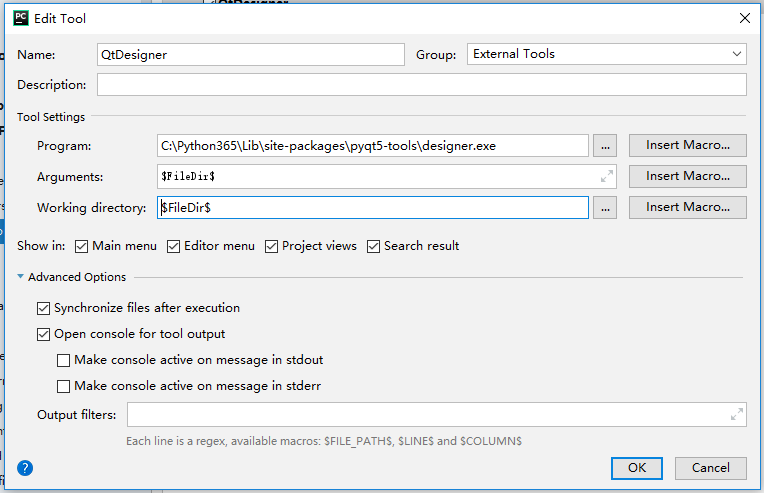
2.1. External Tools: QtDesigner
Settings -> Tools -> External Tools 选中“+”,弹出的对话框:

Name: QtDesigner

Tool Settings:

    Program: C:\Python365\Lib\site-packages\pyqt5_tools\designer.exe

    Parameters: $FileDir$  (这是一个宏,可以通过点击Insert macro来添加这个值,手动输入也是一样的意思)

    Working directory: $FileDir$
2.2. External Tools: PyUIC
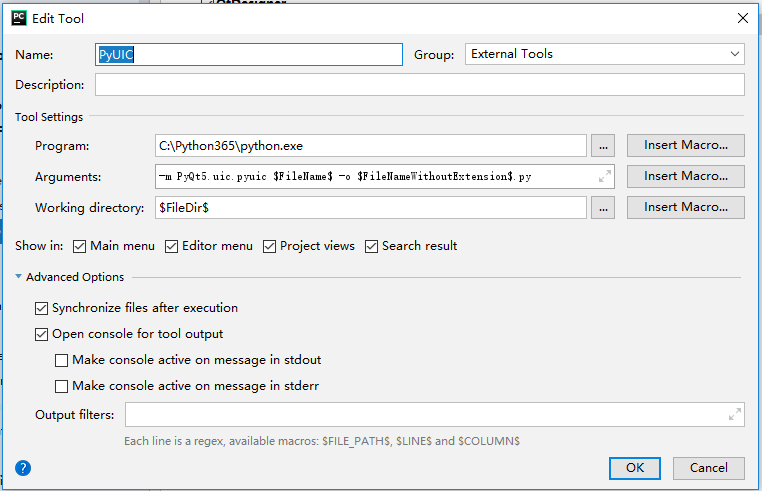
settings -> Tools -> External Tools 选中“+”,弹出的对话框:

Name: PyUIC

Tool settings:

    Program: C:\Python365\python.exe

    Parameters: -m PyQt5.uic.pyuic $FileName$ -o $FileNameWithoutExtension$.py

    Working directory: $FileDir$ (可以通过 insert macro来设置,也可以手动输入)
3. 示例
创建一个纯python工程(Pure Python Project)QtTest。
3.1. 启动QtDesigner.exe
通过右键 -> External Tools -> QtDesigner,将启动QtDesigner.exe,创建一个MainWindow,然后将左侧的一个 PushButton 拖入 创建的MainWindow,保存文件到工程目录,取名 hello.ui
3.2. UI转换为PY
选中 hello.ui,然后右键 -> External Tools -> PyUIC,将自动把 hello.ui 转换为 hello.py 文件了。
3.3. 编写 main.py
在工程目录中创建 main.py 文件,写入如下内容:
import sys

import hello  #生成的 hello.py

from PyQt5.QtWidgets import QApplication, QMainWindow

if __name__ == '__main__':

    app = QApplication(sys.argv)

    w = QMainWindow()

    ui = hello.Ui_MainWindow()

    ui.setUi(w)

    w.show()

    sys.exit(app.exec_())
3.4. 运行
main.py 文件内,点击鼠标右键,选择:Run,将弹出一个 Window 窗口。
3.5. 不启动后台
使用 pythonw.exe 运行 GUI 程序,将不显示 cmd 窗口,只会显示 GUI 窗口,这点非常的有用,但是这个解析器同时关闭了原来的:stdin, stdout, stderr。解决方案参考链接:https://stackoverflow.com/questions/9705982/pythonw-exe-or-python-exe
3.6. 另外一个示例
# 来自 《PyQt5 快速开发与实践》

import sys

from PyQt5.QtWidgets import QPushButton, QApplication, QWidget

class WinForm(QWidget):

    def __init__(self, parent=None):

        super(WinForm, self).__init__(parent)

        self.setGeometry(300, 300, 350, 350)

        self.setWindowTitle('点击按钮关闭窗口')

        quit = QPushButton('Close', self)

        quit.setGeometry(10, 10, 60, 35)

        quit.setStyleSheet("background-color: red")

        quit.clicked.connect(self.close)

if __name__ == '__main__':

    app = QApplication(sys.argv)

    win = WinForm()

    win.show()

    sys.exit(app.exec_())

[TimLinux] PyQt5 安装部署的更多相关文章
- Oracle安装部署,版本升级,应用补丁快速参考
一.Oracle安装部署 1.1 单机环境 1.2 Oracle RAC环境 1.3 Oracle DataGuard环境 1.4 主机双机 1.5 客户端部署 二.Oracle版本升级 2.1 单机 ...
- KVM安装部署
KVM安装部署 公司开始部署KVM,KVM的全称是kernel base virtual machine,对KVM虚拟化技术研究了一段时间, KVM是基于硬件的完全虚拟化,跟vmware.xen.hy ...
- Linux平台oracle 11g单实例 + ASM存储 安装部署 快速参考
操作环境:Citrix虚拟化环境中申请一个Linux6.4主机(模板)目标:创建单机11g + ASM存储 数据库 1. 主机准备 2. 创建ORACLE 用户和组成员 3. 创建以下目录并赋予对应权 ...
- 分布式文件系统 - FastDFS 在 CentOS 下配置安装部署
少啰嗦,直接装 看过上一篇分布式文件系统 - FastDFS 简单了解一下的朋友应该知道,本次安装是使用目前余庆老师开源的最新 V5.05 版本,是余庆老师放在 Github 上的,和目前你能在网络上 ...
- C# winform安装部署(转载)
c# winform 程序打包部署 核心总结: 1.建议在完成的要打包的项目外,另建解决方案建立安装部署项目(而不是在同一个解决方案内新建),在解决方案上右击-〉添加-〉现有项目-〉选择你要打包的项目 ...
- Ubuntu14.04 Django Mysql安装部署全过程
Ubuntu14.04 Django Mysql安装部署全过程 一.简要步骤.(阿里云Ubuntu14.04) Python安装 Django Mysql的安装与配置 记录一下我的部署过程,也方便 ...
- 比Ansible更吊的自动化运维工具,自动化统一安装部署_自动化部署udeploy 1.0
新增功能: 2015-03-11 除pass(备份与更新)与start(启动服务)外,实现一切自动化. 注:pass与start设为业务类,由于各类业务不同,所以无法实现自动化.同类业务除外,如更新的 ...
- 比Ansible更吊的自动化运维工具,自动化统一安装部署自动化部署udeploy 1.0 版本发布
新增功能: 逻辑与业务分离,完美实现逻辑与业务分离,业务实现统一shell脚本开发,由框架统一调用. 并发多线程部署,不管多少台服务器,多少个服务,同时发起线程进行更新.部署.启动. 提高list规则 ...
- SCCM 2012 R2安装部署过程和问题(三)
上篇 SCCM 2012 R2安装部署过程和问题(二) 个人认为对于使用SCCM 2012的最重要的经验是耐心. SCCM采用分布式部署的架构,不同的站点角色可以部署在不同的服务器上,站点角色之间的通 ...
随机推荐
- 在oracle数据库中创建DBLink
涉及到两个数据库之间的访问时,可以创建datebase link来互相访问. ’创建方法: 1.通过PL/SQL客户端,找到datebase link,右键新建 输入相应信息 2.直接用命令行创建 一 ...
- celery 启用worker ValueError: not enough values to unpack
[2018-01-12 19:08:15,545: INFO/MainProcess] Received task: tasks.add[5d387722-5389-441b-9b01-a619b93 ...
- nyoj 457-大小写互换
457-大小写互换 内存限制:64MB 时间限制:1000ms 特判: No 通过数:18 提交数:21 难度:0 题目描述: 现在给出了一个只包含大小写字母的字符串,不含空格和换行,要求 ...
- 领扣(LeetCode)找树左下角的值 个人题解
给定一个二叉树,在树的最后一行找到最左边的值. 示例 1: 输入: 2 / \ 1 3 输出: 1 示例 2: 输入: 1 / \ 2 3 / / \ 4 5 6 / 7 输出: 7 注意: 您可以假 ...
- openresty(nginx)中使用lua脚本获取请求IP地址的代码
人狠话不多,直接上代码:------------------------------------------------------------------------------------- lo ...
- ES6 Map 原理
ES6的Map的键可以是任意的数据结构,并且不重复. 那么map的底层原理是啥呢? Map利用链表,hash的思想来实现. 首先,Map可以实现删除,而且删除的数据可以是中间的值.而链表的优势就是在中 ...
- SQL中Truncate的用法
SQL中Truncate的用法转自:http://www.studyofnet.com/news/555.html本文导读:删除表中的数据的方法有delete,truncate, 其中TRUNCATE ...
- python 学习路程(一)
好早之前就一直想学python,可是一直没有系统的学习过,给自己立个flag,从今天开始一步步掌握python的用法: python是一种脚本形式的语言,据说是面向废程序员学习开发使用的,我觉得很适合 ...
- 三种方法教你HTML实现点击某一个元素之外触发事件
HTML实现点击某一个元素之外触发事件 大致编写的HTML界面渲染后是这个样子的,我们现在想要实现的需求是点击Button所在的div不会触发事件,而在点击Button所在的div之外的区域时会触发事 ...
- Java Import的使用
这里根据上一篇中ClassObject.java的例子改编的:https://www.cnblogs.com/jizizh/p/11938574.html 一.创建ClassObjectImport. ...