
Android Studio 3.0+ Record Espresso Test 自动化测试
准备工作
1.将android studio 版本升级到3.0+
2.百度下载夜神模拟器
夜神模拟器的基本设置

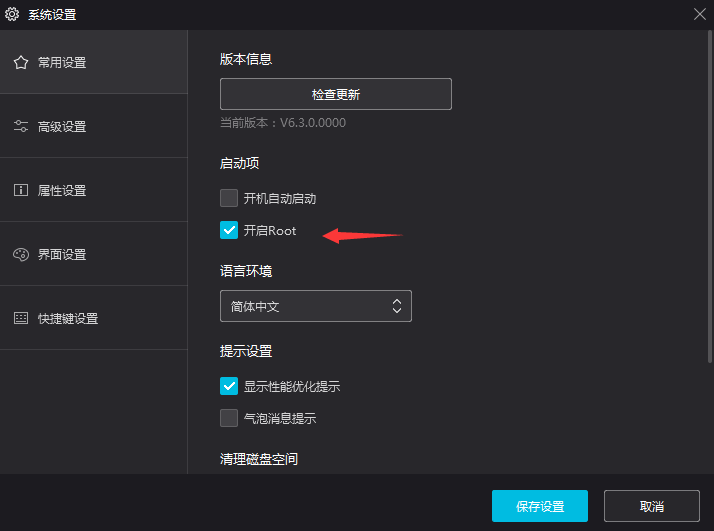
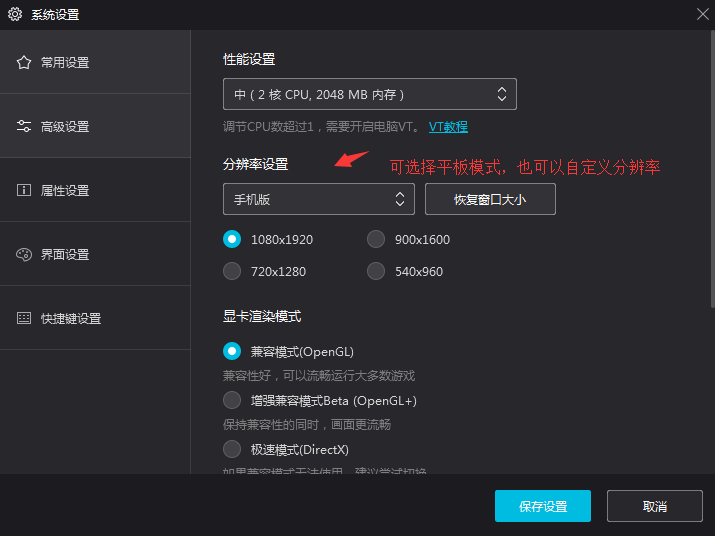
PS:以上就是夜神模拟器的基本设置
Android Studio 连接夜神模拟器
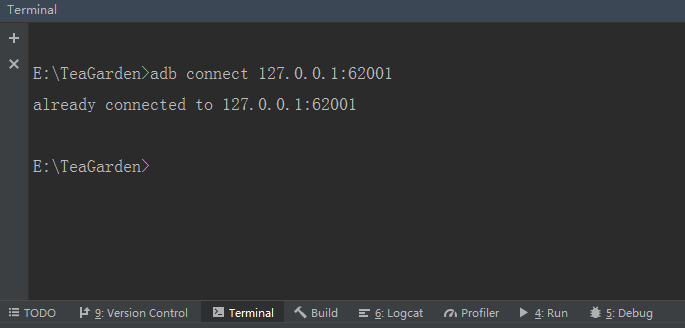
//夜神模拟器默认的地址

adb connect 127.0.0.1:62001
开始录制自动测试代码
在顶部工具栏找到Run -> Record Espresso Test -> 选择夜神模拟器双击启动 -> 启动后界面如下图
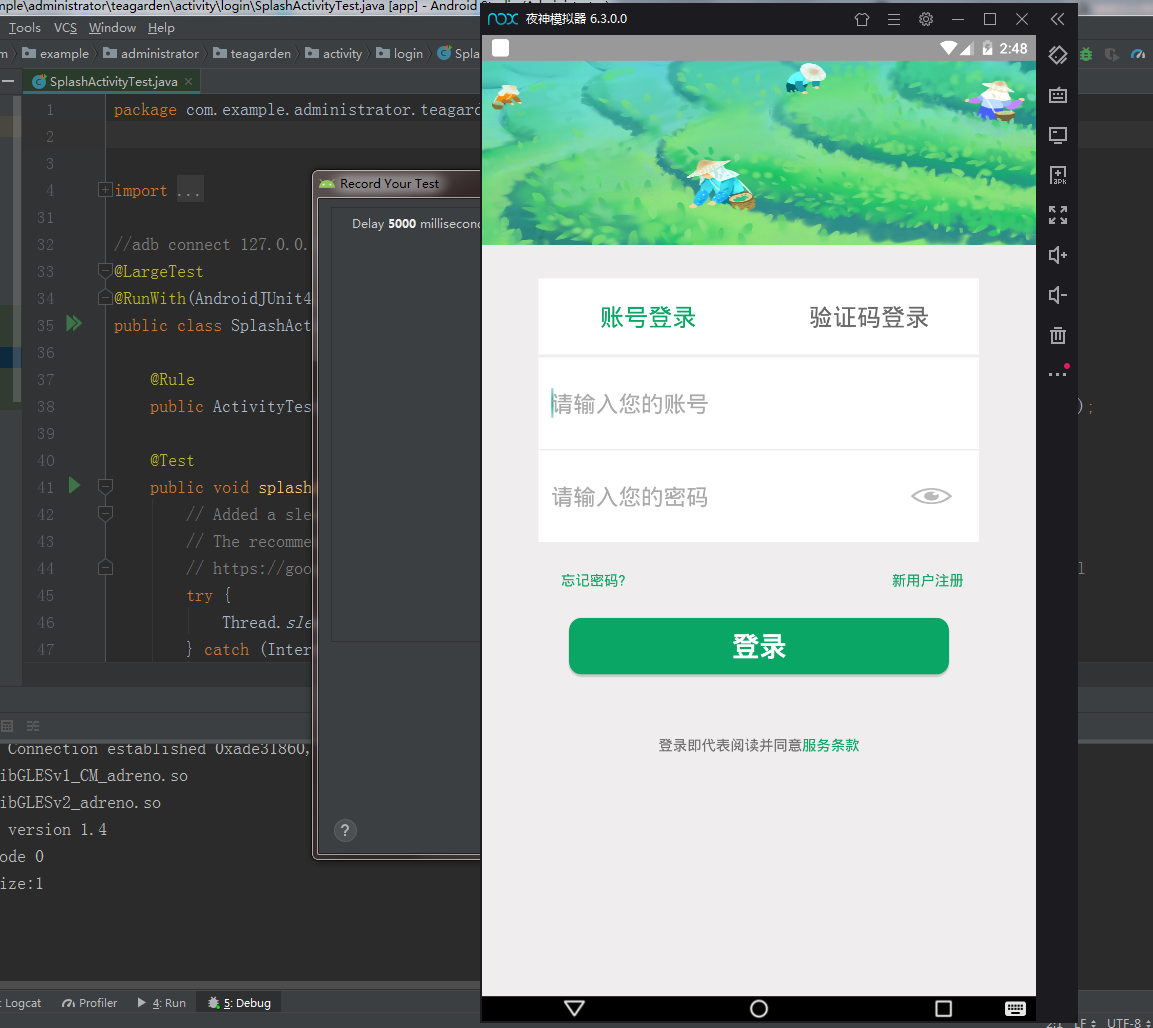
PS:操作模拟器 -> Record Your Test 弹框将自动生成你的行为代码 -> 点击OK -> 命名并保存代码
注意每次运行都会重新安装,从启动页开始,但是可以针对功能点录制,然后生成一份一份的测试脚本
运行自动化测试脚本
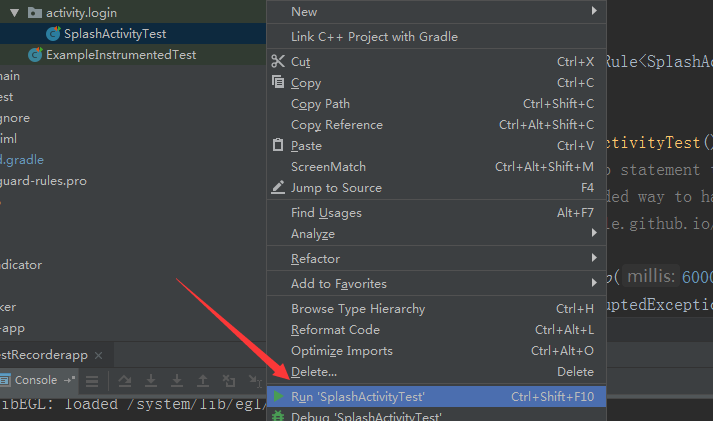
PS:静待安装,然后模拟器会自动执行你录制的动作,Logcat可以查看日志
贴上一份 Record Espresso Test的脚本看看
package com.example.administrator.teagarden.activity.login;

import android.support.test.espresso.ViewInteraction;

import android.support.test.filters.LargeTest;

import android.support.test.rule.ActivityTestRule;

import android.support.test.runner.AndroidJUnit4;

import android.view.View;

import android.view.ViewGroup;

import android.view.ViewParent;

import com.example.administrator.teagarden.R;

import org.hamcrest.Description;

import org.hamcrest.Matcher;

import org.hamcrest.TypeSafeMatcher;

import org.junit.Rule;

import org.junit.Test;

import org.junit.runner.RunWith;

import static android.support.test.espresso.Espresso.onView;

import static android.support.test.espresso.action.ViewActions.click;

import static android.support.test.espresso.action.ViewActions.closeSoftKeyboard;

import static android.support.test.espresso.action.ViewActions.replaceText;

import static android.support.test.espresso.matcher.ViewMatchers.isDisplayed;

import static android.support.test.espresso.matcher.ViewMatchers.withClassName;

import static android.support.test.espresso.matcher.ViewMatchers.withId;

import static android.support.test.espresso.matcher.ViewMatchers.withText;

import static org.hamcrest.Matchers.allOf;

import static org.hamcrest.Matchers.is;

@LargeTest

@RunWith(AndroidJUnit4.class)

public class SplashActivityTest {

    @Rule

    public ActivityTestRule<SplashActivity> mActivityTestRule = new ActivityTestRule<>(SplashActivity.class);

    @Test

    public void splashActivityTest() {

        // Added a sleep statement to match the app's execution delay.

        // The recommended way to handle such scenarios is to use Espresso idling resources:

        // https://google.github.io/android-testing-support-library/docs/espresso/idling-resource/index.html

        try {

            Thread.sleep(6000);

        } catch (InterruptedException e) {

            e.printStackTrace();

        }

        ViewInteraction appCompatEditText = onView(

                allOf(withId(R.id.login_edit_user),

                        childAtPosition(

                                childAtPosition(

                                        withClassName(is("android.widget.LinearLayout")),

                                        2),

                                0),

                        isDisplayed()));

        appCompatEditText.perform(click());

        ViewInteraction appCompatEditText2 = onView(

                allOf(withId(R.id.login_edit_user),

                        childAtPosition(

                                childAtPosition(

                                        withClassName(is("android.widget.LinearLayout")),

                                        2),

                                0),

                        isDisplayed()));

        appCompatEditText2.perform(replaceText("152****3478"), closeSoftKeyboard());

        ViewInteraction appCompatEditText3 = onView(

                allOf(withId(R.id.login_edit_mima),

                        childAtPosition(

                                allOf(withId(R.id.logint_edit_layout),

                                        childAtPosition(

                                                withClassName(is("android.widget.LinearLayout")),

                                                4)),

                                0),

                        isDisplayed()));

        appCompatEditText3.perform(replaceText("admin000"), closeSoftKeyboard());

        ViewInteraction appCompatButton = onView(

                allOf(withId(R.id.login_button), withText("登录"),

                        childAtPosition(

                                childAtPosition(

                                        withClassName(is("android.widget.RelativeLayout")),

                                        1),

                                2),

                        isDisplayed()));

        appCompatButton.perform(click());

        // Added a sleep statement to match the app's execution delay.

        // The recommended way to handle such scenarios is to use Espresso idling resources:

        // https://google.github.io/android-testing-support-library/docs/espresso/idling-resource/index.html

        try {

            Thread.sleep(3000);

        } catch (InterruptedException e) {

            e.printStackTrace();

        }

        ViewInteraction radioButton = onView(

                allOf(withId(R.id.main_home_radio2), withText("监控"),

                        childAtPosition(

                                allOf(withId(R.id.main_tab_group),

                                        childAtPosition(

                                                withClassName(is("android.widget.LinearLayout")),

                                                0)),

                                1),

                        isDisplayed()));

        radioButton.perform(click());

        // Added a sleep statement to match the app's execution delay.

        // The recommended way to handle such scenarios is to use Espresso idling resources:

        // https://google.github.io/android-testing-support-library/docs/espresso/idling-resource/index.html

        try {

            Thread.sleep(3000);

        } catch (InterruptedException e) {

            e.printStackTrace();

        }

        ViewInteraction radioButton2 = onView(

                allOf(withId(R.id.main_home_radio3), withText("动态"),

                        childAtPosition(

                                allOf(withId(R.id.main_tab_group),

                                        childAtPosition(

                                                withClassName(is("android.widget.LinearLayout")),

                                                0)),

                                2),

                        isDisplayed()));

        radioButton2.perform(click());

        // Added a sleep statement to match the app's execution delay.

        // The recommended way to handle such scenarios is to use Espresso idling resources:

        // https://google.github.io/android-testing-support-library/docs/espresso/idling-resource/index.html

        try {

            Thread.sleep(3000);

        } catch (InterruptedException e) {

            e.printStackTrace();

        }

        ViewInteraction radioButton3 = onView(

                allOf(withId(R.id.main_home_radio4), withText("我的"),

                        childAtPosition(

                                allOf(withId(R.id.main_tab_group),

                                        childAtPosition(

                                                withClassName(is("android.widget.LinearLayout")),

                                                0)),

                                3),

                        isDisplayed()));

        radioButton3.perform(click());

    }

    private static Matcher<View> childAtPosition(

            final Matcher<View> parentMatcher, final int position) {

        return new TypeSafeMatcher<View>() {

            @Override

            public void describeTo(Description description) {

                description.appendText("Child at position " + position + " in parent ");

                parentMatcher.describeTo(description);

            }

            @Override

            public boolean matchesSafely(View view) {

                ViewParent parent = view.getParent();

                return parent instanceof ViewGroup && parentMatcher.matches(parent)

                        && view.equals(((ViewGroup) parent).getChildAt(position));

            }

        };

    }

}
ps:代码其实很简单,照搬照套,还有别的花样么...录制的时候,也就是操作模拟器,生成代码的时候有点卡....有没有人告诉我怎么解决?
Android Studio 3.0+ Record Espresso Test 自动化测试的更多相关文章
- Android Studio 2.2 Record Espresso Test
Android Studio 已经更新到了2.2,在 Run 中发现了 Record Espresso Test 功能,很强大,但是不稳定. 尝试了下在 Android 6.0 上的登录页面,可以通过 ...
- Android Studio 3.0 变化之 implementation与compile
Android Studio 3.0 出来很久了,本文就着重介绍一下 新版本中 Moudle 中 build.gradle 文件中的变化. 我们来看看新建一个项目在 Moudle 中的 depende ...
- Android Studio 2.0使用指南
一.下载界面.[无激活码 无序列码 无毒请放心使用][需将JAVA程序升级到1.8] 网址:http://www.android-studio.org/index.php/download/andro ...
- Android Studio 1.0.2项目实战——从一个APP的开发过程认识Android Studio
Android Studio 1.0.1刚刚发布不久,谷歌紧接着发布了Android Studio 1.0.2版本,和1.0.0一样,是一个Bug修复版本.在上一篇Android Studio 1.0 ...
- Android Studio 1.0.1 + Genymotion安卓模拟器打造高效安卓开发环境
我们开发安卓大多是使用Eclipse和安卓SDK中自带的安卓模拟器.当然,Google早就推出了自己的安卓开发环境——Android studio,在不久前,Google发布了Android Stud ...
- [Android] 环境配置之正式版Android Studio 1.0
昨天看见 Android Studio 1.0 正式版本发布了:心里挺高兴的. 算是忠实用户了吧,从去年开发者大会一开始出现 AS 后就开始使用了:也是从那时开始就基本没有用过 Eclipse 了:一 ...
- [Android] android studio 2.0即时运行功能探秘
即时运行instant Run是android studio 2中,开发人员最关心的特性之一 在google发布studio 2.0之后,马上更新体验了一把,然而发现,并没快多少,说好的即时运行呢? ...
- Windows环境下Android Studio v1.0安装教程
Windows环境下Android Studio v1.0安装教程 准备工具 JDK安装包. 要求:JDK 7以及以上版本. Android Studio安装文件. Windows: exe(包含SD ...
- 告别编译运行 ---- Android Studio 2.0 Preview发布Instant Run功能
以往的Android开发有一个头疼的且拖慢速度的问题,就是你每改一行代码要想看到结果必须要编译运行到手机或者模拟器上,而且需要从头(可能是登录界面)一直点击到你修改的界面为止.开发一个完整的Andro ...
随机推荐
- [TimLinux] JavaScript 引用类型——Date
1. Date var now = new Date(); // 不传参数,获取当前日期.时间. now.getDay(); // 日期 now.getMonth(); // 月份 now.getFu ...
- ARTS-S EN0002-London HIV patient's remission spurs hope for curing AIDS
原文 A stem-cell treatment put a London cancer patient's HIV into remission, marking the second such r ...
- java开发中常用的Liunx操作命令
查看所有端口的占用情况 netstat -nultp 其中State值为LISTEN则表示已经被占用 查看某个端口的占用情况: netstat -anp |grep 端口号 在liunx中启动tomc ...
- 【性能优化】404- 从 12.67s到1.06s 性能优化实战
作者:jerryOnlyZRJ 来源:https://juejin.im/post/5b6fa8c86fb9a0099910ac91 本文是对之前同名文章的修正,将所有webpack3的内容更新为we ...
- 《java面试十八式》第一式 --冈本零点零一
第一式 [冈本零点零一] 冈本零点零一:将简历包装于无形,博得人事的芳心,用过的人都说好 . 要想有更多的面试机会,简历是不可缺少的,机会都没有何谈面:所以这也是我们的第一步. 首先是简历模板: 模板 ...
- Redis sorted set 常用命令介绍
Redis sorted set 使用: Redis 有序集合(sorted set) Redis 有序集合和集合一样也是string类型元素的集合,且不允许重复的成员. 不同的是每个元素都会关联一个 ...
- Vue中slot插槽的使用
- ORACLE存储过程详解
1.定义 所谓存储过程(Stored Procedure),就是一组用于完成特定数据库功能的SQL语句集,该SQL语句集经过编译后存储在数据库系统中.在使用时候,用户通过指定已经定义的存储过程名字并给 ...
- Docker swarm实战总结
一.简介 Swarm 是 Docker 官方提供的一款集群管理工具,其主要作用是把若干台 Docker 主机抽象为一个整体,并且通过一个入口统一管理这些 Docker 主机上的各种 Docker 资源 ...
- SoC的软件开发流程,主要包含一些Linux下的操作命令
该笔记主要记录SoC的软件开发流程,主要包含一些Linux下的操作命令 1. 编写design file .c .h 2. 编写makefile 可执行文件名,交叉编译环境,compile fl ...