
Android Studio 3.0+ Record Espresso Test 自动化测试
准备工作
1.将android studio 版本升级到3.0+
2.百度下载夜神模拟器
夜神模拟器的基本设置

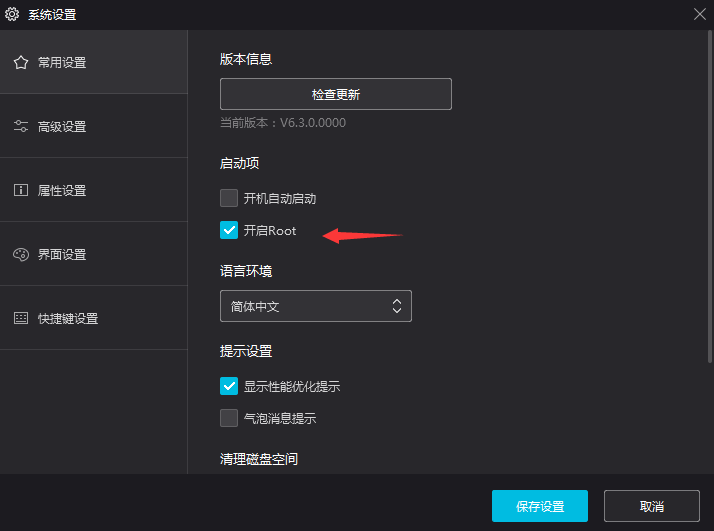
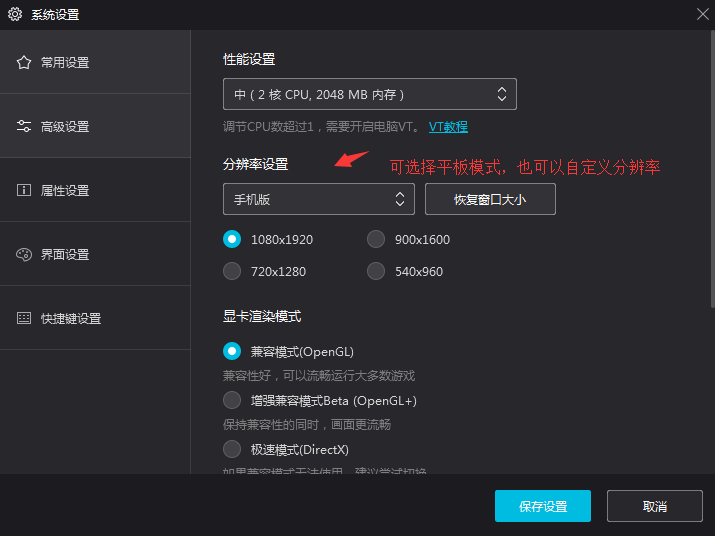
PS:以上就是夜神模拟器的基本设置
Android Studio 连接夜神模拟器
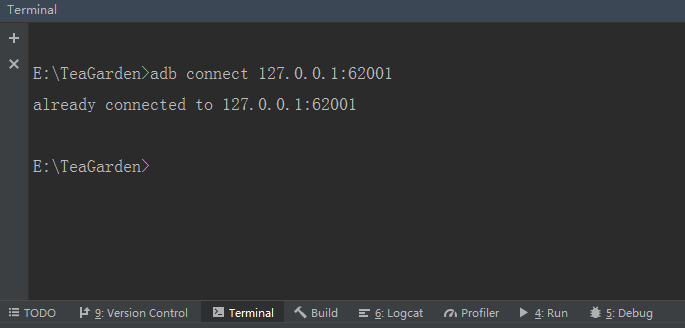
//夜神模拟器默认的地址

adb connect 127.0.0.1:62001
开始录制自动测试代码
在顶部工具栏找到Run -> Record Espresso Test -> 选择夜神模拟器双击启动 -> 启动后界面如下图
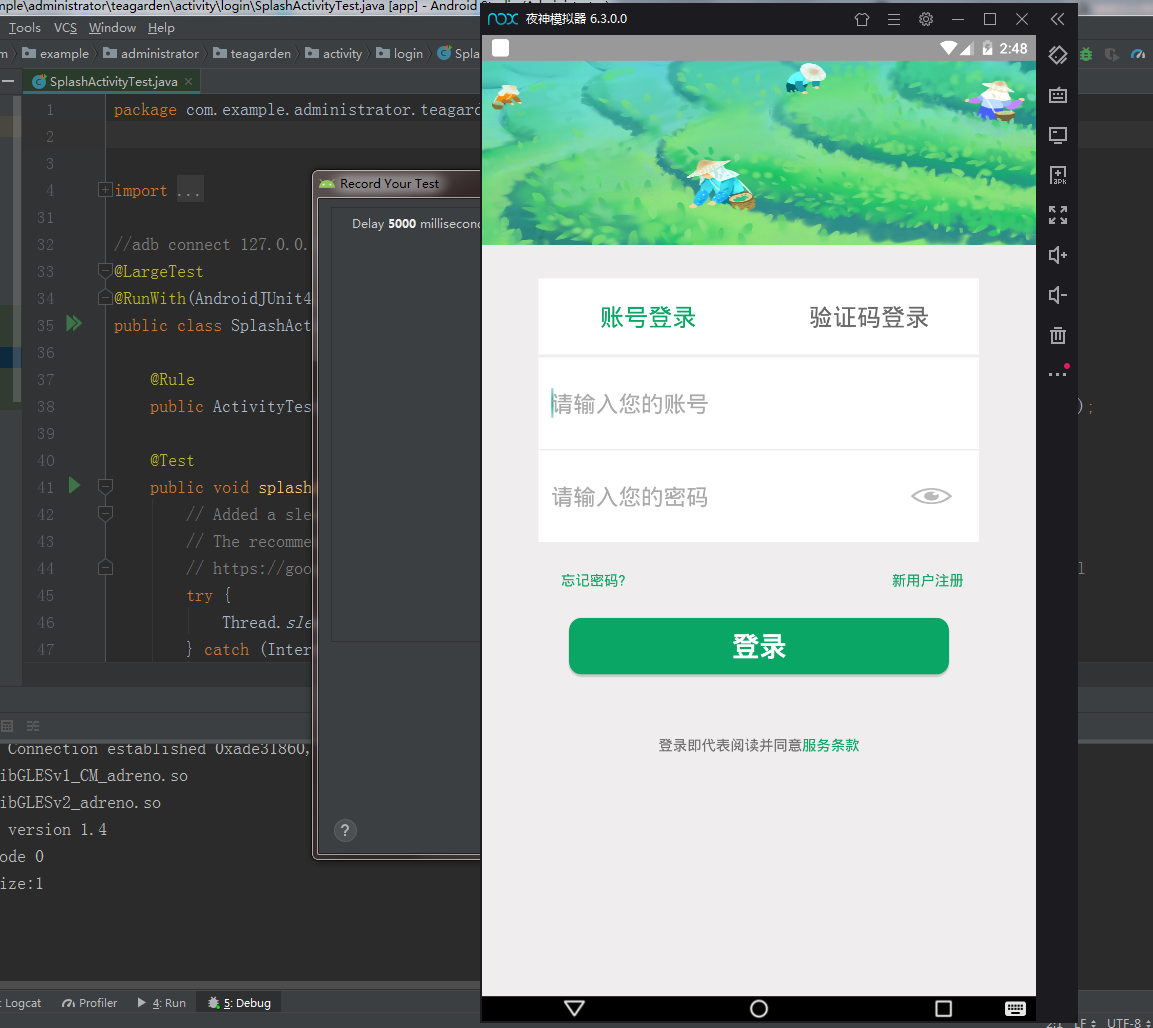
PS:操作模拟器 -> Record Your Test 弹框将自动生成你的行为代码 -> 点击OK -> 命名并保存代码
注意每次运行都会重新安装,从启动页开始,但是可以针对功能点录制,然后生成一份一份的测试脚本
运行自动化测试脚本
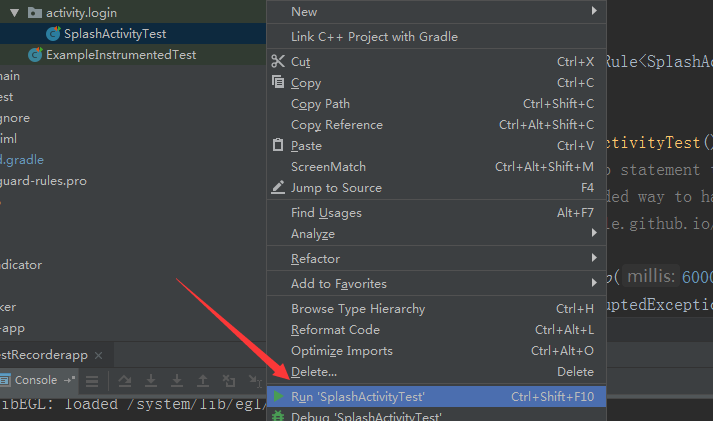
PS:静待安装,然后模拟器会自动执行你录制的动作,Logcat可以查看日志
贴上一份 Record Espresso Test的脚本看看
package com.example.administrator.teagarden.activity.login;

import android.support.test.espresso.ViewInteraction;

import android.support.test.filters.LargeTest;

import android.support.test.rule.ActivityTestRule;

import android.support.test.runner.AndroidJUnit4;

import android.view.View;

import android.view.ViewGroup;

import android.view.ViewParent;

import com.example.administrator.teagarden.R;

import org.hamcrest.Description;

import org.hamcrest.Matcher;

import org.hamcrest.TypeSafeMatcher;

import org.junit.Rule;

import org.junit.Test;

import org.junit.runner.RunWith;

import static android.support.test.espresso.Espresso.onView;

import static android.support.test.espresso.action.ViewActions.click;

import static android.support.test.espresso.action.ViewActions.closeSoftKeyboard;

import static android.support.test.espresso.action.ViewActions.replaceText;

import static android.support.test.espresso.matcher.ViewMatchers.isDisplayed;

import static android.support.test.espresso.matcher.ViewMatchers.withClassName;

import static android.support.test.espresso.matcher.ViewMatchers.withId;

import static android.support.test.espresso.matcher.ViewMatchers.withText;

import static org.hamcrest.Matchers.allOf;

import static org.hamcrest.Matchers.is;

@LargeTest

@RunWith(AndroidJUnit4.class)

public class SplashActivityTest {

    @Rule

    public ActivityTestRule<SplashActivity> mActivityTestRule = new ActivityTestRule<>(SplashActivity.class);

    @Test

    public void splashActivityTest() {

        // Added a sleep statement to match the app's execution delay.

        // The recommended way to handle such scenarios is to use Espresso idling resources:

        // https://google.github.io/android-testing-support-library/docs/espresso/idling-resource/index.html

        try {

            Thread.sleep(6000);

        } catch (InterruptedException e) {

            e.printStackTrace();

        }

        ViewInteraction appCompatEditText = onView(

                allOf(withId(R.id.login_edit_user),

                        childAtPosition(

                                childAtPosition(

                                        withClassName(is("android.widget.LinearLayout")),

                                        2),

                                0),

                        isDisplayed()));

        appCompatEditText.perform(click());

        ViewInteraction appCompatEditText2 = onView(

                allOf(withId(R.id.login_edit_user),

                        childAtPosition(

                                childAtPosition(

                                        withClassName(is("android.widget.LinearLayout")),

                                        2),

                                0),

                        isDisplayed()));

        appCompatEditText2.perform(replaceText("152****3478"), closeSoftKeyboard());

        ViewInteraction appCompatEditText3 = onView(

                allOf(withId(R.id.login_edit_mima),

                        childAtPosition(

                                allOf(withId(R.id.logint_edit_layout),

                                        childAtPosition(

                                                withClassName(is("android.widget.LinearLayout")),

                                                4)),

                                0),

                        isDisplayed()));

        appCompatEditText3.perform(replaceText("admin000"), closeSoftKeyboard());

        ViewInteraction appCompatButton = onView(

                allOf(withId(R.id.login_button), withText("登录"),

                        childAtPosition(

                                childAtPosition(

                                        withClassName(is("android.widget.RelativeLayout")),

                                        1),

                                2),

                        isDisplayed()));

        appCompatButton.perform(click());

        // Added a sleep statement to match the app's execution delay.

        // The recommended way to handle such scenarios is to use Espresso idling resources:

        // https://google.github.io/android-testing-support-library/docs/espresso/idling-resource/index.html

        try {

            Thread.sleep(3000);

        } catch (InterruptedException e) {

            e.printStackTrace();

        }

        ViewInteraction radioButton = onView(

                allOf(withId(R.id.main_home_radio2), withText("监控"),

                        childAtPosition(

                                allOf(withId(R.id.main_tab_group),

                                        childAtPosition(

                                                withClassName(is("android.widget.LinearLayout")),

                                                0)),

                                1),

                        isDisplayed()));

        radioButton.perform(click());

        // Added a sleep statement to match the app's execution delay.

        // The recommended way to handle such scenarios is to use Espresso idling resources:

        // https://google.github.io/android-testing-support-library/docs/espresso/idling-resource/index.html

        try {

            Thread.sleep(3000);

        } catch (InterruptedException e) {

            e.printStackTrace();

        }

        ViewInteraction radioButton2 = onView(

                allOf(withId(R.id.main_home_radio3), withText("动态"),

                        childAtPosition(

                                allOf(withId(R.id.main_tab_group),

                                        childAtPosition(

                                                withClassName(is("android.widget.LinearLayout")),

                                                0)),

                                2),

                        isDisplayed()));

        radioButton2.perform(click());

        // Added a sleep statement to match the app's execution delay.

        // The recommended way to handle such scenarios is to use Espresso idling resources:

        // https://google.github.io/android-testing-support-library/docs/espresso/idling-resource/index.html

        try {

            Thread.sleep(3000);

        } catch (InterruptedException e) {

            e.printStackTrace();

        }

        ViewInteraction radioButton3 = onView(

                allOf(withId(R.id.main_home_radio4), withText("我的"),

                        childAtPosition(

                                allOf(withId(R.id.main_tab_group),

                                        childAtPosition(

                                                withClassName(is("android.widget.LinearLayout")),

                                                0)),

                                3),

                        isDisplayed()));

        radioButton3.perform(click());

    }

    private static Matcher<View> childAtPosition(

            final Matcher<View> parentMatcher, final int position) {

        return new TypeSafeMatcher<View>() {

            @Override

            public void describeTo(Description description) {

                description.appendText("Child at position " + position + " in parent ");

                parentMatcher.describeTo(description);

            }

            @Override

            public boolean matchesSafely(View view) {

                ViewParent parent = view.getParent();

                return parent instanceof ViewGroup && parentMatcher.matches(parent)

                        && view.equals(((ViewGroup) parent).getChildAt(position));

            }

        };

    }

}
ps:代码其实很简单,照搬照套,还有别的花样么...录制的时候,也就是操作模拟器,生成代码的时候有点卡....有没有人告诉我怎么解决?
Android Studio 3.0+ Record Espresso Test 自动化测试的更多相关文章
- Android Studio 2.2 Record Espresso Test
Android Studio 已经更新到了2.2,在 Run 中发现了 Record Espresso Test 功能,很强大,但是不稳定. 尝试了下在 Android 6.0 上的登录页面,可以通过 ...
- Android Studio 3.0 变化之 implementation与compile
Android Studio 3.0 出来很久了,本文就着重介绍一下 新版本中 Moudle 中 build.gradle 文件中的变化. 我们来看看新建一个项目在 Moudle 中的 depende ...
- Android Studio 2.0使用指南
一.下载界面.[无激活码 无序列码 无毒请放心使用][需将JAVA程序升级到1.8] 网址:http://www.android-studio.org/index.php/download/andro ...
- Android Studio 1.0.2项目实战——从一个APP的开发过程认识Android Studio
Android Studio 1.0.1刚刚发布不久,谷歌紧接着发布了Android Studio 1.0.2版本,和1.0.0一样,是一个Bug修复版本.在上一篇Android Studio 1.0 ...
- Android Studio 1.0.1 + Genymotion安卓模拟器打造高效安卓开发环境
我们开发安卓大多是使用Eclipse和安卓SDK中自带的安卓模拟器.当然,Google早就推出了自己的安卓开发环境——Android studio,在不久前,Google发布了Android Stud ...
- [Android] 环境配置之正式版Android Studio 1.0
昨天看见 Android Studio 1.0 正式版本发布了:心里挺高兴的. 算是忠实用户了吧,从去年开发者大会一开始出现 AS 后就开始使用了:也是从那时开始就基本没有用过 Eclipse 了:一 ...
- [Android] android studio 2.0即时运行功能探秘
即时运行instant Run是android studio 2中,开发人员最关心的特性之一 在google发布studio 2.0之后,马上更新体验了一把,然而发现,并没快多少,说好的即时运行呢? ...
- Windows环境下Android Studio v1.0安装教程
Windows环境下Android Studio v1.0安装教程 准备工具 JDK安装包. 要求:JDK 7以及以上版本. Android Studio安装文件. Windows: exe(包含SD ...
- 告别编译运行 ---- Android Studio 2.0 Preview发布Instant Run功能
以往的Android开发有一个头疼的且拖慢速度的问题,就是你每改一行代码要想看到结果必须要编译运行到手机或者模拟器上,而且需要从头(可能是登录界面)一直点击到你修改的界面为止.开发一个完整的Andro ...
随机推荐
- CSS3(1)---圆角边框、边框阴影
CSS3(1)---圆角边框.边框阴影 CSS3可以简单理解成是CSS的增强版,它的优点在于不仅有利于开发与维护,还能提高网站的性能. 一.圆角边框 圆角在实际开放过程中,还是蛮常见的.以前基本是通过 ...
- .NETCore 访问国产达梦数据库
前言 武汉达梦数据库有限公司成立于2000年,为中国电子信息产业集团(CEC)旗下基础软件企业,专业从事数据库管理系统的研发.销售与服务,同时可为用户提供大数据平台架构咨询.数据技术方案规划.产品部署 ...
- [TimLinux] JavaScript 事件
1. 简介 JavaScript与HTML之间的交互式通过事件来实现的,事件是文档或浏览器窗口中发生的一些特定的交互瞬间,使用事件处理程序来预订事件,从而在事件发生时,能够执行特定的代码.事件使页面的 ...
- [TimLinux] python-ldap 介绍
1. 接口 ldap: LDAP库接口 ldap.asyncsearch: 大量搜索结果数据采用流处理 ldap.controls: LDAPv3上层访问扩展控制 ldap.dn: LDAP dist ...
- POJ2528 Mayor's poster
The citizens of Bytetown, AB, could not stand that the candidates in the mayoral election campaign h ...
- java之方法的参数传递(值传递和引用传递)
方法,必须有其所在类或对象调用时才有意义,若方法有参数: 形参:方法声明时的参数: 实参:方法调用时实际传给形参的参数值: java的实参如何传入方法呢? 首先要明确:变量分为两大类:基础数据类型.引 ...
- isensor app kit 之 CF5642V2 OV5642 测试总结
. 总结; 使用官哥的cf5642c-v2时,需要将isensor app kit 上的iic上拉电阻去掉,否则可能导致寄存器初始化不成功,去掉即可,使用柴草电子的模组则不需要.
- python中bitmap的参数
Tkinter Bitmaps: 你会使用这个属性显示一个位图.有以下类型的可用位图. 你会使用这个属性显示一个位图.有以下类型的可用位图.: "error" "gray ...
- 为什么有ASP.NET
最近读了一些文章,总结一下: 在1999年,当时微软的windows系统运行的所有的应用程序都是有组件对象模型为根本基础开发的,用VB来处理数据访问和复杂的用户界面,缺点是不能使用函数指针,因为当时的 ...
- 自建CA证书搭建https服务器
由于CA收费,所以可以自建CA,通过将CA导入浏览器实现https的效果,曾经12306购票就需要自行导入网站证书. 关于https 2015年阿里巴巴将旗下淘宝.天猫(包括移动客户端)全站启用HTT ...