
ASP.NET CORE 使用Consul实现服务治理与健康检查(2)——源码篇
题外话
笔者有个习惯,就是在接触新的东西时,一定要先搞清楚新事物的基本概念和背景,对之有个相对全面的了解之后再开始进入实际的编码,这样做最主要的原因是尽量避免由于对新事物的认知误区导致更大的缺陷,Bug 一旦发生,将比普通的代码缺陷带来更加昂贵的修复成本。
相信有了前一篇和园子里其他同学的文章,你已经基本上掌握了使用 Consul 所需要具备的背景知识,那么就让我们来看下,具体到 ASP.NET Core 中,如何更加优雅的编码。
Consul 在 ASP.NET CORE 中的使用
Consul服务在注册时需要注意几个问题:
- 那就是必须是在服务完全启动之后再进行注册,否则可能导致服务在启动过程中已经注册到 Consul Server,这时候我们要利用 IApplicationLifetime 应用程序生命周期管理中的 ApplicationStarted 事件。
- 应用程序向 Consul 注册时,应该在本地记录应用 ID,以此解决每次重启之后,都会向 Consul 注册一个新实例的问题,便于管理。
具体代码如下:
注意:以下均为根据排版要求所展示的示意代码,并非完整的代码
1. 服务治理之服务注册
- 1.1 服务注册扩展方法
public static IApplicationBuilder AgentServiceRegister(this IApplicationBuilder app,

    IApplicationLifetime lifetime,

    IConfiguration configuration,

    IConsulClient consulClient,

    ILogger logger)

{

    try

    {

        var urlsConfig = configuration["server.urls"];

        ArgumentCheck.NotNullOrWhiteSpace(urlsConfig, "未找到配置文件中关于 server.urls 相关配置!");

        var urls = urlsConfig.Split(';');

        var port =  urls.First().Substring(httpUrl.LastIndexOf(":") + 1);

        var ip = GetPrimaryIPAddress(logger);

        var registrationId = GetRegistrationId(logger);

        var serviceName = configuration["Apollo:AppId"];

        ArgumentCheck.NotNullOrWhiteSpace(serviceName, "未找到配置文件中 Apollo:AppId 对应的配置项!");

        //程序启动之后注册

        lifetime.ApplicationStarted.Register(() =>

        {

            var healthCheck = new AgentServiceCheck

            {

                DeregisterCriticalServiceAfter = TimeSpan.FromSeconds(5),

                Interval = 5,

                HTTP = $"http://{ip}:{port}/health",

                Timeout = TimeSpan.FromSeconds(5),

                TLSSkipVerify = true

            };

            var registration = new AgentServiceRegistration

            {

                Checks = new[] { healthCheck },

                ID = registrationId,

                Name = serviceName.ToLower(),

                Address = ip,

                Port = int.Parse(port),

                Tags = ""//手动高亮

            };

            consulClient.Agent.ServiceRegister(registration).Wait();

            logger.LogInformation($"服务注册成功! 注册地址:{((ConsulClient)consulClient).Config.Address}, 注册信息:{registration.ToJson()}");

        });

        //优雅的退出

        lifetime.ApplicationStopping.Register(() =>

        {

            consulClient.Agent.ServiceDeregister(registrationId).Wait();

        });

        return app;

    }

    catch (Exception ex)

    {

        logger?.LogSpider(LogLevel.Error, "服务发现注册失败!", ex);

        throw ex;

    }

}

private static string GetPrimaryIPAddress(ILogger logger)

{

    string output = GetLocalIPAddress();

    logger?.LogInformation(LogLevel.Information, "获取本地网卡地址结果:{0}", output);

    if (output.Length > 0)

    {

        var ips = output.Split(new[] { ',' }, StringSplitOptions.RemoveEmptyEntries);

        if (ips.Length == 1) return ips[0];

        else

        {

            var localIPs = ips.Where(w => w.StartsWith("10"));//内网网段

            if (localIPs.Count() > 0) return localIPs.First();

            else return ips[0];

        }

    }

    else

    {

        logger?.LogSpider(LogLevel.Error, "没有获取到有效的IP地址,无法注册服务到服务中心!");

        throw new Exception("获取本机IP地址出错,无法注册服务到注册中心!");

    }

}

public static string GetLocalIPAddress()

{

    if (!string.IsNullOrWhiteSpace(_localIPAddress)) return _localIPAddress;

    string output = "";

    try

    {

        foreach (NetworkInterface item in NetworkInterface.GetAllNetworkInterfaces())

        {

            if (item.OperationalStatus != OperationalStatus.Up) continue;

            var adapterProperties = item.GetIPProperties();

            if (adapterProperties.GatewayAddresses.Count == 0) continue;

            foreach (UnicastIPAddressInformation address in adapterProperties.UnicastAddresses)

            {

                if (address.Address.AddressFamily != AddressFamily.InterNetwork) continue;

                if (IPAddress.IsLoopback(address.Address)) continue;

                output = output += address.Address.ToString() + ",";

            }

        }

    }

    catch (Exception e)

    {

        Console.WriteLine("获取本机IP地址失败!");

        throw e;

    }

    if (output.Length > 0)

        _localIPAddress = output.TrimEnd(',');

    else

        _localIPAddress = "Unknown";

    return _localIPAddress;

}

private static string GetRegistrationId(ILogger logger)

{

    try

    {

        var basePath = Directory.GetCurrentDirectory();

        var folderPath = Path.Combine(basePath, "registrationid");

        if (!Directory.Exists(folderPath))

            Directory.CreateDirectory(folderPath);

        var path = Path.Combine(basePath, "registrationid", ".id");

        if (File.Exists(path))

        {

            var lines = File.ReadAllLines(path, Encoding.UTF8);

            if (lines.Count() > 0 && !string.IsNullOrEmpty(lines[0]))

                return lines[0];

        }

        var id = Guid.NewGuid().ToString();

        File.AppendAllLines(path, new[] { id });

        return id;

    }

    catch (Exception e)

    {

        logger?.LogWarning(e, "获取 Registration Id 错误");

        return Guid.NewGuid().ToString();

    }

}
- 1.2 健康检查中间件
既然健康检查是通过http请求来实现的,那么我们可以通过 HealthMiddleware 中间件来实现:
public static void UseHealth(this IApplicationBuilder app)

{

    app.UseMiddleware<HealthMiddleware>();

}

public class HealthMiddleware

{

    private readonly RequestDelegate _next;

    private readonly string _healthPath = "/health";

    public HealthMiddleware(RequestDelegate next, IConfiguration configuration)

    {

        this._next = next;

        var healthPath = configuration["Consul:HealthPath"];

        if (!string.IsNullOrEmpty(healthPath))

        {

            this._healthPath = healthPath;

        }

    }

    //监控检查可以返回更多的信息,例如服务器资源信息

    public async Task Invoke(HttpContext httpContext)

    {

        if (httpContext.Request.Path == this._healthPath)

        {

            httpContext.Response.StatusCode = (int)HttpStatusCode.OK;

            await httpContext.Response.WriteAsync("I'm OK!");

        }

        else

            await this._next(httpContext);

    }

}
- 1.3 Startup 配置
public void ConfigureServices(IServiceCollection services)

{

    services.AddMvc().SetCompatibilityVersion(CompatibilityVersion.Version_2_2);

    //手动高亮

    services.AddSingleton<IConsulClient>(sp =>

    {

        ArgumentCheck.NotNullOrWhiteSpace(this.Configuration["Consul:Address"], "未找到配置中Consul:Address对应的配置");

        return new ConsulClient(c => { c.Address = new Uri(this.Configuration["Consul:Address"]); });

    });

}

public void Configure(IApplicationBuilder app, IHostingEnvironment env, IApplicationLifetime lifetime, IConsulClient consulClient, ILogger<Startup> logger)

{

    ...

    app.UseHealth();//手动高亮

    app.UseMvc();

    app.AgentServiceRegister(lifetime, this.Configuration, consulClient, logger);//手动高亮

}
2. 服务治理之服务发现
public class ServiceManager : IServiceManager

{

    private readonly IHttpClientFactory _httpClientFactory;

    private readonly ILogger _logger;

    private readonly IConsulClient _consulClient;

    private readonly IList<Func<StrategyDelegate, StrategyDelegate>> _components;

    private StrategyDelegate _strategy;

    public ServiceManager(IHttpClientFactory httpClientFactory,

        IConsulClient consulClient,

        ILogger<ServiceManager> logger)

    {

        this._cancellationTokenSource = new CancellationTokenSource();

        this._components = new List<Func<StrategyDelegate, StrategyDelegate>>();

        this._httpClientFactory = httpClientFactory;

        this._optionsConsulConfig = optionsConsulConfig;

        this._logger = logger;

        this._consulClient = consulClient;

    }

    public async Task<HttpClient> GetHttpClientAsync(string serviceName, string errorIPAddress = null, string hashkey = null)

    {

        //重要:获取所有健康的服务

        var resonse = (await this._consulClient.Health.Service(serviceName.ToLower(), this._cancellationTokenSource.Token)).Response;

        var filteredService = this.GetServiceNode(serviceName, resonse.ToArray(), hashkey);

        return this.CreateHttpClient(serviceName.ToLower(), filteredService.Service.Address, filteredService.Service.Port);

    }

    private ServiceEntry GetServiceNode(string serviceName, ServiceEntry[] services, string hashKey = null)

    {

        if (this._strategy == null)

        {

            lock (this) { if (this._strategy == null) this._strategy = this.Build(); }

        }

        //策略过滤

        var filterService = this._strategy(serviceName, services, hashKey);

        return filterService.FirstOrDefault();

    }

    private HttpClient CreateHttpClient(string serviceName, string address, int port)

    {

        var httpClient = this._httpClientFactory.CreateClient(serviceName);

        httpClient.BaseAddress = new System.Uri($"http://{address}:{port}");

        return httpClient;

    }

}
服务治理之——访问策略
服务在注册时,可以通过配置或其他手段给当前服务配置相应的 Tags ,同样在服务获取时,我们也将同时获取到该服务的 Tags, 这对于我们实现策略访问夯实了基础。例如开发和测试共用一套服务注册发现基础设施(当然这实际不可能),我们就可以通过给每个服务设置环境 Tag ,以此来实现环境隔离的访问。这个 tag 维度是没有限制的,开发人员完全可以根据自己的实际需求进行打标签,这样既可以通过内置默认策略兜底,也允许开发人员在此基础之上动态的定制访问策略。
笔者所实现的访问策略方式类似于 Asp.Net Core Middleware 的方式,并且笔者认为这个设计非常值得借鉴,并参考了部分源码实现,使用方式也基本相同。
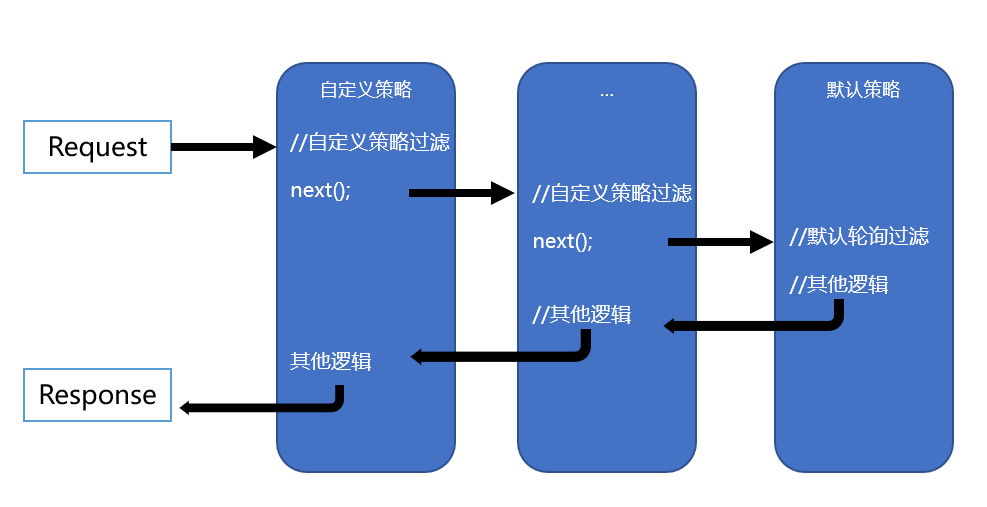
源码实现如下:
//策略委托

public delegate ServiceEntry[] StrategyDelegate(string serviceName, ServiceEntry[] services, string hashKey = null);

//服务管理

public class ServiceManager:IServiceManager

{

    private readonly IList<Func<StrategyDelegate, StrategyDelegate>> _components;

    private StrategyDelegate _strategy;//策略链

    public ServiceManager()

    {

        this._components = new List<Func<StrategyDelegate, StrategyDelegate>>();

    }

    //增加自定义策略

    public IServiceManager UseStrategy(Func<StrategyDelegate, StrategyDelegate> strategy)

    {

        _components.Add(strategy);

        return this;

    }

    //build 最终策略链

    private StrategyDelegate Build()

    {

        StrategyDelegate strategy = (sn, services, key) =>

        {

            return new DefaultStrategy().Invoke(null, sn, services, key);

        };

        foreach (var component in _components.Reverse())

        {

            strategy = component(strategy);

        }

        return strategy;

    }

}

public class DefaultStrategy : IStrategy

{

    private ushort _idx;

    public DefaultStrategy(){}

    public ServiceEntry[] Invoke(StrategyDelegate next, string serviceName, ServiceEntry[] services, string hashKey = null)

    {

        var service = services.Length == 1 ? services[0] : services[this._idx++ % services.Length];

        var result = new[] { service };

        return next != null ? next(serviceName, result, hashKey) : result;

    }

}
自定义策略扩展方法以及使用
public static IApplicationBuilder UseStrategy(this IApplicationBuilder app)

{

    var serviceManager = app.ApplicationServices.GetRequiredService<IServiceManager>();

    var strategies = app.ApplicationServices.GetServices<IStrategy>();

    //注册所有的策略

    foreach (var strategy in strategies)

    {

        serviceManager.UseStrategy(next =>

        {

            return (serviceName, services, hashKey) => strategy.Invoke(next, serviceName, services, hashKey);

        });

    }

    return app;

}

public class Startup

{

    public void ConfigureServices(IServiceCollection services)

    {

        ...

        services.AddSingleton<IStrategy, CustomStrategy>(); //自定义策略1

        services.AddSingleton<IStrategy, CustomStrategy2>(); //自定义测率2

    }

    public void Configure(IApplicationBuilder app, IHostingEnvironment env, IApplicationLifetime lifetime, IConsulClient consulClient, ILogger<Startup> logger)

    {

        app.UseStrategy(); //手动高亮

        app.AgentServiceRegister(lifetime, this.Configuration, consulClient, logger);

    }

}
ASP.NET CORE 使用Consul实现服务治理与健康检查(2)——源码篇的更多相关文章
- ASP.NET CORE 使用Consul实现服务治理与健康检查(1)——概念篇
背景 笔者所在的公司正在进行微服务改造,这其中服务治理组件是必不可少的组件之一,在一番讨论之后,最终决定放弃 Zookeeper 而采用 Consul 作为服务治理框架基础组件.主要原因是 Consu ...
- Asp.net core 向Consul 注册服务
Consul服务发现的使用方法:1. 在每台电脑上都以Client Mode的方式运行一个Consul代理, 这个代理只负责与Consul Cluster高效地交换最新注册信息(不参与Leader的选 ...
- Ubuntu & Docker & Consul & Fabio & ASP.NET Core 2.0 微服务跨平台实践
相关博文: Ubuntu 简单安装 Docker Mac OS.Ubuntu 安装及使用 Consul Consul 服务注册与服务发现 Fabio 安装和简单使用 阅读目录: Docker 运行 C ...
- Docker & Consul & Fabio & ASP.NET Core 2.0 微服务跨平台实践
相关博文: Ubuntu 简单安装 Docker Mac OS.Ubuntu 安装及使用 Consul Consul 服务注册与服务发现 Fabio 安装和简单使用 阅读目录: Docker 运行 C ...
- .net core grpc consul 实现服务注册 服务发现 负载均衡(二)
在上一篇 .net core grpc 实现通信(一) 中,我们实现的grpc通信在.net core中的可行性,但要在微服务中真正使用,还缺少 服务注册,服务发现及负载均衡等,本篇我们将在 .net ...
- asp.net core 和consul
consul集群搭建 Consul是HashiCorp公司推出的使用go语言开发的开源工具,用于实现分布式系统的服务发现与配置,内置了服务注册与发现框架.分布一致性协议实现.健康检查.Key/Valu ...
- .Net Core Grpc Consul 实现服务注册 服务发现 负载均衡
本文是基于..net core grpc consul 实现服务注册 服务发现 负载均衡(二)的,很多内容是直接复制过来的,..net core grpc consul 实现服务注册 服务发现 负载均 ...
- 实战中的asp.net core结合Consul集群&Docker实现服务治理
0.目录 整体架构目录:ASP.NET Core分布式项目实战-目录 一.前言 在写这篇文章之前,我看了很多关于consul的服务治理,但发现基本上都是直接在powershell或者以命令工具的方式在 ...
- .NET Core微服务之基于Consul实现服务治理
Tip: 此篇已加入.NET Core微服务基础系列文章索引 一.Consul基础介绍 Consul是HashiCorp公司推出的开源工具,用于实现分布式系统的服务发现与配置.与其他分布式服务注册与发 ...
随机推荐
- 【论文阅读】A practical algorithm for distributed clustering and outlier detection
文章提出了一种分布式聚类的算法,这是第一个有理论保障的考虑离群点的分布式聚类算法(文章里自己说的).与之前的算法对比有以下四个优点: 1.耗时短O(max{k,logn}*n), 2.传递信息规模小: ...
- 【Luogu P2146】软件包管理器
Luogu P2146 由于对于每一个软件包有且只有一个依赖的软件包,且依赖关系不存在环. 很显然这是一个树形的结构. 再看题目要求的操作,安装实际上对应的是覆盖根节点到当前节点的路径,卸载则是覆盖该 ...
- F#周报2019年第48期
新闻 拥抱可空引用类型 介绍Orleans 3.0 视频及幻灯片 组合的力量 关于.NET:探索新的用于.NET的Azure .NET SDK .NET设计审查:GitHub快速审查 FableCon ...
- 前端vue如何下载或者导出word文件和excel文件
前端用vue怎么接收并导出文件 window.location.href = "excel地址" 如果是 get 请求,那直接换成 window.open(url) 就行了 创建一 ...
- 【Android - 控件】之MD - CardView的使用
CardView是Android 5.0新特性——Material Design中的一个布局控件,可以通过属性设置显示一个圆角的类似卡片的视图. 1.CardView的属性: app:cardCorn ...
- Android多线程之(一)View.post()源码分析——在子线程中更新UI
提起View.post(),相信不少童鞋一点都不陌生,它用得最多的有两个功能,使用简便而且实用: 1)在子线程中更新UI.从子线程中切换到主线程更新UI,不需要额外new一个Handler实例来实现. ...
- ruby传参之引用类型
ruby是完全面向对象语言,所有的变量所储存的,其实是对象的引用. 所以ruby方法的参数,也都是引用类型.即使是基本的类型,比如布尔,整数,小数等,也是一样. class MyObject attr ...
- pringBoot-MongoDB 索引冲突分析及解决【华为云技术分享】
版权声明:本文为博主原创文章,遵循CC 4.0 BY-SA版权协议,转载请附上原文出处链接和本声明. 本文链接:https://blog.csdn.net/devcloud/article/detai ...
- 基于webpack实现多html页面开发框架三 图片等文件路径替换、并输出到打包目录
一.解决什么问题 1.图片路径替换.并输出到打包目录 2.输出目录清理 二.需要安装的包 file-loader:html.css中图片路径替换,图片输出到打包目录:命令:npm ...
- FF.PyAdmin 接口服务/后台管理微框架 (Flask+LayUI)
源码(有兴趣的朋友请Star一下) github: https://github.com/fufuok/FF.PyAdmin gitee: https://gitee.com/fufuok/FF.Py ...