
Maya+VS编程入门初体验(HelloWorld)
Maya2018 + VS2017 环境搭建见 博客
1. 项目:
VS 新建了一个 MEL Command类型的项目(MayaProject)
2. HelloWorld代码
#include<maya/MSimple.h>

// Use helper macro to register a command with Maya.  It creates and

// registers a command that does not support undo or redo.  The

// created class derives off of MPxCommand.

//

DeclareSimpleCommand( MayaProject, "", "");

MStatus sayHello::doIt(const MArgList& args )

{

    MStatus stat = MS::kSuccess;

    displayInfo("Hello World!");

    // Since this class is derived off of MPxCommand, you can use the

    // inherited methods to return values and set error messages

    //

    setResult( "sayHello command executed!/n" );

    return stat;

}
3. 运行,debug文件夹中出现了一个mll文件

4. 把mll文件拷贝到C:\MyProgram\AutoDesk\Maya2018\bin\plug-ins目录下,然后重新打开maya
菜单->窗口->设置/首选项->插件管理器
MayaProject插件加载进来
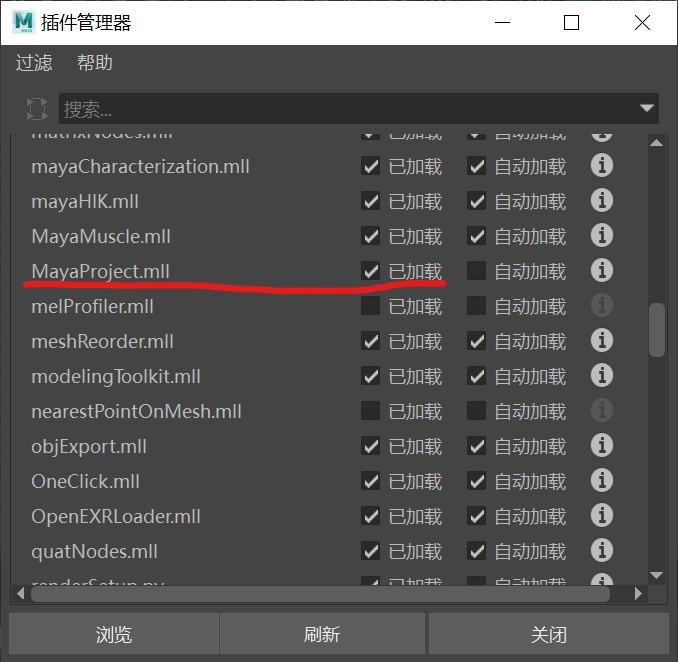
5. 在maya底部的MEL脚本编辑器中输入脚本,对插件进行测试

6. 脚本编辑器显示 结果

附一个创建球模型的代码:(我还没有运行出来)
//

// Copyright (C)

//

// File: MayaProjectCmd.cpp

//

// MEL Command: MayaProject

//

// Author: Maya Plug-in Wizard 2.0

//

// Includes everything needed to register a simple MEL command with Maya.

//

#include <maya/MSimple.h>

#include <maya/MGlobal.h>

#include <maya/MDagPath.h>

#include <maya/MSelectionList.h>

#include <maya/MFnDagNode.h>

#include <maya/MIOStream.h>

#include <maya/MFnMesh.h>

#include <maya/MFloatPointArray.h>

#include <maya/MString.h>

#include <maya/MItSelectionList.h>

#include <maya/MItMeshVertex.h>

#include <maya/MStringArray.h>

// Use helper macro to register a command with Maya.  It creates and

// registers a command that does not support undo or redo.  The

// created class derives off of MPxCommand.

//

DeclareSimpleCommand( MayaProject, "", "");

MStatus MayaProject::doIt( const MArgList& args )

//

//    Description:

//        implements the MEL MayaProject command.

//

//    Arguments:

//        args - the argument list that was passes to the command from MEL

//

//    Return Value:

//        MS::kSuccess - command succeeded

//        MS::kFailure - command failed (returning this value will cause the

//                     MEL script that is being run to terminate unless the

//                     error is caught using a "catch" statement.

//

{

    MStatus stat = MS::kSuccess;

    MSelectionList selection;

    MGlobal::getActiveSelectionList(selection);

    MDagPath dagPath, dagPath_1;

    MObject component, component_1;

    MItSelectionList iter(selection);

    selection.getDagPath(, dagPath, component);

    MItMeshVertex meshIter(dagPath, component, &stat);

    MStringArray verIndexArray;

    if (stat == MS::kSuccess)

    {

        for (; !meshIter.isDone(); meshIter.next())

        {

            MPoint pt = meshIter.position(MSpace::kObject);

            MItMeshVertex meshIter_1(dagPath);

            for (; !meshIter_1.isDone(); meshIter_1.next())

            {

                MPoint pt_1 = meshIter_1.position(MSpace::kObject);

                if (abs(-pt.x - pt_1.x) < 0.01

                    && abs(pt.y - pt_1.y) < 0.01

                    && abs(pt.z - pt_1.z) < 0.01)

                {

                    verIndexArray.append(MString("") + meshIter_1.index());

                    break;

                }

            }

        }

    }

    // Since this class is derived off of MPxCommand, you can use the

    // inherited methods to return values and set error messages

    //

    setResult(verIndexArray );

    return stat;

}
参考:
https://blog.csdn.net/xdhstc/article/details/40355155(球模型代码来源)
https://blog.csdn.net/huadingjin/article/details/8083277
https://blog.csdn.net/mincau/article/details/7925520
https://baijiahao.baidu.com/s?id=1608682630689528579&wfr=spider&for=pc(github/WendyAndAndy/MayaDev)
Maya+VS编程入门初体验(HelloWorld)的更多相关文章
- javaWeb快速入门+——初体验-HelloWorld
文章转载自 https://www.cnblogs.com/1906859953Lucas/p/10821840.html 练习成品下载 https://www.lanzous.com/i9fljkj ...
- gulp快速入门&初体验
前言 一句话先 gulp 是一个可以简单和自动化"管理"前端文件的构建工具 先说我以前的主要工作,我主要是做游戏服务端的,用c++/python,所以我对东西的概念理解难免要套到自 ...
- Scala 深入浅出实战经典 第66讲:Scala并发编程实战初体验
王家林亲授<DT大数据梦工厂>大数据实战视频 Scala 深入浅出实战经典(1-87讲)完整视频.PPT.代码下载:百度云盘:http://pan.baidu.com/s/1c0noOt6 ...
- Android开发学习之路--网络编程之初体验
一般手机都是需要上网的,一般我们的浏览器就是个webview.这里简单实现下下功能,先编写Android的layout布局: <?xml version="1.0" enco ...
- Netty 入门初体验
Netty简介 Netty是一款异步的事件驱动的网络应用程序框架,支持快速开发可维护的高性能的面向协议的服务器和客户端.Netty主要是对java 的 nio包进行的封装 为什么要使用 Netty 上 ...
- Node.js入门初体验
今天有一个类似网络爬虫的需求,本来打算用我还算熟悉的asp或者asp.NET来做这个事情,但是写了这么长时间js,asp的语法实在不喜欢,VS又早被我卸掉了,思来想去打算用一下最近比较火的Node.j ...
- Spring入门初体验
Spring其实就是一个容器,让我们更方便的拿到想要的对象. 1.编写一个service // userService.java public interface userService { publ ...
- angularjs入门初体验
1. http://www.zouyesheng.com/angular.html#toc39
- 我的Go语言学习之旅二:入门初体验 Hello World
好吧,全部的程序猿们都已经习惯了.学习不论什么一门语言,我们都会以Hello World实例開始我们的学习,我也不例外.先来一个简单的样例 打开编辑器 (能够用记事本,我已经习惯 Notepad++了 ...
随机推荐
- js动画--缓冲动画
前面讲述的动画速度都是匀速的,现实生活中的运动速度的变化不一定是恒定的,存在一定的缓冲,就像火车进站一样,速度会越来越慢. 对于改变速度措施,其实只要将动画第一课的程序稍微的改变一下就可以了,我们来看 ...
- Spring Boot 2实现分布式锁——这才是实现分布式锁的正确姿势!
参考资料 网址 Spring Boot 2实现分布式锁--这才是实现分布式锁的正确姿势! http://www.spring4all.com/article/6892
- 不重装nginx实现动态添加模块
如果项目在提供服务的过程中,因为需求使然,需要对nginx进行模块的动态添加,可以按照如下流程进行操作 一.查看nginx当前已经安装了那些模块 1) 进入nginx执行文件目录 cd /usr/ ...
- 软件测试之Monkey 初步了解(入门级)
monkey 介绍 Monkey是Google提供的一个用于稳定性与压力测试的命令行工具.可以运行在模拟器或者实际设备中.它向系统发送伪随机的用户事件(如按键.手势.触摸屏等输入),对软件进行稳定性与 ...
- Linux中的CentOS 7克隆之后修改
1.VMware Workstation软件查看克隆完成后的虚拟机网卡mac地址,记录下来 2.输入[cd /etc/sysconfig/network-scripts/]命令后,再执行[ip add ...
- dump array
<?php //array_dump.php $a=array(); $a[]=1; $a[]=2; $a[]=3; $a[]=4; $a[]='a'; $a[]='b'; $a[]='c'; ...
- sql 查询哪些字段重复及(in和exict的区别)
select count(1),content_id,keyword_id from tb_content_keyword_relation group by content_id,keyword_i ...
- jlink之j-scope使用
网上看到了j-scope的用法,可以把单片机的数据显示成波形,这个和我使用的STMStudio有点类似,但是有区别: 1.STMStudio这个需要stlink结合swo的输出口,j-scope不需要 ...
- 命令行创建react.js项目
npm install -g create-react-app /*搭建一个全局的脚手架*/ create-react-app my-demo /*创建项目 my-demo是项目名字* ...
- 使用apache 的FileUtils处理文件的复制等操作
今日思语:春风很柔,夏风很烈,秋风清爽,东风凛冽,愿你就是春夏秋冬的风~ 平时对一些文件进行操作,比如说写文件,读文件,复制一个文件等,使用原生File操作需要读取源文件,生成流对象,再写入一个新的文 ...