
@SuppressWarnings注解用法
@SuppressWarnings注解主要用在取消一些编译器产生的警告对代码左侧行列的遮挡,有时候这会挡住我们断点调试时打的断点。 如图所示:
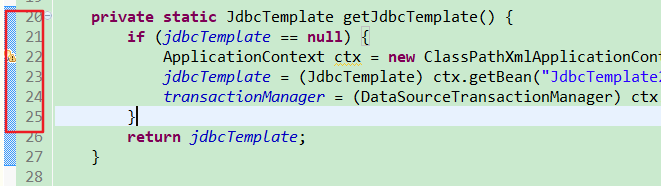
这时候我们在方法上加上@SuppressWarnings注解就可以消除这些警告的产生,注解的使用有三种:

1. @SuppressWarnings("unchecked")  [^ 抑制单类型的警告]

2. @SuppressWarnings("unchecked","rawtypes")  [^ 抑制多类型的警告]

3. @SuppressWarnings("unchecked")  [^ 抑制所有类型的警告]

***

> 通过源码分析可知@SuppressWarnings其注解目标为类、字段、函数、函数入参、构造函数和函数的局部变量。建议把注解放在最近进警告发生的位置。

下面列举警告关键字:
| 关键字 | 用途 |
|---|---|
| all | to suppress all warnings (抑制所有警告) |
| boxing | to suppress warnings relative to boxing/unboxing operations (抑制装箱、拆箱操作时候的警告) |
| cast | to suppress warnings relative to cast operations (抑制映射相关的警告) |
| dep-ann | to suppress warnings relative to deprecated annotation (抑制启用注释的警告) |
| deprecation | to suppress warnings relative to deprecation (抑制过期方法警告) |
| fallthrough | to suppress warnings relative to missing breaks in switch statements (抑制确在switch中缺失breaks的警告) |
| finally | to suppress warnings relative to finally block that don’t return (抑制finally模块没有返回的警告) |
| hiding | to suppress warnings relative to locals that hide variable(抑制相对于隐藏变量的局部变量的警告) |
| incomplete-switch | to suppress warnings relative to missing entries in a switch statement (enum case)(忽略没有完整的switch语句) |
| nls | to suppress warnings relative to non-nls string literals( 忽略非nls格式的字符) |
| null | to suppress warnings relative to null analysis( 忽略对null的操作) |
| rawtypes | to suppress warnings relative to un-specific types when using generics on class params( 使用generics时忽略没有指定相应的类型) |
| restriction | to suppress warnings relative to usage of discouraged or forbidden references( 抑制禁止使用劝阻或禁止引用的警告) |
| serial | to suppress warnings relative to missing serialVersionUID field for a serializable class( 忽略在serializable类中没有声明serialVersionUID变量) |
| static-access | to suppress warnings relative to incorrect static access( 抑制不正确的静态访问方式警告) |
| synthetic-access | to suppress warnings relative to unoptimized access from inner classes( 抑制子类没有按最优方法访问内部类的警告) |
| unchecked | to suppress warnings relative to unchecked operations( 抑制没有进行类型检查操作的警告) |
| unqualified-field-access | to suppress warnings relative to field access unqualified( 抑制没有权限访问的域的警告) |
| unused | to suppress warnings relative to unused code( 抑制没被使用过的代码的警告) |
@SuppressWarnings注解用法的更多相关文章
- java注解 @SuppressWarnings注解用法
@SuppressWarnings注解用法 @SuppressWarnings注解主要用在取消一些编译器产生的警告对代码工具左侧行列提示,但这种警告可以通过注释类型声明来取消 @SuppressWar ...
- @SuppressWarnings注解用法详解
@SuppressWarnings注解用法详解 今天来谈谈@SuppressWarnings注解的作用. J2SE 提供的最后一个批注是 @SuppressWarnings.该批注的作用是给编译器一条 ...
- sping中 各种注解——@SuppressWarnings注解用法
@SuppressWarnings注解用法 @SuppressWarnings注解主要用在取消一些编译器产生的警告对代码左侧行列的遮挡,有时候这会挡住我们断点调试时打的断点. 如图所示: 这时候我们在 ...
- Java中@SuppressWarnings注解用法(转)
背景: J2SE提供的最后一个注解是@SuppressWarnings.该批注的作用是给编译器一条指令,告诉它对被批注的代码元素内部的某些警告保持静默. @SuppressWarnings注解允许您选 ...
- @SuppressWarnings注解用法详解(转)
原文连接https://blog.csdn.net/sysware_carol/article/details/52100580 今天来谈谈@SuppressWarnings注解的作用. J2SE 提 ...
- @SuppressWarnings—注解用法详解
一.前言 编码时我们总会发现如下变量未被使用的警告提示: 上述代码编译通过且可以运行,但每行前面的“感叹号”就严重阻碍了我们判断该行是否设置的断点了.这时我们可以在方法前添加 @SuppressWar ...
- 去除编译警告@SuppressWarnings注解用法详解(转)
使用:@SuppressWarnings(“”)@SuppressWarnings({})@SuppressWarnings(value={}) 编码时我们总会发现如下变量未被使用的警告提示: 上述代 ...
- 忽略警告@SuppressWarnings的用法
@SuppressWarnings注解用法 @SuppressWarnings注解主要用在取消一些编译器产生的警告对代码左侧行列的遮挡,有时候这会挡住我们断点调试时打的断点. 我们可以在方法上加上@S ...
- Java 注解用法详解——@SuppressWarnings
转自: https://www.cnblogs.com/fsjohnhuang/p/4040785.html Java魔法堂:注解用法详解——@SuppressWarnings 一.前言 编码时我 ...
随机推荐
- Eureka 的高级使用
基础架构Eureka架构中的三个核心角色: 服务注册中心 Eureka的服务端应用,提供服务注册和发现功能,就是刚刚我们建立的eureka-demo 服务提供者 提供服务的应用,可以是SpringBo ...
- 一个半吊子PM的反思
故事之源 2019年3月,也就是2016级计算机学院的大三时,软件工程这门课程由选修转为专业必修课,而七个葫芦娃共聚罗杰老师的课堂,组成葫芦娃不想写代码小分队.面临着继承往届项目.完成指定项目和自选项 ...
- rpm 打包:ERROR: No build ID note found in xxxx
网上找修复方法 方法1: define区添加以下这行 %define debug_package %{nil} 参考:https://forums.fedoraforum.org/showthread ...
- supervisor更改某项目配置后 需要重新启动才有效
在linux服务器上部署了node项目,使用supervisor进行管理,supervisor是个好工具,具体介绍见这里about supervisor 梗概了该项目对的某些配置后,重新启动项目,发现 ...
- ios兼容性收集整理
1. ios系统兼input输入框光标问题 异常现象:苹果手机文本输入框样式异常——光标聚焦到文本框,光标高度充满文本框,输入内容,光标高度为文本框上边框到输入内容底部: 光标聚焦: 输入内容: 异常 ...
- JDK性能监控命令
阅读原文 查看虚拟机进程:jps 命令 jps 命令可以列出所有的 Java 进程.如果 jps 不加任何参数,可以列出 Java 程序的进程 ID 以及 Main 函数短名称,如下所示. $ jps ...
- CentOS7优化打开文件句柄数,修改MariaDB允许最大连接数、允许最大插入数据库的数据大小。
修改服务器配置:vim /etc/systemd/system.conf查找并修改下列两行的值:DefaultLimitNOFILE=1024000DefaultLimitNPROC=1024000 ...
- windows下安装zk
1 下载安装包并解压 2 修改conf下配置文件名字 zoo_sample.cfg 文件名改为 zoo.cfg 3 启动zk zKServer.cmd 4启动客户端连接测试 zKCli.cmd 127 ...
- 梳理数据库(MySQL)的主要知识点
一.数据库类型 常用的关系型数据库 Oracle:功能强大,主要缺点就是贵 MySQL:互联网行业中最流行的数据库,免费.关系数据库场景中的功能 MySQL 都能很好的满足 MariaDB:MySQL ...
- Nginx打印json日志
1.修改配置,在http{}中添加 log_format access_json '{"@timestamp":"$time_iso8601",' '" ...