
Using HAProxy as an API Gateway, Part 1 [Introduction]
转自:https://www.haproxy.com/blog/using-haproxy-as-an-api-gateway-part-1/
An API gateway handles load balancing, security, rate limiting, monitoring, and other cross-cutting concerns for API services. Read on to learn how HAProxy Enterprise excels as an API gateway.
“Danger! Avalanche Area” is a sign you’ll see when you drive through some parts of Colorado. Looking at the surrounding mountains in winter, you get the feeling that you’re creeping by sleeping giants that might pour down a surge of snow at any moment. If that weren’t enough, driving alone through such a place can seem like if you were to be buried, would anyone ever know?
In your work as an IT operator, the weight of managing modern IT systems can give you the same, anxious feeling. The complexity that builds up in infrastructure is like snow forming on a mountainside. If you get buried, how long will it take before people know? You’ve got to offload complexity wherever you can!
The specific form of complexity that we’ll address here is of connecting internal microservices to the outside world. Internal functionality, such as authentication, retrieving customer data, fetching product details, and taking payments must be exposed to your frontend clients. This is accomplished by defining application programming interfaces (APIs) that express these function signatures.
The challenge is that having clients connect directly to backend APIs creates tight coupling between the frontend and backend components, which is difficult to manage and scale. The way to handle this, and even get some observability over who’s calling what, is to consolidate the way that external clients access your APIs. Combining disparate APIs behind a single, unifying URL is the purview of an API gateway. In this way, clients can maintain a single reference to the gateway and it will route them to the right place. You also get a smaller area that needs to be exposed to the Internet.
An Open-Source API Gateway
An API gateway is a layer of software between the client and backend services that routes requests intelligently. HAProxy, the world’s fastest and most widely used software load balancer, fills the role as an API gateway extremely well. In addition to routing API calls for /cart or /catalog to the proper backend services, it also handles load balancing, security, rate limiting, monitoring, and other cross-cutting concerns. In essence, by placing all of your APIs behind a shared HAProxy instance, these requirements can be offloaded.
The API gateway becomes the orchestration layer that forwards requests so that frontend code and backend API endpoints are not tightly coupled. All devices can point to a single domain and HAProxy will handle the routing.
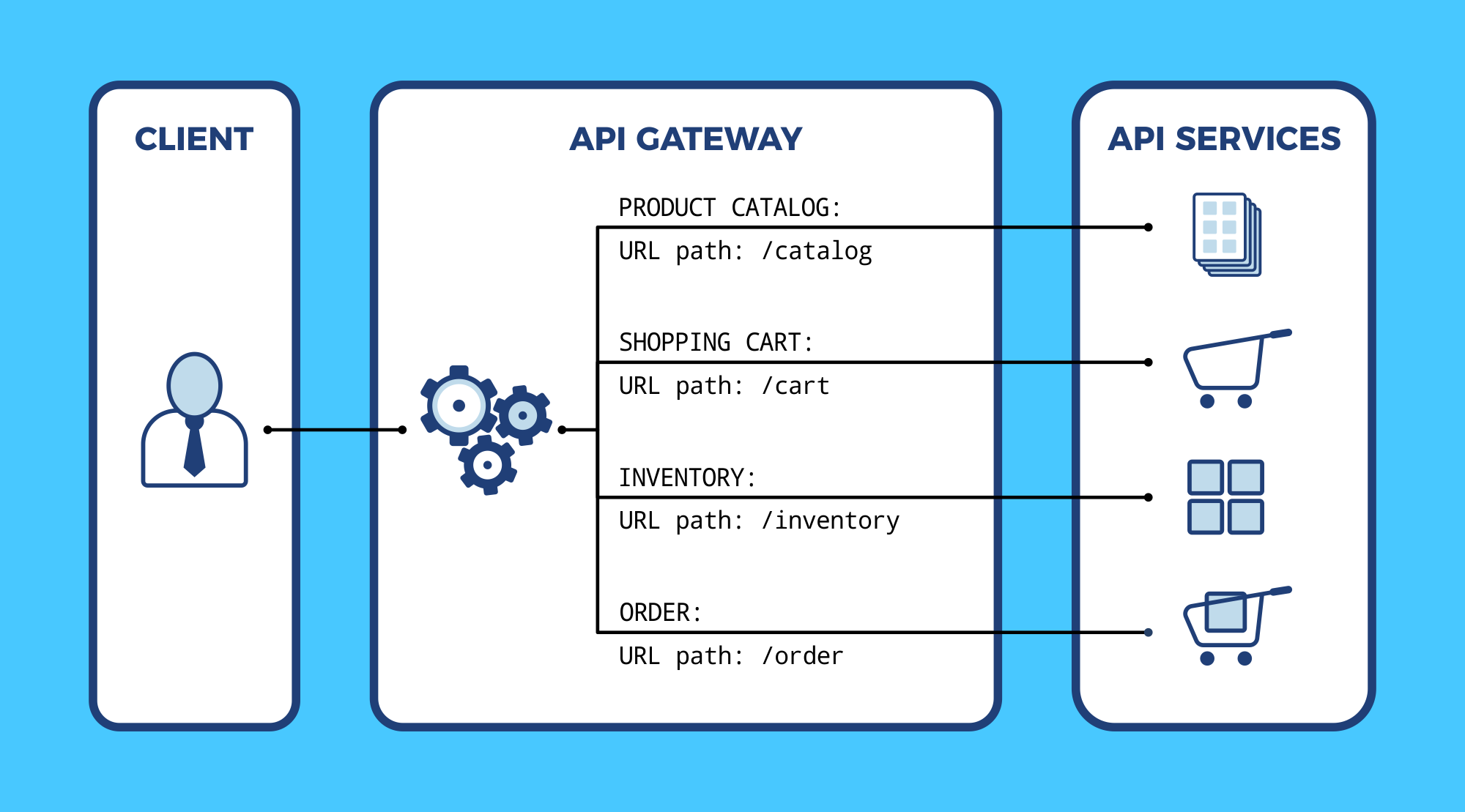
Due to its speed, high availability and reliability, HAProxy can be used as a API gateway
Here are some of the functions that an HAProxy API gateway will handle for you:
- High Performance
- Load balancing
- HTTP routing
- Security
- Rate limiting
- Observability
- Connection queuing
- Circuit-breaking
- Authentication
- Device Detection
Let’s explore some of these features in more detail.
HTTP Routing
The primary role of the API gateway is to route an incoming client request to the appropriate internal service. HAProxy can route based on any information found in the HTTP request, including portions of the URL path, query string, and HTTP headers.
In the following example, our HAProxy configuration sets up a frontend that accepts incoming requests on port 443, checks their URL paths for /cart and /catalog, and then forwards them to the correct backend.
| frontend api_gateway | |
| bind :443 ssl crt /etc/hapee-1.8/certs/cert.pem | |
| acl PATH_cart path_beg -i /cart | |
| acl PATH_catalog path_beg -i /catalog | |
| use_backend be_cart if PATH_cart | |
| use_backend be_catalog if PATH_catalog | |
| backend be_cart | |
| server s1 10.0.0.3:80 | |
| backend be_catalog | |
| server s1 10.0.0.5:80 |
If you are managing multiple website domains, then you can check the Host header when determining how to route requests. Here’s an example that will segregate API requests depending on the domain. When accessing, for example, api.haproxy.com, it will only route requests for /catalog and /cart. B2B partners that access partner.haproxy.com can access the /inventory API.
| frontend api_gateway | |
| bind :443 ssl crt /etc/hapee-1.8/certs/cert.pem | |
| acl VHOST_publicapi req.hdr(Host) -i -m dom api.haproxy.com api.haproxy.fr | |
| acl VHOST_partnersapi req.hdr(Host) -i -m dom partner.haproxy.com partner.haproxy.fr | |
| acl PATH_catalog path_beg -i /catalog | |
| acl PATH_cart path_beg -i /cart | |
| acl PATH_inventory path_beg -i /inventory | |
| use_backend be_cart if VHOST_publicapi PATH_cart | |
| use_backend be_catalog if VHOST_publicapi PATH_catalog | |
| use_backend be_inventory if VHOST_partnersapi PATH_inventory | |
| backend be_cart | |
| server s1 10.0.0.3:80 | |
| backend be_catalog | |
| server s1 10.0.0.5:80 | |
| backend be_inventory | |
| server s1 10.0.0.7 |
Note that HAProxy is extremely flexible and powerful and the examples provided are just simple use cases. HAProxy can apply more complex logic for HTTP routing and request handling.
If an application requires tens, hundreds, or even thousands of paths in a single ACL, then it is better to manage them through a map file. A map file stores key/value associations in memory. In our example, the key would be the “host/path” string and the value would be the name of the backend to route the request to. The map file routing.map would contain:
| # endpoint backend name | |
| api.haproxy.com/catalog/ be_catalog | |
| api.haproxy.fr/catalog/ be_catalog | |
| api.haproxy.com/cart/ be_cart | |
| api.haproxy.fr/cart/ be_cart | |
| partner.haproxy.com/inventory/ be_inventory | |
| partner.haproxy.fr/inventory/ be_inventory |
Our HAProxy configuration would contain:
| frontend api_gateway | |
| # … | |
| use_backend %[base,map_beg(“/etc/hapee-1.8/routing.map”)] |
base fetch method returns the concatenation of the Host header and the path part of the request, which starts at the first slash and ends before the question mark.To simplify the process of adding or removing path-to-backend associations, you can enable the HAProxy Enterprise “lb-update” module. This module can read the contents of the map file and refresh the ACLs during runtime, without the need to reload HAProxy.
Load Balancing

With HAProxy, the load balancing algorithm can be adjusted to suit the type of service and protocol
In order to improve the performance and resilience of each API endpoint, it’s recommended to replicate the service over several nodes. Then, the API gateway will balance incoming client requests among them. You can adjust the load balancing algorithm to suit the type of service and protocol.
- For quick and short API calls, use the
roundrobinalgorithm - For longer-lived websockets, use the
leastconnalgorithm - For services that have backend servers optimized to process particular functions, use the
urialgorithm
In the following example, the mobile API backend is balanced across two nodes using the roundrobin algorithm.
| backend mobile_api | |
| balance roundrobin | |
| server s1 10.0.0.3:80 | |
| server s2 10.0.0.4:80 |
Load balancing your API endpoints improves performance and creates redundancy. Note that you can choose the most appropriate balancing algorithm on a per-backend basis.
You can also define active and passive health checks for your servers so that HAProxy automatically reroutes traffic if there’s a problem. In the following example, we monitor the health of our servers by sending GET requests to the /health URL and expecting a successful response.
| backend mobile_api | |
| balance roundrobin | |
| option httpchk GET /health | |
| server s1 10.0.0.3:80 check | |
| server s2 10.0.0.4:80 check |
The option httpchk directive sets the method and URL to monitor. If you append \r\nyou can add additional HTTP headers to this request. A check parameter is added to each server to enable the feature. Being able to watch a URL endpoint works well with tools like Prometheus that already expose a /metrics web page used for scraping metrics.
HAProxy maxconn
The HAProxy load balancer stands in a strategic position, between your clients and services, ensuring that no backend nodes are saturated by spikes in traffic. Without this, all requests would be forwarded to the backend servers, risking high wait times and timeouts.
HAProxy implements queuing mechanisms to prevent sending too many requests at once to a service. Add the maxconn argument to a server directive to queue additional requests within the gateway, as shown:
| backend mobile_api | |
| balance roundrobin | |
| server s1 10.0.0.3:80 maxconn 100 | |
| server s2 10.0.0.4:80 maxconn 100 |
In this case, up to 100 connections can be established at once to a server. Any more than that will be queued. This relieves strain on your servers, allowing them to process requests more efficiently. HAProxy is highly proficient at managing queues of this sort.
Rate Limiting

HAProxy’s Stick Tables can be used to limit the number of requests sent to the API by one client
You may want to limit the number of requests a client can send to your APIs within a period of time. This might be a to enforce a quota for various tiers of customers. To be allowed to send more requests, clients could subscribe to a higher-priced tier.
In HAProxy, stick tables can be used for such a purpose. You can track clients by IP address, cookie or other means such as API tokens passed in the URL or headers. In this example, the client is expected to pass a URL parameter called apitoken and is limited to 1000 requests within 24 hours. The period is set with the expire parameter on the stick-table directive.
| frontend api_gateway | |
| bind :443 ssl crt /etc/hapee-1.8/certs/cert.pem | |
| stick-table type string size 1m expire 24h store http_req_cnt | |
| acl exceeds_limit url_param(apitoken),table_http_req_cnt(api_gateway) gt 1000 | |
| http-request track-sc0 url_param(apitoken) unless exceeds_limit | |
| http-request deny deny_status 429 if exceeds_limit |
Now, as I make requests to the site, passing the URL parameter, apitoken=abcdefg, the count of HTTP requests is incremented. I can see this by logging into the server via SSH and querying the Runtime API. In the following example, I’ve made 12 requests using my API token.
| root@server1:~$ echo "show table api_gateway" | socat UNIX-CONNECT:/var/run/haproxy.sock stdio | |
| # table: api_gateway, type: string, size:1048576, used:1 | |
| 0x55bd73392fa4: key=abcdefg use=0 exp=86396974 http_req_cnt=12 |
When clients go past their limit, they’ll receive a 429 Too Many Requests response. Check out our blog post Introduction to HAProxy Stick Tables for more information about defining stick tables and other examples of rate limiting.
deny_status to the http-request deny directive allows you to set a custom response code when rejecting requests. Possible values are 200, 400, 403, 405, 408, 425, 429, 500, 502, 503, 504Optionally, instead of a daily limit as used above, you can also do it based on the rate of the requests. This acts as a security feature to prevent abuse or clients with runaway processes. The following example allows a client to make no more than one request per second.
(Note: While the above and below are separate examples they could also be combined to provide extra control)
Detailed monitoring and statistics
HAProxy is very famous for the level of details it provides on the traffic it processes. There are two main features: the statistic dashboard and the logs.
Statistics Dashboard
You can enable an HTML statistics page within HAProxy and HAProxy Enterprise, which comes as a set of tabular data with many metrics for each frontend, backend, backend server and frontend bind line. The image below shows an example of the HAProxy Enterprise Real Time dashboard:
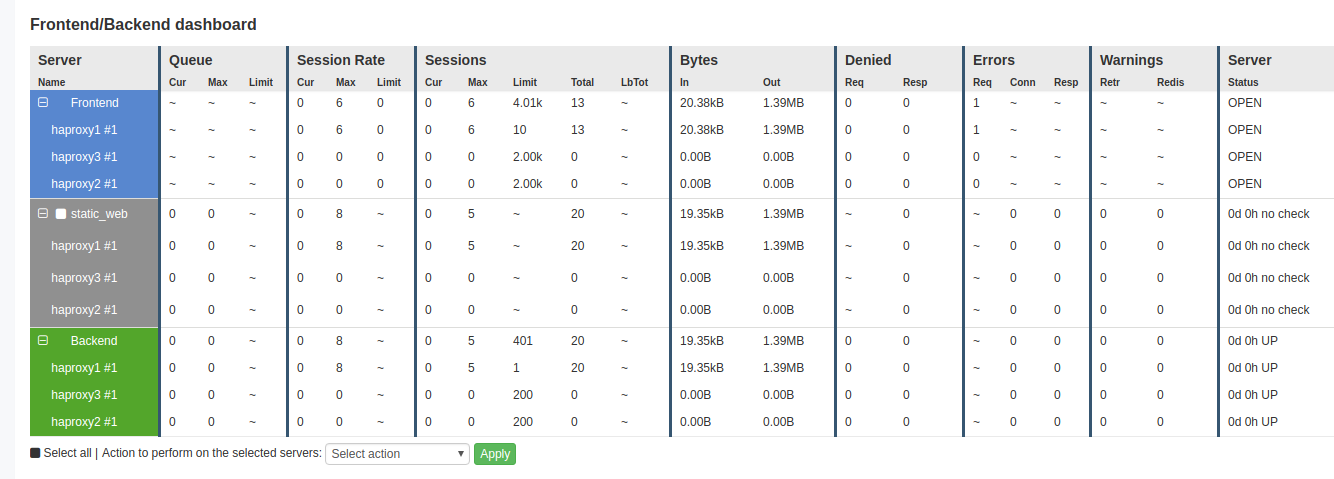
HAProxy’s Real-Time Dashboard
This data is also available by querying the HAProxy Runtime API. JSON (within the Runtime API) and CSV (within both the dashboard and the Runtime API) are also available for easy integration with third party tools like Prometheus, Grafana, and SNMP. The image below shows an integration of HAProxy with Grafana, via the Prometheus exporter:
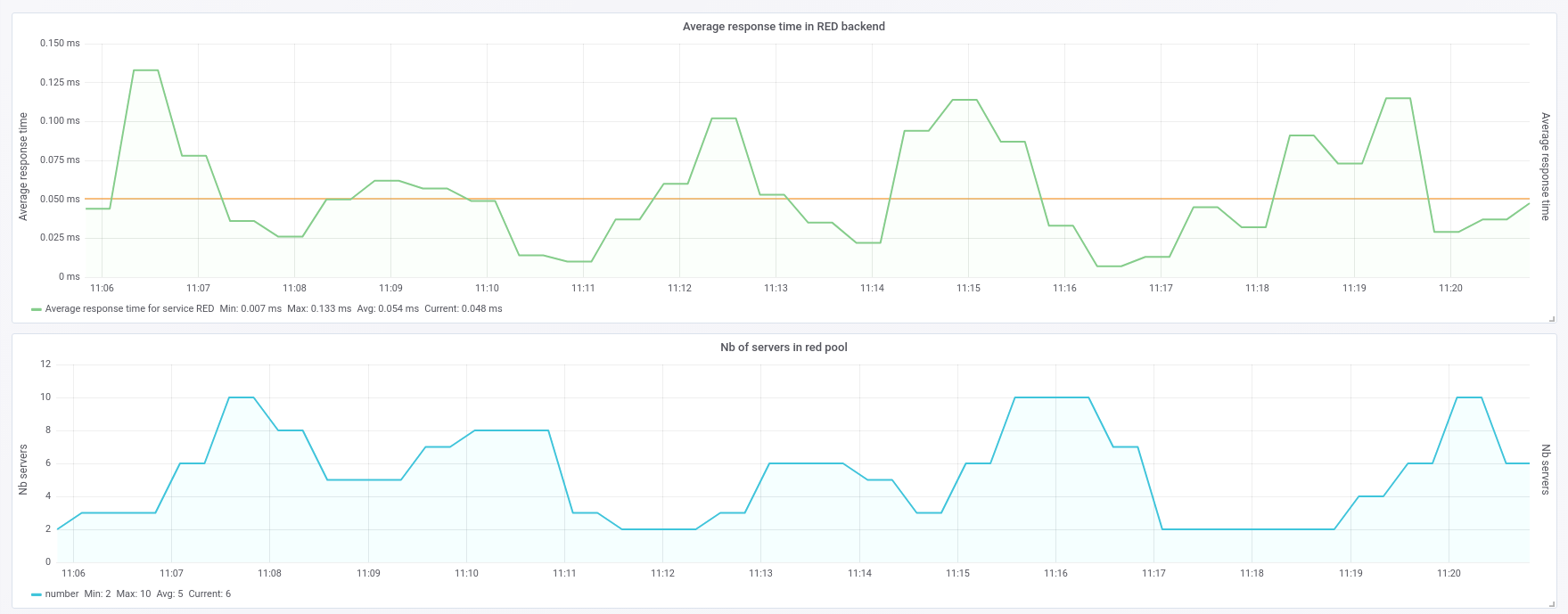
Integration of HAProxy with Grafana, via the Prometheus exporter
Logs
The HAProxy logs are a gold mine of information, since HAProxy can report the following information for each API call:
- Client IP, port
- Routing within HAProxy: frontend, backend, server
- URL endpoint with query string
- Timers: time for the client to send the request, server connection time, response time, total session duration, etc…
- Termination status: did the session finished properly or not, if not what happened and at what phase of the session (connection time, header time, data streaming time, etc…)
- Any custom header or cookie you want to capture
- Any SSL / TLS information
Based on all the information provided above, it is possible to build reports and to figure out when and where problems are occurring (e.g. Is it networking? The application? A particular server?).
Conclusion
In this article, you learned what an API gateway is and how it can simplify connecting microservices to external clients. You also saw how HAProxy load balancer works as an API gateway: managing routing, load balancing, rate limiting and other complexities.
Using HAProxy as an API Gateway, Part 1 [Introduction]的更多相关文章
- Using HAProxy as an API Gateway, Part 2 [Authentication]
转自:https://www.haproxy.com/blog/using-haproxy-as-an-api-gateway-part-2-authentication/ HAProxy is a ...
- Using HAProxy as an API Gateway, Part 3 [Health Checks]
转自:https://www.haproxy.com/blog/using-haproxy-as-an-api-gateway-part-3-health-checks/ Achieving high ...
- API Gateway : Kong
what problems 多个服务要写自己的log,auth,对于比较耗时的,有时还要高流量限制. solution intro 单点部署的情况: why not just haproxy log ...
- API gateway 之 kong 基本介绍 (一)
一.API网关概念介绍 API 网关,即API Gateway,是大型分布式系统中,为了保护内部服务而设计的一道屏障,可以提供高性能.高可用的 API托管服务,从而帮助服务的开发者便捷地对外提供服务, ...
- Using Amazon API Gateway with microservices deployed on Amazon ECS
One convenient way to run microservices is to deploy them as Docker containers. Docker containers ar ...
- Aws api gateway Domain name
Set Up a Custom Domain Name for an API Gateway API The following procedure describes how to set up a ...
- [转载] 构建微服务:使用API Gateway
原文: http://mp.weixin.qq.com/s?__biz=MzA5OTAyNzQ2OA==&mid=206889381&idx=1&sn=478ccb35294c ...
- Amazon API Gateway Importer整合过程小结
(1)需要将swagger json转换成amazon api gateway 所需要的格式(根据Method Request中 Request PathsURL Query String Param ...
- 微服务API Gateway
翻译-微服务API Gateway 原文地址:http://microservices.io/patterns/apigateway.html,以下是使用google翻译对原文的翻译. 让我们想象一下 ...
随机推荐
- Shell编程学习(六)
Shell 脚本条件测试与比较 条件测试方法综述 在Bash的各种条件结构和控制结构中都要进行各种测试,然后根据测试结果执行不同的操作,有时也会与if等条件语句相结合,来完成测试判断,以减少程序运行的 ...
- centos7 挂载未分配的硬盘空间
=============================================== 2019/7/28_第1次修改 ccb_warlock == ...
- DEDE5.5招聘模板
<channel:id>18</channel:id> <channel:nid>zhaopin</channel:nid> <channel:t ...
- wind安装Jenkins+sonar+jdk
最近公司在用Jenkins持续集成软件,自己研究的头痛,而且还是和C#项目融合到一起的,网上看到的都是Java的,我自己配了一套和C#的,和你们分享. Jenkins是一个开源软件项目,旨在提供一个开 ...
- IntelliJ IDEA web项目进行数据库连接时出现java.lang.ClassNotFoundException: com.mysql.jdbc.Driver错误解决办法
首先看报错信息: 意思是找不到类: com.mysql.jdbc.Driver.也就是说tomcat找不到MySQL数据库连接要用的jar包! 出现这种错误的原因是: 项目中没有导入这个jar包, ...
- IDEA中Tomcat热部署不生效问题解决办法
IDEA中Tomcat热部署不生效问题解决办法 1.设置完热部署后 2.一定要在Debug模式下运行不要点RUN!!!!!!!!!!!!!!!!!
- 正则表达式修饰符 i、g、m、s、U、x、a、D、e 等。
正则表达式中常用的模式修正符有i.g.m.s.U.x.a.D.e 等. 它们之间可以组合搭配使用. i 不区分(ignore)大小写: 例如: /abc/i 可以匹配 abc.aBC.Abc g 全局 ...
- 为什么在定义hashcode时要使用31这个数呢?
散列计算就是计算元素应该放在数组的哪个元素里.准确的说是放到哪个链表里面.按照Java的规则,如果你要想将一个对象放入HashMap中,你的对象的类必须提供hashcode方法,返回一个整数值. ht ...
- Linux下的基本命令(不定期更新,欢迎指正错误、交流学习)
ls 列出目录内容 -a //显示所有文件,包括隐藏文件 -i //显示详细信息 -d //显示目录属性 -h //人性化显示文件大小 -l //长格式显示,也可简写为 ll pwd 显示当前工作路径 ...
- HotSpot虚拟机的锁优化
面试中多次被问到synchronized关键字的实现原理,一直认为仅是monitorenter与monitorexit两条指令而已,原来底层涉及到多种锁优化策略,包括:自旋锁,轻量锁,偏向锁. 1.自 ...