
记一次CSS反爬
目标网址:猫眼电影
主要流程
- 爬取每一个电影所对应的url
- 爬取具体电影所对应的源码
- 解析源码,并下载所对应的字体
- 使用 fontTools 绘制所对应的数字
- 运用机器学习的方法识别对应的数字
- 在源码中用识别的数字替换相应的地方
遇坑经历
- 用 pyquery 的 .text() 方法的时候自动对 html 进行了反转义,替换过程失败,直接打出来一堆乱码,不得已改用 lxml
- 一开始在网上看到很多通过将 woff 字体文件转为 xml 并通过分析 xml 中的 glyf 来判断所对应的汉字,但是看了几个之后发现即使是相同的数字所对应的 x,y值也并不是完全相同
- 对多线程的用法还不是很熟悉
项目列表如下
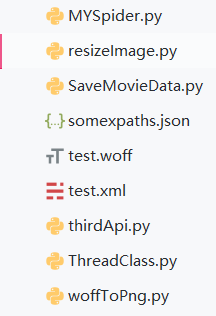
具体代码如下
Myspider.py
import requests

import fake_useragent

import re

import os

from woffToPng import woff_to_image

from resizeImage import resize_img

from lxml import etree

from html import unescape

from ThreadClass import SpiderThread

from SaveMovieData import SaveInfo

from pyquery import PyQuery as pq

from pprint import pprint

import json

import time

# 用协程实现有点苦难,暂时试一试多线程

# 存储urls

film_urls = []

def verify_img(img_dir):

    api_url = "http://127.0.0.1:6000/b"

    img_to_num = {}

    for file in os.listdir(img_dir):

        file_name = os.path.join(img_dir, file)

        # 重新构建图片大小

        resize_img(file_name, file_name)

        files = {"image_file": ("image_file", open(file_name, "rb"), "application")}

        r = requests.post(url=api_url, files=files, timeout=None)

        if r.status_code == 200:

            # 获得图片的名字,即数字所对应的unicode编码

            num_id = os.path.splitext(file)[0][3:]

            img_to_num[str(int(num_id, 16))] = r.json().get("value")

    return img_to_num

def find_certain_part(html, xpath_format):

    try:

        return html.xpath(xpath_format)[0]

    except Exception:

        return "null"

def parse_data_by_lxml(source_code, img_to_num, saver):

    html = etree.HTML(source_code)

    xpaths = json.loads(open("somexpaths.json", "r").read())

    movie_name = find_certain_part(html, xpaths.get("movie_name"))

    movie_ename = find_certain_part(html, xpaths.get("movie_ename"))

    movie_classes = find_certain_part(html, xpaths.get("movie_classes")).strip()

    movie_length = find_certain_part(html, xpaths.get("movie_length")).strip()

    movie_showtime = find_certain_part(html, xpaths.get("movie_showtime")).strip()

    text_pattern = re.compile('.*?class="stonefont">(.*?)</span>')

    data_to_be_replace = []

    movie_score = find_certain_part(html, xpaths.get("movie_score"))

    movie_score_num = find_certain_part(html, xpaths.get("movie_score_num"))

    if movie_score != "null":

        movie_score = text_pattern.search(etree.tostring(movie_score).decode("utf8")).group(1)

    if movie_score_num != "null":

        movie_score_num = text_pattern.search(etree.tostring(movie_score_num).decode("utf8")).group(1)

    data_to_be_replace.append(movie_score)

    data_to_be_replace.append(movie_score_num)

    movie_box = find_certain_part(html, xpaths.get("movie_box"))

    if movie_box != "null":

        movie_box = text_pattern.search(etree.tostring(movie_box).decode("utf8")).group(1)

    movie_box_unit = find_certain_part(html, xpaths.get("movie_box_unit"))

    data_to_be_replace.append(movie_box)

    # 检查是否是字符串

    for item in data_to_be_replace:

        assert isinstance(item, str)

    # 将 unicode 编码的字符串转化为数字

    for key, value in img_to_num.items():

        new_key = f"&#{key};"

        for i in range(len(data_to_be_replace)):

            if data_to_be_replace[i] == "null":

                continue

            if new_key in data_to_be_replace[i]:

                data_to_be_replace[i] = data_to_be_replace[i].replace(new_key, value)

    movie_score, movie_score_num, movie_box = [unescape(item) for item in data_to_be_replace]

    # 没有评分的当作0

    if movie_score == "null":

        movie_score = "0"

    if movie_box != "null":

        movie_box = movie_box + movie_box_unit.strip()

    movie_brief_info = find_certain_part(html, xpaths.get("movie_brief_info"))

    assert(isinstance(movie_brief_info, str))

    # 这里的实现逻辑有一点问题,因为只是默认第一个是导演

    movie_director, *movie_actors = [item.strip() for item in html.xpath("//body//div[@id='app']//div//div//div//div[@class='tab-content-container']//div//div[@class='mod-content']//div//div//ul//li//div//a/text()")]

    movie_actors = ",".join(movie_actors)

    movie_comments = {}

    try:

        names = html.xpath("//body//div[@id='app']//div//div//div//div//div[@class='module']//div[@class='mod-content']//div[@class='comment-list-container']//ul//li//div//div[@class='user']//span[@class='name']/text()")

        comments = html.xpath("//body//div[@id='app']//div//div//div//div//div[@class='module']//div[@class='mod-content']//div[@class='comment-list-container']//ul//li//div[@class='main']//div[@class='comment-content']/text()")

        assert(len(names) == len(comments))

        for name, comment in zip(names, comments):

            movie_comments[name] = comment

    except Exception:

        pass

    save_id = saver.insert_dict({

        "名称": movie_name,

        "别名": movie_ename,

        "类别": movie_classes,

        "时长": movie_length,

        "上映时间": movie_showtime,

        "评分": float(movie_score),

        "评分人数": movie_score_num,

        "票房": movie_box,

        "简介": movie_brief_info,

        "导演": movie_director,

        "演员": movie_actors,

        "热门评论": movie_comments

    })

    print(f"{save_id} 保存成功")

# 爬取源码,在获得源码之后处理字体文件,处理完字体文件之后进行替换

def get_one_film(url, ua, film_id, saver):

    headers = {

        "User-Agent": ua,

        "Host": "maoyan.com"

    }

    r = requests.get(url=url, headers=headers)

    if r.status_code == 200:

        source_code = r.text

        font_pattern = re.compile("url\(\'(.*?\.woff)\'\)")

        font_url = "http:" + font_pattern.search(r.text).group(1).strip()

        del headers["Host"]

        res = requests.get(url=font_url, headers=headers)

        # 下载字体并进行识别对应

        if res.status_code == 200:

            if os.path.exists(film_id):

                os.system(f"rmdir /s /q {film_id}")

            os.makedirs(film_id)

            woff_path = os.path.join(film_id, "temp.woff")

            img_dir = os.path.join(film_id, "images")

            os.makedirs(img_dir)

            with open(woff_path, "wb") as f:

                f.write(res.content)

            woff_to_image(woff_path, img_dir)

            # 以后试着用协程实现汉字识别

            # 先直接识别

            # 用字典存储,{"img_id": "img_num"}

            img_to_num = verify_img(img_dir)

            # 删除所创建的文件

            os.system(f"rmdir /s /q {film_id}")

            # 对所获得的数据和可以替换的信息进行进一步的处理

            parse_data_by_lxml(source_code, img_to_num, saver)

def get_urls(url, ua, showType, offset):

    base_url = "https://maoyan.com"

    headers = {

        "User-Agent": ua,

        "Host": "maoyan.com"

    }

    params = {

        "showType": showType,

        "offset": offset

    }

    urls = []

    r = requests.get(url=url, headers=headers, params=params)

    if r.status_code == 200:

        doc = pq(r.text)

        for re_url in doc("#app div div[class='movies-list'] dl dd div[class='movie-item'] a[target='_blank']").items():

            urls.append(base_url + re_url.attr("href"))

    film_urls.extend(urls)

    print(f"当前捕获url{len(film_urls)}个")

if __name__ == "__main__":

    # 测试

    ua = fake_useragent.UserAgent()

    tasks_one = []

    try:

        for i in range(68):

            tasks_one.append(SpiderThread(get_urls, args=("https://maoyan.com/films", ua.random, "3", str(30*i))))

        for task in tasks_one:

            task.start()

        for task in tasks_one:

            task.join()

    except Exception as e:

        print(e.args)

    saver = SaveInfo()

    film_ids = [url.split("/")[-1] for url in film_urls]

    print(f"捕获电影url共{len(film_urls)}条")

    tasks_two = []

    count = 0

    try:

        for film_url, film_id in zip(film_urls, film_ids):

            tasks_two.append(SpiderThread(get_one_film, args=(film_url, ua.random, film_id, saver)))

        for task in tasks_two:

            task.start()

            count += 1

            if count % 4 == 0:

                time.sleep(5)

        for task in tasks_two:

            task.join()

    except Exception as e:

        print(e.args)

    print("抓取完毕")
resizeimage.py
from PIL import Image

import os

def resize_img(img_path, write_path):

    crop_size = (120, 200)

    img = Image.open(img_path)

    new_img = img.resize(crop_size, Image.ANTIALIAS)

    new_img.save(write_path, quality=100)

if __name__ == "__main__":

    for root, dirs, files in os.walk("verify_images"):

        for file in files:

            img_path = os.path.join(root, file)

            write_path = os.path.join("resized_images", file)

            resize_img(img_path, write_path)
SaveMovieData.py
import pymongo

class SaveInfo:

    def __init__(self, host="localhost", port=27017, db="MovieSpider",

                 collection="maoyan"):

        self._client = pymongo.MongoClient(host=host, port=port)

        self._db = self._client[db]

        self._collection = self._db[collection]

    def insert_dict(self, data: dict):

        result = self._collection.insert_one(data)

        return result.inserted_id
woffToPng.py
from __future__ import print_function, division, absolute_import

from fontTools.ttLib import TTFont

from fontTools.pens.basePen import BasePen

from reportlab.graphics.shapes import Path

from reportlab.lib import colors

from reportlab.graphics import renderPM

from reportlab.graphics.shapes import Group, Drawing

class ReportLabPen(BasePen):

    """A pen for drawing onto a reportlab.graphics.shapes.Path object."""

    def __init__(self, glyphSet, path=None):

        BasePen.__init__(self, glyphSet)

        if path is None:

            path = Path()

        self.path = path

    def _moveTo(self, p):

        (x, y) = p

        self.path.moveTo(x, y)

    def _lineTo(self, p):

        (x, y) = p

        self.path.lineTo(x, y)

    def _curveToOne(self, p1, p2, p3):

        (x1, y1) = p1

        (x2, y2) = p2

        (x3, y3) = p3

        self.path.curveTo(x1, y1, x2, y2, x3, y3)

    def _closePath(self):

        self.path.closePath()

def woff_to_image(fontName, imagePath, fmt="png"):

    font = TTFont(fontName)

    gs = font.getGlyphSet()

    glyphNames = font.getGlyphNames()

    for i in glyphNames:

        if i == 'x' or i == "glyph00000":  # 跳过'.notdef', '.null'

            continue

        g = gs[i]

        pen = ReportLabPen(gs, Path(fillColor=colors.black, strokeWidth=5))

        g.draw(pen)

        w, h = 600, 1000

        g = Group(pen.path)

        g.translate(0, 200)

        d = Drawing(w, h)

        d.add(g)

        imageFile = imagePath + "/" + i + ".png"

        renderPM.drawToFile(d, imageFile, fmt)
import threading

class SpiderThread(threading.Thread):

    def __init__(self, func, args=()):

        super().__init__()

        self.func = func

        self.args = args

    def run(self) -> None:

        self.result = self.func(*self.args)

    # 相当于没有多线程

    # def get_result(self):

    #     threading.Thread.join(self)

    #     try:

    #         return self.result

    #     except Exception as e:

    #         print(e.args)

    #         return None
somexpaths.json
{

  "movie_name": "//body//div[@class='banner']//div//div[@class='movie-brief-container']//h3/text()",

  "movie_ename": "//body//div[@class='banner']//div//div[@class='movie-brief-container']//div/text()",

  "movie_classes": "//body//div[@class='banner']//div//div[@class='movie-brief-container']//ul//li[1]/text()",

  "movie_length": "//body//div[@class='banner']//div//div[@class='movie-brief-container']//ul//li[2]/text()",

  "movie_showtime": "//body//div[@class='banner']//div//div[@class='movie-brief-container']//ul//li[3]/text()",

  "movie_score": "//body//div[@class='banner']//div//div[@class='movie-stats-container']//div//span[@class='index-left info-num ']//span",

  "movie_score_num": "//body//div[@class='banner']//div//div[@class='movie-stats-container']//div//span[@class='score-num']//span",

  "movie_box": "//body//div[@class='wrapper clearfix']//div//div//div//div[@class='movie-index-content box']//span[@class='stonefont']",

  "movie_box_unit": "//body//div[@class='wrapper clearfix']//div//div//div//div[@class='movie-index-content box']//span[@class='unit']/text()",

  "movie_brief_info": "//body//div[@class='container']//div//div//div//div[@class='tab-content-container']//div//div//div[@class='mod-content']//span[@class='dra']/text()",

  "movie_director_and_actress": "//body//div[@id='app']//div//div//div//div[@class='tab-content-container']//div//div[@class='mod-content']//div//div//ul//li//div//a/text()",

  "commenter_names": "//body//div[@id='app']//div//div//div//div//div[@class='module']//div[@class='mod-content']//div[@class='comment-list-container']//ul//li//div//div[@class='user']//span[@class='name']/text()",

  "commenter_comment": "//body//div[@id='app']//div//div//div//div//div[@class='module']//div[@class='mod-content']//div[@class='comment-list-container']//ul//li//div[@class='main']//div[@class='comment-content']/text()"

}
参考资料
记一次CSS反爬的更多相关文章
- 【Python3爬虫】大众点评爬虫(破解CSS反爬)
本次爬虫的爬取目标是大众点评上的一些店铺的店铺名称.推荐菜和评分信息. 一.页面分析 进入大众点评,然后选择美食(http://www.dianping.com/wuhan/ch10),可以看到一页有 ...
- Python爬虫反反爬:CSS反爬加密彻底破解!
刚开始搞爬虫的时候听到有人说爬虫是一场攻坚战,听的时候也没感觉到特别,但是经过了一段时间的练习之后,深以为然,每个网站不一样,每次爬取都是重新开始,所以,爬之前谁都不敢说会有什么结果. 前两天,应几个 ...
- 记一次svg反爬学习
网址:http://www.porters.vip/confusion/food.html 打开开发者工具后 页面源码并不是真实的数字,随便点一个d标签查看其样式 我们需要找到两个文件,food.cs ...
- 爬虫--反爬--css反爬---大众点评爬虫
大众点评爬虫分析,,大众点评 的爬虫价格利用css的矢量图偏移,进行加密 只要拦截了css 解析以后再写即可 # -*- coding: utf- -*- """ Cre ...
- 记一次css字体反爬
前段时间在看css反爬的时候,发现很多网站都做了css反爬,比如,设置字体反爬的(58同城租房版块,实习僧招聘https://www.shixiseng.com/等)设置雪碧图反爬的(自如租房http ...
- 字体反爬--css+svg反爬
这个验证码很恶心,手速非常快才能通过.. 地址:http://www.dianping.com/shop/9964442 检查一下看到好多字没有了,替代的是<x class="xxx& ...
- CSS常见反爬技术
目录 利用字体 反爬原理 应对措施 难点: 利用背景 反爬原理 应对措施 利用伪类 反爬原理 应对措施 利用元素定位 反爬原理 应对措施 利用字符切割 反爬原理 应对措施 利用字体 反爬原理 反爬原理 ...
- Python爬虫入门教程 64-100 反爬教科书级别的网站-汽车之家,字体反爬之二
说说这个网站 汽车之家,反爬神一般的存在,字体反爬的鼻祖网站,这个网站的开发团队,一定擅长前端吧,2019年4月19日开始写这篇博客,不保证这个代码可以存活到月底,希望后来爬虫coder,继续和汽车之 ...
- Python爬虫入门教程 63-100 Python字体反爬之一,没办法,这个必须写,反爬第3篇
背景交代 在反爬圈子的一个大类,涉及的网站其实蛮多的,目前比较常被爬虫coder欺负的网站,猫眼影视,汽车之家,大众点评,58同城,天眼查......还是蛮多的,技术高手千千万,总有五花八门的反爬技术 ...
随机推荐
- PHP扩展使用-CURL
一.简介 功能:是一个可以使用URL的语法模拟浏览器来传输数据的工具库,支持的协议http.https.ftp.gopher.telnet.dict.file.ldap 资源类型:cURL 句柄和 c ...
- UVa 202 Repeating Decimals 题解
The decimal expansion of the fraction 1/33 is 0.03, where the 03 is used to indicate that the cycle ...
- Ubuntu下搭建Kubernetes集群(3)--k8s部署
1. 关闭swap并关闭防火墙 首先,我们需要先关闭swap和防火墙,否则在安装Kubernetes时会导致不成功: # 临时关闭 swapoff -a # 编辑/etc/fstab,注释掉包含swa ...
- 201871010118-唐敬博《面向对象程序设计(java)》第十三周学习总结
博文正文开头格式:(2分) 项目 内容 这个作业属于哪个课程 https://www.cnblogs.com/nwnu-daizh/ 这个作业的要求在哪里 https://www.cnblogs.co ...
- XML 配置文件,知识点
namespace 属性:配置成接口的全限定名称,将 Mapper 接口和 XML 文件关联起来: select 标签的 id 属性值,对应定义的接口方法名. insert 标签的属性 paramet ...
- webpy安装
C:\Users\ceshi>python -m pip install web.pyCollecting web.py Downloading web.py-0.38.tar.gz (91kB ...
- Linux下JDK中文字体乱码
java生成图片的时候用到字体,但是liunx系统没有这些字体需要把C:\Windows\Fonts 上传到/usr/local/jdk1.8.0_171/jre/lib/fonts 重启tomcat ...
- 安装禅道提示:ERROR: 您访问的域名 192.168.110.128 没有对应的公司
您访问的域名 192.168.110.128 没有对应的公司. in /usr/local/nginx/html/zentaopms/module/common/model.php on line 8 ...
- Autofac注册组件详解
注册概念:我们通过创建 ContainerBuilder 来注册 组件 并且告诉容器哪些 组件 暴露了哪些 服务.组件 可以通过 反射 创建; 通过提供现成的 实例创建; 或者通过 lambda 表达 ...
- Spring Cloud微服务安全实战_4-2_常见的微服务安全整体架构
这个图适用于中小公司的微服务架构 微服务:SpringBoot 写的Rest服务 服务注册与发现:微服务所必备的.每个微服务都会到上边去注册.不管是微服务之间的调用,还是服务网关到微服务的转发,都是通 ...