
maven仓库报错 sqljdbc4、ojdbc6、tomcat-jdbc-8.5.14
报错:Cannot resolve com.microsoft.sqlserver:sqljdbc4:4.0 和 Missing artifact com.microsoft.sqlserver:sqljdbc4:jar:4.0
原因:当我们项目中用到的数据库为sql server时 我们一般在maven项目的pom.xml只添加依赖:
<dependency>
<groupId>com.microsoft.sqlserver</groupId>
<artifactId>sqljdbc4</artifactId>
<version>4.0</version>
</dependency>
但是添加完之后 pom.xml会提示:Missing artifact com.microsoft.sqlserver:sqljdbc4:jar:4.0
制定路径下确实没有sqljdbc4.jar文件。
微软不允许以maven的方式直接下载该文件
解决方法:
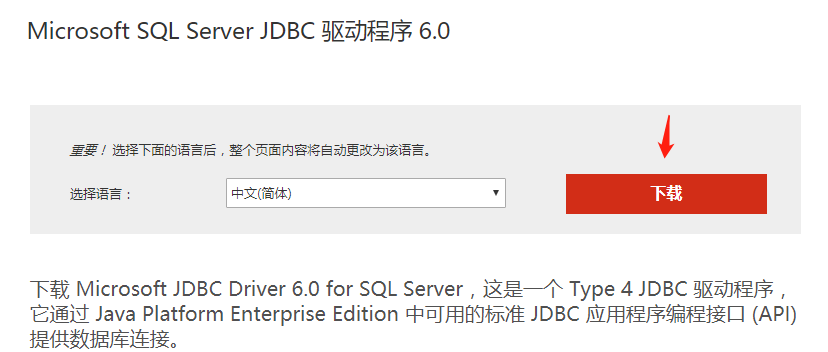
下载 sqljdbc4.jar
官网下载
windows版本http://go.microsoft.com/fwlink/?LinkId=144633&clcid=0x804
UNIX版本http://go.microsoft.com/fwlink/?LinkId=144635&clcid=0x804
官网地址:https://www.microsoft.com/en-us/download/details.aspx?id=11774
推荐几个网站:
http://maven.ibiblio.org/maven/
https://www.kumapai.com/open
http://www.java2s.com/Code/Jar/CatalogJar.htm
几乎什么都能下载了吧,何必花积分在下载区下载呢
(jar包查找网站https://www.findjar.com/网站简介:findJAR.com is a JAR search engine that helps Java developers to find JAR libraries containing required Java classes.)

添加新文件夹 C:\Users\Administrator\.m2\repository\sqlserver\sqljdbc4\4.0
将sqljdbc4-4.0.jar文件放进去
运行命令
mvn install:install-file -Dfile=sqljdbc4-4.0.jar -DgroupId=com.microsoft.sqlserver -DartifactId=sqljdbc4 -Dversion=4.0 -Dpackaging=jar
解释:mvn install:install-file -Dfile=“jar包的绝对路径” -Dpackaging=“文件打包方式” -DgroupId=groupid名 -DartifactId=artifactId名 -Dversion=jar版本
测试
进入maven仓库,发现sqljdbc4.jar已经安装。
执行相关项目的maven,编译通过。idea 标红消失
报错:Failure to find com.oracle:ojdbc6:pom:11.2.0.3
原因:Oracle的ojdbc.jar是收费的,所以maven的中央仓库中没有这个资源,只能通过配置本地库才能加载到项目中去。
下载ojdbc6-11.2.0.3.jar包
下载ojdbc6地址:https://mvnrepository.com/artifact/oracle/ojdbc6/11.2.0.3
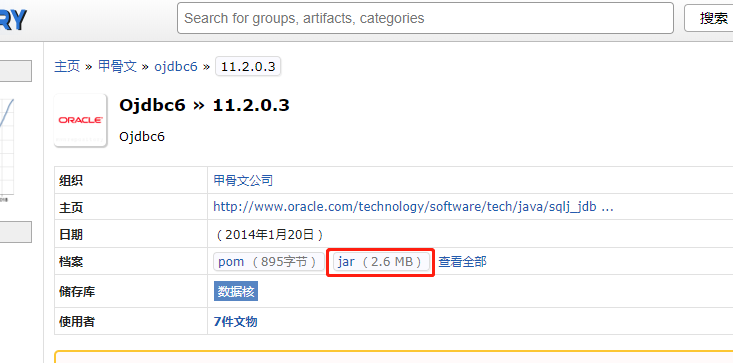
新建C:\Users\Administrator\.m2\repository\ojdbc6\11.2.0.3,将ojdbc6-11.2.0.3.jar放进去,在该目录运行
mvn install:install-file -Dfile=jdbc6-11.2.0.3.jar -DgroupId=com.oracle -DartifactId=ojdbc6 -Dversion=11.2.0 -Dpackaging=jar
注意:不能把jar包放在本地仓库目录里,会报错的
下载ojdbc6-11.2.0.1.0.jar包
http://central.maven.org/maven2/com/jslsolucoes/ojdbc6/11.2.0.1.0/ojdbc6-11.2.0.1.0.jar
新建C:\Users\Administrator\.m2\repository\ojdbc6\11.2.0.1.0,将ojdbc6-11.2.0.1.0.jar放进去,在该目录运行
mvn install:install-file -Dfile=ojdbc6-11.2.0.1.0.jar -DgroupId=com.oracle -DartifactId=ojdbc6 -Dversion=11.2.0 -Dpackaging=jar
安装成功
tomcat-jdbc-8.5.14
https://www.mvnjar.com/org.apache.tomcat/tomcat-jdbc/8.5.14/detail.html
其他操作同上
maven仓库报错 sqljdbc4、ojdbc6、tomcat-jdbc-8.5.14的更多相关文章
- K.O. -------- Eclipse中Maven的报错处理
----------------------siwuxie095 K.O. -------- Eclipse 中 Maven 的报错处理 ...
- ojdbc15-10.2.0.4.0.jar maven 引用报错 Dependency 'com.oracle:ojdbc15:10.2.0.4.0' not found
ojdbc15-10.2.0.4.0.jar maven 引用报错 问题现象 在 Maven 工程中引用 ojdbc15-10.2.0.4.0.jar 报错,报错信息:Dependency 'com. ...
- STS新建的maven项目报错问题
STS新建的maven项目报错问题 解决方法:打开pom.xml文件添加 <dependency> <groupId>javax.servlet</groupId> ...
- maven插件报错之解决
maven插件报错之解决 用m2eclipse创建Maven项目时报错 maveneclipsebuilddependenciesauthorizationplugins 用m2eclipse创建 ...
- Maven的安装、配置及使用入门+maven安装报错:JAVA_HOME【申明:来源于网络】
Maven的安装.配置及使用入门+maven安装报错:JAVA_HOME[申明:来源于网络] Maven的安装.配置及使用入门:http://www.cnblogs.com/dcba1112/arch ...
- java项目连接jdbc报错:com.mysql.jdbc.exceptions.jdbc4.MySQLNonTransientConnectionException: Could not create connection to database server
java项目连接jdbc报错:com.mysql.jdbc.exceptions.jdbc4.MySQLNonTransientConnectionException: Could not creat ...
- maven构建报错org.apache.maven.lifecycle.LifecycleExecutionException
2017年06月04日 15:03:10 阅读数:7991 maven构建报错 org.apache.maven.lifecycle.LifecycleExecutionException: Fail ...
- 【maven】ecplise新建maven项目 报错Could not calculate build plan: Plugin org.apache.maven.plugins:maven-resources-plugin
在ecplise上新建maven项目 报错: Could not calculate build plan: Plugin org.apache.maven.plugins:maven-resourc ...
- gitlab使用URL导入远程仓库报错
gitlab使用URL导入远程仓库报错Import url is blocked: Only allowed ports are 80,443, and any over 1024 报错内容为Impo ...
随机推荐
- DNS用的是TCP协议还是UDP协议
DNS占用53号端口,同时使用TCP和UDP协议.那么DNS在什么情况下使用这两种协议? DNS在区域传输的时候使用TCP协议,其他时候使用UDP协议. DNS区域传输的时候使用TCP协议: 1.辅域 ...
- NOI2016优秀的拆分
一种想法是枚举分割位置, 然后考虑前面部分有多少种可行的AA拆分方式, 后面部分有多少种可行的BB拆分方式, 然后乘法原理即可 那么问题是如何快速求出合法方案 解法是首先枚举长度len, 然后将序列分 ...
- [LeetCode] 287. Find the Duplicate Number 寻找重复数
Given an array nums containing n + 1 integers where each integer is between 1 and n (inclusive), pro ...
- [LeetCode] 164. Maximum Gap 求最大间距
Given an unsorted array, find the maximum difference between the successive elements in its sorted f ...
- [LeetCode] 15. 3Sum 三数之和
Given an array S of n integers, are there elements a, b, c in S such that a + b + c = 0? Find all un ...
- 命令行编译带外部包依赖的java源文件 [以JDBC MySQL8为例]
环境: MySQL8 JDK11(SE) 首先下载MySQL8的JDBC驱动 https://dev.mysql.com/downloads/connector/j/选 PlatForm Indepe ...
- uniApp上传图片
项目中用到了上传图片的功能,记录一下.增强记忆. 要上传图片首先就要先选择图片,或者是先拍照,此时先调用的是 chooseImage 接口,此接口可选择拍照也可以从相册中选择. 它有几个参数,具体可以 ...
- Unity Shader 广告牌效果
广告牌效果指的是,一个二维平面的法线方向始终与视线(摄像机的观察方向)相同.广泛运用于渲染烟雾,云朵,闪光等. 它的本质在于构建旋转矩阵,此时我们可以选择三个基向量来构建此矩阵. 指向→的方向(X轴) ...
- 洛谷疯狂coding~
1.关于数学建模思想在coding之中的应用. 将马路作为一条数轴,每棵树的位置作为数轴上的坐标点,再将坐标点与数组的下标联系到一起,完成建模. 2.本题坑点在于对“其中有多少个数,恰好等于集合中另外 ...
- Sitecore 9 介绍
Sitecore 9就在这里.这个最新版本更大,更智能,更易于使用 - 并且更好地帮助您实现业务和数字目标. 现在,Sitecore 9对营销人员和非Sitecore开发人员来说更容易使用.它拥有许多 ...