
MySQL Config--参数innodb_flush_method
延迟写
传统的UNIX实现在内核中设有缓冲区高速缓存或页面高速缓存,大多数磁盘I/O都通过缓冲进行。当将数据写入文件时,内核通常先将该数据复制到其中一个缓冲区中,如果该缓冲区尚未写满,则并不将其排入输出队列,而是等待其写满或者当内核需要重用该缓冲区以便存放其他磁盘块数据时,再将该缓冲排入输出队列,然后待其到达队首时,才进行实际的I/O操作。这种输出方式被称为延迟写(delayed write)(Bach [1986]第3章详细讨论了缓冲区高速缓存)。
"延迟写"减少了磁盘读写次数,但是却降低了文件内容的更新速度,使得欲写到文件中的数据在一段时间内并没有写到磁盘上。当系统发生故障时,这种延迟可能造成文件更新内容的丢失。为了保证磁盘上实际文件系统与缓冲区高速缓存中内容的一致性,UNIX系统提供了sync、fsync和fdatasync三个函数。
sync函数只是将所有修改过的块缓冲区排入写队列,无需等待写磁盘操作便返回。系统守护进程(update)会周期性(30秒)调用sync函数来刷新内存缓冲区。
fsync函数只对由文件描述符filedes指定的单一文件起作用,需要等待写磁盘操作结束后才返回,确保修改过的数据被写入到磁盘。fsync不但更新数据,还更新指定文件元数据(如修改时间和访问时间)。
fdatasync函数与fsync函数类似,但fdatasync函数只更新数据,而不更新指定文件的属性。
由于fsync函数除需要更新数据外,还需要更新文件元数据(metadata,包括文件大小/访问时间/修改时间等),因此fsync函数需要两次写,而fdatasync函数值需要一次写。
Unfortunately fsync() will alwaysalways initialize two write operations: one for the newly written data and another one in order to update the modification time stored in the inode.
If the modification time is not a part of the transaction concept fdatasync() can be used to avoid unnecessary inode disk write operations.
参数innodb_flush_method
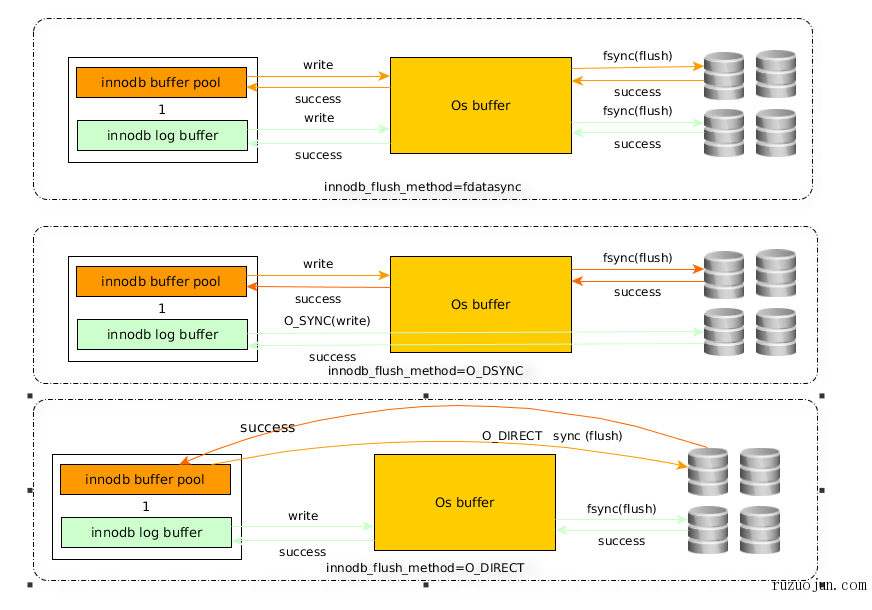
参数innodb_flush_method有在Unix上有6个可选值:fsync/O_DSYNC/littlesync/nosync/O_DIRECT/O_DIRECT_NO_FSYNC,由于littlesync/nosync风险较高,常用的下面4种:
fsync:默认值,使用fsync()系统调用来刷新数据文件和日志文件
O_DSYNC:使用O_SYNC打开和刷新日志文件,使用fsync()刷新数据文件。(在很多UNIX版本上直接使用O_DSYNC会存在问题)
O_DIRECT:使用O_DIRECT打开数据文件,使用fsync()来刷新数据文件和日志文件。(O_DIRECT在大部分UNIX系统上可用)
O_DIRECT_NO_FSYNC:在Flush IO操作时使用O_DIRECT,但在每次write操作时跳过fsync()系统调用。(O_DIRECT_NO_FSYNC在MySQL 5.6.6版本引入,但不适合XFS和EXT4文件系统)
生产环境中使用innodb_flush_method=O_DIRECT
The innodb_flush_method options for Unix-like systems include:

fsync: InnoDB uses the fsync() system call to flush both the data and log files. fsync is the default setting.

O_DSYNC: InnoDB uses O_SYNC to open and flush the log files, and fsync() to flush the data files. InnoDB does not use O_DSYNC directly because there have been problems with it on many varieties of Unix.

littlesync: This option is used for internal performance testing and is currently unsupported. Use at your own risk.

nosync: This option is used for internal performance testing and is currently unsupported. Use at your own risk.

O_DIRECT: InnoDB uses O_DIRECT (or directio() on Solaris) to open the data files, and uses fsync() to flush both the data and log files. This option is available on some GNU/Linux versions, FreeBSD, and Solaris.

O_DIRECT_NO_FSYNC: InnoDB uses O_DIRECT during flushing I/O, but skips the fsync() system call after each write operation.

This setting is not suitable for file systems such as XFS and EXT4, which require an fsync() system call to synchronize file system metadata changes. If you are not sure whether your file system requires an fsync() system call to synchronize file system metadata changes, use O_DIRECT instead.

On storage devices with cache, data loss is possible if data files and redo log files reside on different storage devices, and a crash occurs before data file writes are flushed from the device cache. If you use or intend to use different storage devices for redo logs and data files, use O_DIRECT instead.
如果使用带缓存的RAID控制器,推荐使用O_DIRECT来避免操作系统和存储系统两次缓存。
如果使用SAN存储来存放数据文件和日志文件,对于读负载较高的存储系统,使用fsync()或O_DSYNC可能更快。
摘抄连接:
https://www.cnblogs.com/gomysql/p/3595806.html
https://www.cnblogs.com/bhlsheji/p/5222271.html
https://dev.mysql.com/doc/refman/5.6/en/innodb-parameters.html
MySQL Config--参数innodb_flush_method的更多相关文章
- mysql服务器参数
mysql服务器参数: 配置是从上往下读取,同一个参数项,后边的配置项会覆盖前边的配置项 mysql获取配置信息路径: 命令行参数 mysqld_safe --datadir=/data/sq ...
- mysql核心参数优化
MySQL数据库服务器配置CPU的优化内存的优化IO的优化连接的优化数据一致性的优化 1.描述back_log参数的作用? back_log = 500 要求 MySQL 能有的连接数量.当主要MyS ...
- 【查阅】mysql配置文件/参数文件重要参数笔录(my.cnf)
持续更新,积累自己对参数的理解 [1]my.cnf参数 [client]port = 3306socket = /mysql/data/3306/mysql.sockdefault-character ...
- Mysql性能参数优化
1.Max_connections (1)简介 Mysql的最大连接数,如果服务器的并发请求量比较大,可以调高这个值,当然这是要建立在机器能够支撑的情况下,因为如果连接数越来越多,mysql会为每个连 ...
- 1201MySQL配置文件mysql.ini参数详解
转自http://www.cnblogs.com/feichexia/archive/2012/11/27/mysqlconf.html my.ini(Linux系统下是my.cnf),当mysql服 ...
- (转)MySQL配置文件mysql.ini参数详解、MySQL性能优化
本文转自:http://www.cr173.com/html/18331_1.html my.ini(Linux系统下是my.cnf),当mysql服务器启动时它会读取这个文件,设置相关的运行环境参数 ...
- MySQL配置文件mysql.ini参数详解、MySQL性能优化
my.ini(Linux系统下是my.cnf),当mysql服务器启动时它会读取这个文件,设置相关的运行环境参数. my.ini分为两块:Client Section和Server Section. ...
- MySQL配置文件mysql.ini参数详解
my.ini(Linux系统下是my.cnf),当mysql服务器启动时它会读取这个文件,设置相关的运行环境参数. my.ini分为两块:Client Section和Server Section. ...
- 在Linux最大打开文件数限制下 MySQL 对参数的调整
http://www.actionsky.com/docs/archives/78 2016年4月7日 周文雅 目录 1 起因 2 说明 3 MySQL调整参数的方式 3.1 计算 request ...
随机推荐
- win +R
一.电脑设置免登录密码及修改密码 1.win+R 2.输入control userpasswords2 3.勾选免密码账号登陆,修改密码 二.打开性能监视器 1.win+R 2.输入perfmon.e ...
- base64和Blob互相转换
1.base64转blob(二进制数据) /** * 将以base64的图片url数据转换为Blob * @param urlData 用url方式表示的base64图片数据 */ functio ...
- concurrent(四)Condition
参考文档:Java多线程系列--“JUC锁”06之 Condition条件:http://www.cnblogs.com/skywang12345/p/3496716.html Condition介绍 ...
- java的sha1加密,转化为python版本
java的加密方法如下: public class EncryptUtil { /** 16进制 : 16 */ private static final int HEX = 16; /** SHA: ...
- mysql 添加注释
给表添加注释: alter table m_tb100_disabledsoldier comment '残疾士兵'; 给表中的字段添加注释alter table m_tb100_disable ...
- VisualStudio更改项目文件夹名称
新建了一个空的解决方案(SolutionTest.sln),在文件夹Api中新建了一个webapi项目,物理位置为解决方案根目录下的叫Api文件夹里, 现在想把文件夹名由Api改为MyApi,需要做以 ...
- 在RedisTemplate中使用scan代替keys指令
keys * 这个命令千万别在生产环境乱用.特别是数据庞大的情况下.因为Keys会引发Redis锁,并且增加Redis的CPU占用.很多公司的运维都是禁止了这个命令的 当需要扫描key,匹配出自己需要 ...
- Springboot Actuator之十二:actuator aop
前言spring 中aop是一个核心概念,spring boot 是如何实现自动化配置的?现在我们就来分析一下 解析spring boot 中自动化配置是读取/META-INF/spring.fact ...
- Spark Core知识点复习-2
day1112 1.spark core复习 任务提交 缓存 checkPoint 自定义排序 自定义分区器 自定义累加器 广播变量 Spark Shuffle过程 SparkSQL 一. Spark ...
- C++分治策略实现线性时间选择
问题描述: 给定线性序集中n个元素和一个整数k,1≤k≤n,要求找出这n个元素中第k小的元素,即如果将这n个元素依其线性序排列时,排在第k个的元素即为要找到元素. 细节须知:(与之前的随笔相比) (1 ...