
Flink统计当日的UV、PV
Flink 统计当日的UV、PV
测试环境:
flink 1.7.2
1、数据流程
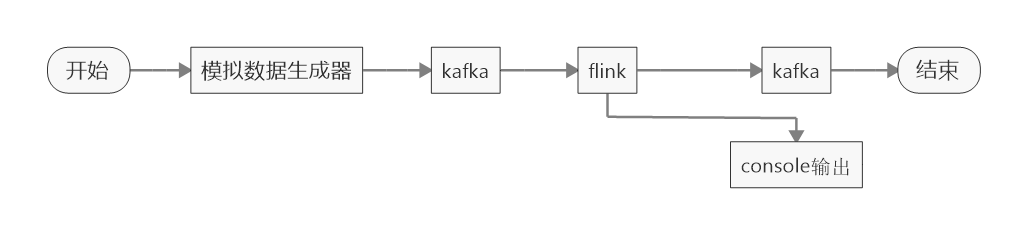
a.模拟数据生成,发送到kafka(json 格式)
b.flink 读取数据,count
c. 输出数据到kafka(为了方便查看,输出了一份到控制台)
2、模拟数据生成器
数据格式如下 : {"id" : 1, "createTime" : "2019-05-24 10:36:43.707"}
id 为数据生成的序号(累加),时间为数据时间(默认为数据生成时间)
模拟数据生成器代码如下:
/**

  * test data maker

  */

object CurrentDayMaker {

  var minute : Int = 1

  val calendar: Calendar = Calendar.getInstance()

  /**

    * 一天时间比较长,不方便观察,将时间改为当前时间,

    * 每次累加10分钟,这样一天只需要144次循环,也就是144秒

    * @return

    */

  def getCreateTime(): String = {

//    minute = minute + 1

    calendar.add(Calendar.MINUTE, 10)

    sdf.format(calendar.getTime)

  }

  val sdf = new SimpleDateFormat("yyyy-MM-dd HH:mm:ss.SSS")

  def main(args: Array[String]): Unit = {

    val producer = new KafkaProducer[String, String](Common.getProp)
  // 初始化开始时间为当前时间

    calendar.setTime(new Date())

    println(sdf.format(calendar.getTime))

    var i =0;

    while (true) {

//      val map = Map("id"-> i, "createTime"-> sdf.format(System.currentTimeMillis()))

      val map = Map("id"-> i, "createTime"-> getCreateTime())

      val jsonObject: JSONObject = new JSONObject(map)

      println(jsonObject.toString())

    // topic current_day

      val msg = new ProducerRecord[String, String]("current_day", jsonObject.toString())

      producer.send(msg)

      producer.flush()
    // 控制数据频率

      Thread.sleep(1000)

      i = i + 1

    }

  }

}
生成数据如下:
{"id" : 0, "createTime" : "2019-05-24 18:02:26.292"}

{"id" : 1, "createTime" : "2019-05-24 18:12:26.292"}

{"id" : 2, "createTime" : "2019-05-24 18:22:26.292"}

{"id" : 3, "createTime" : "2019-05-24 18:32:26.292"}

{"id" : 4, "createTime" : "2019-05-24 18:42:26.292"}
3、flink 程序
package com.venn.stream.api.dayWindow

import java.io.File

import java.text.SimpleDateFormat

import com.venn.common.Common

import com.venn.source.TumblingEventTimeWindows

import org.apache.flink.api.common.functions.ReduceFunction

import org.apache.flink.api.common.serialization.SimpleStringSchema

import org.apache.flink.api.scala._

import org.apache.flink.contrib.streaming.state.RocksDBStateBackend

import org.apache.flink.formats.json.JsonNodeDeserializationSchema

import org.apache.flink.shaded.jackson2.com.fasterxml.jackson.databind.node.ObjectNode

import org.apache.flink.streaming.api.TimeCharacteristic

import org.apache.flink.streaming.api.functions.timestamps.BoundedOutOfOrdernessTimestampExtractor

import org.apache.flink.streaming.api.scala.StreamExecutionEnvironment

import org.apache.flink.streaming.api.windowing.time.Time

import org.apache.flink.streaming.api.windowing.triggers.{ContinuousEventTimeTrigger}

import org.apache.flink.streaming.connectors.kafka.{FlinkKafkaConsumer, FlinkKafkaProducer}

/**

  * Created by venn on 19-5-23.

  *

  * use TumblingEventTimeWindows count current day pv

  * for test, update day window to minute window

  *

  * .windowAll(TumblingEventTimeWindows.of(Time.minutes(1), Time.seconds(0)))

  * TumblingEventTimeWindows can ensure count o minute event,

  * and time start at 0 second (like : 00:00:00 to 00:00:59)

  *

  */

object CurrentDayPvCount {

  def main(args: Array[String]): Unit = {

    println(1558886400000L - (1558886400000L - 8 + 86400000) % 86400000)

    // environment

    val env: StreamExecutionEnvironment = StreamExecutionEnvironment.getExecutionEnvironment

    env.setStreamTimeCharacteristic(TimeCharacteristic.EventTime)

    env.setParallelism(1)

    if ("\\".equals(File.pathSeparator)) {

      val rock = new RocksDBStateBackend(Common.CHECK_POINT_DATA_DIR)

      env.setStateBackend(rock)

      // checkpoint interval

      env.enableCheckpointing(10000)

    }

    val topic = "current_day"

    val sdf = new SimpleDateFormat("yyyy-MM-dd HH:mm:ss.SSS")

    val kafkaSource = new FlinkKafkaConsumer[ObjectNode](topic, new JsonNodeDeserializationSchema(), Common.getProp)

    val sink = new FlinkKafkaProducer[String](topic + "_out", new SimpleStringSchema(), Common.getProp)

    sink.setWriteTimestampToKafka(true)

    val stream = env.addSource(kafkaSource)

      .map(node => {

        Event(node.get("id").asText(), node.get("createTime").asText())

      })

      //            .assignAscendingTimestamps(event => sdf.parse(event.createTime).getTime)

      .assignTimestampsAndWatermarks(new BoundedOutOfOrdernessTimestampExtractor[Event](Time.seconds(60)) {

      override def extractTimestamp(element: Event): Long = {

        sdf.parse(element.createTime).getTime

      }

    })

      // window is one minute, start at 0 second

      //.windowAll(TumblingEventTimeWindows.of(Time.minutes(1), Time.seconds(0)))

      // window is one hour, start at 0 second 注意事件时间,需要事件触发,在窗口结束的时候可能没有数据,有数据的时候,已经是下一个窗口了

      //      .windowAll(TumblingEventTimeWindows.of(Time.hours(1), Time.seconds(0)))

      // window is one day, start at 0 second, todo there have a bug(FLINK-11326), can't use negative number, 1.8 修复

      //      .windowAll(TumblingEventTimeWindows.of(Time.days(1)))

      .windowAll(TumblingEventTimeWindows.of(Time.days(1), Time.hours(-8)))

      // every event one minute

      //      .trigger(ContinuousEventTimeTrigger.of(Time.seconds(3800)))

      // every process one minute

      //      .trigger(ContinuousProcessingTimeTrigger.of(Time.seconds(10)))

      // every event, export current value,

      //      .trigger(CountTrigger.of(1))

      .reduce(new ReduceFunction[Event] {

      override def reduce(event1: Event, event2: Event): Event = {

        // 将结果中,id的最小值和最大值输出

        new Event(event1.id, event2.id, event1.count + event2.count)

      }

    })

    // format output even, connect min max id, add current timestamp

    //      .map(event => Event(event.id + "-" + event.createTime, sdf.format(System.currentTimeMillis()), event.count))

    stream.print("result : ")

    // execute job

    env.execute("CurrentDayCount")

  }

}

case class Event(id: String, createTime: String, count: Int = 1) {}
4、运行结果
测试数据如下:
{"id" : 0, "createTime" : "2019-05-24 20:29:49.102"}
{"id" : 1, "createTime" : "2019-05-24 20:39:49.102"}
...
{"id" : 20, "createTime" : "2019-05-24 23:49:49.102"}
{"id" : 21, "createTime" : "2019-05-24 23:59:49.102"}
{"id" : 22, "createTime" : "2019-05-25 00:09:49.102"}
{"id" : 23, "createTime" : "2019-05-25 00:19:49.102"}
...
{"id" : 163, "createTime" : "2019-05-25 23:39:49.102"}
{"id" : 164, "createTime" : "2019-05-25 23:49:49.102"}
{"id" : 165, "createTime" : "2019-05-25 23:59:49.102"}
{"id" : 166, "createTime" : "2019-05-26 00:09:49.102"}
...
{"id" : 308, "createTime" : "2019-05-26 23:49:49.102"}
{"id" : 309, "createTime" : "2019-05-26 23:59:49.102"}
{"id" : 310, "createTime" : "2019-05-27 00:09:49.102"}
0 - 21 是 24号
22 - 165 是 25 号
166 - 309 是 26 号
输出结果(程序中reduce 方法,将窗口中第一条和最后一条数据的id,都放到 Event中 )如下:
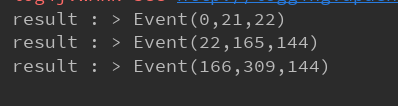
与测试数据对应
5、说明
很多人会错误的以为,窗口时间的开始时间会是程序启动(初始化)的时间。事实上,窗口(以TumblingEventTimeWindows为例)的定义有两个重载的方法:包含两个参数,窗口的长度和窗口的offset(默认为0)
源码:org.apache.flink.streaming.api.windowing.assigners.TumblingEventTimeWindows :
@PublicEvolving

public class TumblingEventTimeWindows extends WindowAssigner<Object, TimeWindow> {

    private static final long serialVersionUID = 1L;

    private final long size;

    private final long offset;

    protected TumblingEventTimeWindows(long size, long offset) {

        if (Math.abs(offset) >= size) {

            throw new IllegalArgumentException("TumblingEventTimeWindows parameters must satisfy abs(offset) < size");

        }

        this.size = size;

        this.offset = offset;

    }

    @Override

    public Collection<TimeWindow> assignWindows(Object element, long timestamp, WindowAssignerContext context) {

        if (timestamp > Long.MIN_VALUE) {

            // Long.MIN_VALUE is currently assigned when no timestamp is present

            long start = TimeWindow.getWindowStartWithOffset(timestamp, offset, size);

            System.out.println("start : " + start + ", end : " + (start+size));

            String startStr =new SimpleDateFormat("yyyy-MM-dd HH:mm:ss.SSS").format(start);

            String endStar =new SimpleDateFormat("yyyy-MM-dd HH:mm:ss.SSS").format(start + size);

            System.out.println("window start: " + new SimpleDateFormat("yyyy-MM-dd HH:mm:ss.SSS").format(start));

            System.out.println("window end: " + new SimpleDateFormat("yyyy-MM-dd HH:mm:ss.SSS").format(start + size));

            return Collections.singletonList(new TimeWindow(start, start + size));

        } else {

            throw new RuntimeException("Record has Long.MIN_VALUE timestamp (= no timestamp marker). " +

                    "Is the time characteristic set to 'ProcessingTime', or did you forget to call " +

                    "'DataStream.assignTimestampsAndWatermarks(...)'?");

        }

    }/**

     * Creates a new {@code TumblingEventTimeWindows} {@link WindowAssigner} that assigns

     * elements to time windows based on the element timestamp.

     *

     * @param size The size of the generated windows.

     * @return The time policy.

     */

    public static TumblingEventTimeWindows of(Time size) {

        return new TumblingEventTimeWindows(size.toMilliseconds(), 0);

    }

    /**

     * Creates a new {@code TumblingEventTimeWindows} {@link WindowAssigner} that assigns

     * elements to time windows based on the element timestamp and offset.

     *

     * <p>For example, if you want window a stream by hour,but window begins at the 15th minutes

     * of each hour, you can use {@code of(Time.hours(1),Time.minutes(15))},then you will get

     * time windows start at 0:15:00,1:15:00,2:15:00,etc.

     *

     * <p>Rather than that,if you are living in somewhere which is not using UTC±00:00 time,

     * such as China which is using UTC+08:00,and you want a time window with size of one day,

     * and window begins at every 00:00:00 of local time,you may use {@code of(Time.days(1),Time.hours(-8))}.

     * The parameter of offset is {@code Time.hours(-8))} since UTC+08:00 is 8 hours earlier than UTC time.

     *

     * @param size The size of the generated windows.

     * @param offset The offset which window start would be shifted by.

     * @return The time policy.

     */

    public static TumblingEventTimeWindows of(Time size, Time offset) {

        return new TumblingEventTimeWindows(size.toMilliseconds(), offset.toMilliseconds());

    }

}
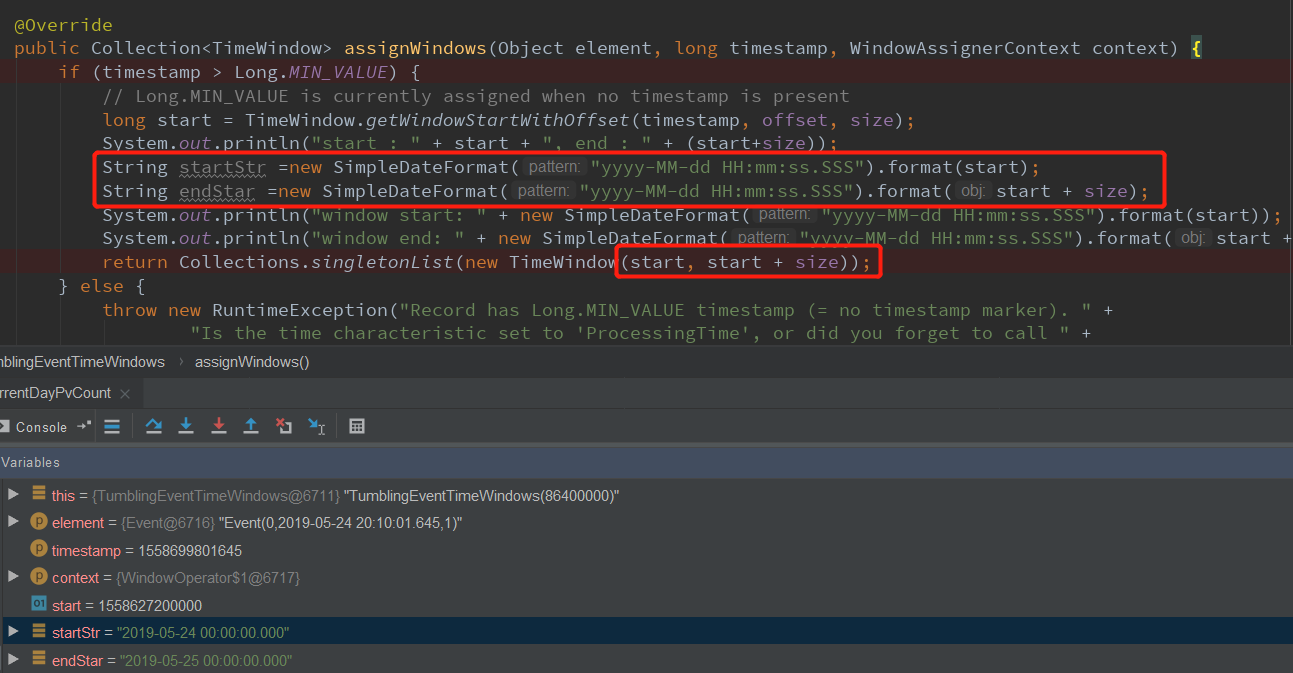
每条数据都会触发: assignWindows 方法
计算函数如下:
public static long getWindowStartWithOffset(long timestamp, long offset, long windowSize) {

        return timestamp - (timestamp - offset + windowSize) % windowSize;

    }
dubug 如下:
6、特别说明
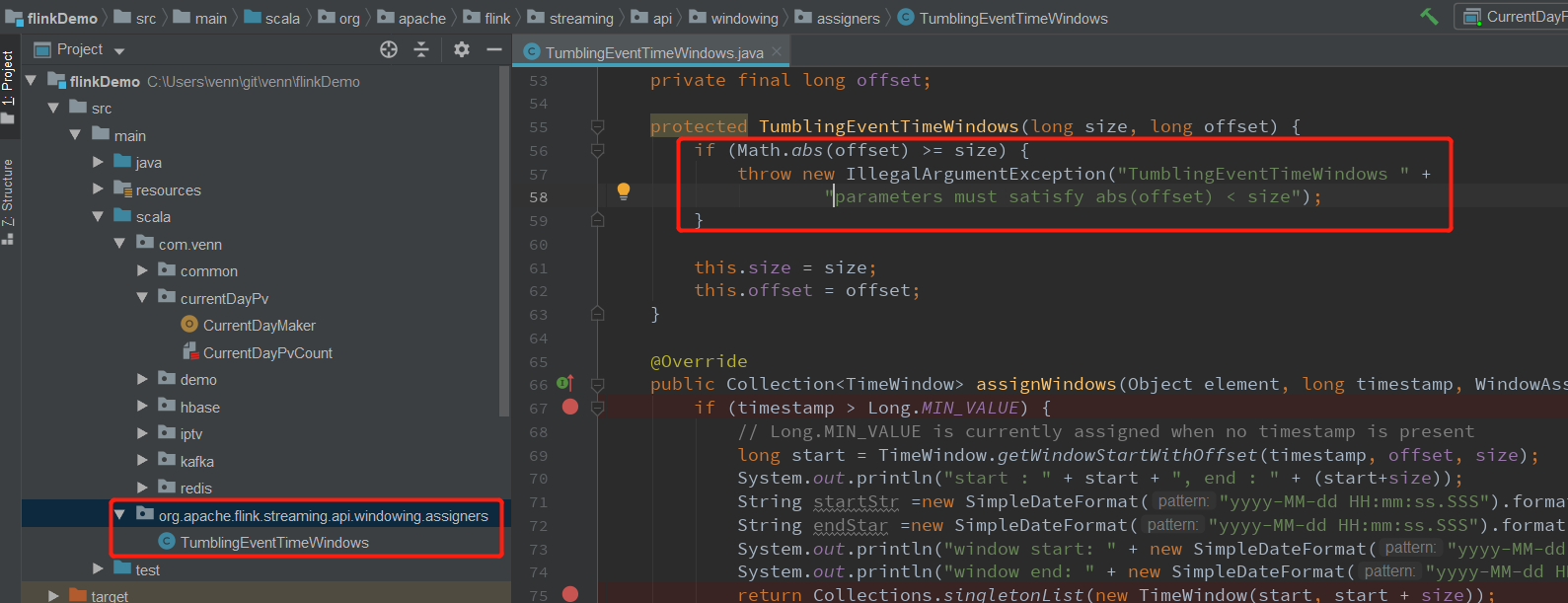
FLink 1.6.3/1.7.1/1.7.2 在 TumblingEventTimeWindows 构造器上有个bug:offset 不能小于0, 但是of 方法中又说明,可以使用: of(Time.days(1),Time.hours(-8)) 表示在中国的 0 点开始的一天窗口。
JIRA :FLINK-11326 ,jira 上注明1.8.0 修复。(我本来准备提个bug的,有人先下手了)
这个bug 可以通过自己创建一个相同包的相同类,将对应代码修改即可。
flink 1.7.2 源码:
protected TumblingEventTimeWindows(long size, long offset) {

        if (offset < 0 || offset >= size) {

            throw new IllegalArgumentException("TumblingEventTimeWindows parameters must satisfy 0 <= offset < size");

        }

        this.size = size;

        this.offset = offset;

    }
最新版源码:
protected TumblingEventTimeWindows(long size, long offset) {

        if (Math.abs(offset) >= size) {

            throw new IllegalArgumentException("TumblingEventTimeWindows parameters must satisfy abs(offset) < size");

        }

        this.size = size;

        this.offset = offset;

    }
修改:
7、上面的案例主要讲Flink 的窗口,pv、uv.keyBy(0)
      .window(TumblingProcessingTimeWindows.of(Time.days(1), Time.hours(-8)))

      .trigger(ContinuousProcessingTimeTrigger.of(Time.seconds(10)))

      .evictor(TimeEvictor.of(Time.seconds(0), true))

      .process(new ProcessWindowFunction[(String, String), (String, String, Long), Tuple, TimeWindow] {

        /*

        这是使用state是因为,窗口默认只会在创建结束的时候触发一次计算,然后数据结果,

        如果长时间的窗口,比如:一天的窗口,要是等到一天结束在输出结果,那还不如跑批。

        所有大窗口会添加trigger,以一定的频率输出中间结果。

        加evictor 是因为,每次trigger,触发计算是,窗口中的所有数据都会参与,所以数据会触发很多次,比较浪费,加evictor 驱逐已经计算过的数据,就不会重复计算了

        驱逐了已经计算过的数据,导致窗口数据不完全,所以需要state 存储我们需要的中间结果

         */

        var wordState: MapState[String, String] = _

        var pvCount: ValueState[Long] = _

        override def open(parameters: Configuration): Unit = {

          // new MapStateDescriptor[String, String]("word", classOf[String], classOf[String])

          wordState = getRuntimeContext.getMapState(new MapStateDescriptor[String, String]("word", classOf[String], classOf[String]))

          pvCount = getRuntimeContext.getState[Long](new ValueStateDescriptor[Long]("pvCount", classOf[Long]))

        }

        override def process(key: Tuple, context: Context, elements: Iterable[(String, String)], out: Collector[(String, String, Long)]): Unit = {

          var pv = 0;

          val elementsIterator = elements.iterator

          // 遍历窗口数据,获取唯一word

          while (elementsIterator.hasNext) {

            pv += 1

            val word = elementsIterator.next()._2

            wordState.put(word, null)

          }

          // add current
          pv += pv + pvCount.value()  # fix bug: pv value not add pvCount in state

          pvCount.update(pv)

          var count: Long = 0

          val wordIterator = wordState.keys().iterator()

          while (wordIterator.hasNext) {

            wordIterator.next()

            count += 1

          }

          // uv

          out.collect((key.getField(0), "uv", count))

          out.collect(key.getField(0), "pv", pv)

        }

      })
Flink统计当日的UV、PV的更多相关文章
- 有关“数据统计”的一些概念 -- PV UV VV IP跳出率等
有关"数据统计"的一些概念 -- PV UV VV IP跳出率等 版权声明:本文为博主原创文章,未经博主允许不得转载. 此文是本人工作中碰到的,随时记下来的零散概念,特此整理一下. ...
- 淘宝中的UV,PV,IPV
1. UV & PV UV: 店铺各页面的访问人数,一个用户在一天内多次访问店铺被记为一个访客(去重) ; Unique visitors PV: 店铺内所有页面的浏览总量(次数累加); p ...
- MySQL格式化时间戳 统计当日,第二天,第三天,3个工作日以后的数据
mysql 查询出来的处理时间和开始时间都是13位的时间戳 SELECT `END_TIME`,`CREATE_TIME` FROM t_table 需求是统计当日,第二天,第三天,3个工作日以后的时 ...
- 怎么区分PV、IV、UV以及网站统计名词解释(pv、曝光、点击)
PV(Page View)访问量,即页面访问量,每打开一次页面PV计数+1,刷新页面也是. IV(Internet Protocol)访问量指独立IP访问数,计算是以一个独立的IP在一个计算时段内访问 ...
- 程序员修仙之路--优雅快速的统计千万级别uv(留言送书)
菜菜,咱们网站现在有多少PV和UV了? Y总,咱们没有统计pv和uv的系统,预估大约有一千万uv吧 写一个统计uv和pv的系统吧 网上有现成的,直接接入一个不行吗? 别人的不太放心,毕竟自己写的,自己 ...
- 程序员修仙之路--优雅快速的统计千万级别uv
菜菜,咱们网站现在有多少PV和UV了? Y总,咱们没有统计pv和uv的系统,预估大约有一千万uv吧 写一个统计uv和pv的系统吧 网上有现成的,直接接入一个不行吗? 别人的不太放心,毕竟自己写的,自己 ...
- 快速的统计千万级别uv
菜菜,咱们网站现在有多少PV和UV了? Y总,咱们没有统计pv和uv的系统,预估大约有一千万uv吧 写一个统计uv和pv的系统吧 网上有现成的,直接接入一个不行吗? 别人的不太放心,毕竟自己写的,自己 ...
- NGINX结合SHELL统计用户的UV及IP汇总
公司新的需求,怀疑PV和IP的比例不对,看是不是有恶意的东东: NGINX配置: log_format main '$remote_addr - $remote_user [$time_local] ...
- 百度统计数据的UV和IP为什么不一样?
相信网站站长们在每天查看百度统计数据时会发现网站的IP和UV数据时大时小,有时候IP比UV大,有时候UV比IP大,站长们可能对这些情况感到奇怪.今天就和大家分享一下UV和IP的知识,帮助大家更好地做好 ...
随机推荐
- CEOI2019 / CodeForces 1192B. Dynamic Diameter
题目简述:给定一棵$N \leq 10^5$个节点的树,边上带权,维护以下两个操作: 1. 修改一条边的边权: 2. 询问当前树的直径长度. 解1:code 注意到树的直径有以下性质: 定理:令$\t ...
- [GCP] Goolge compute Engine
Which of the following is a PAAS option for hosting web apps on GCP? App Engine standard or flexible ...
- GBDT 算法
GBDT (Gradient Boosting Decision Tree) 梯度提升迭代决策树.GBDT 也是 Boosting 算法的一种,但是和 AdaBoost 算法不同(AdaBoost 算 ...
- 洛谷 P2279 [HNOI2003]消防局的设立 题解
每日一题 day34 打卡 Analysis 这道题的正解本来是树形dp,但要设5个状态,太麻烦了.于是我就用贪心试图做出此题,没想到还真做出来了. 考虑当前深度最大的叶子结点,你肯定要有一个消防局去 ...
- ELK实践
一.ElasticSearch+FileBeat+Kibana搭建平台 在C# 里面运行程序,输出日志(xxx.log 文本文件)到FileBeat配置的路径下面. 平台搭建,参考之前的随笔. Fil ...
- ES code study
pom.xml <?xml version="1.0" encoding="UTF-8"?><project xmlns="http ...
- 红黑树 ------ luogu P3369 【模板】普通平衡树(Treap/SBT)
二次联通门 : luogu P3369 [模板]普通平衡树(Treap/SBT) 近几天闲来无事...就把各种平衡树都写了一下... 下面是红黑树(Red Black Tree) 喜闻乐见拿到了luo ...
- 2019-2020-1 20175313 《信息安全系统设计基础》实现mypwd
目录 MyPWD 一.题目要求 二.题目理解 三.需求分析 四.设计思路 五.伪代码分析 六.码云链接 七.运行结果截图 MyPWD 一.题目要求 学习pwd命令 研究pwd实现需要的系统调用(man ...
- postman_
form-data 相当于Content-Type:multipart/form-data;它会将表单的数据处理为一条消息,以标签为单元,用分隔符分开.既可以上传键值对,也可以上传文件. x-www- ...
- Java学习个人备忘录之入门基础
临时配置环境方式:查看path下的环境变量 set path修改path下的环境变量 set path=haha删除path下的环境变量 set path=查看当前java的版本 javac -ver ...