
linux 下 shell脚本报错:-bash: ./build.sh: /bin/sh^M: bad interpreter: No such file or directory
主要原因是build.sh是在windows下编辑然后上传到linux系统里执行的。.sh文件的格式为dos格式。而linux只能执行格式为unix格式的脚本。
我们可以通过vi编辑器来查看文件的format格式。步骤如下:
1.首先用vi命令打开文件
2.在vi命令模式中使用
:set ff
可以看到改文件的格式为dos
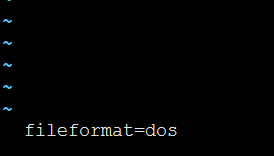
3.修改文件format为unix
方法一:使用vi修改文件format
命令:set ff=unix
:set ff=unix
执行完后再通过set ff命令查看文件格式,结果如下:

然后执行 ./build.sh就不回报错了。
linux 下 shell脚本报错:-bash: ./build.sh: /bin/sh^M: bad interpreter: No such file or directory的更多相关文章
- shell脚本报错:-bash: xxx: /bin/bash^M: bad interpreter: No such file or directory
当我们把文件从windows系统中编辑的文件拷贝到linux系统中,如果我们执行文件会保存如下的错: shell脚本报错:-bash: xxx: /bin/bash^M: bad interprete ...
- shell脚本报错:"[: =: unary operator expected"
shell脚本报错:"[: =: unary operator expected" 在匹配字符串相等时,我用了类似这样的语句: if [ $STATUS == "OK&q ...
- window下编写python脚本在linux下运行出错 usr/bin/python^M: bad interpreter: No such file or directory
今天在windows下使用notepad++写了个python脚本,传到linux服务器执行后提示:-bash: ./logger.py: usr/bin/python^M: bad interpre ...
- nagios监控客户端报错/usr/bin/perl^M: bad interpreter: No such file or directory
nagios服务端监控客户端内存时发现监控不上 在客户端直接执行脚本,报错如下: # /usr/local/nagios/libexec/check_memory.pl -w 6% -c 3% -ba ...
- Linux shell 脚本报错:/bin/bash^M: bad interpreter: No such file or directory
今天遇到一个很诡异的问题,一直运行很正常的shell脚本失败了,只是昨天增加了一个参数而已. 报错信息: /bin/bash^M: bad interpreter: No such file or d ...
- Shell脚本报错:-bash: ./switch.sh: /bin/bash^M: bad interpreter: No such file or directory
在学习shell中测试case参数命令代码如下 #!/bin/bash #switch测试 case $1 in start) echo 'start' ;; ...
- shell脚本报错:-bash: xxx: /bin/sh^M: bad interpreter: No such file or directory
今天执行一个shell脚本,然后在执行的时候报错,脚本内容很简单,仅供测试: #!/bin/sh echo "test shell " 具体报错信息如下 [root@localho ...
- shell脚本报错:.sh: /bin/bash^M: 坏的解释器: 没有那个文件或目录
.sh: /bin/bash^M: 坏的解释器: 没有那个文件或目录 这是因为shell脚本是Windows下编辑的 格式不一样 执行 sed -i 's/\r$//' 脚本名称.sh
- CRLF line terminators导致shell脚本报错:command not found
Linux和Windows文本文件的行结束标志不同.在Linux中,文本文件用"/n"表示回车换行,而Windows用"/r/n"表示回车换行.有时候在Wind ...
随机推荐
- (未完成)catalyst-system WriteUp(2019暑假CTF第一周reverse)
目录 预备学习--Linux实践:ELF文件格式分析 一.概述 二.分析ELF文件头(ELF header) 三.通过文件头找到section header table,理解其内容 四.通过secti ...
- photoshop 的安装破解
最近学习需要用到photoshop,但是photoshop试用期只有30天,于是尝试破解photoshop.参考了网上的很多博客,失败了好几次,终于找到一篇靠谱的博客,很顺利的成功了.在这里记录一下, ...
- EMQ 与 mqtt 与 IOT设备
1.IOT设备的特性 IOT(物联网things of internet)设备和传统的智能设备有什么区别,笔者总结下的IOT设备有如下特点: 硬件能力差(存储能力基本只有几MB,CPU频率低连使用HT ...
- jmeter测试 flask 接口请求
jmeter测试 flask 接口请求 flask的代码如下: #!/usr/bin/env python # -*- coding: utf-8 -*- from flask import Flas ...
- 工具系列 | VScode Remote 远程开发与调试(告别SSH)
简介 最近VScode发布了远程编程与调试的插件Remote Development,使用这个插件可以在很多情况下代替vim直接远程修改与调试服务器上的代码,同时具备代码高亮与补全功能,就和在本地使用 ...
- 【maven】插件和依赖管理
1.插件管理 定义 pluginManagement 用来做插件管理的.它是表示插件声明,即你在项目中的pluginManagement下声明了插件,Maven不会加载该插件,pluginManage ...
- semi-join子查询优化 -- LooseScan策略
LooseScan执行semi-join子查询的一种策略. 我们将通过示例来演示这种松散(LooseScan)策略.假设,我们正在查找拥有卫星的国家.我们可以通过以下查询获得它们(为了简单起见,我们忽 ...
- SpringMVC返回JSON数据时日期格式化问题
https://dannywei.iteye.com/blog/2022929 SpringMVC返回JSON数据时日期格式化问题 博客分类: Spring 在运用SpringMVC框架开发时,可 ...
- 如何从OA系统批量整理出邮箱地址,并导入到Foxmail 地址薄中?
一.打开某位leader的OA,点击查看“下属” a. 将所有的下属信息 --- 全选 --- 复制 --- 粘贴到 excel 表格中 b. 分别提取“姓名” 和 “邮箱”地址信息,结合notepa ...
- word/wps 制作下拉列表
准备: 1.数据页 2.项目名称sheet 3.问题类型sheet 开始制作: 数据 --- 有效性 --- 允许“序列” --- 来源 -- 其他sheet页“单元格”选择范围 回车.确定 即可