
git提交报错:Updates were rejected because the tip of your current branch is behind
提交代码push时报错: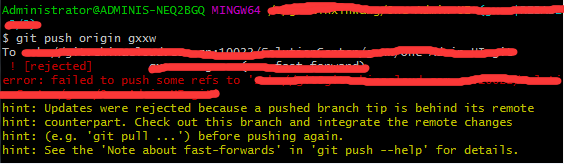
上网查询了一下解决办法有很多种,
1.使用强制push的方法:(上网查询说这种会使远程修改丢失,一般是不可取的,尤其是多人协作开发的时候。)
git push -u origin master -f
2.push前先将远程repository修改pull下来
git pull origin master
git push -u origin master
3.若不想merge远程和本地修改,
先创建新的分支:
git branch [name]
然后push
git push -u origin [name]
git提交报错:Updates were rejected because the tip of your current branch is behind的更多相关文章
- git提交时报错:Updates were rejected because the tip of your current branch is behind
有如下3种解决方法: 1.使用强制push的方法:git push -u origin master -f这样会使远程修改丢失,一般是不可取的,尤其是多人协作开发的时候. 2.push前先将远程rep ...
- git push时报错:Updates were rejected because the tip of your current branch is behind
出现这样的问题是由于:自己当前版本低于远程仓库版本 有如下几种解决方法: 1.使用强制push的方法: git push -u origin master -f 这样会使远程修改丢失,一般是不可取的, ...
- Git 报错:Updates were rejected because the tip of your current branch is behind
刚开始学习 git 命令,发现会出现很多的错误,所以就总结下出现的错误,以此来加深理解和掌握吧! 环境:在本地库操作了一系列的 add 和 commit 操作后,想把本地仓库推送到远端,但是发生以下错 ...
- [git] Updates were rejected because the tip of your current branch is behind its remote counterpart.
场景 $ git push To https://github.com/XXX/XXX ! [rejected] dev -> dev (non-fast-forward) error: fai ...
- (转)Updates were rejected because the tip of your current branch is behind
刚创建的github版本库,在push代码时出错: $ git push -u origin masterTo git@github.com:******/Demo.git ! [rejected] ...
- 01_第一次如何上传GitHub(转)Updates were rejected because the tip of your current branch is behind
https://www.cnblogs.com/code-changeworld/p/4779145.html 刚创建的github版本库,在push代码时出错: $ git push -u orig ...
- Updates were rejected because the tip of your current branch is behind 问题出现解决方案
提供如下几种方式: 1.使用强制push的方法(多人协作时不可取): git push -u origin master -f 2.push前先将远程repository修改pull下来 git pu ...
- git push ! [rejected] master -> master (non-fast-forward) error: failed to push some refs to 'https://github.com/Operater9/guest' hint: Updates were rejected because the tip of your current bra
推送本地代码到github报错 git push报错 ! [rejected] master -> master (non-fast-forward) error: failed to push ...
- vscode安装dlv插件报错:There is no tracking information for the current branch.
vscode安装dlv插件报错:There is no tracking information for the current branch. https://blog.csdn.net/a7859 ...
随机推荐
- Fortify漏洞之Insecure Randomness(不安全随机数)
继续对Fortify的漏洞进行总结,本篇主要针对 Insecure Randomness 漏洞进行总结,如下: 1.Insecure Randomness(不安全随机数) 1.1.产生原因: 成弱 ...
- HDFS写流程
HDFS client首先会与NameNode交互元数据信息,然后NameNode制定策略,分配NameNode节点,客户端先会与离自己最近的DataNode进行socket连接,已经与DataNod ...
- oracle rpad()和lpad()函数
函数参数:rpad( string1, padded_length, [ pad_string ] ) rpad函数从右边对字符串使用指定的字符进行填充 string 表示:被填充的字符串 padde ...
- navicat for mysql 链接时报错:1251-Client does not support authentication protocol requested by server
客户端使用navicat for mysql.本地安装了mysql 8.0.但是在链接的时候提示: 主要原因是mysql服务器要求的认证插件版本与客户端不一致造成的. 打开mysql命令行输入如下命令 ...
- C++中string::find()函数和string::npos函数的使用
1. string::find()函数和string::npos函数的介绍 我们在学习C++的时候必不可少的使用到string类中的find()函数,它是一个查找函数,功能还是很强大的,但是此处我们不 ...
- Python 利用random库来实现圆周率的运算
蒙特卡罗方法求解圆周率 随机向一个正方形以及其内切圆(半径为1)的图形中随机抛洒大量的点,计算每个点到圆心的距离从而判断该点在圆内或圆外,用圆内的点除以总点数就是π/4的值.点数越多,值就越精确. 具 ...
- LG4723 【模板】常系数线性递推
P4723 [模板]常系数齐次线性递推 题目描述 求一个满足$k$阶齐次线性递推数列${a_i}$的第$n$项. 即:$a_n=\sum\limits_{i=1}^{k}f_i \times a_{n ...
- LINQ查询表达式(3) - LINQ 查询分组
对查询结果进行分组 分组是 LINQ 最强大的功能之一. 下面的示例演示如何以各种方式对数据进行分组: 按照单个属性. 按照字符串属性的首字母. 按照计算出的数值范围. 按照布尔谓词或其他表达式. 按 ...
- Oracle 中 CONTAINS 函数的用法
Oracle 中 CONTAINS 函数的用法 1. 查询住址在北京的学生 SELECT student_id,student_name FROM students WHERE CONTAINS( a ...
- js 相差年、月、日
<!-- 相差天数--> function datedifference(startDate, endDate) { var dateSpan, tempDate, iDays; sDat ...