
Utility3:Understand Dashboard Report
To see data in the SQL Server Utility dashboard, select the top node in the Utility Explorer tree - labeled "Utility<UCP_Name>\(ComputerName\UCP)." The dashboard includes summary and detail data from all managed instances of SQL Server and all data-tier applications in the SQL Server Utility. To refresh data in the dashboard, right-click the top node in the Utility Explorer tree, and select Refresh.
Dashboard Report 如下图
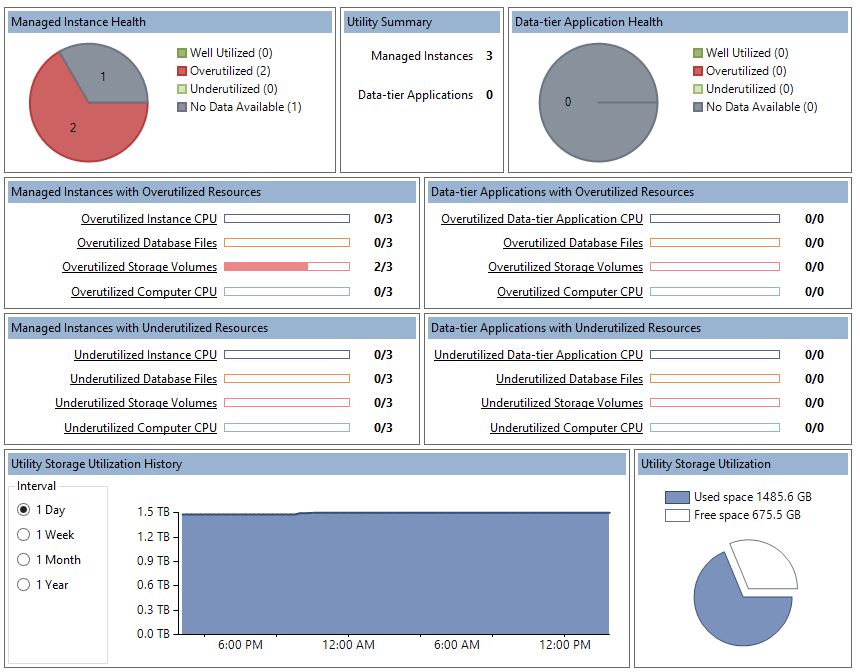
1,health status
- Well-utilized - Number of managed instances of SQL Server which are not violating resource utilization policies.
- Underutilized - Number of managed resources which are violating resource underutilization policies.
- Overutilized - Number of managed resources which are violating resource overutilization policies.
- No Data Available - Data is not available for managed instances of SQL Server either because the instance of SQL Server has just been enrolled and the first data collection operation has not completed, or because there is a problem with the managed instance of SQL Server collecting and uploading data to the UCP.
2,Utility Storage Utilization
Utility Storage 是UCP的所有数据有效的Managed instancde(health status不是No Data Available的Managed instancde)的Storage 加和之后的utilization.
Utility Storage Utilization History
Utilization history is shown in a time graph at the bottom of the SQL Server Utility dashboard. Note that time data show the UCP local date and time using the datetime data type. When using the Utility object model, note that SSMS uses the datetimeoffset data type.
Use the radio buttons to the left of the display area to change the reporting period for the graph.
Options for the reporting interval are:
- 1 Day, displayed in 15-minute intervals.
- 1 Week, displayed in 1-day intervals.
- 1 Month, displayed in 1-week intervals.
- 1 Year, displayed in 1-month intervals.
After you make a change to the reporting interval, the data refreshes automatically.
Utility Storage Utilization
In the bottom right of the dashboard, the storage utilization pie chart displays the ratio of used space to free space on volumes residing on computers that contain managed instances of SQL Server. Data for this display are refreshed every 15 minutes.
3,understand concept
- Instance CPU 是指分配给SQL Server instance的CPU的利用
- Computer 是指SQL Server Instance 所在Server的CPU 的利用
- Database fies是database的Data files 和Log file 对Disk Space的利用
- Storage Volume 是指SQL Server Instance 所在Server的Disk Space的利用
参考文档;
Utility Dashboard (SQL Server Utility)
Utility3:Understand Dashboard Report的更多相关文章
- jmeter Dashboard Report
说明:详情参考:https://jmeter.apache.org/usermanual/generating-dashboard.html JMeter3.0以后引入了Dashboard Repor ...
- 【JMeter】生成报告-Dashboard Report
Dashboard Report 用于生成HTML页面格式图形化报告 1.在JMmeter性能测试结束时,自动生成本次测试的HTML图形化报告 2.使用一个已有的结果文件(如CSV)来生成该次的HTM ...
- kubernetes学习笔记之十一:kubernetes dashboard认证及分级授权
第一章.部署dashboard 作为Kubernetes的Web用户界面,用户可以通过Dashboard在Kubernetes集群中部署容器化的应用,对应用进行问题处理和管理,并对集群本身进行管理.通 ...
- SpringCloud学习笔记(5):Hystrix Dashboard可视化监控数据
简介 上篇文章中讲了使用Hystrix实现容错,除此之外,Hystrix还提供了近乎实时的监控.本文将介绍如何进行服务监控以及使用Hystrix Dashboard来让监控数据图形化. 项目介绍 sc ...
- JMeter:Dashboard Report自动生成测试报告的巧用和避坑
官网地址查阅:http://jmeter.apache.org/usermanual/generating-dashboard.html 最近在压测过程中使用 Generating Report Da ...
- springcloud-知识点总结(三):Hystrix & Dashboard & turbine & Zuul & SpringCloud Config
1.Hystrix断路器简介 Hystrix断路器简介 hystrix对应的中文名字是“豪猪”,豪猪周身长满了刺,能保护自己不受天敌的伤害,代表了一种防御机制,这与hystrix本身的功能不谋而合,因 ...
- 剥开比原看代码09:通过dashboard创建密钥时,前端的数据是如何传到后端的?
作者:freewind 比原项目仓库: Github地址:https://github.com/Bytom/bytom Gitee地址:https://gitee.com/BytomBlockchai ...
- Spring Cloud Alibaba基础教程:Sentinel Dashboard中修改规则同步到Nacos
上一篇我们介绍了如何通过改造Sentinel Dashboard来实现修改规则之后自动同步到Apollo.下面通过这篇,详细介绍当使用Nacos作为配置中心之后,如何实现Sentinel Dashbo ...
- Spring Cloud Alibaba基础教程:Sentinel Dashboard同步Apollo存储规则
在之前的两篇教程中我们分别介绍了如何将Sentinel的限流规则存储到Nacos和Apollo中.同时,在文末的思考中,我都指出了这两套整合方案都存在一个不足之处:不论采用什么配置中心,限流规则都只能 ...
随机推荐
- gradle下载地址
gradle下载:http://services.gradle.org/distributions
- SOAPUI使用教程-REST服务和WADL
首先创建一个新的REST项目: 选择文件|新建项目REST从主菜单: 通常情况下,我们可能会只提供一个URI 点击导入消耗. 在新建项目消耗对话框: 点击浏览. 然后,我们可以浏览到该文件: 点击 ...
- python中的函数
Python 函数 函数是组织好的,可重复使用的,用来实现单一,或相关联功能的代码段. 函数能提高应用的模块性,和代码的重复利用率.你已经知道Python提供了许多内建函数,比如print().但你也 ...
- @Autowired
1. Spring框架中进行注入式,使用@Autowired. @Autowired可以对成员变量.方法和构造函数进行标注,来完成自动装配的工作,这里必须明确:@Autowired是根据类型进行自动装 ...
- windows下用虚拟机安装ubuntu
虚拟机软件推荐VMware Workstation,为了较好支持Win8,最好下载VMware Workstation10及以上新版本,对机器配置要求比较高,如果本身操作系统是WinXP或Win7的话 ...
- java并发编程(五)正确使用volatile
转载请注明出处: volatile用处说明 在JDK1.2之前,Java的内存模型实现总是从主存(即共享内存)读取变量,是不需要进行特别的注意的.而随着JVM的成熟和优化,现在在多线程 ...
- bzoj1455: 罗马游戏 + bzoj2809: Dispatching(可并堆)
昨天看了可并堆是什么,写的是左偏树 大概就是一棵树 1.有左偏性质,即当前根到左叶子节点距离比到右叶子节点距离大 2.有堆性质,堆顶关键字比子树关键字小 合并两个堆的时候,关键字大的插入到关键字小的那 ...
- JDBC的连接和增删改和查找
package Test2;import java.sql.*;import java.sql.DriverManager;import java.sql.SQLException;public cl ...
- 【三】用Markdown写blog的常用操作
本系列有五篇:分别是 [一]Ubuntu14.04+Jekyll+Github Pages搭建静态博客:主要是安装方面 [二]jekyll 的使用 :主要是jekyll的配置 [三]Markdown+ ...
- poj3122-Pie(二分法+贪心思想)
一,题意: 有f+1个人(包括自己),n块披萨pie,给你每块pie的半径,要你公平的把尽可能多的pie分给每一个人 而且每个人得到的pie来自一个pie,不能拼凑,多余的边角丢掉.二,思路: 1,输 ...