
Runtime学习与使用(一):为UITextField添加类目实现被键盘遮住后视图上移,点击空白回收键盘
OC中类目无法直接添加属性,可以通过runtime实现在类目中添加属性。
在学习的过程中,试着为UITextField添加了一个类目,实现了当TextField被键盘遮住时视图上移的功能,顺便也添加了点击空白回收键盘功能。
效果预览
使用时不需要一句代码就可以实现上述功能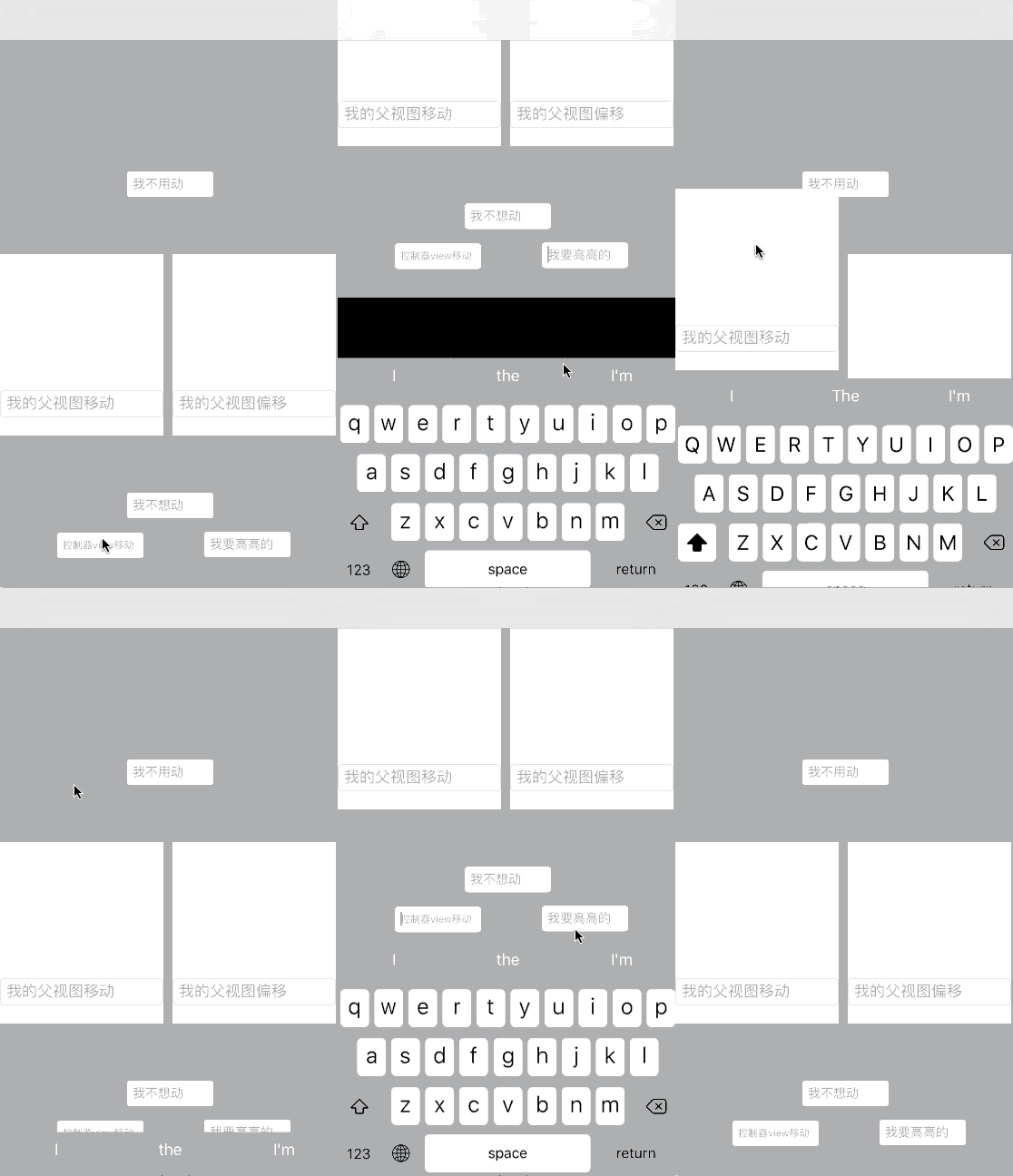
[github链接](https://github.com/a1419430265/CHTTextFieldHealper)
.h文件
 //

 //  UITextField+CHTPositionChange.h

 //  CHTTextFieldHealper

 //

 //  Created by risenb_mac on 16/8/17.

 //  Copyright © 2016年 risenb_mac. All rights reserved.

 //

 #import <UIKit/UIKit.h>

 @interface UITextField (CHTHealper)

 /**

  *  是否支持视图上移

  */

 @property (nonatomic, assign) BOOL canMove;

 /**

  *  点击回收键盘、移动的视图,默认是当前控制器的view

  */

 @property (nonatomic, strong) UIView *moveView;

 /**

  *  textfield底部距离键盘顶部的距离

  */

 @property (nonatomic, assign) CGFloat heightToKeyboard;

 @property (nonatomic, assign, readonly) CGFloat keyboardY;

 @property (nonatomic, assign, readonly) CGFloat keyboardHeight;

 @property (nonatomic, assign, readonly) CGFloat initialY;

 @property (nonatomic, assign, readonly) CGFloat totalHeight;

 @property (nonatomic, strong, readonly) UITapGestureRecognizer *tapGesture;

 @property (nonatomic, assign, readonly) BOOL hasContentOffset;

 @end
在.h文件中声明属性之后需要在.m中重写setter,getter方法
首先定义全局key用作关联唯一标识符
 static char canMoveKey;

 static char moveViewKey;
@implementation UITextField (CHTHealper)

@dynamic canMove;

@dynamic moveView;
具体实现
 - (void)setCanMove:(BOOL)canMove {

 // 参数意义:关联对象 ,关联标识符,关联属性值,关联策略

     objc_setAssociatedObject(self, &canMoveKey, @(canMove), OBJC_ASSOCIATION_RETAIN_NONATOMIC);

 }

 - (BOOL)canMove {

 // 关联属性值为对象类型,需要转换

     return [objc_getAssociatedObject(self, &canMoveKey) boolValue];

 }
想要实现键盘遮住TextField后视图上移,首先应确定TextField是否被键盘遮住,需要知道TextField在整个屏幕中的位置
// 此方法可以获得TextField左上角在当前window中的坐标

[self convertPoint:self.bounds.origin toView:[UIApplication sharedApplication].keyWindow]
还需要知道键盘高度,这点需要接受系统通知,但是什么时候接受通知、注销通知?
我的思路是在TextField成为第一响应者的时候,为TextField添加通知,但是如果直接重写becomeFirstResponder方法会覆盖掉UITextField本身的方法,造成的最明显的后果就是没有光标了……为了避免这个问题,我用了runtime另外一个强大的功能,方法交换
为了保证方法交换只进行一次,使用dispatch_once
为了保证方法交换尽早执行,写在了load方法中
 + (void)load {

     static dispatch_once_t onceToken;

     dispatch_once(&onceToken, ^{

         SEL systemSel = @selector(initWithFrame:);

         SEL mySel = @selector(setupInitWithFrame:);

         [self exchangeSystemSel:systemSel bySel:mySel];

         SEL systemSel2 = @selector(becomeFirstResponder);

         SEL mySel2 = @selector(newBecomeFirstResponder);

         [self exchangeSystemSel:systemSel2 bySel:mySel2];

         SEL systemSel3 = @selector(resignFirstResponder);

         SEL mySel3 = @selector(newResignFirstResponder);

         [self exchangeSystemSel:systemSel3 bySel:mySel3];

         SEL systemSel4 = @selector(initWithCoder:);

         SEL mySel4 = @selector(setupInitWithCoder:);

         [self exchangeSystemSel:systemSel4 bySel:mySel4];

     });

     [super load];

 }
具体交换步骤
 // 交换方法

 + (void)exchangeSystemSel:(SEL)systemSel bySel:(SEL)mySel {

     Method systemMethod = class_getInstanceMethod([self class], systemSel);

     Method myMethod = class_getInstanceMethod([self class], mySel);

     //首先动态添加方法,实现是被交换的方法,返回值表示添加成功还是失败

     BOOL isAdd = class_addMethod(self, systemSel, method_getImplementation(myMethod), method_getTypeEncoding(myMethod));

     if (isAdd) {

         //如果成功,说明类中不存在这个方法的实现

         //将被交换方法的实现替换到这个并不存在的实现

         class_replaceMethod(self, mySel, method_getImplementation(systemMethod), method_getTypeEncoding(systemMethod));

     }else{

         //否则,交换两个方法的实现

         method_exchangeImplementations(systemMethod, myMethod);

     }

 }
在上面我交换了四组方法,两组init方法,是为了保证无论是代码创建的还是xib拖得TextField都进行初始化
 - (instancetype)setupInitWithCoder:(NSCoder *)aDecoder {

     [self setup];

     return [self setupInitWithCoder:aDecoder];

 }

 - (instancetype)setupInitWithFrame:(CGRect)frame {

     [self setup];

     return [self setupInitWithFrame:frame];

 }

 - (void)setup {

     self.heightToKeyboard = ;

     self.canMove = YES;

     self.keyboardY = ;

     self.totalHeight = ;

     self.tapGesture = [[UITapGestureRecognizer alloc] initWithTarget:self action:@selector(tapAction)];

 }
在TextField成为第一响应者时,为self添加通知接收,为moveView添加点击事件(实现点击空白回收键盘),注销第一响应者时,注销通知,移除点击事件
 - (BOOL)newBecomeFirstResponder {

 // 如果没有设置moveView 默认为当前控制器的view

     if (self.moveView == nil) {

         self.moveView = [self viewController].view;

     }

 // 保证moveView只有一个本TextField的点击事件

     if (![self.moveView.gestureRecognizers containsObject:self.tapGesture]) {

         [self.moveView addGestureRecognizer:self.tapGesture];

     }

 // 当重复点击当前TextField时(重复成为第一响应者)或设置为不可移动 不再添加通知

     if ([self isFirstResponder] || !self.canMove) {

         return [self newBecomeFirstResponder];

     }

     [[NSNotificationCenter defaultCenter] addObserver:self selector:@selector(showAction:) name:UIKeyboardWillShowNotification object:nil];

     [[NSNotificationCenter defaultCenter] addObserver:self selector:@selector(hideAction:) name:UIKeyboardWillHideNotification object:nil];

     return [self newBecomeFirstResponder];

 }

 - (BOOL)newResignFirstResponder {

 // 确保当前moveView有当前点击事件,移除

     if ([self.moveView.gestureRecognizers containsObject:self.tapGesture]) {

         [self.moveView removeGestureRecognizer:self.tapGesture];

     }

     if (!self.canMove) {

         return [self newResignFirstResponder];

     }

     BOOL result = [self newResignFirstResponder];

     [[NSNotificationCenter defaultCenter] removeObserver:self name:UIKeyboardWillShowNotification object:nil];

     [[NSNotificationCenter defaultCenter] removeObserver:self name:UIKeyboardWillHideNotification object:nil];

 // 当另外一个TextField成为第一响应者,当前TextField注销第一响应者时不会回收键盘,手动调用moveView改变方法

     [self hideKeyBoard:];

     return result;

 }

 //获取当前TextField所在controller

 - (UIViewController *)viewController {

     UIView *next = self;

     while () {

         UIResponder *nextResponder = [next nextResponder];

         if ([nextResponder isKindOfClass:[UIViewController class]]) {

             return (UIViewController *)nextResponder;

         }

         next = next.superview;

     }

     return nil;

 }
接收到弹出键盘后调用的方法
 - (void)showAction:(NSNotification *)sender {

     if (!self.canMove) {

         return;

     }

 // 获取键盘高度以及键盘的Y坐标

     self.keyboardY = [sender.userInfo[UIKeyboardFrameEndUserInfoKey] CGRectValue].origin.y;

     self.keyboardHeight = [sender.userInfo[UIKeyboardFrameEndUserInfoKey] CGRectValue].size.height;

     [self keyboardDidShow];

 }

 - (void)hideAction:(NSNotification *)sender {

     if (!self.canMove || self.keyboardY == ) {

         return;

     }

     [self hideKeyBoard:0.25];

 }

 - (void)keyboardDidShow {

     if (self.keyboardHeight == ) {

         return;

     }

 // 获取TextField在window中的Y坐标

     CGFloat fieldYInWindow = [self convertPoint:self.bounds.origin toView:[UIApplication sharedApplication].keyWindow].y;

 // 确定是否需要视图上移,以及移动的距离

     CGFloat height = (fieldYInWindow + self.heightToKeyboard + self.frame.size.height) - self.keyboardY;

     CGFloat moveHeight = height >  ? height : ;

     [UIView animateWithDuration:0.25 animations:^{

 // 判断是否是scrollView并进行相应移动

         if (self.hasContentOffset) {

             UIScrollView *scrollView = (UIScrollView *)self.moveView;

             scrollView.contentOffset = CGPointMake(scrollView.contentOffset.x, scrollView.contentOffset.y + moveHeight);

         } else {

             CGRect rect = self.moveView.frame;

             self.initialY = rect.origin.y;

             rect.origin.y -= moveHeight;

             self.moveView.frame = rect;

         }

 // 记录当前TextField使得moveView移动的距离

         self.totalHeight += moveHeight;

     }];

 }

 - (void)hideKeyBoard:(CGFloat)duration {

     [UIView animateWithDuration:duration animations:^{

         if (self.hasContentOffset) {

             UIScrollView *scrollView = (UIScrollView *)self.moveView;

             scrollView.contentOffset = CGPointMake(scrollView.contentOffset.x, scrollView.contentOffset.y - self.totalHeight);

         } else {

             CGRect rect = self.moveView.frame;

             rect.origin.y += self.totalHeight;

             self.moveView.frame = rect;

         }

 // moveView回复状态后将移动距离置0

         self.totalHeight = ;

     }];

 }
点击事件当前controllerview endediting
- (void)tapAction {

    [[self viewController].view endEditing:YES];

}
Runtime学习与使用(一):为UITextField添加类目实现被键盘遮住后视图上移,点击空白回收键盘的更多相关文章
- Objective - C - 添加类目 - NSDate
1.类目为系统内部的类或者是没有源代码的类添加方法,不有添加实例变量 2.添加的方法会成为原类的一部分,子类照样可以使用 3.类目的文件名为原类名+文件名 4.既可以添加实例方法,也可以添加类方法 X ...
- ECshop网点程序优化-后台添加类目自动选择上次父类目并计算Sort Order
如果在ECshop后台批量添加过大量类目的人都能体会到是多么的不方便(这点还是要说一下ECshop的产品经理,细节上还是要多注意),每次添加都需要在几百个类目里面找到要添加的父类目也是一个麻烦事,比如 ...
- iOS阶段学习第29天笔记(UITextField的介绍)
iOS学习(UI)知识点整理 一.关于UITextField的介绍 1)概念: UITextField 是用于接收用户输入的一个控件 2)UITextField 初始化实例代码: //创建一个UIt ...
- ASP.NET MVC 5 学习教程:数据迁移之添加字段
原文 ASP.NET MVC 5 学习教程:数据迁移之添加字段 起飞网 ASP.NET MVC 5 学习教程目录: 添加控制器 添加视图 修改视图和布局页 控制器传递数据给视图 添加模型 创建连接字符 ...
- bootstrap学习笔记之为导航条添加标题、二级菜单及状态 http://www.imooc.com/code/3120
为导航条添加标题.二级菜单及状态 加入导航条标题 在Web页面制作中,常常在菜单前面都会有一个标题(文字字号比其它文字稍大一些),其实在Bootstrap框架也为大家做了这方面考虑,其通过" ...
- swift UITextfield 添加点击方法 - 简单实现
1. 真正在任何系统上都有效的方法 1./// 城市选择 private lazy var cityTextfield:UITextField = { let tf = UITextField() t ...
- Python小白学习之如何添加类属性和类方法,修改类私有属性
如何添加类属性和类方法,修改类私有属性 2018-10-26 11:42:24 类属性.定义类方法.类实例化.属性初始化.self参数.类的私有变量的个人学习笔记 直接上实例: class play ...
- ArcGIS Runtime SDK for WPF之SimpleRenderer无法添加、报错“图形符号无法序列化为 JSON”
ArcGIS Runtime SDK for WPF之SimpleRenderer无法添加.报错“图形符号无法序列化为 JSON” 在上一篇博文中如果在 esri:Map 里面是否设置了的UseAcc ...
- 【转】Pandas学习笔记(三)修改&添加值
Pandas学习笔记系列: Pandas学习笔记(一)基本介绍 Pandas学习笔记(二)选择数据 Pandas学习笔记(三)修改&添加值 Pandas学习笔记(四)处理丢失值 Pandas学 ...
随机推荐
- Codeforces Good Bye 2015 C. New Year and Domino 前缀和
C. New Year and Domino 题目连接: http://www.codeforces.com/contest/611/problem/C Description They say &q ...
- 使用AmplifyJS和JQuery编写更好更优雅的javascript事件处理代码
事件(或消息)是一种经常使用的软件设计模式.可以减少消息处理者和消息公布者的之间的耦合,比方J2EE里面的JMS规范.设计模式中的观察者模式(也叫公布/订阅模式).这对于javascript代码相同适 ...
- 关于Web端即JS端编程
主要的技术是 HTML/JS/CSS/XML Web就是JS/DOM编程. 页面的数据来源: XML, JSON, HTML, Text, 第三方页面或者数据. 不一定都要跟服务器进行交互. JS端 ...
- TP第2个项目总结
1.参数尼玛传接受要非数字方法 $id = $this->_get('id','intval',0); $field_wc = $this->_get('wc_field'); 2.参数不 ...
- TP复习3
## ThinkPHP 3.1.2 CURD特性#讲师:赵桐正微博:http://weibo.com/zhaotongzheng 本节课大纲: 一.ThinkPHP 3 的CURD介绍 (了解) 二. ...
- 单片机modebus RTU通信实现,採用C语言,可适用于单片机,VC,安卓等
当前使用的是STM32+ucos_ii编写的,能够移植到安卓以及VC .NET等方便移植使用,採用modebus poll測试过. 仅仅须要改动响应的通信接口就可以,方便多串口使用 //modebus ...
- 已解决】Sublime中运行带input或raw_input的Python代码出错:EOFError: EOF when reading a line(转)
[问题] 在折腾: [已解决]Sublime Text 2中运行Python程序出错:The system cannot find the file specified 的过程中,虽然解决了找不到py ...
- 推荐几个可以与PhoneGap很好搭配的UI框架
- xui.js:可以被视作是jquery在phonegap上的替代品,挺好用的- jq.mobi:同上,不过体积比xui.js要大,一般还是用xui.js- jq.ui:jq.mobi配套的UI框架 ...
- cocos2d-x jsbinding 在线更新策略设计
在线更新是用脚本编写游戏逻辑的特有功能,由于脚本语言是边解释边编译的特性,使得游戏在运行的时候可以通过下载最新的脚本来执行游戏逻辑.在不修改Native接口的情况下,在线更新每次更新只需要下载一个(5 ...
- linux内存——/proc/sys/vm/drop_caches
原贴:http://www.linuxfly.org/post/320/ http://blog.csdn.net/chinalinuxzend/article/category/265273/2 ...