
GoJS研究,简单图表制作。
话不多说,先上图
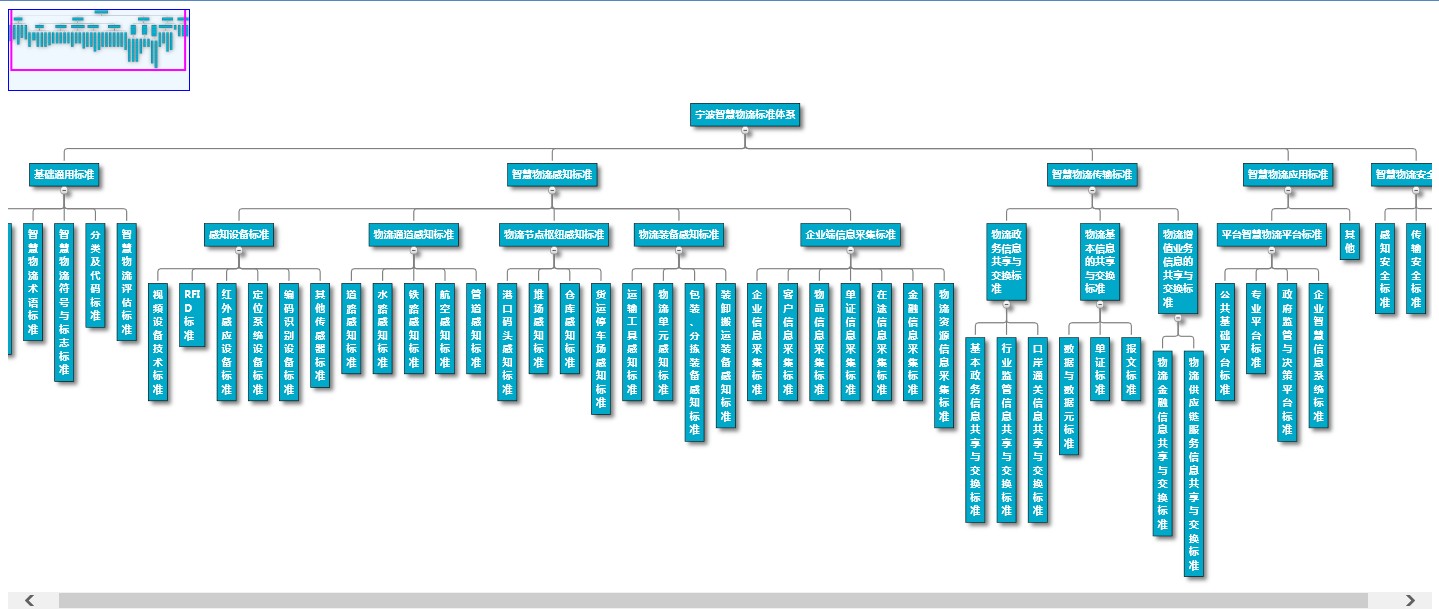
我在这个中加入了缩略图、鼠标放大缩小等功能。
 <!doctype html>

 <html>

 <head>

     <title>Flowchart</title>

     <script src="/Common/Scripts/jQuery/jquery-1.8.3.min.js" type="text/javascript"></script>

     <script src="/Common/Scripts/goDev.js" type="text/javascript"></script>

 </head>

 <body>

     <div id="sample">

         <div id="myDiagram" style="height: 600px"></div>

         <div id="myOverview" style="border: solid 1px blue; width: 180px; height: 80px; position: absolute; top: 0px; left: 0px; background-color: aliceblue; z-index: 300"></div>

         <textarea id="mySavedModel" style="display: none">{"class":"go.GraphLinksModel","linkFromPortIdProperty":"fromPort","linkToPortIdProperty":"toPort","nodeDataArray":[{"key":"2616","category":"A1","text":"宁波智慧物流标准体系"},{"key":"2617","category":"A1","text":"基础通用标准"},{"key":"2622","text":"智慧物流标准化导则"},{"key":"2623","text":"智慧物流术语标准"},{"key":"2624","text":"智慧物流符号与标志标准"},{"key":"2625","text":"分类及代码标准"},{"key":"2626","text":"智慧物流评估标准"},{"key":"2618","category":"A1","text":"智慧物流感知标准"},{"key":"2627","category":"A1","text":"感知设备标准"},{"key":"2640","text":"视频设备技术标准"},{"key":"2641","text":"RFID标准"},{"key":"2642","text":"红外感应设备标准"},{"key":"2643","text":"定位系统设备标准"},{"key":"2644","text":"编码识别设备标准"},{"key":"2645","text":"其他传感器标准"},{"key":"2628","category":"A1","text":"物流通道感知标准"},{"key":"2646","text":"道路感知标准"},{"key":"2647","text":"水路感知标准"},{"key":"2648","text":"铁路感知标准"},{"key":"2649","text":"航空感知标准"},{"key":"2650","text":"管道感知标准"},{"key":"2629","category":"A1","text":"物流节点枢纽感知标准"},{"key":"2651","text":"港口码头感知标准"},{"key":"2652","text":"堆场感知标准"},{"key":"2653","text":"仓库感知标准"},{"key":"2654","text":"货运停车场感知标准"},{"key":"2630","category":"A1","text":"物流装备感知标准"},{"key":"2655","text":"运输工具感知标准"},{"key":"2656","text":"物流单元感知标准"},{"key":"2657","text":"包装、分拣装备感知标准"},{"key":"2658","text":"装卸搬运装备感知标准"},{"key":"2631","category":"A1","text":"企业端信息采集标准"},{"key":"2659","text":"企业信息采集标准"},{"key":"2660","text":"客户信息采集标准"},{"key":"2661","text":"物品信息采集标准"},{"key":"2662","text":"单证信息采集标准"},{"key":"2663","text":"在途信息采集标准"},{"key":"2664","text":"金融信息采集标准"},{"key":"2665","text":"物流资源信息采集标准"},{"key":"2619","category":"A1","text":"智慧物流传输标准"},{"key":"2632","category":"A2","text":"物流政务信息共享与交换标准"},{"key":"2666","text":"基本政务信息共享与交换标准"},{"key":"2667","text":"行业监管信息共享与交换标准"},{"key":"2668","text":"口岸通关信息共享与交换标准"},{"key":"2633","category":"A2","text":"物流基本信息的共享与交换标准"},{"key":"2669","text":"数据与数据元标准"},{"key":"2670","text":"单证标准"},{"key":"2671","text":"报文标准"},{"key":"2634","category":"A2","text":"物流增值业务信息的共享与交换标准"},{"key":"2672","text":"物流金融信息共享与交换标准"},{"key":"2673","text":"物流供应链服务信息共享与交换标准"},{"key":"2620","category":"A1","text":"智慧物流应用标准"},{"key":"2635","category":"A1","text":"平台智慧物流平台标准"},{"key":"2674","text":"公共基础平台标准"},{"key":"2675","text":"专业平台标准"},{"key":"2676","text":"政府监管与决策平台标准"},{"key":"2677","text":"企业智慧信息系统标准"},{"key":"2636","text":"其他"},{"key":"2621","category":"A1","text":"智慧物流安全标准"},{"key":"2637","text":"感知安全标准"},{"key":"2638","text":"传输安全标准"},{"key":"2639","text":"应用安全标准"}],"linkDataArray":[{"from":"2616","to":"0"},{"from":"2616","to":"2617"},{"from":"2617","to":"2622"},{"from":"2617","to":"2623"},{"from":"2617","to":"2624"},{"from":"2617","to":"2625"},{"from":"2617","to":"2626"},{"from":"2616","to":"2618"},{"from":"2618","to":"2627"},{"from":"2627","to":"2640"},{"from":"2627","to":"2641"},{"from":"2627","to":"2642"},{"from":"2627","to":"2643"},{"from":"2627","to":"2644"},{"from":"2627","to":"2645"},{"from":"2618","to":"2628"},{"from":"2628","to":"2646"},{"from":"2628","to":"2647"},{"from":"2628","to":"2648"},{"from":"2628","to":"2649"},{"from":"2628","to":"2650"},{"from":"2618","to":"2629"},{"from":"2629","to":"2651"},{"from":"2629","to":"2652"},{"from":"2629","to":"2653"},{"from":"2629","to":"2654"},{"from":"2618","to":"2630"},{"from":"2630","to":"2655"},{"from":"2630","to":"2656"},{"from":"2630","to":"2657"},{"from":"2630","to":"2658"},{"from":"2618","to":"2631"},{"from":"2631","to":"2659"},{"from":"2631","to":"2660"},{"from":"2631","to":"2661"},{"from":"2631","to":"2662"},{"from":"2631","to":"2663"},{"from":"2631","to":"2664"},{"from":"2631","to":"2665"},{"from":"2616","to":"2619"},{"from":"2619","to":"2632"},{"from":"2632","to":"2666"},{"from":"2632","to":"2667"},{"from":"2632","to":"2668"},{"from":"2619","to":"2633"},{"from":"2633","to":"2669"},{"from":"2633","to":"2670"},{"from":"2633","to":"2671"},{"from":"2619","to":"2634"},{"from":"2634","to":"2672"},{"from":"2634","to":"2673"},{"from":"2616","to":"2620"},{"from":"2620","to":"2635"},{"from":"2635","to":"2674"},{"from":"2635","to":"2675"},{"from":"2635","to":"2676"},{"from":"2635","to":"2677"},{"from":"2620","to":"2636"},{"from":"2616","to":"2621"},

 {"from":"2621","to":"2637"},{"from":"2621","to":"2638"},{"from":"2621","to":"2639"}]}</textarea>

     </div>

     <script type="text/javascript" id="code">

         $().ready(function () {

             $("#mySavedModel").hide();

             $("#myOverview").offset(function (n, c) {

                 newPos = new Object();

                 newPos.left = $("#myDiagram").offset().left;

                 newPos.top = $("#myDiagram").offset().top;

                 return newPos;

             });

             if (window.goSamples) goSamples();

             var GO = go.GraphObject.make;

             myDiagram =

               GO(go.Diagram, "myDiagram",

                 {

                     "toolManager.mouseWheelBehavior": go.ToolManager.WheelZoom,

                     allowCopy: false,

                     allowDelete: false,

                     allowMove: false,

                     initialContentAlignment: go.Spot.Center,

                     initialAutoScale: go.Diagram.UniformToFill,

                 });

             myDiagram.layout =

               GO(go.TreeLayout,

                 {

                     angle: 90,

                     alignment: go.TreeLayout.AlignmentCenterChildren,

                     compaction: go.TreeLayout.CompactionNone

                 });

             var str = document.getElementById("mySavedModel").value;

             myDiagram.model = go.Model.fromJson(str);

             myDiagram.nodeTemplateMap.add("",

                 GO(go.Node, "Vertical", {

                     locationSpot: go.Spot.Center,

                     isShadowed: true,

                     resizable: false,

                     rotatable: false,

                     layoutConditions: go.Part.LayoutStandard & ~go.Part.LayoutNodeSized

                 },

                     new go.Binding("location", "loc", go.Point.parse).makeTwoWay(go.Point.stringify),

                     GO(go.Panel, "Auto",

                         GO(go.Shape, "Rectangle",

                             { strokeWidth: 1, fill: "#00A9C9" },

                             new go.Binding("figure", "figure")),

                         GO(go.TextBlock,

                             {

                                 font: "bold 13pt 微软雅黑",

                                 margin: 8, maxSize: new go.Size(30, NaN),

                                 stroke: "#ffffff"

                             },

                             new go.Binding("stroke", "stroke"),

                             new go.Binding("text", "text").makeTwoWay()),

                         {

                             cursor: "pointer",

                             click: function (e, obj) { window.open("/cn/stdLibCatalog/StdLibCatalogList_1_20.html?CatalogID=" + encodeURIComponent(obj.part.data.key)); }

                         }

                     ),

                     GO("TreeExpanderButton")

                 ));

             //"category":"A1",

             myDiagram.nodeTemplateMap.add("A1",

                 GO(go.Node, "Vertical", {

                     locationSpot: go.Spot.Center,

                     isShadowed: true,

                     resizable: false,

                     rotatable: false,

                     layoutConditions: go.Part.LayoutStandard & ~go.Part.LayoutNodeSized

                 },

                     new go.Binding("location", "loc", go.Point.parse).makeTwoWay(go.Point.stringify),

                     GO(go.Panel, "Auto",

                         GO(go.Shape, "Rectangle",

                             { strokeWidth: 1, fill: "#00A9C9" },

                             new go.Binding("figure", "figure")),

                         GO(go.TextBlock,

                             {

                                 font: "bold 13pt 微软雅黑",

                                 margin: 8,

                                 stroke: "#ffffff"

                             },

                             new go.Binding("stroke", "stroke"),

                             new go.Binding("text", "text").makeTwoWay()),

                         {

                             cursor: "pointer",

                             click: function (e, obj) { window.open("/cn/stdLibCatalog/StdLibCatalogList_1_20.html?CatalogID=" + encodeURIComponent(obj.part.data.key)); }

                         }

                     ),

                     GO("TreeExpanderButton")

                 ));

             //"category":"A2",

             myDiagram.nodeTemplateMap.add("A2",

                 GO(go.Node, "Vertical", {

                     locationSpot: go.Spot.Center,

                     isShadowed: true,

                     resizable: false,

                     rotatable: false,

                     layoutConditions: go.Part.LayoutStandard & ~go.Part.LayoutNodeSized

                 },

                     new go.Binding("location", "loc", go.Point.parse).makeTwoWay(go.Point.stringify),

                     GO(go.Panel, "Auto",

                         GO(go.Shape, "Rectangle",

                             { strokeWidth: 1, fill: "#00A9C9" },

                             new go.Binding("figure", "figure")),

                         GO(go.TextBlock,

                             {

                                 font: "bold 13pt 微软雅黑",

                                 margin: 8, maxSize: new go.Size(60, NaN),

                                 stroke: "#ffffff"

                             },

                             new go.Binding("stroke", "stroke"),

                             new go.Binding("text", "text").makeTwoWay()),

                         {

                             cursor: "pointer",

                             click: function (e, obj) { window.open("/cn/stdLibCatalog/StdLibCatalogList_1_20.html?CatalogID=" + encodeURIComponent(obj.part.data.key)); }

                         }

                     ),

                     GO("TreeExpanderButton")

                 ));

             /* 设置链接的线条样式 */

             myDiagram.linkTemplate =

                 GO(go.Link,

                     {

                         routing: go.Link.Orthogonal,//AvoidsNodes、Orthogonal

                         corner: 5,

                         toShortLength: 4, relinkableFrom: false, relinkableTo: false, reshapable: false

                     },

                     new go.Binding("points").makeTwoWay(),

                     GO(go.Shape, { isPanelMain: true, stroke: "gray", strokeWidth: 2 })

                 );

             myOverview =

               GO(go.Overview, "myOverview",

                 { observed: myDiagram });

         });

     </script>

 </body>

 </html>
上面为了方便,把代码直接拷贝了几份,设置了默认,A1,A2三种样式,只是为了区分控件的大小。其实控件的大小在参数里也可以设置,加一个属性"size":"100 100",在设置节点的时候,加一句new go.Binding("desiredSize", "size", go.Size.parse).makeTwoWay(go.Size.stringify)即可。
支持购买原版http://www.gojs.net。
最新版1.2.8破解,去除水印,下载。
GoJS研究,简单图表制作。的更多相关文章
- 个人永久性免费-Excel催化剂功能第77波-专业图表制作辅助之批量维护序列点颜色及数据标签
2018年最后一天工作日完成第77波,7是代表完美,2个7,双重的完美,Excel催化剂的2018年从始至终共77波都充满着完美接近极致的功能体验.感谢各位一路相随,陪伴成长.最后一波,再次让数据分析 ...
- 图表制作软件哪家强?当属火爆商业智能圈的Smartbi
图表制作软件选择多吗? 相对来说,统计图表制作软件还是很多的.比如常见的百度图说还有wps和excel都是可以制作好看的统计图的.关键就是看是在怎样的业务场景下使用.一般情况下,如果你对Excel足够 ...
- silverlight visifire控件图表制作——silverlight 后台方法页面事件
1.返回事件 (1.返回silverlight页面,2.返回web页面) private void button_ClickBack(object sender, RoutedEventArgs e) ...
- silverlight visifire控件图表制作——silverlight 后台方法ControlChart.xaml.cs
一.构造方法ControlChart 1.前台页面控件赋值 //时间下拉框赋值,下拉框赋选定值 for (int ii = DateTime.Today.Year; ii ...
- 自学Zabbix3.8.1.1-可视化Visualisation-Graphs简单图表
自学Zabbix3.8.1.1-可视化Visualisation-Graphs简单图表 Zabbix提供了一些简单的图表,用于可视化由项目收集的数据. 用户不需要进行配置工作来查看简单的图表.他们是由 ...
- 【转】Django 图表制作(By Highcharts)
马克,待不时之需 Django 图表制作(By Highcharts):https://blog.csdn.net/Temanm/article/details/54141759 免费而优秀的图表JS ...
- 实验报告系列:实验一 HTML语言的简单网页制作
实验一 HTML语言的简单网页制作 一.实验目的: 1.掌握常用的HTML语言标记: 2.利用文本编辑器建立HTML文档,制作简单网页. 3.学习将其它格式的文档转换成HTML格式的文档 二.实验内容 ...
- web前段canvasjs图表制作一
关于web图表制作的方法有很多种,大家可以去网上这里我就介绍我经常使用的一种方法CanvasJS,这也是一款非常容易掌握并且好用的一种方法. 首先可以去网上下载canvasjs.js插件.下载路径:h ...
- Highcharts使用教程(1):制作简单图表
今天我们要使用JavaScript图表Highcharts制作简单的柱形图,我们已经安装好Highcharts,让我们开始制作图表吧. 步骤一 在网页中添加一个div.设置id,设置图表长.高.代码如 ...
随机推荐
- hug and Compression Resistance
Hugging => content does not want to grow Compression Resistance => content does not want to sh ...
- 多IDC数据分布--MySQL多机房部署 - 学习笔记 - 51CTO技术博客
多IDC数据分布--MySQL多机房部署 - 学习笔记 - 51CTO技术博客 多IDC数据分布--MySQL多机房部署
- [html][css]让文字在div中居中的方法[转]
转至:http://dreamweaver.abang.com/od/divcss/a/vertical-align.htm 一.行高(line-height)法 如果要垂直居中的只有一行或几个文字, ...
- SQLite 入门教程(四)增删改查,有讲究 (转)
转于: SQLite 入门教程(四)增删改查,有讲究 一.插入数据 INSERT INTO 表(列...) VALUES(值...) 根据前面几篇的内容,我们可以很轻送的创建一个数据表,并向其中插入一 ...
- struts2标签 遍历map集合
首先我们来构造几个map集合. 假设如下代码 都是在ssh配置环境下搭建好,(至少struts2开发环境搭建好) (1).java 代码 下面的student对象包含的字段为 ...
- MVC传递Model之TempData、ViewData、ViewBag差别及用途
MVC使用过程中常常会用到TempData.ViewData.ViewBag三种方式,这三种什么差别呢? TempData:默认存储于Session中,可通过继承ITempDataProvider接口 ...
- adt-bundle-linux-x86_64-20131030下新建project提示找不到adb和R.java问题的解决
adt-bundle-linux-x86_64-20131030下新建project提示找不到adb和R.java问题的解决 在ubuntu14.04下,搭建Android开发环境,下载官方的adt- ...
- requireJS(二)
一.前言 requireJS(一) 本篇主要整理requirejs的一些用法,相对比较零散. 实例目录 二.优化 requirejs建议我们给每一个模块书写一个js文件.但是这样会增加网站的http请 ...
- 修改Tomcat 6 默认的ROOT
1.找到conf/server.xml. 2.找到Host节点. 3.在该节点中添加子节点<Context path="" docBase="项目名称" ...
- 晕,hibernate 的 merge和cascade="all-delete-orphan"要慎重合在一起使用
遇到一个比较后悔莫及事情,使用了hibernate 的 merge和cascade="all-delete-orphan" ,子表数据被删除了. 1.使用cascade=" ...