
ios Using CocoaPods to Modularize a Big iOS App->使用CocoaPods来进行模块化开发
Selecting the right architecture for your mobile app is a pretty big deal. It will shape your daily workflow, frame the problems you face, and can be a huge asset or huge liability.
HubSpot's app is fully-featured. It's an analytics app, a social media app, an email app and a contacts management app (with more to come) all coexisting under one roof. As we set out to build this fairly complex app last summer, we knew we had to have an architecture that'd scale with it.
We actually build each sub-app as a fully complete standalone app, then use CocoaPods to integrate them into the main app.
In the screenshots below, you can see how each sub-app - Sources, Dashboard, Social Media, is actually both a standalone iPhone app as well as an app that can be brought into the menu of the main app.
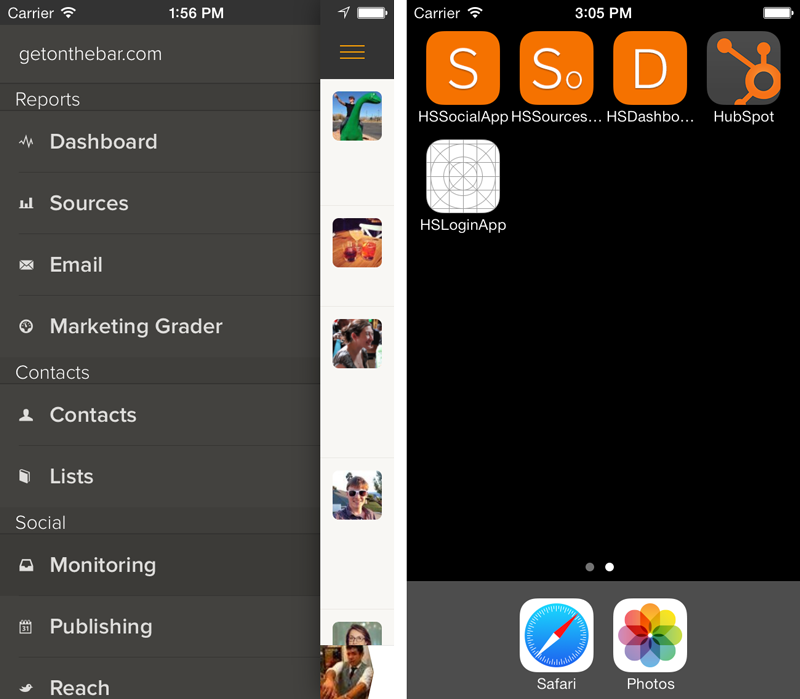
This gives us a few huge advantages:
- Most critically, we're very easily able to ensure that the master branch of each sub-app is ready to ship, and can pull in specific versions of sub-apps in a snap.
- We spend a lot more time building and a lot less time merging. Each individual app's sandbox makes it very easy to iterate within the sub-apps and spend minimal time integrating with other apps. If you've worked on an iOS team of more than one, you've undoubtedly had gross .xcodeproj merges. While they are resolvable, they're a pain -- this lets us sidestep them almost completely.
- We are able to individually deploy each app if necessary -- this is amazing for doing usability testing on an individual app level. We could ship the app to our testers earlier before “glue” features like navigation were complete so we could get high quality, targeted feedback.
- Because user flows between sub-apps are only done with URL-based routes (more about this later), it means that routes are built-in and documented -- instead of searching through a pile of UIViewControllers for the right way to instantiate a particular view, there’s a well-defined route. This is useful when building meta-functionality like walkthrough tutorials or new push notifications.
This architecture has been a huge timesaver for us in building multifaceted iOS apps with a team of more than two people. Sound like your jam? Read on.
Learning from the Web
The inspiration for splitting up our mobile app into sub-apps came from the successes we've seen with HubSpot's web architecture.
HubSpot's web app architecture is built for development-speed and scalability. As my colleagues have written, we use a variety of tools and techniques to let us collectively deploy about 300 times a day. This is critical, as HubSpot's product suite consists of several loosely coupled but very different applications -- analytics, social media, email, blogging, and reporting tools.
On the web, we can build, test, and deploy small sections of the HubSpot app independently -- including backend APIs and jobs written in Java, front end CoffeeScript projects, and Python projects. Why not do the same for mobile?
CocoaPods: Use It.
CocoaPods, the excellent dependency management solution for iOS, is key in bringing everything together.
A multi-app architecture may be overkill for your use case, but CocoaPods certainly is not -- even if you're just bringing in a handful of 3rd party libraries for usage tracking, view components, or networking -- investing the few minutes to set it up is fully worth your time. The ruby gem-like syntax makes integrating open source components into an app nearly seamless.
Core libraries and shared resources like login, styling classes, and API/credential persistence and access are built as independent projects with Kiwi tests and a podspec file. We publish them to ourprivate CocoaPods repository and include them in our actual fully-built applications. However, we take it a step further by building each sub-app -- all of Social Media, Email, or Sources, for example -- as a separate project with a podspec, then build them all into a single app using CocoaPods.
This means we can ship test versions of a single feature internally, and can move quickly with breaking changes in a single app without worrying about breaking the big build for other developers working in other unrelated sub-apps.
The Podfile for our aggregate app, therefore, looks like:
platform :ios, '6.0'

# networking, slider navigation, routing

pod 'AFNetworking', '~> 1.2.1'

pod 'ViewDeck', '~> 2.2.11'

pod 'JLRoutes', '~> 1.2'

# sub-apps, pulling from the head of each repo for development. alternately, we can pin it to a release version like we do the other pods

pod 'HSAPIClient', :head

pod 'HSCommonResources', :head

pod 'HSMarketingGraderApp', :head

pod 'HSContactsApp', :head

pod 'HSDashboardApp', :head

pod 'HSLoginApp', :head

pod 'HSSocialApp', :head

pod 'HSSourcesApp', :head

pod 'HSSettingsApp', :head

pod 'HSSocialReach', :head

pod 'HSEmailApp', :head
Gluing it all Together
Astute readers will notice we've used a couple of open source tools in our main application that are key in gluing the sub-apps together,IIViewDeck and JLRoutes.
To make it so that we don't have to provide information in the base app about the different menu items and routes each sub-app can handle, each sub-app provides a single class that implements an HSBaseApp protocol with a few methods:
@protocol HSBaseApp <NSObject>

+ (UINavigationController *)baseNavigationController;

+ (NSArray *)menuItems;

+ (NSArray *)routesToRegister;

@end
An example implementation is:
+ (UINavigationController *)baseNavigationController {

    return [[HSNavigationController alloc] initWithRootViewController:[[HSSocialViewController alloc] initWithNibName:@"HSSocialViewController" bundle:nil]];

}

+ (NSArray *)menuItems {

    HSMenuItem *calendarMenuItem = [[HSMenuItem alloc] initWithTitle:@"Publishing" icon:@"\\" launchHubSpotApp:[HSSocial class]];

    calendarMenuItem.sectionTitle = @"Social";

    return @[calendarMenuItem];

}

+ (NSArray *)routesToRegister {

    HSRoute *newItemRoute = [HSRoute routeWithUrl:@"social/new" andAction:^BOOL(id<HSRoutingDelegate> routingDelegate, NSString *url, NSDictionary *parameters) {

    //  handle route, usually by suppying a UIViewController to the routingDelegate

    }];

    NSArray *routes = @[newItemRoute]; // could be more routes here too

    return routes;

}
We use routes to handle incoming push notifications, and we use the same scheme to link across sub-apps within the main app -- as is the case when we link to Contacts from Sources or Social Media, for example.
HSRoutingDelegate has a little bit of magic in it for passing around the currently active UINavigationController so we can push on top or create a modal in a route based on context, but otherwise it's a simple wrapper for JLRoutes' excellent block-based syntax.
ios Using CocoaPods to Modularize a Big iOS App->使用CocoaPods来进行模块化开发的更多相关文章
- 李洪强iOS之集成极光推送三iOS集成指南
李洪强iOS之集成极光推送三iOS集成指南 SDK说明 适用版本 本文匹配的 SDK版本:r2.1.5 以后.查看最近更新了解最新的SDK更新情况.使用Xcode 6及以上版本可以使用新版Push S ...
- iOS 从0到1搭建高可用App框架
iOS 从0到1搭建高可用App框架 最近在搭建新项目的iOS框架,一直在思考如何才能搭建出高可用App框架,能否避免后期因为代码质量问题的重构.以前接手过许多“烂代码”,架构松散,底层混乱,缺少规范 ...
- iOS关于模块化开发解决方案(纯干货)
关于iOS模块化开发解决方案网上也有一些介绍,但真正落实在在具体的实例却很少看到,计划编写系统文章来介绍关于我对模块化解决方案的理解,里面会有包含到一些关于解耦.路由.封装.私有Pod管理等内容:并编 ...
- 根据iOS 10 的新特性,创建iMessage App,可用于自定义表情
第一. 介绍(原文作者 澳大利亚19岁少年--Davis Allie ----原文地址) 随着iOS10的发布,苹果对开发者开放了Messages应用程序,开发人员现在可以创建他们自己的各种类型 并且 ...
- iOS应用内抓包、NSURLProtocol 拦截 APP 内的网络请求
前言 开发中遇到需要获取SDK中的数据,由于无法看到代码,所以只能通过监听所有的网络请求数据,截取相应的返回数据,可以通过NSURLProtocol实现,还可用于与H5的交互 一.NSURLProto ...
- 李洪强iOS之集成极光推送二iOS 证书 设置指南
李洪强iOS之集成极光推送二iOS 证书 设置指南 创建应用程序ID 登陆 iOS Dev Center 选择进入iOS Provisioning Portal. 在 iOS Provisioning ...
- 李洪强iOS之集成极光推送一iOS SDK概述
李洪强iOS之集成极光推送一iOS SDK概述 JPush iOS 从上图可以看出,JPush iOS Push 包括 2 个部分,APNs 推送(代理),与 JPush 应用内消息. 红色部分是 A ...
- iOS 9音频应用播放音频之iOS 9音频播放进度
iOS 9音频应用播放音频之iOS 9音频播放进度 iOS 9音频应用开发播放进度 音频文件在播放后经过了多久以及还有多久才可以播放完毕,想必是用户所关注的问题.为了解决这一问题,在很多的音乐播放器中 ...
- IOS学习笔记48--一些常见的IOS知识点+面试题
IOS学习笔记48--一些常见的IOS知识点+面试题 1.堆和栈什么区别? 答:管理方式:对于栈来讲,是由编译器自动管理,无需我们手工控制:对于堆来说,释放工作由程序员控制,容易产生memor ...
随机推荐
- 初谈SQL Server逻辑读、物理读、预读【转】
前言 本文涉及的内容均不是原创,是记录自己在学习IO.执行计划的过程中学习其他大牛的博客和心得并记录下来,之所以想写下来是为了记录自己在追溯的过程遇到的几个问题,并把这些问题弄清楚. 本章最后已贴出原 ...
- Unity3D Mathf函数
Mathf.Abs绝对值 计算并返回指定参数 f 绝对值. Mathf.Acos反余弦 static function Acos (f : float) : float 以弧度为单位计算并返回参数 f ...
- HDU5407.CRB and Candies(数论)
官方题解: The problem is just to calculate g(N) = LCM(C(N,0),C(N,1),...,C(N,N)) Introducing function f(n ...
- EF查看sql的方法
using (context = new DataBaseContext()) { #region EF6.0 var listuser =context.dbuser.ToList(); Log.D ...
- RH442之Tuned优化方案
系统优化 介绍: Tuned是监控并收集系统组件使用资源的守护进程,可根据收集信息动态调整系统,可调整CPU和网络资源的使用来提高活跃设备性能与不活跃设备电能消耗.通过tuned-adm中提供优化案例 ...
- C#获取内存图像数据流的方法
背景:有的时候我们已经得到一个图像的内存对象,如Bitmap对象,我们想要获取到这个对象的数据流,可以将其序列化到磁盘上,并且也可以反序列化为内存对象,这个时候就有了如题的问题出现,我搜遍全网就是没有 ...
- android selector 背景选择器的使用, button (未点击,点击,选中保持状态)效果实现
android selector 背景选择器的使用, button (未点击,点击,选中保持状态)效果实现 首先看到selector的属性: android:state_focus ...
- 多平台响应键盘事件!(适用于Cocos2dx 3.0 alpha以上版本号)
Hello everyone! For a week I've been looking on how to make a keyboard work! I managed to figure it ...
- CameraTest
from com.android.monkeyrunner import MonkeyRunner,MonkeyDevice,MonkeyImage #device = MonkeyRunner.wa ...
- MFC框架中消失的WinMain()
学过一段时间的MFC之后,很多人大概都有一个疑问:在MFC中,WinMain()哪去了?因为任何一个使用过Win32 SDK编程的人都知道,WinMain()函数是Win32程序开始的入口点,可是在M ...