
Hierarchy Viewer显示视图性能指标
Hierarchy Viewer默认打开“Tree View”窗口无法显示显示Performance indicators:

但选中根视图再点击按钮“Obtain layout times for tree rooted at selected node”:

就可以显示:
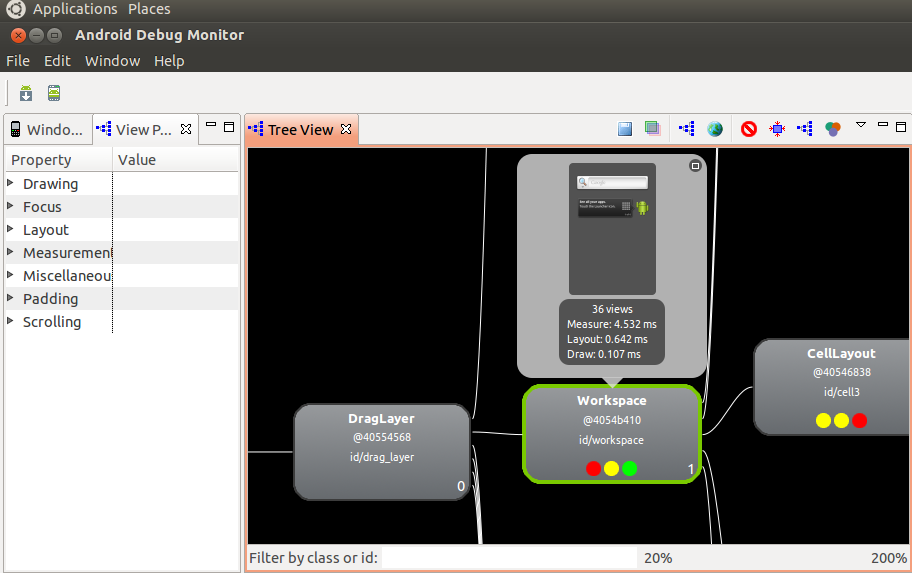
其上该视图性能的颜色指示符从左到右依次为:Measure、Layout和Draw,其中红色代表此树中该视图渲染最慢即占用总渲染时间的80%或其以上,绿色代表此树中该视图渲染时长小于总渲染时间的50%,黄色代表此树种该视图渲染时长50%或其以上但低于80%。


public class ProfileNodesAction extends SelectedNodeEnabledAction implements ImageAction {

...

public ProfileNodesAction() {

        super("Profile Node");

        ImageLoader imageLoader = ImageLoader.getLoader(HierarchyViewerDirector.class);

        mImage = imageLoader.loadImage("profile.png", Display.getDefault()); //$NON-NLS-1$

        setImageDescriptor(ImageDescriptor.createFromImage(mImage));

        setToolTipText("Obtain layout times for tree rooted at selected node");

    }

...

@Override

    public void run() {

        HierarchyViewerDirector.getDirector().profileCurrentNode();

    }

...
public void profileCurrentNode() {

        final DrawableViewNode selectedNode = TreeViewModel.getModel().getSelection();

        if (selectedNode != null) {

            executeInBackground("Profile Node", new Runnable() {

                @Override

                public void run() {

                    IHvDevice hvDevice = getHvDevice(selectedNode.viewNode.window.getDevice());

                    hvDevice.loadProfileData(selectedNode.viewNode.window, selectedNode.viewNode);

                    // Force the layout viewer to redraw.

                    TreeViewModel.getModel().notifySelectionChanged();

                }

            });

        }

    }
public static boolean loadProfileData(Window window, ViewNode viewNode) {

        DeviceConnection connection = null;

        try {

            connection = new DeviceConnection(window.getDevice());

            connection.sendCommand("PROFILE " + window.encode() + "" + viewNode.toString()); //$NON-NLS-1$

            BufferedReader in = connection.getInputStream();

            int protocol;

            synchronized (sViewServerInfo) {

                protocol = sViewServerInfo.get(window.getDevice()).protocolVersion;

            }

            if (protocol < 3) {

                return loadProfileData(viewNode, in);

            } else {

                boolean ret = loadProfileDataRecursive(viewNode, in);

                if (ret) {

                    viewNode.setProfileRatings();

                }

                return ret;

            }

        } catch (Exception e) {

            Log.e(TAG, "Unable to load profiling data for window " + window.getTitle()

                    + " on device " + window.getDevice());

        } finally {

            if (connection != null) {

                connection.close();

            }

        }

        return false;

    }

private static boolean loadProfileData(ViewNode node, BufferedReader in) throws IOException {

        String line;

        if ((line = in.readLine()) == null || line.equalsIgnoreCase("-1 -1 -1") //$NON-NLS-1$

                || line.equalsIgnoreCase("DONE.")) { //$NON-NLS-1$

            return false;

        }

        String[] data = line.split("");

        node.measureTime = (Long.parseLong(data[0]) / 1000.0) / 1000.0;

        node.layoutTime = (Long.parseLong(data[1]) / 1000.0) / 1000.0;

        node.drawTime = (Long.parseLong(data[2]) / 1000.0) / 1000.0;

        return true;

    }

    public static boolean loadProfileDataRecursive(ViewNode node, BufferedReader in)

            throws IOException {

        if (!loadProfileData(node, in)) {

            return false;

        }

        for (int i = 0; i < node.children.size(); i++) {

            if (!loadProfileDataRecursive(node.children.get(i), in)) {

                return false;

            }

        }

        return true;

    }
public class ViewNode {

    public static enum ProfileRating {

        RED, YELLOW, GREEN, NONE

    };

    private static final double RED_THRESHOLD = 0.8;

    private static final double YELLOW_THRESHOLD = 0.5;

...

public void setProfileRatings() {

        final int N = children.size();

        if (N > 1) {

            double totalMeasure = 0;

            double totalLayout = 0;

            double totalDraw = 0;

            for (int i = 0; i < N; i++) {

                ViewNode child = children.get(i);

                totalMeasure += child.measureTime;

                totalLayout += child.layoutTime;

                totalDraw += child.drawTime;

            }

            for (int i = 0; i < N; i++) {

                ViewNode child = children.get(i);

                if (child.measureTime / totalMeasure >= RED_THRESHOLD) {

                    child.measureRating = ProfileRating.RED;

                } else if (child.measureTime / totalMeasure >= YELLOW_THRESHOLD) {

                    child.measureRating = ProfileRating.YELLOW;

                } else {

                    child.measureRating = ProfileRating.GREEN;

                }

                if (child.layoutTime / totalLayout >= RED_THRESHOLD) {

                    child.layoutRating = ProfileRating.RED;

                } else if (child.layoutTime / totalLayout >= YELLOW_THRESHOLD) {

                    child.layoutRating = ProfileRating.YELLOW;

                } else {

                    child.layoutRating = ProfileRating.GREEN;

                }

                if (child.drawTime / totalDraw >= RED_THRESHOLD) {

                    child.drawRating = ProfileRating.RED;

                } else if (child.drawTime / totalDraw >= YELLOW_THRESHOLD) {

                    child.drawRating = ProfileRating.YELLOW;

                } else {

                    child.drawRating = ProfileRating.GREEN;

                }

            }

        }

        for (int i = 0; i < N; i++) {

            children.get(i).setProfileRatings();

        }

    }
/**

 * This class is used for connecting to a device in debug mode running the view

 * server.

 */

public class DeviceConnection {

...

public void sendCommand(String command) throws IOException {

        BufferedWriter out = getOutputStream();

        out.write(command);

        out.newLine();

        out.flush();

    }

...
Hierarchy Viewer显示视图性能指标的更多相关文章
- Android 实用工具Hierarchy Viewer实战
在Android的SDK工具包中,有很多十分有用的工具,可以帮助程序员开发和测试Android应用程序,大大提高其工作效率.其中的一款叫Hierachy Viewer的可视化调试工具,可以很方便地在开 ...
- Android优化——UI检视利器:Hierarchy Viewer
在Android的SDK工具包中,有很多十分有用的工具,可以帮助程序员开发和测试Android应用程序,大大提高其工作效率.其中的一款叫 Hierachy Viewer的可视化调试工具,可以很方便地在 ...
- Hierarchy Viewer
http://blog.csdn.net/ddna/article/details/5527072 Hierarchy Viewer是随AndroidSDK发布的工具,位置在tools文件夹下,名为h ...
- 看了一本书,说可以利用Hierarchy Viewer优化布局
看了一本书,说可以利用Hierarchy Viewer优化布局,今以志之. 参考:http://www.cnblogs.com/Rocky_/archive/2011/11/04/2236243.ht ...
- 【转】【Android工具】被忽略的UI检视利器:Hierarchy Viewer
原文:http://blog.csdn.net/ddna/article/details/5527072 Hierarchy Viewer是随AndroidSDK发布的工具,位置在tools文件夹下, ...
- 利用Hierarchy Viewer优化布局
好久没更新博客了,趁着清明来写点什么. 今天来讲下如何使用android中提供的工具优化我们的布局.首先我们写一个最简单的框架布局. <?xml version="1.0" ...
- Android 卡顿优化 3 布局优化 工具 Hierarchy Viewer
欲善其事, 先利其器. 分析布局, 就不得不用到Hierarchy Viewer了. 本文工具使用皆以GithubApp的详情界面RepoDetailActivity为例说明. 为了不影响阅读体验, ...
- Android工具 Hierarchy Viewer 分析
Hierarchy Viewer是随AndroidSDK发布的工具,位置在tools文件夹下,名为hierarchyviewer.bat.它是Android自带的非常有用而且使用简单的工具,可以帮助我 ...
- Android官方命令深入分析之Hierarchy Viewer
Hierarchy Viewer允许你调试和优化用户界面.它提供了一个层可视的方式来显示. 启动Hierarchy Viewer,如下: 在Android Studio中,选择Tools > A ...
随机推荐
- excel中VBA对多个文件的操作
添加引用 "Scripting.FileSystemObject" (Microsoft Scripting Runtime) '用于操作文件.目录 Sub 数据整理部分() ' ...
- 屏蔽Codeforces做题时的Problem tags提示
当在Codeforces上做题的时,有时会无意撇到右侧的Problem tags边栏,但是原本并不希望能够看到它. 能否把它屏蔽了呢?答案是显然的,我们只需要加一段很短的CSS即可. span.tag ...
- java.util.Random深入理解
java.util.Random next方法的原理 比较好的参考文档: http://isky001.iteye.com/blog/1339979 package random.utilrandom ...
- apk文件解析,学习笔记
Android 应用程序包文件 (APK) 是一种Android操作系统上的应用程序安装文件格式,其英文全称为 “application package file” . 如果懂得使用反编译工具,可以下 ...
- PL/SQL Developer远程连接Oracle数据库
首先打开电脑,到pl/sql安装的指定目录[D:\app\DZL\product\11.2.0\dbhome_1\NETWORK\ADMIN]找到[tnsnames.ora] 打开[tnsna ...
- 如何管理你的 Javascript 代码
今天不聊技术的问题,咱们来聊聊在前端开发中如何管理好自己的 Javascript 代码.首先,咱们先来说说一般都有哪些管理方式?我相信 seajs . requirejs 对于前端开发者而言都不陌 ...
- 最简单的基于FFmpeg的移动端例子:IOS 推流器
转至:http://blog.csdn.net/leixiaohua1020/article/details/47072519 ================================== ...
- IOI1994 北京2008的挂钟 迭代加深
总的来讲,这是一道很⑨的题,因为: (1)题目中有⑨个挂钟 (2)有⑨种操作方案 (3)这题因为解空间太小所以可以直接⑨重循环!! 这题可以用迭代加深搜索高效求解,剪枝的策略也很显然: >所求的 ...
- pthread_setcanceltype 线程取消
取消线程: (1)一个线程可以调用pthread_cancel来取消另一个线程. (2)被取消的线程需要被join来释放资源. (3)被取消的线程的返回值为PTHREAD_CANCELED ...
- SGU 162.Pyramids
时间限制:0.25s 空间限制:6M; 题意: 按照AB, AC, AD, BC, BD, CD.给出一个空间四面体的6条边长.求出它的体积. Solution: 欧拉四面体公式: ...