
Mybatis分页插件PageHelper使用
一. Mybatis分页插件PageHelper使用
1、不使用插件如何分页:
使用mybatis实现:
1)接口:
List<Student> selectStudent(Map<String, Object> map);
2)mapper.xml:
<select id="selectStudent" resultMap="BaseResultMap" parameterType="java.util.Map" >

    select

    <include refid="Base_Column_List" />

    from student  limit #{pageNum},#{pageSize}

  </select>
3)测试:
@Test

    public void TestGetStudent() throws IOException {

        try {

            StudentMapper mapper=session.getMapper(StudentMapper.class);

            Map<String,Object> map=new HashMap<String,Object>();

            map.put("pageNum", 0);

            map.put("pageSize", 3);

            List<Student> students=mapper.selectStudent(map);

            for(Student student :students)

                System.out.println(student.gettId() + "   " + student.gettName() + "  "+student.gettAge()+" "+student.gettEnterdate()+"  "+student.gettSid());

        }finally {

            session.close();

    }

    }
2 使用PageHelper插件如何分页:
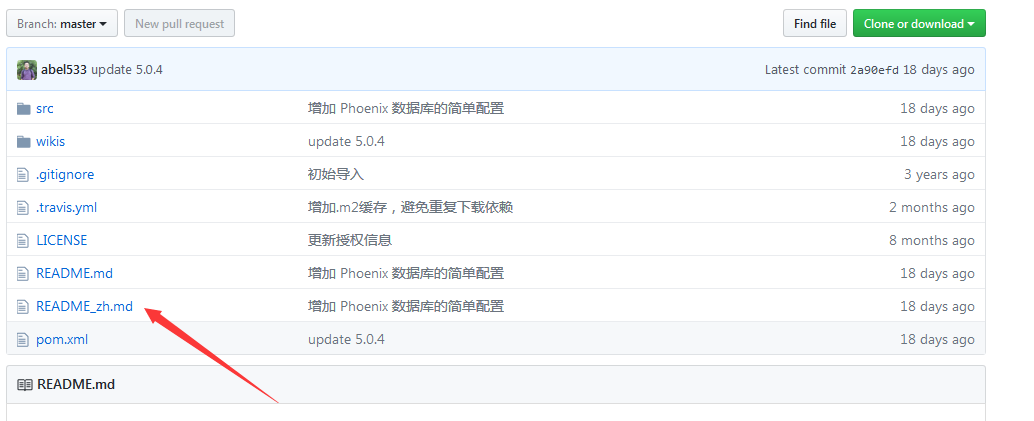
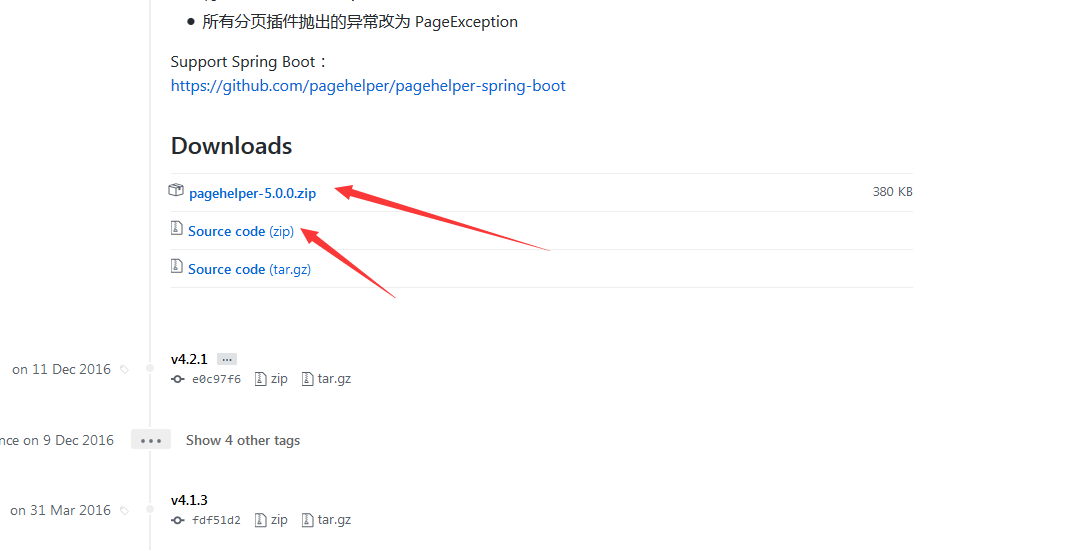
下载地址:
https://github.com/pagehelper/Mybatis-PageHelper

https://github.com/JSQLParser/JSqlParser

另外一个地址:
Pagehelper下载地址:
http://repo1.maven.org/maven2/com/github/pagehelper/pagehelper/
jsqlparser 下载地址:
http://repo1.maven.org/maven2/com/github/jsqlparser/jsqlparser/
使用步骤:
1、导入相关包pagehelper-x.x.x.jar 和 jsqlparser-x.x.x.jar。
2、在MyBatis全局配置文件中配置分页插件。
   <plugins>

<plugin interceptor="com.github.pagehelper.PageInterceptor"></plugin>

</plugins>
3、使用PageHelper提供的方法进行分页
  StudentMapper mapper = session.getMapper(StudentMapper.class);

//放在查询之前

Page<Object> page = PageHelper.startPage(1, 3);

    StudentExample example=null;

    List<Student> students=mapper.selectByExample(example);

    for(Student student :students)

        System.out.println(student.gettId() + "   " + student.gettName() + "  "+student.gettAge()+" "+student.gettEnterdate()+"  "+student.gettSid());

    System.out.println("当前页码:"+page.getPageNum());

    System.out.println("总记录数:"+page.getTotal());

    System.out.println("每页的记录数:"+page.getPageSize());

    System.out.println("总页码:"+page.getPages());
4、可以使用更强大的PageInfo封装返回结果
           StudentMapper mapper = session.getMapper(StudentMapper.class);

            Page<Object> page = PageHelper.startPage(1, 3);

            StudentExample example=null;

            List<Student> students=mapper.selectByExample(example);

                for(Student student :students)

                    System.out.println(student.gettId() + "   " + student.gettName() + "  "+student.gettAge()+" "+student.gettEnterdate()+"  "+student.gettSid());

                 PageInfo<Student> info = new PageInfo<Student>(students, 3);

                    System.out.println("当前页码:"+info.getPageNum());

                    System.out.println("总记录数:"+info.getTotal());

                    System.out.println("每页的记录数:"+info.getPageSize());

                    System.out.println("总页码:"+info.getPages());

                    System.out.println("是否第一页:"+info.isIsFirstPage());

                    System.out.println("连续显示的页码:");

                    int[] nums = info.getNavigatepageNums();

                    for (int i = 0; i < nums.length; i++) {

                        System.out.println(nums[i]);

                    }
Mybatis分页插件PageHelper使用的更多相关文章
- Mybatis分页插件PageHelper的配置和使用方法
Mybatis分页插件PageHelper的配置和使用方法 前言 在web开发过程中涉及到表格时,例如dataTable,就会产生分页的需求,通常我们将分页方式分为两种:前端分页和后端分页. 前端分 ...
- Java SSM框架之MyBatis3(三)Mybatis分页插件PageHelper
引言 对于使用Mybatis时,最头痛的就是写分页,需要先写一个查询count的select语句,然后再写一个真正分页查询的语句,当查询条件多了之后,会发现真不想花双倍的时间写count和select ...
- Mybatis学习---Mybatis分页插件 - PageHelper
1. Mybatis分页插件 - PageHelper说明 如果你也在用Mybatis,建议尝试该分页插件,这个一定是最方便使用的分页插件. 该插件目前支持Oracle,Mysql,MariaDB,S ...
- Mybatis分页插件PageHelper的实现
Mybatis分页插件PageHelper的实现 前言 分页这个概念在做web网站的时候很多都会碰到 说它简单吧 其实也简单 小型的网站,完全可以自己写一个,首先查出数据库总条数,然后按照分页大小分为 ...
- 基于Mybatis分页插件PageHelper
基于Mybatis分页插件PageHelper 1.分页插件使用 1.POM依赖 PageHelper的依赖如下.需要新的版本可以去maven上自行选择 <!-- PageHelper 插件分页 ...
- Mybatis分页插件-PageHelper的使用
转载:http://blog.csdn.net/u012728960/article/details/50791343 Mybatis分页插件-PageHelper的使用 怎样配置mybatis这里就 ...
- (转)淘淘商城系列——MyBatis分页插件(PageHelper)的使用以及商品列表展示
http://blog.csdn.net/yerenyuan_pku/article/details/72774381 上文我们实现了展示后台页面的功能,而本文我们实现的主要功能是展示商品列表,大家要 ...
- springmvc mybatis 分页插件 pagehelper
springmvc mybatis 分页插件 pagehelper 下载地址:pagehelper 4.2.1 , jsqlparser 0.9.5 https://github.com/pagehe ...
- MyBatis 分页插件PageHelper 后台报错
今天遇到一个问题,使用MyBatis 分页插件PageHelper 进行排序分页后,能正常返回正确的结果,但后台却一直在报错 net.sf.jsqlparser.parser.ParseExcepti ...
随机推荐
- zookeeper 笔记-机制的特点
zookeeper的getData(),getChildren()和exists()方法都可以注册watcher监听.而监听有以下几个特性: 一次性触发(one-time trigger) 当数据改变 ...
- 100. Same Tree(leetcode)
Given two binary trees, write a function to check if they are equal or not. Two binary trees are con ...
- Web前端性能优化——如何有效提升静态文件的加载速度
WeTest 导读 此文总结了笔者在Web静态资源方面的一些优化经验. 一.如何优化 用户在访问网页时, 最直观的感受就是页面内容出来的速度,我们要做的优化工作, 也主要是为了这个目标.那么为了提高页 ...
- Knight Moves
Problem Description A friend of you is doing research on the Traveling Knight Problem (TKP) where yo ...
- L2-2. 链表去重
L2-2. 链表去重 时间限制300 ms内存限制65536 kB代码长度限制8000 B判题程序Standard作者陈越给定一个带整数键值的单链表L,本题要求你编写程序,删除那些键值的绝对值有重复的 ...
- node调试工具--node-inspector安装
node-inspector安装: npm install --registry=http://r.cnpmjs.org -g cnpm cnpm install -g node-inspector ...
- [译]ASP.NET Core 2.0 系列文章目录
基础篇 [译]ASP.NET Core 2.0 中间件 [译]ASP.NET Core 2.0 带初始参数的中间件 [译]ASP.NET Core 2.0 依赖注入 [译]ASP.NET Core 2 ...
- ABP框架个人开发实战(1)_环境搭建
前言 之前关注ABP框架有一阵子了,一直没有潜下心来实际研究一下.最近想自己建站,以后有自己的功能开发项目,可以在自己的站点上开发,并一步步的完善,所以找个比较好用的框架迫在眉睫,选来选去,决定用AB ...
- pgjdbc源码分析
一. 源代码目录结构 pgjdbc的源码结构如下图: 那么我们来一一看看各个模块都是做什么的吧. 1 core 该目录是程序的核心模块目录. 这里实现了大部分pgjdbc的基类和接口,例如statem ...
- python量化之路:获取历史某一时刻沪深上市公司股票代码及上市时间
最近开始玩股票量化,由于想要做完整的股票回测,因此股票的上市和退市信息就必不可少.因为我们回测的时候必须要知道某一日期沪深股票的成分包含哪些对吧.所以我们要把沪深全部股票的上市时间.退市时间全部都爬下 ...