
ASP.NET Core 1.0 Configuration 配置管理
documentation: https://docs.asp.net/en/latest/fundamentals/configuration.html
github: https://github.com/aspnet/Configuration/
项目结构
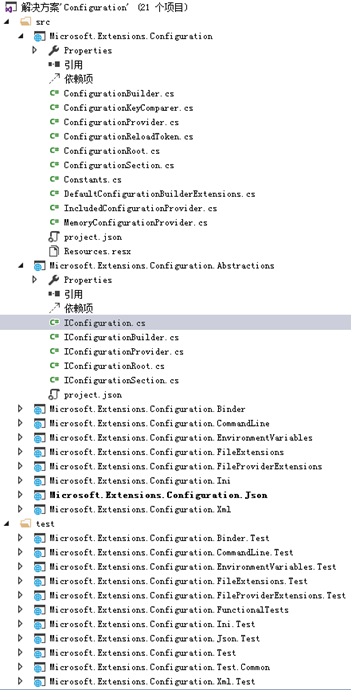
- 配置的接口定义与基础实现
- Microsoft.Extensions.Configuration 配置文件的基础实现
- Microsoft.Extensions.Configuration.Abstractions 配置文件的基础实现的接口定义
- Microsoft.Extensions.Configuration.Binder 特殊配置文件实现
- 配置的扩展
- Microsoft.Extensions.Configuration.CommandLine 命令行扩展
- Microsoft.Extensions.Configuration.EnvironmentVariables 环境变量扩展
- Microsoft.Extensions.Configuration.FileExtensions 文本类型扩展
- Microsoft.Extensions.Configuration.FileProviderExtensions 用来检测配置文本是否变动
- Microsoft.Extensions.Configuration.Ini Ini文件类型扩展
- Microsoft.Extensions.Configuration.Json Json文件类型扩展
- Microsoft.Extensions.Configuration.Xml Xml文件类型扩展
ASP.NET Core 1.0 中抛弃了原先的web.config文件机制,引用了现有的appsettings.json文件机制,配置的文件的类型可以是JSON,XML,INI等,如在Startup类中:
    /// <summary>

    /// 配置信息

     /// </summary>

    public IConfigurationRoot Configuration { get; set; }

    /// <summary>

    /// 程序入口点

    /// </summary>

    /// <param name="env"></param>

    public Startup(IHostingEnvironment env)

    {

        var builder = new ConfigurationBuilder()

                     .AddJsonFile("appsettings.json")

                     .AddEnvironmentVariables();

        Configuration = builder.Build();

    }
新的配置机制基于Microsoft.Extensions.Configuration命名空间,IConfiguration接口中定义配置信息的实例接口
    /// <summary>

    /// Represents a set of key/value application configuration properties.

    /// </summary>

    public interface IConfiguration

    {

        /// <summary>

        /// Gets or sets a configuration value.

        /// </summary>

        /// <param name="key">The configuration key.</param>

        /// <returns>The configuration value.</returns>

        string this[string key] { get; set; }

        /// <summary>

        /// Gets a configuration sub-section with the specified key.

        /// </summary>

        /// <param name="key">The key of the configuration section.</param>

        /// <returns>The <see cref="IConfigurationSection"/>.</returns>

        /// <remarks>

        ///     This method will never return <c>null</c>. If no matching sub-section is found with the specified key,

        ///     an empty <see cref="IConfigurationSection"/> will be returned.

        /// </remarks>

        IConfigurationSection GetSection(string key);

        /// <summary>

        /// Gets the immediate descendant configuration sub-sections.

        /// </summary>

        /// <returns>The configuration sub-sections.</returns>

        IEnumerable<IConfigurationSection> GetChildren();

        IChangeToken GetReloadToken();

    }
IConfigurationRoot接口继承IConfiguration接口,定义了Reload方法; IConfigurationProvider 是定义所有实现的基础接口约定;IConfigurationBuilder接口是基础实现的构造器,ConfigurationBuilder类定义了基础具体实现。
扩展方法
支持多文件类型配置,是在IConfigurationBuilder构造器接口上进行扩展方法
       var configurationBuilder = new ConfigurationBuilder();

       configurationBuilder.AddIniFile(_iniConfigFilePath);

       configurationBuilder.AddJsonFile(_jsonConfigFilePath);

       configurationBuilder.AddXmlFile(_xmlConfigFilePath);

       configurationBuilder.AddInMemoryCollection(_memConfigContent);

       var config = configurationBuilder.Build();
如AddJsonFile扩展方法
        /// <summary>

        /// Adds the JSON configuration provider at <paramref name="path"/> to <paramref name="configurationBuilder"/>.

        /// </summary>

        /// <param name="configurationBuilder">The <see cref="IConfigurationBuilder"/> to add to.</param>

        /// <param name="path">Absolute path or path relative to <see cref="IConfigurationBuilder.BasePath"/> of

        /// <paramref name="configurationBuilder"/>.</param>

        /// <param name="optional">Determines if loading the configuration provider is optional.</param>

        /// <returns>The <see cref="IConfigurationBuilder"/>.</returns>

        /// <exception cref="ArgumentException">If <paramref name="path"/> is null or empty.</exception>

        /// <exception cref="FileNotFoundException">If <paramref name="optional"/> is <c>false</c> and the file cannot

        /// be resolved.</exception>

        public static IConfigurationBuilder AddJsonFile(

            this IConfigurationBuilder configurationBuilder,

            string path,

            bool optional)

        {

            if (configurationBuilder == null)

            {

                throw new ArgumentNullException(nameof(configurationBuilder));

            }

            if (string.IsNullOrEmpty(path))

            {

                throw new ArgumentException(Resources.Error_InvalidFilePath, nameof(path));

            }

            var fullPath = Path.Combine(configurationBuilder.GetBasePath(), path);

            if (!optional && !File.Exists(fullPath))

            {

                throw new FileNotFoundException(Resources.FormatError_FileNotFound(fullPath), fullPath);

            }

            configurationBuilder.Add(new JsonConfigurationProvider(fullPath, optional: optional));

            return configurationBuilder;

        }
Application Secrets
https://github.com/aspnet/UserSecretsConfiguration
https://docs.asp.net/en/latest/fundamentals/configuration.htmlhttp://developer.telerik.com/featured/new-configuration-model-asp-net-core/
http://jameschambers.com/2016/01/Strongly-Typed-Configuration-in-ASP-NET-Core-MVC/
ASP.NET Core 1.0 Configuration 配置管理的更多相关文章
- ASP.NET Core 1.0 开发记录
官方资料: https://github.com/dotnet/core https://docs.microsoft.com/en-us/aspnet/core https://docs.micro ...
- [转]Writing Custom Middleware in ASP.NET Core 1.0
本文转自:https://www.exceptionnotfound.net/writing-custom-middleware-in-asp-net-core-1-0/ One of the new ...
- .NET跨平台之旅:将示例站点从 ASP.NET 5 RC1 升级至 ASP.NET Core 1.0
终于将“.NET跨平台之旅”的示例站点 about.cnblogs.com 从 ASP.NET 5 RC1 升级至 ASP.NET Core 1.0 ,经历了不少周折,在这篇博文中记录一下. 从 AS ...
- [译]Writing Custom Middleware in ASP.NET Core 1.0
原文: https://www.exceptionnotfound.net/writing-custom-middleware-in-asp-net-core-1-0/ Middleware是ASP. ...
- 初识ASP.NET Core 1.0
本文将对微软下一代ASP.NET框架做个概括性介绍,方便大家进一步熟悉该框架. 在介绍ASP.NET Core 1.0之前有必要澄清一些产品名称及版本号.ASP.NET Core1.0是微软下一代AS ...
- ASP.NET Core 1.0 静态文件、路由、自定义中间件、身份验证简介
概述 ASP.NET Core 1.0是ASP.NET的一个重要的重新设计. 例如,在ASP.NET Core中,使用Middleware编写请求管道. ASP.NET Core中间件对HttpCon ...
- ASP.NET Core 1.0 部署 HTTPS (.NET Framework 4.5.1)
var appInsights=window.appInsights||function(config){ function r(config){t[config]=function(){var i= ...
- 在 Mac OS 上创建并运行 ASP.NET Core 1.0 网站
var appInsights=window.appInsights||function(config){ function r(config){t[config]=function(){var i= ...
- ASP.NET Core 1.0 中的依赖项管理
var appInsights=window.appInsights||function(config){ function r(config){t[config]=function(){var i= ...
随机推荐
- 第十四个目标 (fzu)
http://acm.fzu.edu.cn/contest/problem.php?cid=151&sortid=8 Problem Description 目暮警官.妃英里.阿笠博士等人接连 ...
- 【python-ini】python读写ini文件
[python-ini]python读写ini文件 本文实例讲述了Python读写ini文件的方法.分享给大家供大家参考.具体如下: 比如有一个文件update.ini,里面有这些内容: 1 2 ...
- VC中C++数值范围的确定
1. Visual C++ 32 位和 64 位编译器可识别本文后面的表中的类型. 如果其名称以两个下划线 (__) 开始,则数据类型是非标准的. 下表中指定的范围均包含起始值和结束值. 类型名称 字 ...
- 2、GCC编译器的使用
GCC编译器是一个非常强大和流行的C编译器,适用于各种Linux发行版.本文解释了一些流行的GCC编译器选项. GCC编译器选项 1.指定输出可执行文件名称 在最基本的形式中,gcc编译器可以用作: ...
- 3.java面向对象编程三大特性之多态
面向对象编程的三大特性:封装.继承.多态 封装隐藏了类的内部实现机制,可以在不影响使用的情况下改变类的内部结构,同时也保护了数据.对类的外部而言它的内部实现细节是隐藏的,暴露给外界的只是它的实现方法. ...
- Maven的插件管理
<pluginManagement> 这个元素和<dependencyManagement>相类似,它是用来进行插件管理的. 在我们项目开发的过程中,也会频繁的引入插件,所以解 ...
- Uval4726-数形结合的思想
题意:给定一段01序列,求一段长度不小于L的连续序列,使其平均值最大 思路:一看就想到了斜率优化,但是用基本的推公示一直没推出来,看了别人的代码,像推出斜率的式子一直没弄出来..后来一看别人写的题解, ...
- shell 命令 rz sz
尝试了几个版本,下面的是可用的 https://segmentfault.com/a/1190000012166969
- 《principal component analysis based cataract grading and classification》学习笔记
Abstract A cataract is lens opacification caused by protein denaturation which leads to a decrease i ...
- DOS和批处理基本命令
http://www.cnblogs.com/leizhao/archive/2013/03/07/2949026.html 1.rem和:: rem注释命令,该命令后的内容不被执行,但能回显 ::注 ...