
jquery另外一种类似tab切换效果
简要:最近做项目一些效果不能用淘宝kissy框架 所以代码得自己写啊 网上当然有很多组件 但是用他们的代码很多(有的是我不需要的代码) 且还要看API 还不如自己动手写个简单一个,是这么一种简单的效果,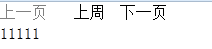 比如菜单项 有上周 本周 下周 等等项 那么对应的项 有相应的内容,上周项 的 内容为111 本周项的内容为222 下周项内容为333等等,当我点击上一页或者下一页时候 切换当前的项及项对应的内容,如果项的索引等于0的时候 那么上一页按钮灰掉 变得不可点击 同理 下一页索引等于最大项时候 也灰掉 不可点击等。
简单的HTML也贴上:(只是为了做个demo 容易说明而已)。
<div class="container">

        <div class="menuItem">

            <span class="prev">上一页</span>

            <div class="wrapList">

                <ul class="list">

                    <li class="menu">上周</li>

                    <li class="menu">本周</li>

                    <li class="menu">下周</li>

                </ul>

            </div>

            <span class="next">下一页</span>

        </div>

        <div class="allContent">

            <div class="inner">

                <div class="content">11111</div>

                <div class="content">22222</div>

                <div class="content">33333</div>

            </div>

        </div>

    </div>
CSS代码如下:
 <style>

     *{margin:0;padding:0;}

     ul,li{list-style:none;}

     .container{width:100%;overflow:hidden;}

     .menuItem {width:300px;height:22px;line-height:22px;}

     .prev, .next{float:left;width:60px;cursor:pointer;overflow:hidden;}

     .wrapList {float:left;width:60px;height:22px;line-height:22px;overflow:hidden;}

     .list li{float:left;width:60px;height:22px;line-height:22px;text-align:center;overflow:hidden;}

     .allContent{width:300px;height:300px;overflow:hidden;}

     .content{float:left;width:300px;height:300px;overflow:hidden;}

     .disable {cursor:default;color:gray;}

  </style>
JS代码如下:
/**

 * 另外一种类似tab切换效果

 */

 function TabPage() {

    this.config = {

        type               :     'click',      // 默认为点击 上一页按钮 及 下一页按钮

        menuItemCls        :     '.menu',      // 要移动的菜单项

        menuWrapCls        :     '.wrapList',  // 菜单项外部容器

        panelCls           :     '.content',   // 要滚动的内容

        panelWarpCls       :     '.allContent',// 面板外部容器

        prevCls            :     '.prev',      // 上一页按钮

        nextCls            :     '.next',      // 下一页按钮

        disabledCls        :     'disable',    //  当上一页达到最前面的一页 或者 下一页达到最后一页时候 让其不可点击 按钮变灰

        switchTo           :     0,            //  默认切换到第几项 默认为第一项

        callback           :     null          //  切换完后添加回调函数

    };

    this.cache = {

        index   :  0        // 保存当前的索引

    };

 }

 TabPage.prototype = {

    init: function(options) {

        this.config = $.extend(this.config,options || {});

        var self = this,

            _config = self.config,

            _cache = self.cache;

        // 初始化容器的宽度 使其左右动画移动操作

        var menuParent = $(_config.menuItemCls).parent(),

            menuWidth = $(_config.menuWrapCls).width(),

            len = $(_config.menuItemCls).length,

            contentParent = $(_config.panelCls).parent(),

            contentWidth = $(_config.panelWarpCls).width();

        $(menuParent).css("width",menuWidth * len);

        $(contentParent).css('width',contentWidth * len);

        // 保存页面加载时候 切换到第几项索引 然后当上一页点击 或者 下一页点击 计算出当前的索引

        _cache.index = _config.switchTo;

        // 页面初始化时候 先判断_cache.index= 0,或者 _cache.index 等于最大的时候 如果是的话 那么让其对应的按钮变灰不可点击

        if(_cache.index == 0) {

            !$(_config.prevCls).hasClass(_config.disabledCls) && $(_config.prevCls).addClass(_config.disabledCls);

            return;

        }else {

            $(menuParent).animate({"marginLeft":-menuWidth*_cache.index});

            $(contentParent).animate({"marginLeft":-contentWidth*_cache.index});

        }

        if(_cache.index == len) {

            !$(_config.nextCls).hasClass(_config.disabledCls) && $(_config.nextCls).addClass(_config.disabledCls);

            return;

        }

        // prev点击

        $(_config.prevCls).unbind(_config.type);

        $(_config.prevCls).bind(_config.type,function(){

            //判断当前的索引是否是第一项 如果是的话 上一页按钮是不可点击的状态

            if(_cache.index == 0) {

                !$(_config.prevCls).hasClass(_config.disabledCls) && $(_config.prevCls).addClass(_config.disabledCls);

                return;

             }else {

                _cache.index--;

                // 动画animate 移动操作

                $(menuParent).animate({"marginLeft":-menuWidth*_cache.index});

                $(contentParent).animate({"marginLeft":-contentWidth*_cache.index});

                $(_config.nextCls).hasClass(_config.disabledCls) && $(_config.nextCls).removeClass(_config.disabledCls);

                //回调函数

                _config.callback && $.isFunction(_config.callback) && _config.callback(_cache.index);

                // 如果已经是第一项的话 那么上一页按钮灰掉 不可点击状态

                if(_cache.index == 0){

                    !$(_config.prevCls).hasClass(_config.disabledCls) && $(_config.prevCls).addClass(_config.disabledCls);

                    return;

                }

            }

        });

        // click点击

        $(_config.nextCls).unbind('click');

        $(_config.nextCls).bind('click',function(){

            //判断当前的索引是否是最后一项 如果是的话 下一页按钮是不可点击的状态

            if(_cache.index == len-1) {

                !$(_config.nextCls).hasClass(_config.disabledCls) && $(_config.nextCls).addClass(_config.disabledCls);

                return;

             }else {

                _cache.index++;

                // 动画animate 移动操作

                $(menuParent).animate({"marginLeft":-menuWidth*_cache.index});

                $(contentParent).animate({"marginLeft":-contentWidth*_cache.index});

                $(_config.prevCls).hasClass(_config.disabledCls) && $(_config.prevCls).removeClass(_config.disabledCls);

                //回调函数

                _config.callback && $.isFunction(_config.callback) && _config.callback(_cache.index);

                // 同理 如果已经是最后的话 那么下一页按钮灰掉 不可点击状态

                if(_cache.index == len - 1){

                    !$(_config.nextCls).hasClass(_config.disabledCls) && $(_config.nextCls).addClass(_config.disabledCls);

                    return;

                }

             }

        });

    }

 };
调用方式如下:
<script>

    new TabPage().init({

		switchTo : 1,

		callback: function(index){

			console.log(index);

		}

	});

</script>
jquery另外一种类似tab切换效果的更多相关文章
- vue-cli 路由 实现类似tab切换效果(vue 2.0)
1,更改main.js 2,在App.vue中,写入两个跳转链接(router-link),分别跳转到"home""About" (home.About即分别是 ...
- jquery写的tab切换效果 非常简单
自己写的一款 tab切换效果,比较简单,适合新手 <style type="text/css">*{margin:0; padding:0; font-size:12p ...
- 案例(拖拽对话框、高清放大镜、自制滚动条、元素的隐藏方式、表格隔行变色、tab切换效果、字符串拼接、刷新评论)
一.拖拽对话框 <style> .of{ width: 500px; } #link,#close{ text-decoration: none; margin: 0 10px; font ...
- 又一Tab切换效果(js实现)
<!DOCTYPE html PUBLIC "-//W3C//DTD XHTML 1.0 Transitional//EN" "http://www.w3.org/ ...
- CSS3 :target伪类实现Tab切换效果
用:target伪类实现Tab切换效果真的非常简单!简单到什么程度呢?它只需要下面这些代码. style.css: .song-info { position: absolute; backgroun ...
- 实用CSS3属性之 :target伪类实现Tab切换效果
CSS3 :target伪类用来改变页面中锚链接URL所指向的ID样式,例如你要改变描链接指向#tab的元素字体颜色为蓝色,哪么你可以这样写成#tab:target {color:blue} 浏览器支 ...
- CSS3 :target伪类实现Tab切换效果 BY commy
http://www.shejidaren.com/examples/css3-target/css3-target.html#tab1 标签一 标签二 标签三 欢迎加设计达人Q群:50063010设 ...
- 100种不同图片切换效果插件pageSwitch
分享100种不同图片切换效果插件pageSwitch.这是一款适用于全屏切换场景,即一切一屏,并且实现了超过一百种切换效果,支持自定义切页动画.效果图如下: 在线预览 源码下载 实现的代码. ht ...
- 基于jquery鼠标点击图片翻开切换效果
基于jquery鼠标点击图片翻开切换效果是一款基于jQuery+CSS3实现的点击图片切换特效.效果图如下: 在线预览 源码下载 实现的代码. html代码: <div class=&quo ...
随机推荐
- JavaScript--DOM操作表格及样式(21)
一 操作表格 // <table>标签是HTML中结构最为复杂的一个,我们可以通过DOM来创建生成它,或者HTMLDOM来操作它; // 使用DOM来创建表格; var table = d ...
- python学习之老男孩python全栈第九期_day015作业_老男孩Python全9期练习题(面试真题模拟)
一. 选择题(32分) 1. python不支持的数据类型有:AA. charB. intC. floatD. list 2. Ex = ‘foo’y = 2print(x + y)A. fooB. ...
- django-templates过滤器
常用内置过滤器: 过滤器会更改量或便签参数的值: title过滤器: {{ django|title }} 在下列context中 {'django': 'the web framework for ...
- python邮件发送
'''qq邮件与其他邮件有所不同,下以我的qq邮件为例(切勿转载):''' import osimport smtplibfrom email.mime.text import MIMEText # ...
- 【读书笔记】iOS-网络-错误处理的经验法则
一,在接口契约中处理错误. 二,错误状态可能不正确. 设备模糊地确认操作是崇拜失败的.比如,移动应用发出HTTP请求以在两个账户间转账.请求被银行系统接收并正确地处理:然而,由于网络失败应答却丢失了, ...
- js 动态声明变量
var object = {}; for(var i=0; i<5; i++){ object['attr'+i] = i; }
- Android 常见adb命令
Android 常见adb命令 by:授客 QQ:1033553122 1. 查看所有已链接的设备 命令: adb devices 例: C:\Users\laiyu>adb device ...
- windows 远程连接
* 方法1:windows自带的远程工具 缺点:如果操作系统是家庭版,会一致连接不上:尽管想办法把这个功能打开: 步骤: * 打开允许远程连接: 点进去自己设置就行,没有什么好说的 设置完之后,需要允 ...
- Ionic命令大全
start [options] <PATH> [template] ............. Starts a new Ionic project in the specified P ...
- windows10移动热点打开后手机不能上网
电脑的win10操作系统自带有移动热点功能,可以共享上网,类似于手机的热点功能.今天在共享时遇到一些问题,现在解决了分享一下. 如果本身电脑无法上网,即wlan上网功能无效,有可能是驱动不兼容,可以在 ...