
spring cloud 学习(10) - 利用springfox集成swagger
对绝大多数程序员而言,写接口文档是一件痛苦的事情,相对文档,他们更愿意写代码。最理想的情况就是:代码即文档!服务开发完成后,部署上去文档就自动生成,没错,这就是springfox + swagger要解决的问题!
swagger号称 THE WORLD'S MOST POPULAR API TOOLING。但swagger默认情况下,仍要单独部署,程序员还是要跑到一个单独的web页面上编辑,写一堆yaml文档,依然不爽。
github上有一个springfox项目,可以在开发rest服务时,只要加一些注解,就自动生成swagger-ui界面,以及相关的文档,而且可以跟spring-boot/spring-cloud无缝集成。
步骤:
一、添加依赖项
    dependencies {

        ...

        compile "io.springfox:springfox-swagger2:2.7.0"

        compile "io.springfox:springfox-swagger-ui:2.7.0"

        ...

    }
二、添加swagger配置类
 package cn.mwee.order.cloud.service.express.config;

 import org.springframework.context.annotation.Bean;

 import org.springframework.context.annotation.Configuration;

 import org.springframework.web.servlet.config.annotation.ResourceHandlerRegistry;

 import org.springframework.web.servlet.config.annotation.WebMvcConfigurerAdapter;

 import springfox.documentation.builders.ApiInfoBuilder;

 import springfox.documentation.builders.PathSelectors;

 import springfox.documentation.builders.RequestHandlerSelectors;

 import springfox.documentation.service.ApiInfo;

 import springfox.documentation.service.Contact;

 import springfox.documentation.spi.DocumentationType;

 import springfox.documentation.spring.web.plugins.Docket;

 import springfox.documentation.swagger2.annotations.EnableSwagger2;

 /**

  * Created by yangjunming on 13/10/2017.

  */

 @Configuration

 @EnableSwagger2

 public class SwaggerConfig {

     @Bean

     public Docket createRestApi() {

         return new Docket(DocumentationType.SWAGGER_2)

                 .apiInfo(apiInfo())

                 .select()

                 .apis(RequestHandlerSelectors.basePackage("xxx.controller")) //Controller所在的package

                 .paths(PathSelectors.any())

                 .build();

     }

     @Bean

     public WebMvcConfigurerAdapter addResourceHandlers() {

         return new WebMvcConfigurerAdapter() {

             @Override

             public void addResourceHandlers(ResourceHandlerRegistry registry) {

                 registry.addResourceHandler("swagger-ui.html")

                         .addResourceLocations("classpath:/META-INF/resources/");

                 registry.addResourceHandler("/webjars/**")

                         .addResourceLocations("classpath:/META-INF/resources/webjars/");

             }

         };

     }

     private ApiInfo apiInfo() {

         return new ApiInfoBuilder()

                 .title("express-service online api document")

                 .description("某某服务")

                 .contact(new Contact("作者名字", "http://作者介绍网址", "作者@邮箱.com"))

                 .version("1.0.0") //显示版本号

                 .build();

     }

 }
三、在Controller上添加注解
 package cn.mwee.order.cloud.service.express.controller;

 import cn.mwee.order.cloud.admin.common.controller.AbstractController;

 import cn.mwee.order.cloud.admin.service.dto.common.DataResult;

 import cn.mwee.order.cloud.admin.service.dto.express.sf.*;

 import cn.mwee.order.cloud.admin.service.express.SFExpressService;

 import io.swagger.annotations.Api;

 import io.swagger.annotations.ApiOperation;

 import org.springframework.beans.factory.annotation.Autowired;

 import org.springframework.cloud.context.config.annotation.RefreshScope;

 import org.springframework.web.bind.annotation.PostMapping;

 import org.springframework.web.bind.annotation.RequestBody;

 import org.springframework.web.bind.annotation.RequestMapping;

 import org.springframework.web.bind.annotation.RestController;

 import javax.servlet.http.HttpServletRequest;

 /**

  * Created by 菩提树下的杨过(http://yjmyzz.cnblogs.com/) on 2017/7/18.

  */

 @RestController

 @RefreshScope

 @RequestMapping("/sf")

 @Api(consumes = "application/json",

         produces = "application/json",

         protocols = "http",

         basePath = "/sf", value = "顺丰对接服务")

 public class SFController extends AbstractController {

     ...

     @ApiOperation(value = "下单", tags = "顺丰速运")

     @PostMapping(value = "submitOrder")

     public DataResult<SFSubmitResponse> submitOrder(@RequestBody SFSubmitOrderRequest request) throws Exception {

         return ...;

     }

     ...

 }
注意上面几处带@Api开头的注解
四、参数实体上添加注解
 package cn.mwee.order.cloud.admin.service.dto.express.sf;

 import cn.mwee.order.cloud.admin.service.dto.express.ExpressBaseOrder;

 import cn.mwee.order.common.utils.date.DateUtil;

 import com.alibaba.fastjson.annotation.JSONField;

 import io.swagger.annotations.ApiModel;

 import io.swagger.annotations.ApiModelProperty;

 import lombok.Data;

 import lombok.EqualsAndHashCode;

 import java.util.ArrayList;

 import java.util.Date;

 import java.util.List;

 /**

  * 顺丰的物流订单

  * Created by 菩提树下的杨过(http://yjmyzz.cnblogs.com/) on 26/09/2017.

  */

 @Data

 @EqualsAndHashCode(callSuper = false)

 @ApiModel(description = "顺丰-提交订单参数")

 public class SFSubmitOrderRequest extends ExpressBaseOrder {

     @ApiModelProperty(value = "商家编码(顺丰分配提供)", required = true, dataType = "String", example = "A001")

     private String clientCode; //商家编码,为顺丰分配提供

     ...

 }
还是注意上面几处带@Api开头的注解,一看就懂。
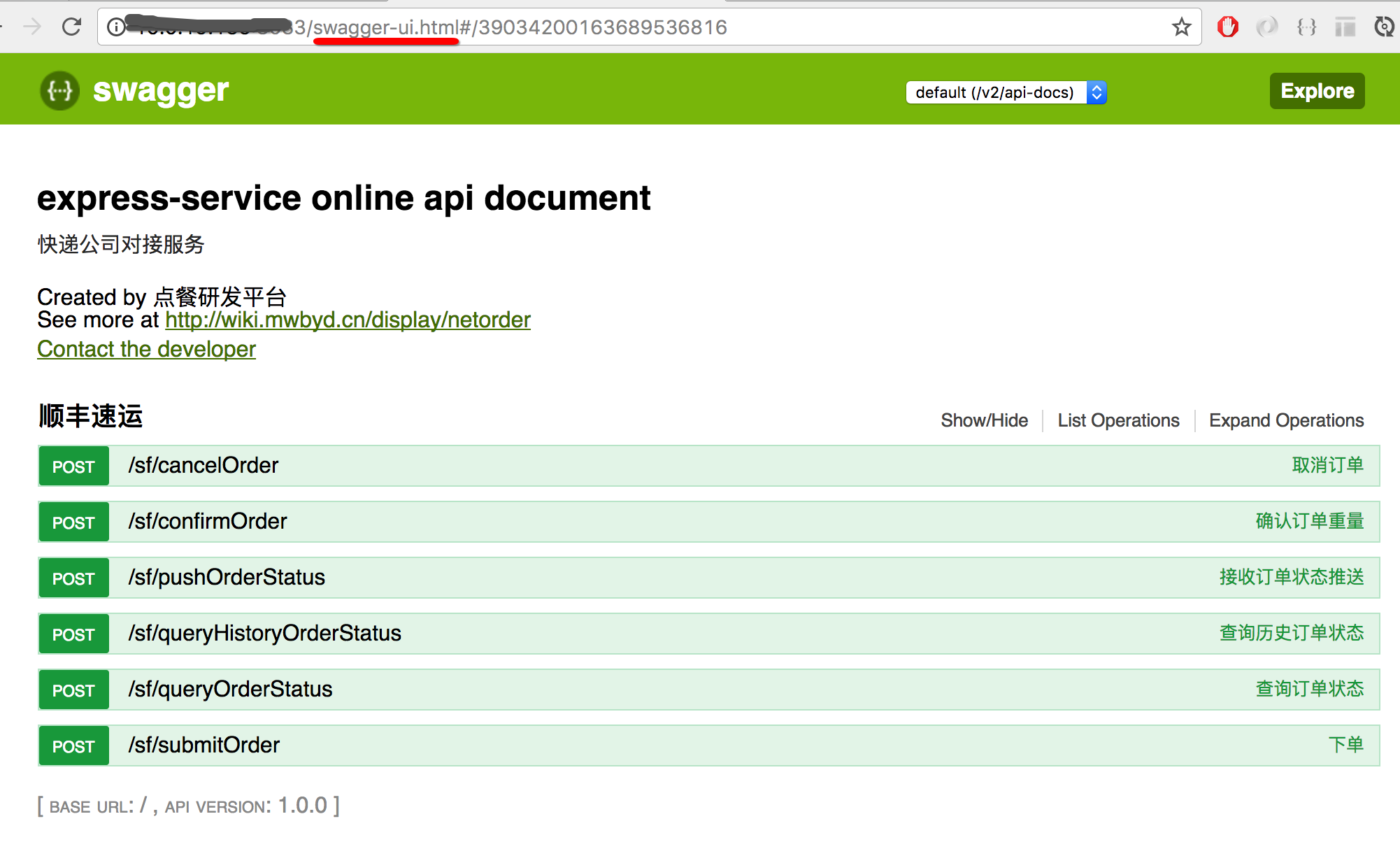
启动后,就可以用 http://xxxx.xxxx:port/swagger-ui.html访问了
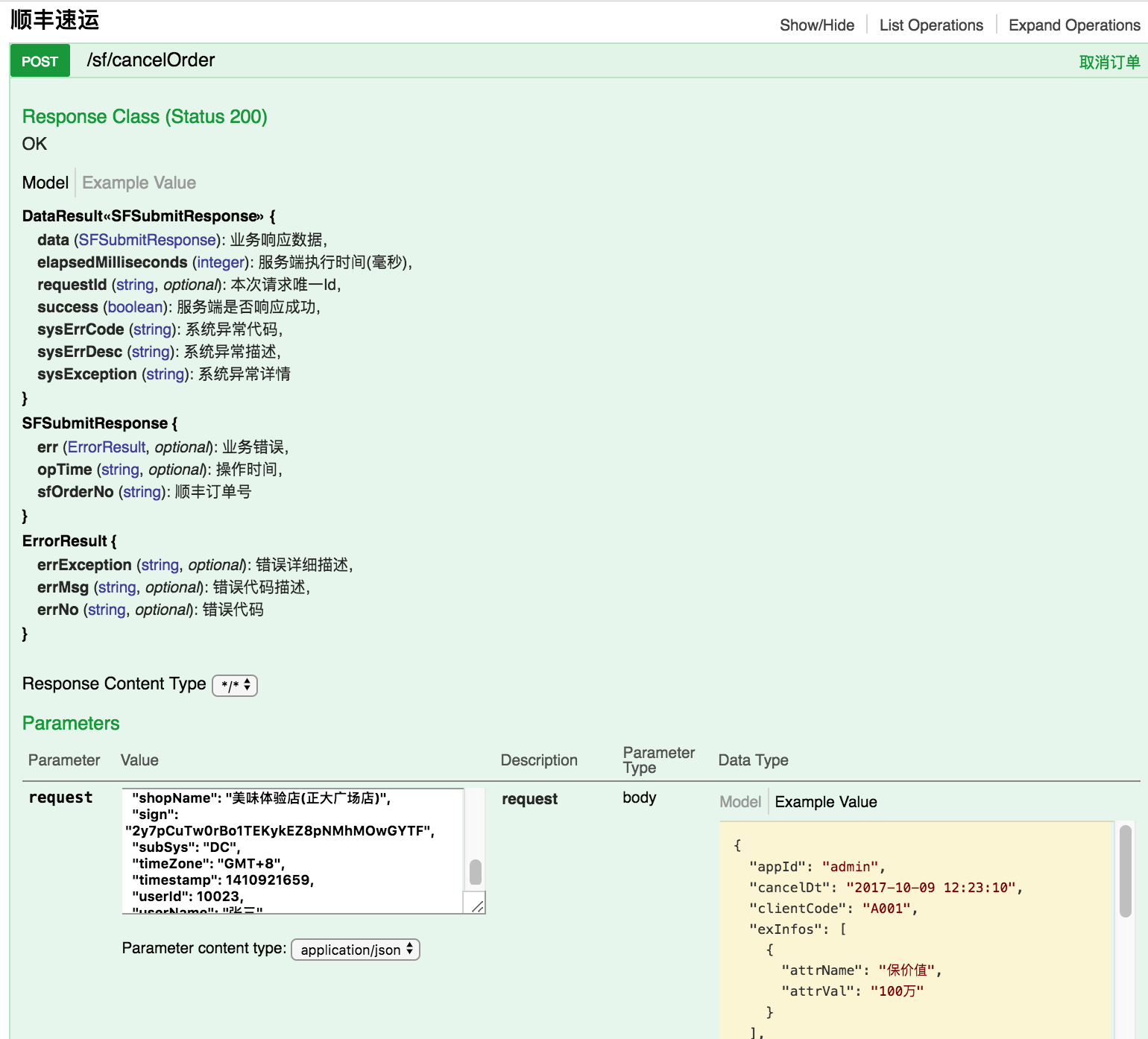
随便点开一个方法,比如cancelOrder
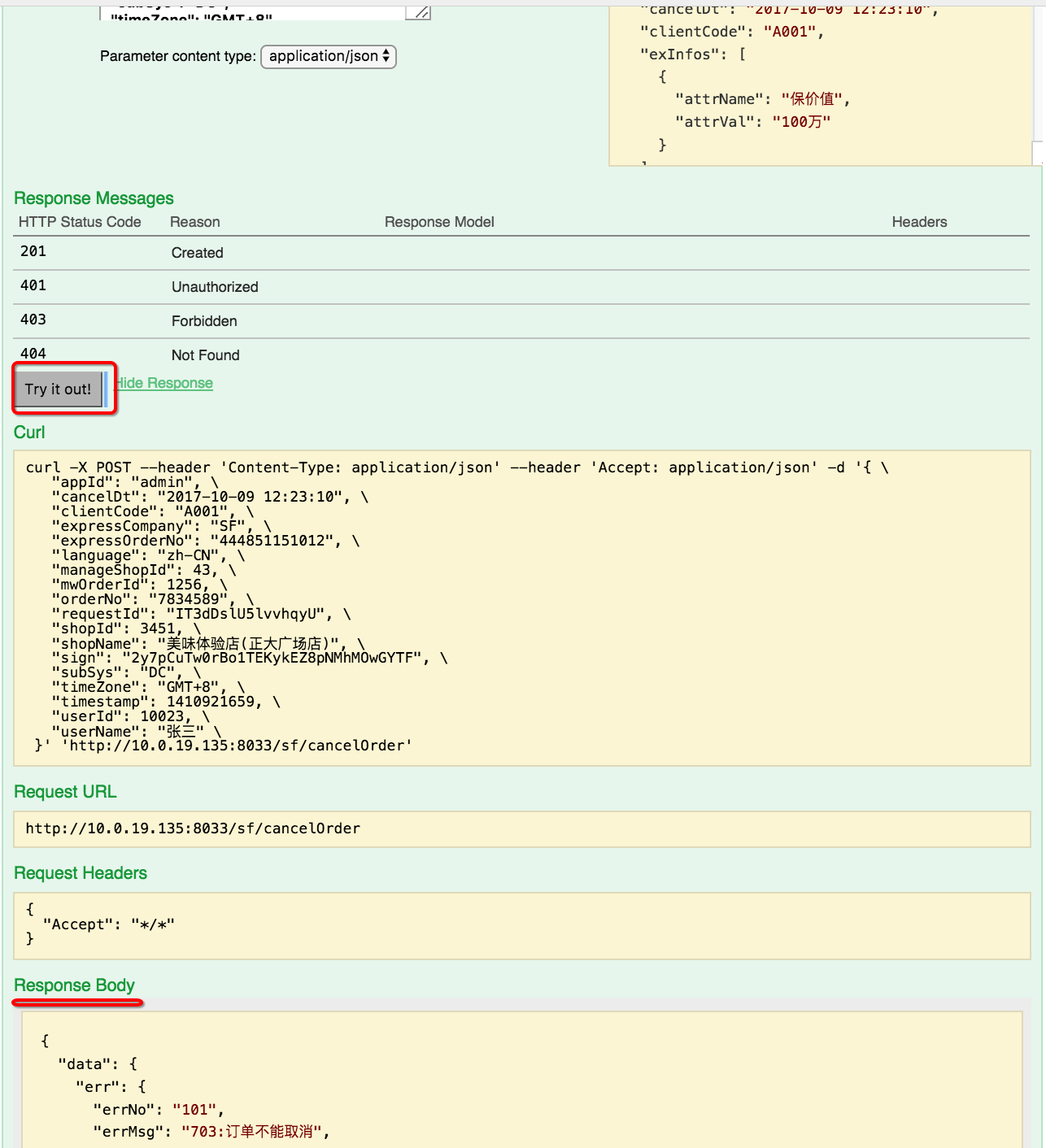
还可以直接调用REST(相当于postman之类的rest服务测试工具了)
spring cloud 学习(10) - 利用springfox集成swagger的更多相关文章
- spring cloud 学习(8) - sleuth & zipkin 调用链跟踪
业务复杂的微服务架构中,往往服务之间的调用关系比较难梳理,一次http请求中,可能涉及到多个服务的调用(eg: service A -> service B -> service C... ...
- spring cloud 学习(9) - turbine stream无法在eureka注册的解决办法
turbine是啥就不多解释了,初次接触的可以移步spring cloud 学习(4) - hystrix 服务熔断处理 拉到最后看一下,turbine stream默认情况下启动成功后,eureka ...
- Spring Cloud学习(一):Eureka服务注册与发现
1.Eureka是什么 Eureka是Netflix开发的服务发现框架,本身是一个基于REST的服务,主要用于定位运行在AWS域中的中间层服务,以达到负载均衡和中间层服务故障转移的目的. Eureka ...
- spring cloud 学习资料
spring cloud 学习资料 网址 拜托!面试请不要再问我Spring Cloud底层原理 https://mp.weixin.qq.com/s/ZH-3JK90mhnJPfdsYH2yDA
- Spring Boot和Spring Cloud学习资源推荐
Spring Boot和Spring Cloud学习资源推荐 比较好的学习资源,分享一下. 1.Spring Boot官方文档:http://projects.spring.io/spring-b ...
- Spring Cloud 学习 之 Spring Cloud Eureka(源码分析)
Spring Cloud 学习 之 Spring Cloud Eureka(源码分析) Spring Boot版本:2.1.4.RELEASE Spring Cloud版本:Greenwich.SR1 ...
- spring cloud 学习(二)关于 Eureka 的学习笔记
关于 Eureka 的学习笔记 个人博客地址 : https://zggdczfr.cn/ ,欢迎光临~ 前言 Eureka是Netflix开发的服务发现组件,本身是一个基于REST的服务.Sprin ...
- 搭建服务与负载均衡的客户端-Spring Cloud学习第二天(非原创)
文章大纲 一.Eureka中的核心概念二.Spring RestTemplate详解三.代码实战服务与负载均衡的客户端四.项目源码与参考资料下载五.参考文章 一.Eureka中的核心概念 1. 服务提 ...
- Spring Cloud学习之-什么是Spring Cloud?
SpringCloud 什么是微服务? 要想学习微服务,首先需要知道什么是微服务?为什么会有微服务?相信看完架构的发展史读者就会明白 架构发展史 单体应用架构 如图所示:将所有的模块,所有内容(页面. ...
随机推荐
- [整理]win7下VS2010遇到内存不足解决方发
电脑重装Win7 64bit不久后,一天内VS2010使用久了,就会出现内存不足,实际内存使用情况却不是,显示内存已使用70%.以前没有遇到过,经网上查找,貌似是VS2010对内存计算会在某些情况下计 ...
- 在Windows环境中利用Responder工具窃取NTLMv2哈希
在Windows环境中利用Responder工具窃取NTLMv2哈希 翻译自:https://github.com/incredibleindishell/Windows-AD-environment ...
- git使用常用命令
第一部分:个人整理部分(读<Git教程By廖雪峰.pdf>笔记) /* 配置全局参数 */git config --global user.name "username" ...
- arm交叉编译器gnueabi、none-eabi、arm-eabi、gnueabihf等的区别【转】
转自:https://www.cnblogs.com/deng-tao/p/6432578.html 博客来之于: http://www.veryarm.com/296.html 交叉编译工具链的命 ...
- python格式化输出【转】
今天写代码时,需要统一化输出格式进行,一时想不起具体细节,用了最笨的方法,现在讲常见的方法进行一个总结. 一.格式化输出 1.整数的输出 直接使用'%d'代替可输入十进制数字: >>> ...
- Python学习一|anaconda的安装问题以及Python语言的特点
安装时遇到的问题 安装anaconda3.0到D盘之后,配置好两个环境变量:D:\anaconda和D:\anaconda\Scripts.发现在命令行中执行python指令可以,但conda指令却是 ...
- 公司软raid问题
RAID的技术介绍: stripe width(条带宽度):RAID中的磁盘数,就是组成这个stripe的磁盘数.如,4个磁盘组成的RAID 0,条带宽度就是4. stripe depth(条带深度) ...
- Kotlin 语言下设计模式的不同实现
偶然在 Github 上看到 dbacinski 写的 Kotlin 语言下设计模式的不同实现(这里的不同是相对于 Java 语言的),有些实现非常好,但是有些实现的例子不是很赞同.所以自己写了 Ko ...
- 卷积神经网络CNN经典模型整理Lenet,Alexnet,Googlenet,VGG,Deep Residual Learning(转)
参考:http://blog.csdn.net/xbinworld/article/details/45619685
- linux 环境变量设置方法总结(PATH / LD_LIBRARY_PATH)
PATH和LD_LIBRARY_PATH本质都是变量,所谓变量的意思就是由别人赋值产生的,直觉往往会让我们添加和减少这个变量本身的某些路径,实际上这是不正确的.正确的做法是我们要去修改赋予这个变量数值 ...