
Network Basic Commands Summary
Network Basic Commands Summary
set or modify hostname
a) temporary ways
hostname NEW_HOSTNAME, but if you reboot your system, it will disabled.
b) permanent ways:
edit “/etc/sysconfig/network” HOSTNAME, then restart system, it will effect..
And you better to modify the “/etc/hosts” to make the hostname be same as “/etc/sysconfig/network”, otherwise some service will start with slowly or error.
The picture is flowing:


View Network configuration
if you want to view the network configuration, you can use the command:
“ifconfig”
[root@YGH_Linux ~]#
[root@YGH_Linux ~]# ifconfig
eth0 Link encap:Ethernet HWaddr 00:0C:29:83:42:DE
inet addr:192.168.98.131 Bcast:192.168.98.255 Mask:255.255.255.0
inet6 addr: fe80::20c:29ff:fe83:42de/64 Scope:Link
UP BROADCAST RUNNING MULTICAST MTU:1500 Metric:1
RX packets:2253 errors:0 dropped:0 overruns:0 frame:0
TX packets:1357 errors:0 dropped:0 overruns:0 carrier:0
collisions:0 txqueuelen:1000
RX bytes:195575 (190.9 KiB) TX bytes:190320 (185.8 KiB)
lo Link encap:Local Loopback
inet addr:127.0.0.1 Mask:255.0.0.0
inet6 addr: ::1/128 Scope:Host
UP LOOPBACK RUNNING MTU:16436 Metric:1
RX packets:18 errors:0 dropped:0 overruns:0 frame:0
TX packets:18 errors:0 dropped:0 overruns:0 carrier:0
collisions:0 txqueuelen:0
RX bytes:1308 (1.2 KiB) TX bytes:1308 (1.2 KiB)

you also can view the network config
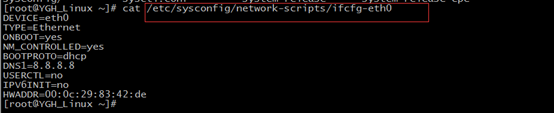
the detail of newwork.
[root@oldboy ~]# cat /etc/sysconfig/network-scripts/ifcfg-eth0 ==》这里是eth0网卡设备的默认配置文件
# Advanced Micro Devices [AMD] 79c970 [PCnet32 LANCE]
DEVICE=eth0 ================》这里是网卡名称第一块网卡为eth0,第二块为eth1...
BOOTPROTO=static============》static为固定IP地址,非动态DHCP获取
BROADCAST=10.0.0.255 =======》这里是广播地址,一般为网络地址的最后一个地址。
HWADDR=00:0C:29:0E:5F:63 ===》这里mac地址,不同的机器不能重复,尤其是在刻隆虚拟机或复制网卡配置时要注意。
IPADDR=10.0.0.161 ==========》这里是IP地址
NETMASK=255.255.255.0=======》子网掩码/24
NETWORK=10.0.0.0 =========》网段设置
ONBOOT=yes =================》开机网卡自启动
GATEWAY=10.0.0.254==========》网关的配置,也可以命令行通过route添加删除。
TYPE=Ethernet===============》类型
提示:第一块网卡为ifcfg-eth0,第二块为ifcfg-eth1...
If you want to add another network settings.
you use two ways flowing:
a)
temporary ways
use this
command:” ifconfig eth0:1 10.0.0.0/24 ”
or “ifconfig eth0:1 10.0.0.0 netmask
255.255.255.0”
if you restart
the network service ,it will be lost
if you want to
make it permanent, you should create a file whose content is same as “ifcfh-eth0”,
but file name is the network name you want to create.
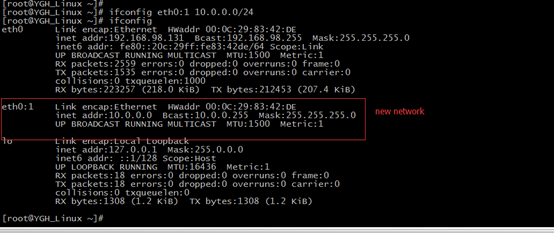
modify or set DNS
DNS will be write two main files.
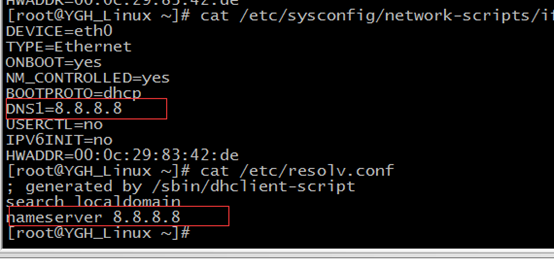
The first file is “/etc/sysconfig/network-scripts/ifcfg-eth0”
The second file is “/etc/resolv.conf”. But this
file is same as the above.
if edit the “/etc/resolv.conf” NAMESERVER, then
restart the network service, the NAMSEVER
will be lost and the DNS1 in the “/etc/sysconfig/network-scripts/ifcfg-eth0”
will be set in the “/etc/resolv.conf”. In a word, the “NAMESERVER” must keep
same with “DNS1
”
View route configuration
if want to view the route config ,you can
user the “route -n”.
the last line is default route.

you can also add new route or delete route.
add new route use this command
route
add default gw 10.0.0.254
delete existing route
route
del default gw 10.0.0.254.
Some ways to check you service whether can be used.
a)
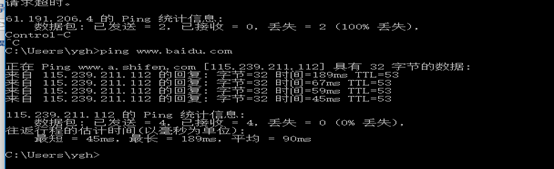
ping
ping is mean send ICMP ECHO_REQUEST to network hosts
for example:

In
Windows Operate System, you also use this command.
b)
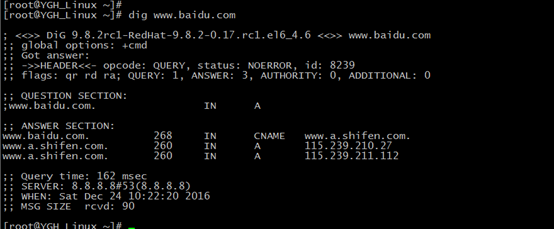
dig
dig means DNS lookup utility.
for example:
c)
traceroute
traceroute means to print the route packets trace network
host.

d)
tcpdump
tcpdump means to dump traffic on network.
if you want to check some requests and your service reply,
you can use this command.
for example:
First executing “tcpdump -n icmp -i eth0” in your Linux
System.

Executing “ ping 192.168.98.131” in Window Operate System DOS.

you will view those in Linux System

you can see the REQUEST and REPLY.
if a request is replied, this show you server is good.
if a request is not replied, show you server is error.
you can use this command to check you server whether error.
This is very useful commands!
How to check your server when it can’t go Internet
1)
checking physical line whether
fluent.
2)
checking your server IP,DNS and
route
3)
checking your server gateway
4)
ping open internet IP
7)如果win32和linux服务器无法连接网络,分别描述排查方法?
此题留给大家了。大家可以评论或单独和我交流。
提示:基本检查思路:
a.物理链路是否通畅
b.本机IP,路由,DNS的设置情况是否达标。
c.测试到网关或路由器的通畅情况。
d.测试ping公网ip的通常情况(平时要记几个外部IP)
e.测试DNS的通畅,可以ping etiantian.org看是否出对应IP。
根据每级的结果来排查,如果是系统管理员,以上问题都检查了后,还可以在网关路由服务器上向上向下测试。
逐级排查。
Network Basic Commands Summary的更多相关文章
- Linux--Introduction and Basic commands(Part one)
Welcome to Linux world! Introduction and Basic commands--Part one J.C 2018.3.11 Chapter 1 What Is Li ...
- Postgres Basic Commands for Beginners
Just sharing what I have learned about postgres recently. Here is a part of basic commands you may n ...
- CheeseZH: Octave basic commands
1.Basic Operations 5+6 3-2 5*8 1/2 2^6 1 == 2 %false ans = 0 1 ~= 2 %true ans = 1 1 && 0 %AN ...
- Network Basic Knowledge
@1: 应用层的常用协议以及对应的端口号: DNS 53/tcp/udp SMTP 25/tcp POP3 110/tcp HTTP 80/tcp HTTPS 443/udp TELNET 23/tc ...
- linux basic commands
1. man - an interface to the on-line reference manuals $man man 2. apt - advanced package tool SEE A ...
- kafka basic commands
kafka-server-start.sh config/server.properties & kafka-server-stop.sh kafka-topics.sh --creat ...
- Network Principle Course Summary 001
1.物理层 物理层 协议:RJ45.CLOCK.IEEE802.3 (中继器,集线器) 作用:通过媒介传输比特,确定机械及电气规范(比特Bit) 1.1 通信基础 数据 (data) —— 运送消息的 ...
- 【转】linux network namespace 学习
原文地址:https://segmentfault.com/a/1190000004059167 介绍 在专业的网络世界中,经常使用到Virtual Routing and Forwarding(VR ...
- 机器学习技法:14 Radial Basis Function Network
Roadmap RBF Network Hypothesis RBF Network Learning k-Means Algorithm k-Means and RBF Network in Act ...
随机推荐
- webstorm官网最新版激活:
2016.2.3版本的破解方式:目前最新的就是2.3版本,在打开的License Activation窗口中选择"activation code",在输入框输入下面的注册码:3B4 ...
- Android中的 init.rc文件简介
init.rc脚本是由Android中linux的第一个用户级进程init进行解析的. init.rc 文件并不是普通的配置文件,而是由一种被称为"Android初始化语言"(An ...
- C# 在Repeater 的ItemDataBound 如何转换e.Item.DataItem 的类型
1.使用DataSet和DataTable绑定数据源时,用 DataRowView view = (DataRowView)e.Item.DataItem; 2.DataReader绑定数据源时,用 ...
- Python导出Excel为Lua/Json/Xml实例教程(三):终极需求
相关链接: Python导出Excel为Lua/Json/Xml实例教程(一):初识Python Python导出Excel为Lua/Json/Xml实例教程(二):xlrd初体验 Python导出E ...
- Linux下面安装rpm包
[root@localhost ~]# mount /dev/sdb4 /mnt/ [root@localhost ~]# cd /mnt[root@localhost mnt]# lsaddons ...
- 如何通过JS调用某段SQL语句
如何通过JS调用某段SQL语句,这样的需求在报表.数据平台开发中很常见.以报表平台FineReport开发为例,例如在点击某个按钮之后,来判断一下数据库条数,再决定下一步操作.那这在后台如何实现呢? ...
- 禁止chrome记住密码
谷歌浏览器保存密码后输入框背景色变成黄色,会影响原来的输入框样式,css样式input:-webkit-autofill可以改变输入框样式,background-color,background-im ...
- js给数组去重写法
数组为 var list =['A','B','A']; 法一:常规做法,新建list,给list添加元素,添加前判断是否包含 var removeRepeatItem = function(list ...
- PS切图(一)
Photoshop界面设置 新建文件Ctrl+N,其中[预设]-[web],[宽度]-[1920],高度不定.[背景内容]-[透明],也可存储为预设. 移动设置(V) 建议不勾选[自动选择],选择[图 ...
- c# 三种常见的委托
参考 <编写高质量代码:改善C#程序的157个建议> , 尽量使用FCL中的委托声明. FCL: FrameWork Class Library 三种常用:Action.Func.Pre ...