
Python IDLE 增加清屏功能
(Python2,Python3 通用)
保存如下代码到 ClearWindow.py
"""

Clear Window Extension

Version: 0.2

Author: Roger D. Serwy

        roger.serwy@gmail.com

Date: 2009-06-14

It provides "Clear Shell Window" under "Options"

with ability to undo.

Add these lines to config-extensions.def

[ClearWindow]

enable=1

enable_editor=0

enable_shell=1

[ClearWindow_cfgBindings]

clear-window=<Control-Key-l>

"""

class ClearWindow:

    menudefs = [

        ('options', [None,

               ('Clear Shell Window', '<<clear-window>>'),

       ]),]

    def __init__(self, editwin):

        self.editwin = editwin

        self.text = self.editwin.text

        self.text.bind("<<clear-window>>", self.clear_window2)

        self.text.bind("<<undo>>", self.undo_event)  # add="+" doesn't work

    def undo_event(self, event):

        text = self.text

        text.mark_set("iomark2", "iomark")

        text.mark_set("insert2", "insert")

        self.editwin.undo.undo_event(event)

        # fix iomark and insert

        text.mark_set("iomark", "iomark2")

        text.mark_set("insert", "insert2")

        text.mark_unset("iomark2")

        text.mark_unset("insert2")

    def clear_window2(self, event): # Alternative method

        # work around the ModifiedUndoDelegator

        text = self.text

        text.undo_block_start()

        text.mark_set("iomark2", "iomark")

        text.mark_set("iomark", 1.0)

        text.delete(1.0, "iomark2 linestart")

        text.mark_set("iomark", "iomark2")

        text.mark_unset("iomark2")

        text.undo_block_stop()

        if self.text.compare('insert', '<', 'iomark'):

            self.text.mark_set('insert', 'end-1c')

        self.editwin.set_line_and_column()

    def clear_window(self, event):

        # remove undo delegator

        undo = self.editwin.undo

        self.editwin.per.removefilter(undo)

        # clear the window, but preserve current command

        self.text.delete(1.0, "iomark linestart")

        if self.text.compare('insert', '<', 'iomark'):

            self.text.mark_set('insert', 'end-1c')

        self.editwin.set_line_and_column()

        # restore undo delegator

        self.editwin.per.insertfilter(undo)
将上述文件保存到 C:\Python27\Lib\idlelib 下。再打开此目录下的 config-extensions.def 文件,在其尾部添加如下代码
################################# >>> Added for clear Window

[ClearWindow]

enable=1

enable_editor=0

enable_shell=1

[ClearWindow_cfgBindings]

clear-window=<Control-Key-l>
好了,现在 IDLE 已经可以支持 Ctrl + l 清屏了。
注意:如果遇到 IDLE 快捷键冲突 (我在 Ubuntu 18.04 的 Python3.6.8 IDLE 中遇到过),例如 IDLE 默认已经定义了 Ctrl + l 为其它用途快捷键,则可以在 IDLE 菜单 Options -> Configure IDLE -> Keys 重新设定快捷键,如下图:
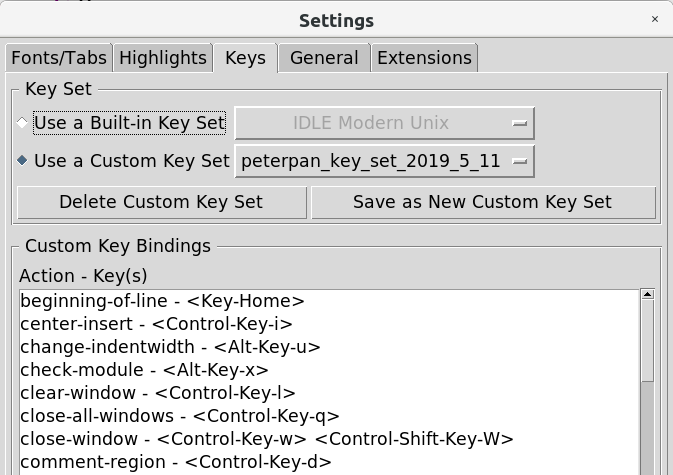
以上方法同样适用于 Linux。在 Linux 下,上述两个文件应该位于: /usr/lib/python2.7/idlelib 或 /usr/lib/python3.4/idlelib 或 /usr/lib64/python2.7/idlelib
完。
Python IDLE 增加清屏功能的更多相关文章
- Python IDLE配置清屏快捷键(Ctrl+L)
1.在Python\Lib\idlelib下,新建一个ClearWindow.py文件(没有时就新建),内容如下: """ Clear Window Extension ...
- My first Python program(附增加清屏方法)
#TempConvert.py TempStr = input("请输入带有符号的温度值:") if TempStr[-1] in ['F', 'f']: C = (eval(Te ...
- Python IDLE如何清屏
金gordon 原文 IDLE如何清屏 在学习和使用python的过程中,少不了要与Python IDLE打交道.但使用 Python IDLE 都会遇到一个常见而又懊恼的问题——要怎么清屏? 答案是 ...
- python中的清屏函数
一:cmd中python的清屏函数 import os os.system("cls") cmd中演示 1.在cmd中输入命令行: 2.执行后: 3.为什么会遗留一个0? 因为函数 ...
- python添加清屏功能
创建文件ClearWindow添加内容 class ClearWindow: menudefs = [ ('options', [None, ('Clear Shell Window', '<& ...
- Python IDLE 代码高亮主题
Python IDLE 代码高亮主题 使用方法: 打开C盘我的 C:\Documents and Settings\你的用户名.idlerc文件夹 里面会有一个 config-highlight.cf ...
- x8086汇编实现dos清屏(clear screen)
题目要求:x8086汇编实现dos下的清屏功能 80X25彩色字符模式显示缓冲区的结构: 在内存地址结构中,B8000H~BFFFFH共32KB的空间,为80x25彩色字符模式的显示缓冲区.向这个地址 ...
- Python:IDLE清屏
清屏很简单,为IDLE增加一个清屏的扩展ClearWindow即可. 首先下载clearwindow.py(点击可直接下载,不能下载的可以右键保存,格式为py结尾), 将这个文件放到Python安装目 ...
- python idle 清屏问题的解决
在学习和使用python的过程中,少不了要与python idle打交道.但使用python idle都会遇到一个常见而又懊恼的问题——要怎么清屏? 我在stackoverflow看到这样两种答案 ...
随机推荐
- Grunt 入门操作指南
0.简介 grunt是一个任务自动运行器.简单来讲,用了以后,再也不用每次修改sass后,去生成下css,也再也不用去一遍遍压缩js了 ,也再也不用修改了点点东西就要去刷新页面,也不需要去复杂地建立一 ...
- 【代码笔记】Web-JavaScript-JavaScript正则表达式
一,效果图. 二,代码. <!DOCTYPE html> <html> <head> <meta charset="utf-8"> ...
- 观察者模式与.NET的delegate、event机制
1.引言 最近在写一些程序玩的时候,接触到了delegate(委托)和event(事件),网上查找了很多的资料,有些博文说可以把delegate近似当做C++当中的函数指针来看,由于自己本身对C++的 ...
- concrrent类下ReentrantReadWriteLock类的原理以及使用
1.ReentrantreadWriteLock 类的介绍 Lock接口下的子类存在 ReentrantLock子类,该子类是一个线程同步处理类:ReentrantLock类的介绍详见XXX: Loc ...
- Ubuntu下解压缩文件
记录Ubuntu下各种压缩和解压方式: .tar解包:tar xvf FileName.tar打包:tar cvf FileName.tar DirName(注:tar是打包,不是压缩!)—————— ...
- Linux中DNS的设置
1.查看本机的域名 hostname 2.修改DNS 临时修改: hostname desktop0.example.com 永久修改: hostnamectl set-hostname deskto ...
- myeclipse10 blue版激活码
http://blog.itpub.net/27042095/viewspace-1164998/
- C# DBHelper类 参考
using System;using System.Collections.Generic;using System.Text;using System.Configuration;using Sys ...
- MySQL 数据库 简单操作命令 (部分总结)
1.查看进程方式查看数据库 ps - ajx|grep mysql 2.登录 MySQL mysql -u用户名 -p密码 3.开启服务 sudo service mysql start 4.停止服务 ...
- xss挑战之旅wp
Level 1 - 180831 第一关很简单,开胃菜 payload: http://localhost/xss_game/level1.php?name=test123<script&g ...