
Winform 实现像菜单一样弹出层
在实际工作中,如果能像菜单一样弹出自定义内容,会方便很多,比如查询时,比如下拉列表显示多列信息时,比如在填写某个信息需要查看一些信息树时。这个时候自定义弹出界面就显的非常重要了
我这里其实用到的是网上找到的一个控件(下载地址),控件可以把你装载的任何对象显示出来(这里的对象是指:窗体,自定义控件等),这里文章写出来并不是为了炫耀什么,只是觉得发现些好东西就分享出来而已,同时也做个记录,方便以后查找
开始正文,这里我做一个多列下拉列表来说明:
1、新建winform项目:PopupApplication
2、添加引用,引用上面下载的dll文件
3、因为要显示数据,所以这里需要构造一个数据源,因此我建了一个对象Student,属性:SId,SCode,SName,SAge,SAddress
namespace PopupApplication

{

    public class Student

    {

        public int SId { get; set; }

        public string SCode { get; set; }

        public string SName { get; set; }

        public int SAge { get; set; }

        public string SAddress{get;set;}

    }

}
4、创建用户控件:StudentListControl
5、在用户控件中添加一个DataGridView命名:dgvStudentList 和TextBox命名:txtKeys,DataGridView是用来显示数据列表的,TextBox是用来让用户输入关键字用来检索信息用的
如图:

6、构建数据源并绑定数据,代码:
        private List<Student> _dataList = new List<Student>();

        private TextBox _txtBox;

        public StudentListControl(TextBox txtBox)

        {

            InitializeComponent();

            _txtBox = txtBox;

            _dataList = GetDataList();

        }

        private void StudentListControl_Load(object sender, EventArgs e)

        {

            dgvStudentList.DataSource = _dataList;

        }

        /// <summary>

        /// 构造数据源

        /// </summary>

        /// <returns></returns>

        private List<Student> GetDataList()

        {

            List<Student> stList = new List<Student>();

            stList.Add(new Student() { SId = , SName = "张阳", SAge = , SCode = "zy", SAddress = "广东省中山市9999999" });

            stList.Add(new Student() { SId = , SName = "欧阳新文", SAge = , SCode = "oyxw", SAddress = "广东省广州市99" });

            stList.Add(new Student() { SId = , SName = "宇文化及", SAge = , SCode = "ywhj", SAddress = "广东省湛江市2222" });

            stList.Add(new Student() { SId = , SName = "温斯特梅拉", SAge = , SCode = "wstml", SAddress = "广东省茂名市" });

            stList.Add(new Student() { SId = , SName = "唐兵", SAge = , SCode = "tb", SAddress = "四川省阆中市555555555555" });

            stList.Add(new Student() { SId = , SName = "杨红军", SAge = , SCode = "yhj", SAddress = "四川省乐山市22222222222222222222" });

            stList.Add(new Student() { SId = , SName = "张翠山", SAge = , SCode = "zcs", SAddress = "四川省南充市7777777777777777" });

            stList.Add(new Student() { SId = , SName = "张三丰", SAge = , SCode = "zsf", SAddress = "广东省中山市555" });

            stList.Add(new Student() { SId = , SName = "何月", SAge = , SCode = "hy", SAddress = "广东省中山市88888" });

            stList.Add(new Student() { SId = , SName = "何宝生", SAge = , SCode = "hbs", SAddress = "广东省中山市77" });

            stList.Add(new Student() { SId = , SName = "王家新", SAge = , SCode = "wjx", SAddress = "广东省茂名市8" });

            stList.Add(new Student() { SId = , SName = "肖月伦", SAge = , SCode = "xyl", SAddress = "广东省茂名市7777777" });

            stList.Add(new Student() { SId = , SName = "王岳伦", SAge = , SCode = "wyl", SAddress = "广东省中山市888888888888" });

            stList.Add(new Student() { SId = , SName = "紫阳红玉", SAge = , SCode = "zyhy", SAddress = "四川省南充市2" });

            stList.Add(new Student() { SId = , SName = "雷小兵", SAge = , SCode = "lxb", SAddress = "广东省中山市999999999999999" });

            stList.Add(new Student() { SId = , SName = "张郭老", SAge = , SCode = "zgl", SAddress = "四川省南充市333333333333333333333333" });

            stList.Add(new Student() { SId = , SName = "汤小雨", SAge = , SCode = "txy", SAddress = "四川省乐山市333333333333" });

            stList.Add(new Student() { SId = , SName = "吴志胜", SAge = , SCode = "wzs", SAddress = "四川省乐山市33" });

            stList.Add(new Student() { SId = , SName = "伍国天", SAge = , SCode = "wgt", SAddress = "四川省阆中市6666" });

            stList.Add(new Student() { SId = , SName = "朱新朝", SAge = , SCode = "zxz", SAddress = "四川省阆中市666666666666666" });

            return stList;

        }
7、给txtKeys控件添加TextChange事件:
        private void txtKeys_TextChanged(object sender, EventArgs e)

        {

            if(string.IsNullOrEmpty(txtKeys.Text))

            {

                return;

            }

            var resultList = _dataList.FindAll(std=>std.SName.Contains(txtKeys.Text) || std.SAddress.Contains(txtKeys.Text));

            dgvStudentList.DataSource = resultList;

        }
8、给dgvStudentList添加点击事件,当点击列表的时候需要把选中的值显示到需要显示选中值的TextBox中
        private void dgvStudentList_Click(object sender, EventArgs e)

        {

            if (dgvStudentList.RowCount >  && dgvStudentList.SelectedRows.Count > )

            {

                DataGridViewCell nameCell= dgvStudentList.CurrentRow.Cells["ColumnSName"];

                DataGridViewCell addressCell = dgvStudentList.CurrentRow.Cells["ColumnSAddress"];

                string strName = nameCell != null && nameCell.Value != null ? nameCell.Value.ToString() : "";

                string strAddress = addressCell != null && addressCell.Value != null ? addressCell.Value.ToString() : "";

                _txtBox.Text = string.Format("{0},{1}",strName,strAddress);

            }

        }
9、在Form1界面添加TextBox控件命名:txtSelectValue,添加如下代码:
    public partial class Form1 : Form

    {

        public Form1()

        {

            InitializeComponent();

        }

        private void txtSelectValue_Click(object sender, EventArgs e)

        {

            StudentListControl uc = new StudentListControl(txtSelectValue);

            Popup pop = new Popup(uc);

            pop.Show(txtSelectValue, false);

        }

    }
至此 功能实现了,全部代码:
using System;

using System.Windows.Forms;

using PopupTool;

namespace PopupApplication

{

    public partial class Form1 : Form

    {

        public Form1()

        {

            InitializeComponent();

        }

        private void txtSelectValue_Click(object sender, EventArgs e)

        {

            StudentListControl uc = new StudentListControl(txtSelectValue);

            Popup pop = new Popup(uc);

            pop.Show(txtSelectValue, false);

        }

    }

}

using System;

using System.Collections.Generic;

using System.Windows.Forms;

namespace PopupApplication

{

    public partial class StudentListControl : UserControl

    {

        private List<Student> _dataList = new List<Student>();

        private TextBox _txtBox;

        public StudentListControl(TextBox txtBox)

        {

            InitializeComponent();

            _txtBox = txtBox;

            _dataList = GetDataList();

        }

        private void StudentListControl_Load(object sender, EventArgs e)

        {

            dgvStudentList.DataSource = _dataList;

        }

        /// <summary>

        /// 构造数据源

        /// </summary>

        /// <returns></returns>

        private List<Student> GetDataList()

        {

            List<Student> stList = new List<Student>();

            stList.Add(new Student() { SId = , SName = "张阳", SAge = , SCode = "zy", SAddress = "广东省中山市9999999" });

            stList.Add(new Student() { SId = , SName = "欧阳新文", SAge = , SCode = "oyxw", SAddress = "广东省广州市99" });

            stList.Add(new Student() { SId = , SName = "宇文化及", SAge = , SCode = "ywhj", SAddress = "广东省湛江市2222" });

            stList.Add(new Student() { SId = , SName = "温斯特梅拉", SAge = , SCode = "wstml", SAddress = "广东省茂名市" });

            stList.Add(new Student() { SId = , SName = "唐兵", SAge = , SCode = "tb", SAddress = "四川省阆中市555555555555" });

            stList.Add(new Student() { SId = , SName = "杨红军", SAge = , SCode = "yhj", SAddress = "四川省乐山市22222222222222222222" });

            stList.Add(new Student() { SId = , SName = "张翠山", SAge = , SCode = "zcs", SAddress = "四川省南充市7777777777777777" });

            stList.Add(new Student() { SId = , SName = "张三丰", SAge = , SCode = "zsf", SAddress = "广东省中山市555" });

            stList.Add(new Student() { SId = , SName = "何月", SAge = , SCode = "hy", SAddress = "广东省中山市88888" });

            stList.Add(new Student() { SId = , SName = "何宝生", SAge = , SCode = "hbs", SAddress = "广东省中山市77" });

            stList.Add(new Student() { SId = , SName = "王家新", SAge = , SCode = "wjx", SAddress = "广东省茂名市8" });

            stList.Add(new Student() { SId = , SName = "肖月伦", SAge = , SCode = "xyl", SAddress = "广东省茂名市7777777" });

            stList.Add(new Student() { SId = , SName = "王岳伦", SAge = , SCode = "wyl", SAddress = "广东省中山市888888888888" });

            stList.Add(new Student() { SId = , SName = "紫阳红玉", SAge = , SCode = "zyhy", SAddress = "四川省南充市2" });

            stList.Add(new Student() { SId = , SName = "雷小兵", SAge = , SCode = "lxb", SAddress = "广东省中山市999999999999999" });

            stList.Add(new Student() { SId = , SName = "张郭老", SAge = , SCode = "zgl", SAddress = "四川省南充市333333333333333333333333" });

            stList.Add(new Student() { SId = , SName = "汤小雨", SAge = , SCode = "txy", SAddress = "四川省乐山市333333333333" });

            stList.Add(new Student() { SId = , SName = "吴志胜", SAge = , SCode = "wzs", SAddress = "四川省乐山市33" });

            stList.Add(new Student() { SId = , SName = "伍国天", SAge = , SCode = "wgt", SAddress = "四川省阆中市6666" });

            stList.Add(new Student() { SId = , SName = "朱新朝", SAge = , SCode = "zxz", SAddress = "四川省阆中市666666666666666" });

            return stList;

        }

        private void txtKeys_TextChanged(object sender, EventArgs e)

        {

            if(string.IsNullOrEmpty(txtKeys.Text))

            {

                return;

            }

            var resultList = _dataList.FindAll(std=>std.SName.Contains(txtKeys.Text) || std.SAddress.Contains(txtKeys.Text));

            dgvStudentList.DataSource = resultList;

        }

        private void dgvStudentList_Click(object sender, EventArgs e)

        {

            if (dgvStudentList.RowCount >  && dgvStudentList.SelectedRows.Count > )

            {

                DataGridViewCell nameCell= dgvStudentList.CurrentRow.Cells["ColumnSName"];

                DataGridViewCell addressCell = dgvStudentList.CurrentRow.Cells["ColumnSAddress"];

                string strName = nameCell != null && nameCell.Value != null ? nameCell.Value.ToString() : "";

                string strAddress = addressCell != null && addressCell.Value != null ? addressCell.Value.ToString() : "";

                _txtBox.Text = string.Format("{0},{1}",strName,strAddress);

                this.Dispose();

            }

        }

    }

}
效果图: 点击Textbox后弹出自定义控件
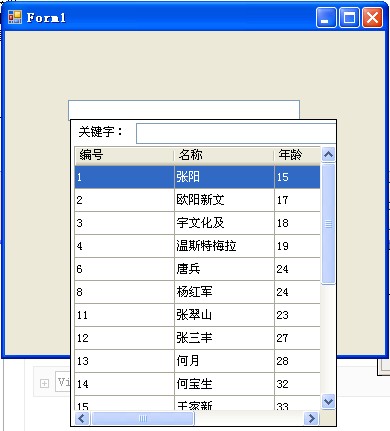
在弹出控件中输入关键字:温

选中一条记录后 弹出界面消失,并把选中的值显示在TextBox中

你可以自己解决在弹出层中显示什么,
比如只显示两列,
还可以设置弹出界面自动适应随内容的宽度,这样内容不会被截取显示,也就是说没有横向滚动条出现
以此,我另外做了个下拉列表 大家有兴趣的可以下来看看 点击下载
Winform 实现像菜单一样弹出层的更多相关文章
- 【position也可以很复杂】当弹出层遇上了鼠标定位(下)
前言 接着昨天的内容写,为了保证内容连续性,这里还是把昨天的内容拷了过来. 请用现代浏览器测试 引出问题 有图有真相,我们来看一个智联招聘里面经常出现的图层: 他这个是没有什么问题的,我们来简单看看其 ...
- 【position也可以很复杂】当弹出层遇上了鼠标定位(上)
前言 周五时同事有一个关于弹出层的问题没有解决,但是面临下班问题,我有点不舒服,便叫回去周六过来解决,但是上周六病了,所以请了个假,于是故事发生啦.... 今天上班时候,组员们卡到了那个地方,然后结果 ...
- layer 弹出层 回调函数调用 弹出层页面 函数
1.项目中用到layer 弹出层,定义一个公用的窗口,问题来了窗口弹出来了,如何保存页面上的数据呢?疯狂百度之后,有了结果,赶紧记下. 2.自己定义的公共页面方法: layuiWindow: func ...
- webui-popover 一个轻量级的jquery弹出层插件
该提示框插件可以和Bootstrap完美结合,但是并不一定需要和Bootstrap一起使用.它支持IE7以上的浏览器. 首先要引入需要的css js 文件 <link rel="s ...
- 分享一个JQuery弹出层插件
JQuery插件TipsWindown 1.1 一个基于jQuery的弹出层.支持拖拽,支持内容为文字,图片,URL等!至于兼容性.在IE6下,弹出对像无法绝对固定.其他应该没啥大问题: 最新更新:( ...
- adminlte+layui框架搭建3 - layui弹出层
在amdinlte首页引入layui.js 和layui.css后添加代码 <script> layui.use(['layer'], function () { var layer = ...
- JS弹出层制作,以及移动端禁止弹出层下内容滚动,overflow:hidden移动端失效问题
HTML <div class="layer"> <div class="menu-list"> <span>社会</ ...
- Android的Toolbar(含溢出菜单设置[弹出菜单的使用])的使用PopMenu的样式
http://blog.csdn.net/yingtian648/article/details/52432438(转载) 1.在Toolbar.xml中设置弹出菜单的风格(app:popupThem ...
- JavaScript学习笔记(一)——延迟对象、跨域、模板引擎、弹出层、AJAX示例
一.AJAX示例 AJAX全称为“Asynchronous JavaScript And XML”(异步JavaScript和XML) 是指一种创建交互式网页应用的开发技术.改善用户体验,实现无刷新效 ...
随机推荐
- 20140719中国互联网公司市值排名TOP20
近期在找工作.关注了一下中国互联网公司的市值,实际情况跟想象的区别非常大. 比方异军突起的小米.京东.唯品会.聚美优品. 比方乐视网由于政策原因,市值两日缩水10亿$.停牌了. 搜房网市值90天蒸发3 ...
- Android 浏览器开发WebView setBlockNetworkImage本末
含义本身防止网络数据图片 webSettings.setBlockNetworkImage(true); 停止发布数据 webSettings.setBlockNetworkImage(false); ...
- 在C#主线程和子线程将数据传递给对方如何实现
在C#中主线程和子线程怎样实现互相传递数据 老帅 在C#中创建线程Thread时,能够有多种方法,而主线程和子线程之间又怎样实现互相传递数据,每种创建方法传递參数的效果是不同的,逐一看一下: 一.不 ...
- 【Web探索之旅】第二部分第二课:服务器语言
内容简介 1.第二部分第二课:服务器语言 2.第二部分第三课预告:框架和内容管理系统 第二部分第二课:服务器语言 介绍了Web的客户端,我们来谈谈Web的服务器端. 既然客户端有客户端的编程语言(HT ...
- 在线API大全
之前整理过几个经常使用api地址,在经常使用在线API集合博文中. 近期浏览网页的时候,又发现一个很完整的api的大全,分享出来,建议大家收藏起来,用的时候方便查询. 经常使用API文档索引http: ...
- UML 简单的总结
上某一个地方,总有个记忆挥不散,每一个深夜某一个地方,总有着最深的思量- 都说岁月无情人有情,记忆easy催人老,可有时候反倒觉着人比岁月更无情.岁月留下了我们成长的印记,但是有时候以前认为会相伴永远 ...
- axWindowsMediaPlayer1获取音频长度
OpenFileDialog openFileDialog1 = new OpenFileDialog { InitialDirectory = "c:\\", Filter = ...
- Spring.Net控制翻转、依赖注入、面向切面编程
Spring.Net快速入门:控制翻转.依赖注入.面向切面编程 Spring.Net主要功能: 1.IoC:控制翻转(Inversion of Control) 理解成抽象工厂翻转控制:就是创建对象 ...
- SQLSERVER中的log block校验(译)
原文:SQLSERVER中的log block校验(译) SQLSERVER中的log block校验(译) 来自:http://sankarreddy.com/2010/03/transaction ...
- 【Java基础】对象的具体创建过程
所有的类(以Dog类为例)在第一次使用时,动态的加载到JVM中,当首次创建Dog对象时,或者是Dog类的静态方法.静态属性域在第一次被访问时,JVM解释器查找到classpath,定位到Dog.cla ...