
Dell-R730 【Pxe+dhcp+ftp+tftp+Kickstart+CentOs6.6】
IP:10.104.0.101
[root@localhost network-scripts]# cat ifcfg-em1
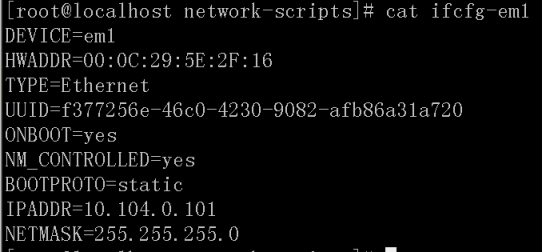
[root@localhost network-scripts]# iptables -F
[root@localhost network-scripts]# iptables -X
[root@localhost network-scripts]# service iptables stop
iptables:将链设置为政策 ACCEPT:filter [确定]
iptables:清除防火墙规则: [确定]
iptables:正在卸载模块: [确定]
[root@localhost network-scripts]# service iptables save

[root@localhost network-scripts]# vim /etc/sysconfig/selinux

[root@localhost network-scripts]#setenforce 0
setenforce: SELinux is disabled
[root@localhost network-scripts]# mkdir /media/cdrom
[root@localhost network-scripts]# mount /dev/cdrom /media/cdrom/
mount: block device /dev/sr0 is write-protected, mounting read-only read-only
[root@localhost network-scripts]# cd /etc/yum.repos.d/
[root@localhost yum.repos.d]# mv CentOS-Base.repo CentOS-Base.repo.bak
[root@localhost yum.repos.d]# vim CentOS-Media.repo

[root@localhost yum.repos.d]# yum -y install ftp tftp-server syslinux vsftpd xinetd dhcp

[root@localhost yum.repos.d]# mkdir /var/ftp/rhel6
[root@localhost yum.repos.d]# cp -rf /media/cdrom/* /var/ftp/rhel6/
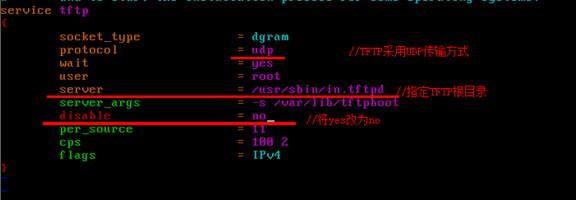
[root@localhost yum.repos.d]# vim /etc/xinetd.d/tftp
[root@localhost yum.repos.d]# cd /media/cdrom/images/pxeboot/
[root@localhost pxeboot]# cp initrd.img vmlinuz /var/lib/tftpboot/
[root@localhost pxeboot]# cp /usr/share/syslinux/pxelinux.0 /var/lib/tftpboot/
[root@localhost pxeboot]# mkdir /var/lib/tftpboot/pxelinux.cfg
[root@localhost pxeboot]# vim /var/lib/tftpboot/pxelinux.cfg/default
 default auto

 prompt

 timeout

 label auto

         kernel vmlinuz

         append initrd=initrd.img ks=ftp://10.104.0.101/rhel6/ks.cfg devfs=nomount ramdisk_size=8192 ksdevice=em1 biosname=0

 label linux text

         kernel vmlinuz

         append text initrd=initrd.img devfs=nomount ramdisk_size=

 label linux rescue

         kernel vmlinuz

         append rescue  initrd=initrd.img devfs=nomount ramdisk_size=
[root@zuo pxeboot]# vim /etc/dhcp/dhcpd.conf
 subnet 10.104.0.0 netmask 255.255.255.0 {

         default-lease-time ;

         max-lease-time ;

         range 10.104.0.100 10.104.0.130;

         next-server 10.104.0.101;

         filename "pxelinux.0";

 }
[root@localhost pxeboot]# dhcpd

[root@localhost pxeboot]# service vsftpd restart
[root@localhost pxeboot]# chkconfig vsftpd on
[root@localhost pxeboot]# service xinetd restart
[root@localhost pxeboot]# chkconfig xinetd on
[root@localhost pxeboot]# service dhcpd restart
[root@localhost pxeboot]# chkconfig dhcpd on
[root@localhost pxeboot]# yum -y install system-config-kickstart
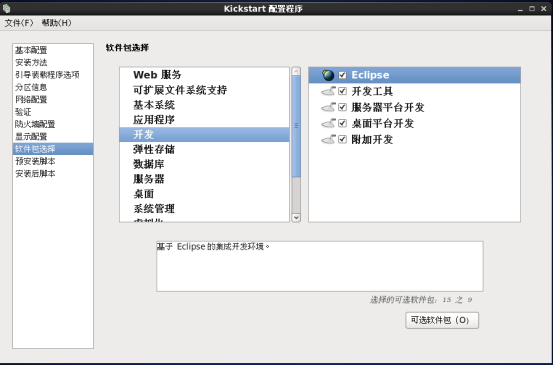
[root@localhost pxeboot]# system-config-kickstart



[root@localhost rhel6]# vim ks.cfg
install
# Use network installation
url --url="ftp://10.104.0.101/rhel6"
# Root password
rootpw --iscrypted $1$u0Tl6e4j$o3QI9JgfVdQU2o3pqDWlo/
# System authorization information
auth --useshadow --passalgo=md5
# Use graphical install
graphical
firstboot --disable
# System keyboard
keyboard us
# System language
lang en_US
# SELinux configuration
selinux --disabled
# Installation logging level
logging --level=info
reboot
# System timezone
timezone Asia/Shanghai
# Network information
network --bootproto=dhcp --device=em1 --onboot=on
# System bootloader configuration
bootloader --location=mbr --append="biosdevname=0"
# Clear the Master Boot Record
zerombr
# Partition clearing information
clearpart --all --initlabel
# Disk partitioning information
part /boot --fstype="ext4" --size=200
part swap --fstype="swap" --size=65536
part / --fstype="ext4" --size=51250
part /opt --fstype="ext4" --grow --size=1
%packages
@additional-devel
@backup-client
@base
@basic-desktop
@compat-libraries
@console-internet
@debugging
@desktop-debugging
@desktop-platform
@desktop-platform-devel
@development
@dial-up
@directory-client
@eclipse
@emacs
@fonts
@ftp-server
@general-desktop
@graphical-admin-tools
@graphics
@ha
@ha-management
@hardware-monitoring
@identity-management-server
@infiniband
@input-methods
@internet-applications
@internet-browser
@java-platform
@kde-desktop
@large-systems
@legacy-unix
@legacy-x
@mainframe-access
@mysql
@mysql-client
@network-file-system-client
@network-server
@network-tools
@nfs-file-server
@office-suite
@performance
@perl-runtime
@php
@postgresql
@postgresql-client
@print-client
@remote-desktop-clients
@resilient-storage
@ruby-runtime
@scalable-file-systems
@scientific
@security-tools
@server-platform
@server-platform-devel
@smart-card
@storage-client-fcoe
@storage-client-iscsi
@storage-client-multipath
@storage-server
@system-admin-tools
@system-management
@system-management-messaging-client
@system-management-snmp
@system-management-wbem
@technical-writing
@tex
@turbogears
@web-server
@web-servlet
@x11
ElectricFence
PyQt4-devel
SDL-devel
ant
babel
bzr
chrpath
cmake
compat-gcc-34
compat-gcc-34-c++
compat-gcc-34-g77
compat-openmpi
compat-openmpi-psm
crypto-utils
cups-devel
cvs-inetd
dejagnu
desktop-file-utils
e2fsprogs-devel
eclipse-mylyn-cdt
eclipse-mylyn-pde
eclipse-mylyn-trac
eclipse-mylyn-webtasks
eclipse-mylyn-wikitext
eclipse-subclipse-graph
expat-devel
expect
expect
freeglut-devel
fuse-devel
gcc-gnat
gcc-java
gcc-objc
gcc-objc++
glade3
gmp-devel
gnome-common
gnome-devel-docs
gnome-python2-desktop
gnutls-devel
gstreamer-plugins-base-devel
gtk2-devel-docs
hmaccalc
httpd-devel
hunspell-devel
imake
iptables-devel
java-1.8.0-openjdk-devel
jpackage-utils
junit
kdebase-devel
kdebase-workspace-devel
kdegraphics-devel
kdelibs-apidocs
kdelibs-devel
kdemultimedia-devel
kdenetwork-devel
kdepim-devel
kdepimlibs-devel
kdesdk
kdesdk-devel
kdewebdev
ksc
libXau-devel
libXaw-devel
libXinerama-devel
libXmu-devel
libXpm-devel
libXrandr-devel
libaio-devel
libblkid-devel
libbonobo-devel
libcap-devel
libdrm-devel
libgcrypt-devel
libglade2-devel
libgnomeui-devel
libgudev1-devel
libhugetlbfs-devel
libibverbs-devel
libnl-devel
libnl3-devel
libstdc++-docs
libtiff-devel
libtopology-devel
libudev-devel
libusb-devel
libuuid-devel
libxslt-devel
mercurial
mod_dav_svn
mod_revocator
mpfr-devel
nasm
net-snmp-devel
numactl-devel
openmotif-devel
papi-devel
pcre-devel
perl-Test-Pod
perl-Test-Pod-Coverage
perltidy
popt-devel
python-docs
qt-doc
rpmdevtools
rpmlint
sane-backends-devel
snappy-devel
startup-notification-devel
systemtap-sdt-devel
systemtap-server
tcl-devel
tcp_wrappers-devel
tk-devel
unique-devel
unixODBC-devel
xorg-x11-proto-devel
xz-devel
%end
Dell-R730 【Pxe+dhcp+ftp+tftp+Kickstart+CentOs6.6】的更多相关文章
- Linux系统网络安装——基于pxe+dhcp+nfs+tftp+kickstart
原文发表于:2010-09-05 转载至cu于:2012-07-21 一.原理简介 PXE(preboot execute environment)工作于Client/Server的网络模式,支持工作 ...
- linux pxe+dhcp+nfs+tftp
yum -y install vsftpd dhcp xinetd tftp-server syslinux(安装"syslinux"才有pxelinux.0) tftp 服务(v ...
- 使用PXE+DHCP+TFTP+kickstart搭建无人执守系统安装服务器
原理和概念: 1. 什么是PXE 严格来说,PXE 并不是一种安装方式,而是一种引导的方式.进行 PXE 安装的必要条件是要安装的计算机中包含一个 PXE 支持的网卡(NIC),即网卡中必须要有 ...
- dhcp、tftp及pxe简介
DHCP: 全称:Dynamic Host Configuration Protocol 动态主机配置协议 DHCP配置内容: IP/Netmask Gateway DNS Server bootp ...
- PXE+DHCP+TFTP+Cobbler 无人值守安装centos 7
Cobbler(补鞋匠)是通过将DHCP.TFTP.DNS.HTTP等服务进行集成,创建一个中央管理节点,其可以实现的功能有配置服务,创建存储库,解压缩操作系统媒介,代理或集成一个配置管理系统,控制电 ...
- Linux之FTP/TFTP(vsftp、vsftpd) HTTP(httpd、apache) DHCP(dhcpd)
FTP/TFTP(vsftp.vsftpd): FTP是File Transfer Protocol(文件传输协议)而中文简称为"文传协议".用于Internet上的控制文件的双向 ...
- Dell R730服务器 Raid0 Raid5配置
Dell R730服务器,有7块5t硬盘,默认做的RAID5.我们的目的是取其中6块硬盘做RAID5,留一块硬盘做热备. 一块SSD系统盘. 在这里,我具体解释一下 ①6块硬盘做成RAID5 ②6块硬 ...
- Dell R730服务器 Raid5配置
Dell R730服务器,有7块5t硬盘,默认做的RAID5.我们的目的是取其中6块硬盘做RAID5,留一块硬盘做热备. 一块SSD系统盘. 在这里,我具体解释一下 ①6块硬盘做成RAID5 ②6块硬 ...
- dell R730 安装windwos 2008 R2在windows loading files...完成后屏幕无信号(iDrac绿屏)
dell R730 安装windwos 2008 R2在windows loading files...完成后,Starting Windows时屏幕无信号(iDrac绿屏) 解决方法: F2 进行 ...
随机推荐
- .NET的DTO映射工具AutoMapper
.NET的DTO映射工具AutoMapper 原文:https://github.com/AutoMapper/AutoMapper/wiki/Getting-started 参考:http://ww ...
- Spring IOC之容器扩展点
一般来说,一个应用开发者不需要继承ApplicationContext实现类.取而代之的是,Spring IoC容器可以通过插入特殊的整合接口的实现来进行扩展.下面的几点将要讲述这些整合的接口. 1. ...
- C# WinForm程序退出的方法(转)
转自:http://www.cnblogs.com/yugen/archive/2010/08/10/1796864.html 1.this.Close(); 只是关闭当前窗口,若不是主窗体的话, ...
- javascript this指向
this对象是什么: this对象是与运行时函数执行的上下文绑定的.这句话其实已经很好的解释了this对象,为我们确定this指明了方向!但是需要注意的是:由于javascript具有动态性(解释执行 ...
- C#Console程序使用Ninject
本来想使用一下Ninject的,然后搜索了很久,都没找到比较详细的关于Ninject的使用方法等内容.于是乎干脆自己来写几篇介绍Ninject的内容. 1. 依赖注入和IOC 依赖注入和IO ...
- Android简单发送邮件(可带附件)
项目中遇到了一个发送邮件的功能,在网上查了很多,资料也很多.这里就不一一介绍了,只是写出我使用的方案(最简单的) Intent email = new Intent(android.content.I ...
- [原]逆向iOS SDK -- “添加本地通知”的流程分析
观点: 代码面前没有秘密 添加通知的 Demo 代码 - (void)scheduleOneLocalNotification { [[UIApplication sharedApplication] ...
- IOS7学习之路九(ios7自定义UIAlertView)
IOS7的UIAlertView 不支持自定义,无法添加subview . 不过可以用第三方库git上的下载链接 https://github.com/wimagguc/ios-custom-a ...
- 《Troubleshooting SQL Server》读书笔记-CPU使用率过高(下)
<Troubleshooting SQL Server>读书笔记-CPU使用率过高(下) 第三章 High CPU Utilization. CPU使用率过高的常见原因 查询优化器会尽量从 ...
- 一步一步深入spring(6)--使用基于XML配置的spring实现的AOP
上节我们提到了使用基于注解实现的AOP,这节我们将用基于xml配置的方式来实现的AOP. 1.首先建立一个类,作为切面类,这个类主要用来实现注解中各种通知要实现的方法. package com.yan ...