
react中文API解读二(教程)
记下自己的react学习之路 ,官方文档写的很详尽,学起来应该比较简单
官方文档地址:react.http://reactjs.cn/react/docs/getting-started.html
2 .1运行一个服务器
我使用的是wampserver,当图标显示为绿色时表示服务器正常开启 。红色表示服务器异常。
进入www目录,初始index.php名称改成其他的,我改成index11.php。
将下载后的压缩包(react-tutorial-master)解压,改名成react后复制到进入www目录。
在浏览器中输入http://127.0.0.1/react/public/index.html 正常显示
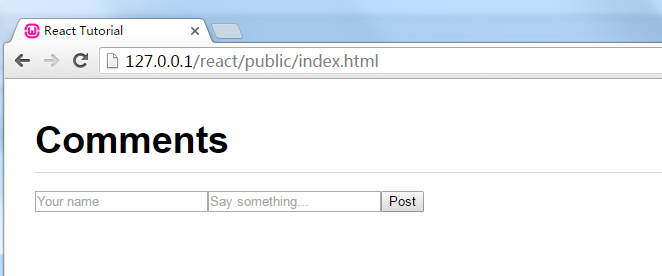
2.2你的第一个组件
// tutorial1.js

var CommentBox = React.createClass({

  render: function() {

    return (

      <div className="commentBox">

        Hello, world! I am a CommentBox.

      </div>

    );

  }

});

ReactDOM.render(

  <CommentBox />,

  document.getElementById('content')

);
React.createClass构造react网页组件。可以理解为在内存中创建了一个虚拟网页。
ReactDOM.render();render()函数有两个参数。第一个指的是需要从内存中取出的网页,第二个指的是要渲染到的目标对象。

2.3制作组件

逻辑和1.2一样,只是在结构嵌套一层,更符合实际。
本例代码结构:构造一个CommentList组件和CommentForm组件。
<script type="text/babel">

var CommentList = React.createClass({

  render: function() {

    return (

      <div className="commentList">

        Hello, world! I am a CommentList.

      </div>

    );

  }

});

var CommentForm = React.createClass({

  render: function() {

    return (

      <div className="commentForm">

        Hello, world! I am a CommentForm.

      </div>

    );

  }

});

var CommentBox = React.createClass({

  render: function() {

    return (

      <div className="commentBox">

        <h1>Comments</h1>

        <CommentList />

        <CommentForm />

      </div>

    );

  }

});

ReactDOM.render(

  React.createElement(CommentBox, null),

  document.getElementById('content')

);

</script>
2.4使用属性与2.5组件属性
如果纯粹2.2,2.3中的使用方法,把所有内容直接写出来,那还不如直接在html里面写简单,模板标签也失去了存在的意义。
正是有了属性,才使得模板有了血液,模板和数据进行分离。
var CommentForm = React.createClass({

  render: function() {

    return (

      <div className="commentForm">

        Hello, world! I am a CommentForm.

      </div>

    );

  }

});

var CommentBox = React.createClass({

  render: function() {

    return (

      <div className="commentBox">

        <h1>Comments</h1>

        <CommentList />

        <CommentForm />

      </div>

    );

  }

});

var Comment = React.createClass({

  render: function() {

    return (

      <div className="comment">

        <h2 className="commentAuthor">

          {this.props.author}

        </h2>

        {this.props.children}

      </div>

    );

  }

});

var CommentList = React.createClass({

  render: function() {

    return (

      <div className="commentList">

        <Comment author="Pete Hunt">This is one comment</Comment>

        <Comment author="Jordan Walke">This is *another* comment</Comment>

      </div>

    );

  }

});

ReactDOM.render(

  React.createElement(CommentBox, null),

  document.getElementById('content')

);
2.6 添加 Markdown 语法格式的评论
本节可以看到,<p>标签并没有被解析成html标签,而是直接被输出到页面。
2.7接入数据模型
我们的使用越来越接近实际开发了。
data可以看作是接口给我们返回的数据
 var data = [

  {author: "Pete Hunt", text: "This is one comment"},

  {author: "Jordan Walke", text: "This is *another* comment"}

];

var Comment = React.createClass({

  rawMarkup: function() {

    var rawMarkup = marked(this.props.children.toString(), {sanitize: true});

    return { __html: rawMarkup };

  },

  render: function() {

    return (

      <div className="comment">

        <h2 className="commentAuthor">

          {this.props.author}

        </h2>

        <span dangerouslySetInnerHTML={this.rawMarkup()} />

      </div>

    );

  }

});

var CommentList = React.createClass({

  render: function() {

    var commentNodes = this.props.data.map(function (comment) {

      return (

        <Comment author={comment.author}>

          {comment.text}

        </Comment>

      );

    });

    return (

      <div className="commentList">

        {commentNodes}

      </div>

    );

  }

});

var CommentForm = React.createClass({

  render: function() {

    return (

      <div className="commentForm">

        Hello, world! I am a CommentForm.

      </div>

    );

  }

});

var CommentBox = React.createClass({

  render: function() {

    return (

      <div className="commentBox">

        <h1>Comments</h1>

        <CommentList data={this.props.data} />

        <CommentForm />

      </div>

    );

  }

});

ReactDOM.render(

  <CommentBox data={data} />,

  document.getElementById('content')

);
2.8从服务器获取数据
2.9响应状态变化( Reactive state )
react中文API解读二(教程)的更多相关文章
- react中文API解读一(快速开始)
记下自己的react学习之路 ,官方文档写的很详尽,学起来应该比较简单 官方文档地址:react.http://reactjs.cn/react/docs/getting-started.html 1 ...
- js-jquery-Validate校验【二】中文api
jQuery.validate 中文 API 名称 返回类型 描述 validate(options) Validator 验证所选的 FORM. valid() Boolean 检查是否验证通过. ...
- .NET Core 微服务—API网关(Ocelot) 教程 [二]
上篇文章(.NET Core 微服务—API网关(Ocelot) 教程 [一])介绍了Ocelot 的相关介绍. 接下来就一起来看如何使用,让它运行起来. 环境准备 为了验证Ocelot 网关效果,我 ...
- [Python][flask][flask-wtf]关于flask-wtf中API使用实例教程
简介:简单的集成flask,WTForms,包括跨站请求伪造(CSRF),文件上传和验证码. 一.安装(Install) 此文仍然是Windows操作系统下的教程,但是和linux操作系统下的运行环境 ...
- [转载]fullPage.js中文api 配置参数~
fullPage.js中文api 配置参数 选项 类型 默认值 说明 verticalCentered 字符串 true 内容是否垂直居中 resize 布尔值 false 字体是否随着窗口缩放而缩放 ...
- android SDK下载及中文API地址
中文API:http://wiki.eoeandroid.com/Android_API_Guides Android Dev Tools官网地址:www.androiddevtools.cn 收集整 ...
- 【干货分享】Node.js 中文学习资料和教程导航
这篇文章来自 Github 上的一位开发者收集整理的 Node.js 中文学习资料和教程导航.Node 是一个服务器端 JavaScript 解释器,它将改变服务器应该如何工作的概念,它的目标是帮助程 ...
- 中文翻译:pjsip教程(一)之PJNATH简介
在学习pjsip的过程中,发现只是单单的阅读英文官方文档,对于里边概念的理解还是不够透彻,并且苦于pjsip没有发现全一点的中文版本,所以想尽自己所能为建设和谐社会而贡献一份力量,文中定会有所疏漏,希 ...
- [置顶] COcos2d-X 中文API
本文来自http://blog.csdn.net/runaying ,引用必须注明出处! COcos2d-X 中文API 温馨提醒:使用二维码扫描软件,就可以在手机上访问我的博客啦!另外大家可以访问另 ...
随机推荐
- Socket编程中 setsockopt的作用
功能描述: 获取或者设置与某个套接字关联的选 项.选项可能存在于多层协议中,它们总会出现在最上面的套接字层.当操作套接字选项时,选项位于的层和选项的名称必须给出.为了操作套接字层的选项,应该 将层的值 ...
- wpf ProgressBar使用
wpf progressBar使用起来有些麻烦,直接设置value的值还不行 而是通过委托来执行setValue方法 //Create a Delegate that matches the ...
- 2. SpringMVC 上传文件操作
1.创建java web项目:SpringMVCUploadDownFile 2.在项目的WebRoot下的WEB-INF的lib包下添加如下jar文件 com.springsource.com.mc ...
- H5 App页面 绝对定位 软键盘弹出时顶起底部按钮
做H5 App页面时,有时候,按钮可能会放到页面的最底下,这个时候可能会用到绝对定位(position: absolute),但是,当input 输入框被点击时,弹出的软键盘会顶起底部的按钮,就像这样 ...
- java操作mongodb——插入数据
在mongodb中,表(Table)被称之为集合(Collection),记录(Record)被称为文档(Document) 首先连接到数据库 MongoClient mongoClient = ne ...
- Canvas裁剪和Region、RegionIterator
主要是看这边文章学习:http://blog.csdn.net/lonelyroamer/article/details/8349601 Region.op参数 DIFFERENCE(0), //最终 ...
- java 打开浏览器 url
public class openBrowers { public static void main(String[] args) { try { //String url = "http: ...
- Abstraction elimination
(本文不保证不误人子弟,切勿轻信) Unlambda指的是lambda计算中去掉lambda操作(does not have lambda(or abstraction) operation of t ...
- iOS混合应用开发入门
原文出处: cocoacontrols 译文出处:魏志峰(@JeremyWei) 欢迎分享原创到伯乐头条 http://blog.jobbole.com/46554/ 介绍 上周(译者:原文成 ...
- action 耦合方式
//ActionContext 方式 package com.hanqi.action; import java.util.Map; import com.opensymphony.xwork2.Ac ...