
巧用weui.topTips验证数据
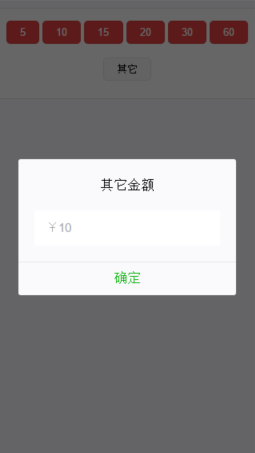
场景一、有一个输入金额的场景,这个金额需要验证,验证说明如下:
不能为空格;
不能为0;
不能为汉字;
不能为其它字符;
不能大于200;
唯一可以的是,只有输入3~199之间的数字,下面的确定按钮才会显示,否则,隐藏这个按钮。
HTML:
<!--医生问诊金额-->

                <div class="weui-jiaj-panel">

                    <div class="weui-jiaj-money-box dialog js_show">

                        <div class="weui-jiaj-money-box-btn">

                        </div>

                        <div class="weui-jiaj-money-box-three">

                            <div class="weui-flex__item">

                                <a id="showMoney" href="javascript:;" class="weui-btn weui-btn_mini weui-btn_default">其它</a>

                            </div>

                        </div>

                    </div>

                </div>

                <!--其它金额-->

                <div class="weui_dialog_alert" id="showMoneyDialog" style="display: none;">

                    <div class="weui_mask"></div>

                    <div class="weui_dialog">

                        <div class="weui_dialog_hd"><strong class="weui_dialog_title">其它金额</strong></div>

                        <div class="weui_dialog_bd">

                            <div class="weui-jiaj-dialog-panel">

                                <div class="weui-cell">

                                    <div class="weui-cell__bd">

                                        <input id="dialogPrice" type="text" required class="weui-input" placeholder="¥10" />

                                    </div>

                                </div>

                            </div>

                        </div>

                        <div class="weui_dialog_ft">

                            <div id="otherPriceBtn" class="weui_btn_dialog primary">确定</div>

                        </div>

                    </div>

                </div>
JS:
<script>

            //设置其它金额

            var doctorPrices = [{

                "doctorPrice": "5"

            }, {

                "doctorPrice": "10"

            }, {

                "doctorPrice": "15"

            }, {

                "doctorPrice": "20"

            }, {

                "doctorPrice": "30"

            }, {

                "doctorPrice": "60"

            }];

            var userId = $.cookie('doctorId');

            $(function() {

                selectedPrice();

            });

            var page = $('.page'); //顶层div

            var panel = page.find('weui-jiaj-panel');

            function selectedPrice() {

                var $titleHtml = '';

                for(var a = 0; a < doctorPrices.length; a++) {

                    var priceName = doctorPrices[a].doctorPrice;

                    //点周weui_btn_dialog隐藏

                    $titleHtml += '<button class="price_btn weui-btn weui-btn_mini weui-btn_warn"' + 'name=' + priceName + '>' + priceName + '</button>';

                    $('.price_btn').css('margin', '5px');

                }

                $('.weui-jiaj-money-box-btn').append($titleHtml);

                //选择金额

                $('.price_btn').click(function() {

                    var titleValue = $(this).attr('name'); //$(this)表示获取当前被点击元素的name值

                    var data = {

                        userId: userId,

                        price: titleValue

                    };

                    data = JSON.stringify(data);

                    $.ajax({

                        data: {},

                        dataType: 'json',

                        type: "post",

                        url: postDoctorPrice().replace("{userId}", userId).replace("{price}", titleValue),

                        contentType: 'application/json; charset=utf-8',

                        success: function(data) {

                            if(data && data.status == '200') {

                                weui.topTips('提交成功');

                            }

                        },

                        error: function(data) {

                            location.href = 'doctor_wode.html';

                        }

                    });

                });

                //其它金额

                $('#otherPriceBtn').on('click', function(e) {

                    var otherPrice = $('#dialogPrice').val();

                    otherPrice = parseInt(otherPrice);

                    otherPrice = otherPrice.toString();

                    console.log("其它金额" + otherPrice);

                    var data = {

                        userId: userId,

                        price: otherPrice

                    };

                    data = JSON.stringify(data);

                    $.ajax({

                        data: {},

                        dataType: 'json',

                        type: "post",

                        url: postDoctorPrice().replace("{userId}", userId).replace("{price}", otherPrice), //post 时url带参数

                        contentType: 'application/json; charset=utf-8',

                        success: function(data) {

                            if(data && data.status == '200') {

                                weui.topTips('设置成功!');

                            }

                        },

                        error: function(data) {

                            location.href = 'doctor_wode.html';

                        }

                    });

                });

            }

            //验证

            $('input').on('blur',function(){

                var value = this.value;

                var regChinese = new RegExp("[\\u4E00-\\u9FFF]+","g");

                //字符串不能为空

                if(value.length == 0) {

                    $('#otherPriceBtn').hide();

                    weui.topTips('不能为空');

                    //字符串是否为“空”字符即用户输入了空格

                }else if(value.replace(/(^s*)|(s*$)/g, "").length ==0){

                    $('#otherPriceBtn').hide();

                    weui.topTips('不能为空');

                    //字符串是否为空或者全部都是空格

                }else if(value == null){

                    $('#otherPriceBtn').hide();

                    weui.topTips('不能为null');

                    //字符串是否为汉字

                }else if(regChinese.test(value)){

                    $('#otherPriceBtn').hide();

                    weui.topTips('不能输入汉字');

                    //字符串不能为0

                }else if(parseInt(value) == 0){

                    $('#otherPriceBtn').hide();

                    weui.topTips('不能为0');

                    //不能大于200

                }else if(parseInt(value) > 200){

                    $('#otherPriceBtn').hide();

                    weui.topTips('自定义金额不能大于200元');

                    //自定义金额只能是数字

                }else if(typeof(parseInt(value))){

                    $('#otherPriceBtn').show();

                }

            })

        </script>

场景二、所有违反规距的都有信息提示,但是“确定”按钮不隐藏,只是删除它的click事件,只有符合条件的才可以跳转
//验证

            $('input').on('blur', function() {

                var value = this.value;

                var regChinese = new RegExp("[\\u4E00-\\u9FFF]+", "g"); //汉语

                var specialSymbol =/[`~!@#$%^&*_+<>{}\/'[\]]/im; //特殊符号

                //字符串不能为空

                if(value.length == 0) {

                    $('#otherPriceBtn').unbind('click');

                    setTimeout(function() {

                        $('.hide-description').css('display', 'block').text('不能为空,请重新输入');

                    }, 500);

                    //字符串是否为“空”字符即用户输入了空格

                } else if(value.replace(/(^s*)|(s*$)/g, "").length == 0) {

                    $('#otherPriceBtn').unbind('click');

                    setTimeout(function() {

                        $('.hide-description').css('display', 'block').text('不能为空,请重新输入');

                    }, 500);

                    //字符串是否为空或者全部都是空格

                } else if(value == null) {

                    $('#otherPriceBtn').unbind('click');

                    setTimeout(function() {

                        $('.hide-description').css('display', 'block').text('不能为空,请重新输入');

                    }, 500);

                    //字符串是否为汉字

                } else if(regChinese.test(value)) {

                    $('#otherPriceBtn').unbind('click');

                    setTimeout(function() {

                        $('.hide-description').css('display', 'block').text('不能输入汉字,请重新输入');

                    }, 500);

                    //字符串不能为0

                } else if(parseInt(value) == 0) {

                    $('#otherPriceBtn').unbind('click');

                    setTimeout(function() {

                        $('.hide-description').css('display', 'block').text('不能为0,请重新输入');

                    }, 500);

                    //小于3

                } else if(parseInt(value) < 4) {

                    $('#otherPriceBtn').unbind('click');

                    setTimeout(function() {

                        $('.hide-description').css('display', 'block').text('自定义金额不能小于3,请重新输入');

                    }, 500);

                    //不能大于200

                } else if(parseInt(value) > 200) {

                    $('#otherPriceBtn').unbind('click');

                    setTimeout(function() {

                        $('.hide-description').css('display', 'block').text('自定义金额不能大于200,请重新输入');

                    }, 500);

                } else if(specialSymbol.test(value)){

                    //禁止输入特殊字符

                    $('#otherPriceBtn').unbind('click');

                    setTimeout(function() {

                        $('.hide-description').css('display', 'block').text('不可输入!@#¥%……&*特殊字符!');

                    }, 500);

                    //自定义金额只能是数字

                } else if(typeof(parseInt(value))) {

                    setTimeout(function() {

                        $('.hide-description').css('display', 'block').text('你设置的金额为' + value);

                    }, 500);

                    //其它金额

                    $('#otherPriceBtn').on('click', function(e) {

                        var otherPrice = $('#dialogPrice').val();

                        otherPrice = parseInt(otherPrice);

                        otherPrice = otherPrice.toString();

                        console.log("其它金额" + otherPrice);

                        var data = {

                            userId: userId,

                            price: otherPrice

                        };

                        data = JSON.stringify(data);

                        $.ajax({

                            data: {},

                            dataType: 'json',

                            type: "post",

                            url: postDoctorPrice().replace("{userId}", userId).replace("{price}", otherPrice), //post 时url带参数

                            contentType: 'application/json; charset=utf-8',

                            success: function(data) {

                                if(data && data.status == '200') {

                                    weui.topTips('设置成功!');

                                }

                            },

                            error: function(data) {

                                location.href = 'doctor_wode.html';

                            }

                        });

                    });

                }

            })
巧用weui.topTips验证数据的更多相关文章
- 【C#】让工具栏ToolStrip能触发焦点控件的Leave、Validating、DataError等事件以验证数据
----------------更新:2014-04-21--------------- 蒙doggo兄指教,得知有更好的方法可以代替蹩脚的0尺寸Button法,即调用窗体的验证方法Form.Vali ...
- 微信支付java版V3验证数据合法性
[TOC] 1. 微信支付java版V3验证数据合法性 概要:使用微信支付接口时,微信会返回或回调给商户XML数据,开发者需要验证微信返回的数据是否合法. 特别提醒:商户系统对于支付结果通知的内容一定 ...
- RSA签名和验证数据
private const string PubKey = "BgIAAACkAABSU0ExAAQAAAEAAQAxg/L6l3AyA+Zd7Hm7ESCcS4CcgY8PvwE2arRv ...
- JSR303中的来验证数据信息
spring mvc之实现简单的用户管理三 博客分类: spring spring mvc spring mvc dispatcherServlet springspring mvcbean vali ...
- XML序列化 判断是否是手机 字符操作普通帮助类 验证数据帮助类 IO帮助类 c# Lambda操作类封装 C# -- 使用反射(Reflect)获取dll文件中的类型并调用方法 C# -- 文件的压缩与解压(GZipStream)
XML序列化 #region 序列化 /// <summary> /// XML序列化 /// </summary> /// <param name="ob ...
- vue props 下有验证器 validator 验证数据返回true false后,false给default值
vue props 下有验证器 validator 验证数据返回true false后,false给default值 props: { type: { validator (value) { retu ...
- js案例之使用正则表达式进行验证数据正确性
#js案例之使用正则表达式进行验证数据正确性 代码上传至 "GitHub" 样例: <tr> <td>密码:</td> <td> & ...
- mongoose 更新数据时不验证数据(忽略设定的集合规则)的问题
问题: mongoose 更新数据时不验证数据(忽略设定的集合规则)的问题 参考: http://www.mongoosejs.net/docs/api.html#updateone_updateOn ...
- Struts2(十二)使用验证框架验证数据较验
一.数据验证 1.1.为什么要进行数据验证 对数据的合法性进行检查,只允许合法的数据进入应用程序 1.2.在哪里实现数据验证 客户端验证: 数据提交前在客户端验证 可使用JavaScript或者JQu ...
随机推荐
- 防范CSRF(一)
CSRF是跨网站伪造请求的缩写.大致的攻击流程是,黑客获得浏览器向服务器发送的请求,然后对请求进行修改,让服务器执行指定的操作. 防范方式可以使用微软提供的解决方案. View放置Html.AntiF ...
- STM32普通定时器(TIM2-7)的时钟源
STM32普通定时器(TIM2-7)的时钟源
- 利用StringBuffer向字符串特定的重复子字符串插入数据
public class InsertDetail { public void insertInvoiceDetail(StringBuffer sb, String Label, String ...
- ios9 新关键字 __kindof 等(etc) 小结
首先__kindof:规定参数为UITableViewCell(举例)这个类或者其子类.比如说一个NSArray<UIView *>*,如果不加__kindof,这个数组只能有UIView ...
- sql 根据字段查询不同表
SELECT snFundType,snBusinessType, THEN (select vcPaySerialNo from aa where vcSerialNo=a.vcRelationSe ...
- Latex问题收集
1. Latex中的空格 两个quad空格 a \qquad b 两个m的宽度 quad空格 a \quad b 一个m的宽度 大空格 a\ b 1/3m宽度 中等空格 a\;b 2/7m宽度 小空格 ...
- java URLEncoder 和Base64.encode()
参考: http://www.360doc.com/content/10/1103/12/1485725_66213001.shtml (URLEncode) http://blog.csdn.net ...
- 02--Java TCP Socket编程
一.基础知识 1. TCP状态转换知识,可参考: http://www.cnblogs.com/qlee/archive/2011/07/12/2104089.html 2. TCP/IP五层模型 ...
- WCF初接触实作
我们通过实现一个简单的示例来对WCF有个直观而浅显的认识,希望对初次涉及WCF的朋友有所帮助. 可以简单地认为WCF程序分为4部分:契约.服务.宿主.客户端.我们通过一个例子来逐步完成各部分,示例程序 ...
- JS代码备忘
function $(v) { if (typeof v === 'function') { window.onload = v; } else if (typeof v === 'string') ...