
C#输出日历
用C#输出日历,此功能可用于Ajax方式列出计划日程相关的内容,由于是C#控制输出,可以方便加上自己需要的业务处理逻辑。
1.控制台输出:
- using System;
- namespace 控制台日历
- {
- class Program
- {
- public static void Main(string[] args)
- {
- string s = " ";
- Console.WriteLine("输入年份:");
- int nYear = int.Parse(Console.ReadLine());
- Console.WriteLine("输入月份:");
- int nMonth = int.Parse(Console.ReadLine());
- DateTime day1 = new DateTime(nYear,nMonth,1);
- Console.WriteLine("{0}/{1}",day1.Year,day1.Month);
- Console.WriteLine("日 一 二 三 四 五 六");
- int week1 =(int )day1.DayOfWeek;//获取当年当月1号的星期
- //Console.WriteLine("当月一号的星期{0}",week1);
- int lastday = day1.AddMonths(1).AddDays(-1).Day; //获取当月的最后一天
- for (int i = 0; i < week1; i++)
- Console.Write(s);//不能换行输出
- for (int i = 1; i <= lastday; i++)
- {
- Console.Write("{0:00} ", i);//按01 02 输出
- if ((i + week1) % 7 == 0)
- Console.WriteLine();
- }
- Console.WriteLine();
- Console.Write("Press any key to continue . . . ");
- Console.ReadKey(true);
- }
- }
- }
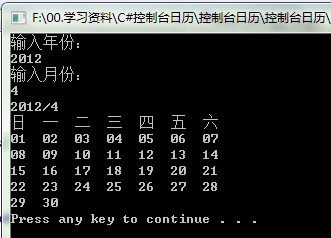
效果图:
2.Html表格输出:
- #region 生成表格日历
- /// <summary>
- /// 生成表格日历 index:月份偏量,用来查看上一月下一月
- /// </summary>
- /// <param name="index"></param>
- /// <returns></returns>
- public static string GetCalendarHtml(int index = 0)
- {
- DateTime day1 = new DateTime(DateTime.Now.AddMonths(index).Year, DateTime.Now.AddMonths(index).Month, 1);
- int week1 = (int)day1.DayOfWeek;//获取当年当月1号的星期
- int lastday = day1.AddMonths(1).AddDays(-1).Day; //获取当月的最后一天
- System.Text.StringBuilder builder = new System.Text.StringBuilder();
- builder.Append(string.Format("<table class='calendar_table'><caption><span style='cursor:pointer' class='prevMonth' onclick='javascript:changeMonth(-1)'>上一月</span><span class='currMonth'> {0}年{1}月</span><span style='cursor:pointer' class='nextMonth' onclick='javascript:changeMonth(1)'>下一月</span></caption>", DateTime.Now.AddMonths(index).Year, DateTime.Now.AddMonths(index).Month));
- builder.Append("<tr class='calendar_head'>");
- builder.Append("<td class='calendar_cell'>日</td>");
- builder.Append("<td class='calendar_cell'>一</td>");
- builder.Append("<td class='calendar_cell'>二</td>");
- builder.Append("<td class='calendar_cell'>三</td>");
- builder.Append("<td class='calendar_cell'>四</td>");
- builder.Append("<td class='calendar_cell'>五</td>");
- builder.Append("<td class='calendar_cell'>六</td>");
- builder.Append("</tr>");
- string emptyString = "<td class='calendar_cell'> </td>";
- if (week1 > 0)
- {
- builder.Append("<tr class='calendar_body'>");
- for (int i = 0; i < week1; i++)
- {
- builder.Append(emptyString);
- }
- }
- for (int i = 1; i <= lastday; i++)
- {
- string day = string.Format("{0:00} ", i);//按01 02 输出
- builder.Append(string.Format("<td class='calendar_cell'>{0}</td>", day));
- if ((i + week1) % 7 == 0)
- {
- builder.Append("</tr><tr class='calendar_body'>");
- }
- }
- builder.Append("</tr>");
- builder.Append("</table>");
- return builder.ToString();
- }
- #endregion
页面前台结合javascript实现ajax日历切换效果,只需用js改变函数中的index偏移量即可。
C#输出日历的更多相关文章
- JS输出日历
页面HTML代码 <!DOCTYPE html> <html> <head> <meta charset="utf-8" /> &l ...
- PHP程序输出日历
以下代码只是简单实现日历的效果和逻辑思路,没有使用类封装,权当抛砖引玉,有兴趣的朋友可以封装起来,方便调用. <?php /** * PHP利用时间函数输出日历 * Rain.zen $ int ...
- C语言 · 输出日历
算法提高 输出日历 时间限制:1.0s 内存限制:512.0MB 按照下述格式打印2006年12月日历: Calendar 2006-12---------------------- ...
- Java输出日历写法
package TestString_2; import java.text.ParseException;import java.util.Calendar;import java.util.Gre ...
- Java输出日历
源码链接:http://pan.baidu.com/s/1o6xeybK
- Python学习实践-----打印日历
使用python语言实现在控制台打印日历 输入年.月.日 输出对应日历,指定的日数输出为'--' 程序没有做严格的输入验证,故输入整数即可. 以下为没有优化的源码: print_calendar.py ...
- javascript js写特效日历
<!doctype html public "-//W3C//DTD XHTML 1.0 Transitional//EN" "http://www.w3.org/ ...
- 创建一个js日历(原生JS实现日历)
前言 方法是有参考网上一些资料的,比如闰年的判断,比如每个月第一天是星期几的判断.不说太多,拆分出一个个函数,希望能描述尽可能的清晰明了. 一,判断闰年 //判断闰年 function runNian ...
- .net mvc页面UI之Jquery博客日历控件
摘要:最近在做一个博客系统,其他需要用到博客日历控件,网上搜索了很多资料,其中大部分都是javascript的,经过总结使用jquery实现了博客日历效果.代码如下: 原文链接转载请注明:http:/ ...
随机推荐
- Collector
安装 参考安装文章 创建项目project 转到你创建的目录,运行命令 django-admin.py startproject collector 生成下列文件 collector/ __ini ...
- 分布式版本控制系统Git-----4.Git 常用命令整理
1. git init 初始化 git 目录 2. git add 添加文件 git add fileName #添加指定文件 git add -i #手工选择要添 ...
- iOS通过URL Scheme启动app(收集了常用的app的URL Scheme)
URL Scheme不仅可以打开其他的app,当然你也能为自己的app设置URL Scheme 1.如何设置给app设置URL Scheme 添加URL types字段数组 设置URL identif ...
- meta常用标签总结
meta元素共有三个可选属性(http-equiv.name和scheme)和一个必选属性(content),content定义与 http-equiv 或 name 属性相关的元信息 可选属性 属性 ...
- hancher57公众号突破3000人
- php mysq模糊查询l
范例 <!DOCTYPE html PUBLIC "-//W3C//DTD XHTML 1.0 Transitional//EN" "http://www.w3.o ...
- emoji图像转码解码 存入数据库
public String emojiConvert1(String str) throws UnsupportedEncodingException { String patternString = ...
- Hadoop之初体验
首先是来说一下这两天来自己的个人感受吧.我争取在第一段将情怀给逼逼完,大家可以无视这一段~~~真心是不容易,第一个感觉就是,乱.为啥呢?先说说我使用Hadoop的原因吧.选了云计算这门课,打算到时候深 ...
- COCOA® PROGRAMMING FOR MAC® OS X (1)- Get Start
这个是Mac OS App开发学习的第一篇,希望是一个好的开始. 一.为什么要学习Mac OS App开发 a)长时间做IOS开发,发现自己所做的局限在苹果的一些库上面,一些底层的API却是私有的,不 ...
- 7 个 jQuery 最佳实践
前言 随着富网络应用(rich web applications)数量的增长,以及用户对快速交互响应的高期望,开发者开始使用JavaScript库来快速高效的完成一些重复性的工作.这其中最流行的Jav ...