
第一篇:初识ASP.NET控件开发_第三节:“生死有序”的控件生命周期
一、Page本质是一个Control
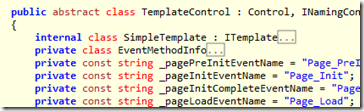
我们首先要澄清的第一个概念是页面类Page本质是一个控件类,它派生于TemplateControl类,而TemplateControl派生自Control类。既然饭我没有乱吃,自然话也不会乱讲。借田有良老师的翠花给大家上证据如下:

二、Control的“生死之序”
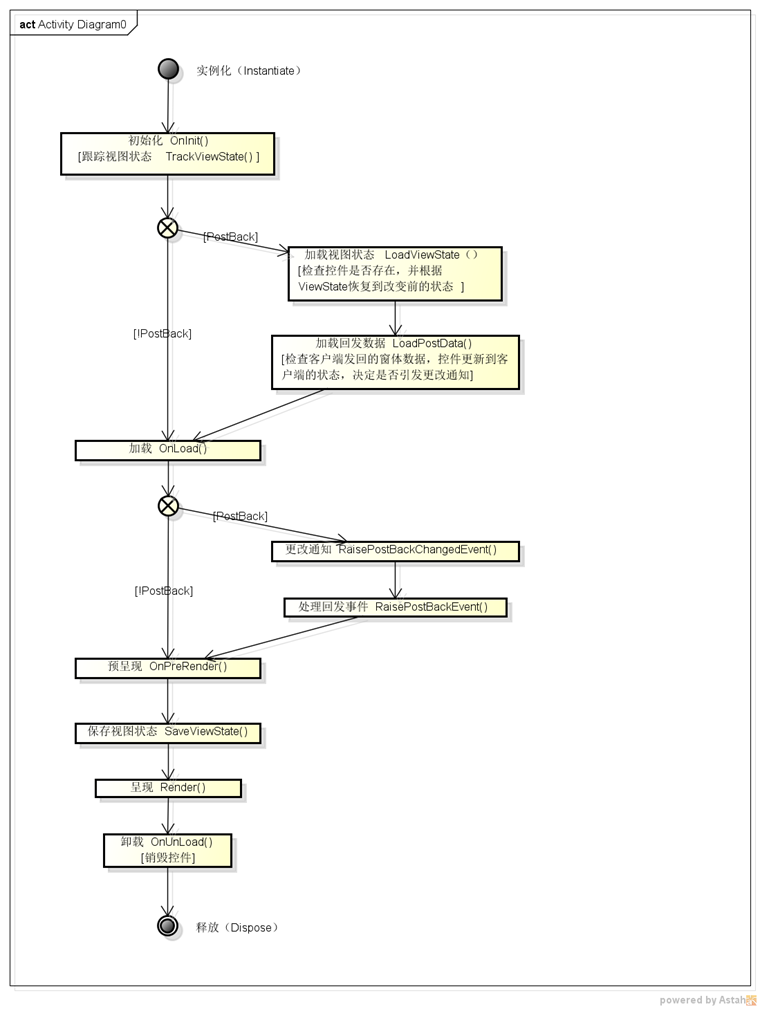
- 1.实例化(Instantiate)
我们写控件一般不要接触此活动。 - 2.初始化(Initialize)
【初始化自己,创建它的子控件(但该过程控件的状态没有加载)。触发该控件的OnInit()事件。】我们写控件一般不要接触此活动。
【跟踪视图状态(Tracking View State)* 】这个比较重要,涉及到视图状态,一般情况下不必重载此方法。 - 3.加载视图状态(Load view state)*
只会在回传过程中调用此方法,用法同上。 - 4.加载回发数据(Load postback data)*
如果你的控件生成之后要和客户端交互,那么这个方法就很重要,只会在回传过程中调用此方法。 - 5.加载(Load)
这个活动一般只是Page的OnLoad才会要去管它,我们写控件一般不要接触此方法。 - 6.更改通知(Raise changed events)*
控件生成后,数据被客户端更改过,和加载回传数据是一路的。 - 7.处理回发事件(Raise postback event)*
一般用于实现IPostBackEventHandler接口的控件的把客户端事件转化成服务器端事件。只用于回传过程。 - 8.预呈现(PerRender)**
生成前期工作,这个是很重要的一个过程,通过重载OnPreRender方法实现自定义。 - 9.保存视图状态(Save view state)*
如果所以信息都是用ViewState[xxx]这种方式来保存,不必重载,只有自定义视图状态管理时才重载此方法,当然,这里做了手脚,LoadViewState也就一定要和这里的Save方法配套。 - 10.呈现(Render)***
这个是主角,控件成生什么东东基本就由这里管了。 - 11.卸载(Unload)
- 12.释放(Dispose)
三、控件树的“合成模式(Composite)”
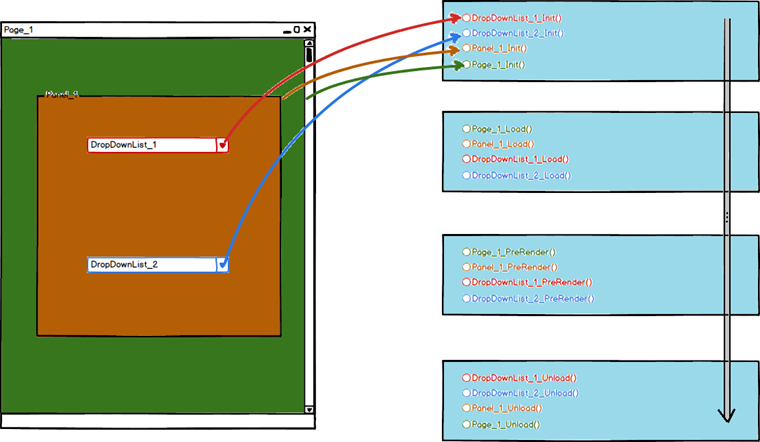
从设计模式的角度讲,页面模型是一个“合成模式(Composite)”,它本身是一棵由多层控件组成的结构树,顶层是Page,以下有叶有树枝,叶是不再包涵子控件的控件,枝是又包涵子控件的控件,每一层控件的"初始化\加载视图状态\加载\预呈现\保存视图状态\卸载"等方法都会调用子控件的对应方法,父控件调用子控件的方法,子又调用孙的,如此递归。
1、初始化:
internal virtual void InitRecursive(Control namingContainer)
{
this.ResolveAdapter();
if (this._controls != null)
{
if (this.flags[128])
{
namingContainer = this;
}
string collectionReadOnly = this._controls.SetCollectionReadOnly("Parent_collections_readonly");
int count = this._controls.Count;
for (int i = 0; i < count; i++)
{
Control control = this._controls[i];
control.UpdateNamingContainer(namingContainer);
if (control._id == null && namingContainer != null && !control.flags[64])
{
control.GenerateAutomaticID();
}
control._page = this.Page;
control.InitRecursive(namingContainer);
}
this._controls.SetCollectionReadOnly(collectionReadOnly);
}
if (this._controlState < ControlState.Initialized)
{
this._controlState = ControlState.ChildrenInitialized;
if (this.Page != null && !this.DesignMode && this.Page.ContainsTheme && this.EnableTheming)
{
this.ApplySkin(this.Page);
}
if (this.AdapterInternal != null)
{
this.AdapterInternal.OnInit(EventArgs.Empty);
}
else
{
this.OnInit(EventArgs.Empty);
}
this._controlState = ControlState.Initialized;
}
this.TrackViewState();
}
2、加载视图状态:
internal void LoadViewStateRecursive(object savedState)
{
if (savedState == null || this.flags[4])
{
return;
}
if (this.Page != null && this.Page.IsPostBack)
{
object obj = null;
Pair pair = savedState as Pair;
object first;
ArrayList arrayList;
if (pair != null)
{
first = pair.First;
arrayList = (ArrayList)pair.Second;
}
else
{
Triplet triplet = (Triplet)savedState;
first = triplet.First;
obj = triplet.Second;
arrayList = (ArrayList)triplet.Third;
}
try
{
if (obj != null && this.AdapterInternal != null)
{
this.AdapterInternal.LoadAdapterViewState(obj);
}
if (first != null)
{
this.LoadViewState(first);
}
if (arrayList != null)
{
if (this.LoadViewStateByID)
{
this.LoadChildViewStateByID(arrayList);
}
else
{
this.LoadChildViewStateByIndex(arrayList);
}
}
}
catch (InvalidCastException)
{
throw new HttpException(SR.GetString("Controls_Cant_Change_Between_Posts"));
}
catch (IndexOutOfRangeException)
{
throw new HttpException(SR.GetString("Controls_Cant_Change_Between_Posts"));
}
}
this._controlState = ControlState.ViewStateLoaded;
}
internal void LoadChildViewStateByID(ArrayList childState)
{
int count = childState.Count;
for (int i = 0; i < count; i += 2)
{
string text = (string)childState[i];
object obj = childState[i + 1];
Control control = this.FindControl(text);
if (control != null)
{
control.LoadViewStateRecursive(obj);
}
else
{
this.EnsureOccasionalFields();
if (this._occasionalFields.ControlsViewState == null)
{
this._occasionalFields.ControlsViewState = new Hashtable();
}
this._occasionalFields.ControlsViewState[text] = obj;
}
}
}
3、加载:
internal virtual void LoadRecursive()
{
if (this._controlState < ControlState.Loaded)
{
if (this.AdapterInternal != null)
{
this.AdapterInternal.OnLoad(EventArgs.Empty);
}
else
{
this.OnLoad(EventArgs.Empty);
}
}
if (this._controls != null)
{
string collectionReadOnly = this._controls.SetCollectionReadOnly("Parent_collections_readonly");
int count = this._controls.Count;
for (int i = 0; i < count; i++)
{
this._controls[i].LoadRecursive();
}
this._controls.SetCollectionReadOnly(collectionReadOnly);
}
if (this._controlState < ControlState.Loaded)
{
this._controlState = ControlState.Loaded;
}
}
4、预呈现:
internal virtual void PreRenderRecursiveInternal()
{
if (!this.Visible)
{
this.flags.Set(16);
}
else
{
this.flags.Clear(16);
this.EnsureChildControls();
if (this.AdapterInternal != null)
{
this.AdapterInternal.OnPreRender(EventArgs.Empty);
}
else
{
this.OnPreRender(EventArgs.Empty);
}
if (this._controls != null)
{
string collectionReadOnly = this._controls.SetCollectionReadOnly("Parent_collections_readonly");
int count = this._controls.Count;
for (int i = 0; i < count; i++)
{
this._controls[i].PreRenderRecursiveInternal();
}
this._controls.SetCollectionReadOnly(collectionReadOnly);
}
}
this._controlState = ControlState.PreRendered;
}
5、保存视图状态:
internal object SaveViewStateRecursive(ViewStateMode inheritedMode)
{
if (this.flags[4])
{
return null;
}
bool flag;
if (this.flags[8388608])
{
if (this.flags[16777216])
{
flag = true;
inheritedMode = ViewStateMode.Enabled;
}
else
{
flag = false;
inheritedMode = ViewStateMode.Disabled;
}
}
else
{
flag = (inheritedMode == ViewStateMode.Enabled);
}
object obj = null;
object obj2 = null;
if (flag)
{
if (this.AdapterInternal != null)
{
obj = this.AdapterInternal.SaveAdapterViewState();
}
obj2 = this.SaveViewState();
}
ArrayList arrayList = null;
if (this.HasControls())
{
ControlCollection controls = this._controls;
int count = controls.Count;
bool loadViewStateByID = this.LoadViewStateByID;
for (int i = 0; i < count; i++)
{
Control control = controls[i];
object obj3 = control.SaveViewStateRecursive(inheritedMode);
if (obj3 != null)
{
if (arrayList == null)
{
arrayList = new ArrayList(count);
}
if (loadViewStateByID)
{
control.EnsureID();
arrayList.Add(control.ID);
}
else
{
arrayList.Add(i);
}
arrayList.Add(obj3);
}
}
}
if (this.AdapterInternal != null)
{
if (obj2 != null || obj != null || arrayList != null)
{
return new Triplet(obj2, obj, arrayList);
}
}
else
{
if (obj2 != null || arrayList != null)
{
return new Pair(obj2, arrayList);
}
}
return null;
}
6、卸载:
internal virtual void UnloadRecursive(bool dispose)
{
Page page = this.Page;
if (page != null && page.RequiresControlState(this))
{
page.UnregisterRequiresControlState(this);
this.RareFieldsEnsured.RequiredControlState = true;
}
if (this.flags[2097152])
{
this._id = null;
this.flags.Clear(2097152);
}
if (this._controls != null)
{
string collectionReadOnly = this._controls.SetCollectionReadOnly("Parent_collections_readonly");
int count = this._controls.Count;
for (int i = 0; i < count; i++)
{
this._controls[i].UnloadRecursive(dispose);
}
this._controls.SetCollectionReadOnly(collectionReadOnly);
}
if (this.AdapterInternal != null)
{
this.AdapterInternal.OnUnload(EventArgs.Empty);
}
else
{
this.OnUnload(EventArgs.Empty);
}
if (dispose)
{
this.Dispose();
}
if (this.IsReloadable)
{
this._controlState = ControlState.Constructed;
}
}
四、从InitRecursive、LoadRecursive、PreRenderRecursiveInternal、UnloadRecursive函数看事件的触发顺序
第一篇:初识ASP.NET控件开发_第三节:“生死有序”的控件生命周期的更多相关文章
- 【第一篇】ASP.NET MVC快速入门之数据库操作(MVC5+EF6)
目录 [第一篇]ASP.NET MVC快速入门之数据库操作(MVC5+EF6) [第二篇]ASP.NET MVC快速入门之数据注解(MVC5+EF6) [第三篇]ASP.NET MVC快速入门之安全策 ...
- 深入理解javascript对象系列第一篇——初识对象
× 目录 [1]定义 [2]创建 [3]组成[4]引用[5]方法 前面的话 javascript中的难点是函数.对象和继承,前面已经介绍过函数系列.从本系列开始介绍对象部分,本文是该系列的第一篇——初 ...
- android开发3:四大基本组件的介绍与生命周期
android开发3:四大基本组件的介绍与生命周期 Android四大基本组件分别是Activity,Service服务,Content Provider内容提供者,BroadcastReceiver ...
- [ASP.NET Core 3框架揭秘] 依赖注入[8]:服务实例的生命周期
生命周期决定了IServiceProvider对象采用怎样的方式提供和释放服务实例.虽然不同版本的依赖注入框架针对服务实例的生命周期管理采用了不同的实现,但总的来说原理还是类似的.在我们提供的依赖注入 ...
- go [第一篇]初识
[第一篇] 简介 Go 是一个开源的编程语言,它能让构造简单.可靠且高效的软件变得容易. Go是从2007年末由Robert Griesemer, Rob Pike, Ken Thompson主持开发 ...
- 我们一起学习WCF 第一篇初识WCF(附源码供对照学习)
前言:去年由于工作需要我学习了wcf的相关知识,初期对wcf的作用以及为何用怎么样都是一知半解,也许现在也不是非常的清晰.但是通过项目对wcf的运用在脑海里面也算有了初步的模型.今天我就把我从开始wc ...
- Spring之旅第一篇-初识Spring
一.概述 只要用框架开发java,一定躲不过spring,Spring是一个轻量级的Java开源框架,存在的目的是用于构建轻量级的J2EE应用.Spring的核心是控制反转(IOC)和面向切面编程(A ...
- iOS开发——UI进阶篇(十)导航控制器、微博详情页、控制器的View的生命周期
一.导航控制器出栈 1.initWithRootViewController本质 UIViewController *vc = [[OneViewController alloc] init]; // ...
- spring总结之一(spring开发步骤、bean对象的管理、bean生命周期)
###spring 1.概念:开源,轻量级,简化开发的企业级框架. 开源:免费,发展快. 轻量级:占内存小. 简化开发:通用的功能封装,提高程序员的开发效率.--------------------- ...
随机推荐
- 微软BI 之SSRS 系列 - 如何实现报表标签的本地化 - 中文和英文的互换
SSRS 中并没有直接提供本地化的配置方式,因此在 SSRS 中实现本地化,比如有英文标题还有可选的中文标题,就需要通过其它的方式来解决. 比如默认是这样的英文标题 - 但是本地中方用户可能比较喜欢看 ...
- SQL Server 中断开连接到指定数据库的所有连接
常用的情形是在部署测试数据库时需要通过SQL代码自动重新创建数据库,在删除的时候往往会发生错误,错误信息一般会指出目前有用户连接到这个数据库上,因此不能删除. 实现的方式是通过查询指定数据库中活跃的 ...
- LCD显示——点阵字体
Bitmap font 点阵字体是把每一个字符都分成16×16或24×24个点,然后用每个点的虚实来表示字符的轮廓. 点阵字体优点是显示速度快,不像矢量字体需要计算:其最大的缺点是不能放大,一旦放大后 ...
- 从#!/bin/bash中想到的...
罪过罪过,开发了N年的SHELL,竟然第一次思考#!/bin/bash是啥意思?真是怀疑以前的的代码是咋开发出来的- 如果要解释#!/bin/bash是啥意思?为啥每个SHELL脚本第一行都写它哪?首 ...
- Spring Boot 之 RESTfull API简单项目的快速搭建(一)
1.创建项目 2.创建 controller IndexController.java package com.roncoo.example.controller; import java.util. ...
- 元素高度、宽度获取 style currentStyle getComputedStyle getBoundingClientRect
1.示例代码 (1)html <!DOCTYPE html> <html> <head> <meta charset="UTF-8"> ...
- Cas Server源码编译现场实例
最近公司有项目需要做单点登录,根据要求就写下这篇从github上下载的包到项目编译通过,再到修改原代码实现自己的特殊逻辑. 前提: java环境 tomcat环境 maven环境 MyEclipse开 ...
- Windows下MySQL 5.7安装记录
软件下载 环境:Windows 7 旗舰版 64位 MySQL版本:mysql-5.7.3.0-winx64 MySQL下载地址:http://dev.mysql.com/downloads/inst ...
- 【Linux】Ubuntu13.10 设置静态ip地址
vim /etc/network/interfaces # interfaces() ) and ifdown() auto eth0 iface eth0 inet static address 2 ...
- 【FinancialKnowledge】商业银行业务知识
商业银行业务思维导图 一.资产业务 资产业务是商业银行的主要收入来源 1.放款业务 1.1 信用放款 信用放款,是单凭借款人的信誉, 不需要提供任何抵押品的放款,是一种资本放款. 1.1.1 普通借款 ...