
Android 自定义漂亮的圆形进度条
公司有这样一个需求,实现这个圆弧进度条
所以,现在就将它抽取出来分享
- 如果需要是圆帽的就将,下面这句代码放开即可
- mRingPaint.setStrokeCap(Paint.Cap.ROUND);//设置线冒样式,有圆 有方
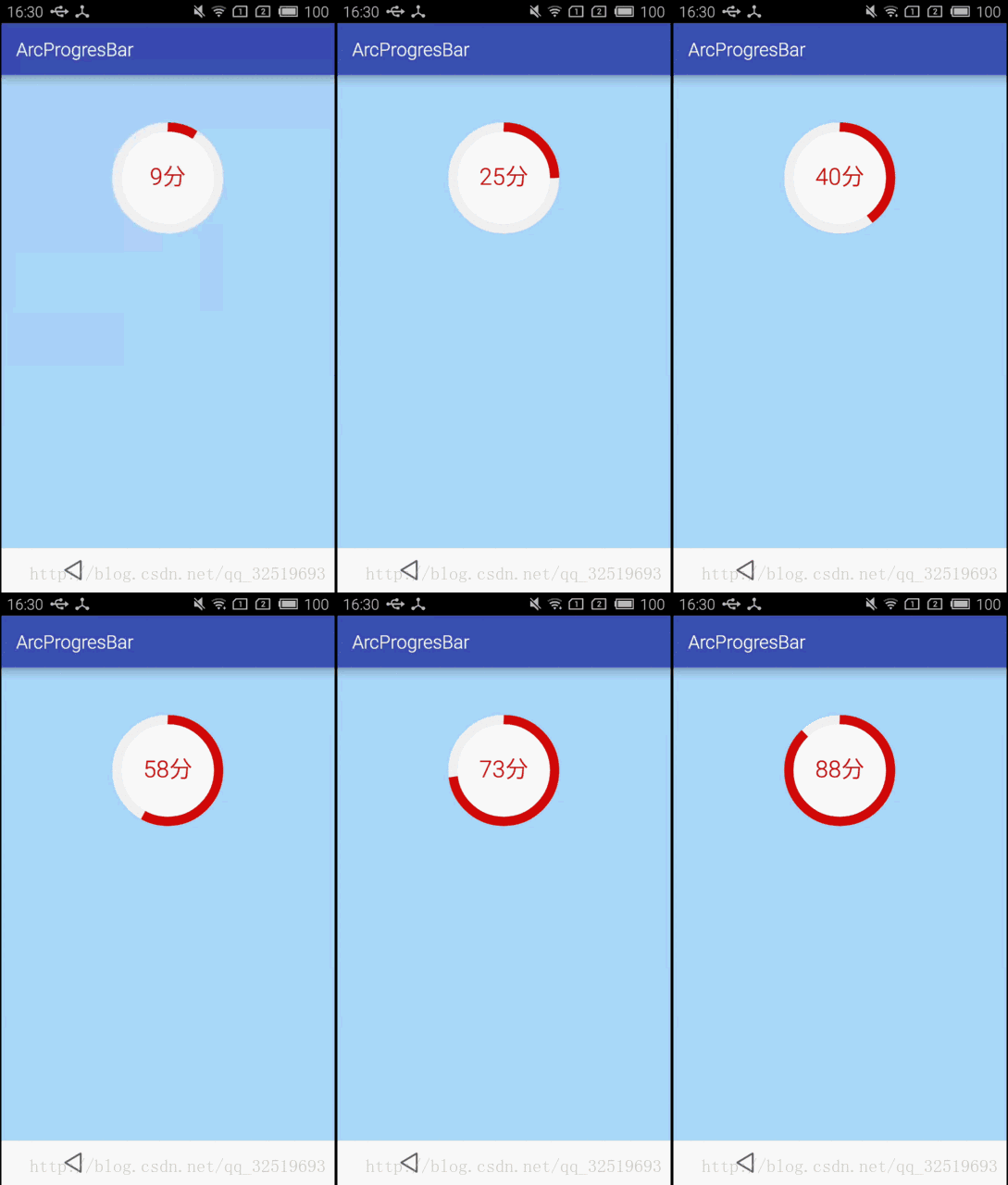
不废话,直接上代码
- 自定义view
import android.content.Context;

import android.content.res.TypedArray;

import android.graphics.Canvas;

import android.graphics.Paint;

import android.graphics.RectF;

import android.util.AttributeSet;

import android.view.View;

/**

 * Created by Administrator on 2017/8/5.

 */

public class CompletedView extends View {

    // 画实心圆的画笔

    private Paint mCirclePaint;

    // 画圆环的画笔

    private Paint mRingPaint;

    // 画圆环的画笔背景色

    private Paint mRingPaintBg;

    // 画字体的画笔

    private Paint mTextPaint;

    // 圆形颜色

    private int mCircleColor;

    // 圆环颜色

    private int mRingColor;

    // 圆环背景颜色

    private int mRingBgColor;

    // 半径

    private float mRadius;

    // 圆环半径

    private float mRingRadius;

    // 圆环宽度

    private float mStrokeWidth;

    // 圆心x坐标

    private int mXCenter;

    // 圆心y坐标

    private int mYCenter;

    // 字的长度

    private float mTxtWidth;

    // 字的高度

    private float mTxtHeight;

    // 总进度

    private int mTotalProgress = 100;

    // 当前进度

    private int mProgress;

    public CompletedView(Context context, AttributeSet attrs) {

        super(context, attrs);

        // 获取自定义的属性

        initAttrs(context, attrs);

        initVariable();

    }

    //属性

    private void initAttrs(Context context, AttributeSet attrs) {

        TypedArray typeArray = context.getTheme().obtainStyledAttributes(attrs,

                R.styleable.TasksCompletedView, 0, 0);

        mRadius = typeArray.getDimension(R.styleable.TasksCompletedView_radius, 80);

        mStrokeWidth = typeArray.getDimension(R.styleable.TasksCompletedView_strokeWidth, 10);

        mCircleColor = typeArray.getColor(R.styleable.TasksCompletedView_circleColor, 0xFFFFFFFF);

        mRingColor = typeArray.getColor(R.styleable.TasksCompletedView_ringColor, 0xFFFFFFFF);

        mRingBgColor = typeArray.getColor(R.styleable.TasksCompletedView_ringBgColor, 0xFFFFFFFF);

        mRingRadius = mRadius + mStrokeWidth / 2;

    }

    //初始化画笔

    private void initVariable() {

        //内圆

        mCirclePaint = new Paint();

        mCirclePaint.setAntiAlias(true);

        mCirclePaint.setColor(mCircleColor);

        mCirclePaint.setStyle(Paint.Style.FILL);

        //外圆弧背景

        mRingPaintBg = new Paint();

        mRingPaintBg.setAntiAlias(true);

        mRingPaintBg.setColor(mRingBgColor);

        mRingPaintBg.setStyle(Paint.Style.STROKE);

        mRingPaintBg.setStrokeWidth(mStrokeWidth);

        //外圆弧

        mRingPaint = new Paint();

        mRingPaint.setAntiAlias(true);

        mRingPaint.setColor(mRingColor);

        mRingPaint.setStyle(Paint.Style.STROKE);

        mRingPaint.setStrokeWidth(mStrokeWidth);

        //mRingPaint.setStrokeCap(Paint.Cap.ROUND);//设置线冒样式,有圆 有方

        //中间字

        mTextPaint = new Paint();

        mTextPaint.setAntiAlias(true);

        mTextPaint.setStyle(Paint.Style.FILL);

        mTextPaint.setColor(mRingColor);

        mTextPaint.setTextSize(mRadius / 2);

        Paint.FontMetrics fm = mTextPaint.getFontMetrics();

        mTxtHeight = (int) Math.ceil(fm.descent - fm.ascent);

    }

    //画图

    @Override

    protected void onDraw(Canvas canvas) {

        mXCenter = getWidth() / 2;

        mYCenter = getHeight() / 2;

        //内圆

        canvas.drawCircle(mXCenter, mYCenter, mRadius, mCirclePaint);

        //外圆弧背景

        RectF oval1 = new RectF();

        oval1.left = (mXCenter - mRingRadius);

        oval1.top = (mYCenter - mRingRadius);

        oval1.right = mRingRadius * 2 + (mXCenter - mRingRadius);

        oval1.bottom = mRingRadius * 2 + (mYCenter - mRingRadius);

        canvas.drawArc(oval1, 0, 360, false, mRingPaintBg); //圆弧所在的椭圆对象、圆弧的起始角度、圆弧的角度、是否显示半径连线

        //外圆弧

        if (mProgress > 0 ) {

            RectF oval = new RectF();

            oval.left = (mXCenter - mRingRadius);

            oval.top = (mYCenter - mRingRadius);

            oval.right = mRingRadius * 2 + (mXCenter - mRingRadius);

            oval.bottom = mRingRadius * 2 + (mYCenter - mRingRadius);

            canvas.drawArc(oval, -90, ((float)mProgress / mTotalProgress) * 360, false, mRingPaint); //

            //字体

            String txt = mProgress + "分";

            mTxtWidth = mTextPaint.measureText(txt, 0, txt.length());

            canvas.drawText(txt, mXCenter - mTxtWidth / 2, mYCenter + mTxtHeight / 4, mTextPaint);

        }

    }

    //设置进度

    public void setProgress(int progress) {

        mProgress = progress;

        postInvalidate();//重绘

    }

}
- attrs.xml文件
<?xml version="1.0" encoding="utf-8"?>

<resources>

    <!--圆弧进度条-->

    <declare-styleable name="TasksCompletedView">

        <attr name="radius" format="dimension"/>

        <attr name="strokeWidth" format="dimension"/>

        <attr name="circleColor" format="color"/>

        <attr name="ringColor" format="color"/>

        <attr name="ringBgColor" format="color"/>

    </declare-styleable>

</resources>- color.xml文件
<?xml version="1.0" encoding="utf-8"?>

<resources>

    <color name="colorPrimary">#3F51B5</color>

    <color name="colorPrimaryDark">#303F9F</color>

    <color name="colorAccent">#FF4081</color>

    <color name="white">#FFFFFF</color>

    <color name="white2">#f5f3f3</color>

    <color name="colorRed">#d50f09</color>

</resources>- MainActivity文件!,,,注意,,,开一个子线程去刷新进度,如果用系统handler去更新,阻塞主线程会出现界面刷新的卡顿情况,因为handler就是程操作主线程的
public class MainActivity extends AppCompatActivity {

    private int mTotalProgress = 90;

    private int mCurrentProgress = 0;

    //进度条

    private CompletedView mTasksView;

    @Override

    protected void onCreate(Bundle savedInstanceState) {

        super.onCreate(savedInstanceState);

        setContentView(R.layout.activity_main);

        mTasksView = (CompletedView) findViewById(R.id.tasks_view);

        new Thread(new ProgressRunable()).start();

    }

    class ProgressRunable implements Runnable {

        @Override

        public void run() {

                while (mCurrentProgress < mTotalProgress) {

                    mCurrentProgress += 1;

                    mTasksView.setProgress(mCurrentProgress);

                    try {

                        Thread.sleep(90);

                    } catch (Exception e) {

                        e.printStackTrace();

                    }

                }

        }

    }

}- activity_main.xml文件
<?xml version="1.0" encoding="utf-8"?>

<LinearLayout xmlns:android="http://schemas.android.com/apk/res/android"

    xmlns:tc="http://schemas.android.com/apk/res/com.example.administrator.arcprogresbar"

    xmlns:tools="http://schemas.android.com/tools"

    android:layout_width="match_parent"

    android:layout_height="match_parent"

    android:background="#addafd"

    android:orientation="vertical">

    <LinearLayout

        android:layout_width="match_parent"

        android:layout_height="wrap_content"

        android:gravity="center_horizontal"

        android:orientation="vertical">

        <com.example.administrator.arcprogresbar.CompletedView

            android:id="@+id/tasks_view"

            android:layout_width="223dp"

            android:layout_height="223dp"

            tc:circleColor="@color/white"

            tc:radius="50dip"

            tc:ringBgColor="@color/white2"

            tc:ringColor="@color/colorRed"

            tc:strokeWidth="10dip" />

    </LinearLayout>

</LinearLayout>
布局文件中后面自定义命名空间接着的是应用的包名:xmlns:tc=”http://schemas.android.com/apk/res/com.example.administrator.arcprogresbar”
注意:xmlns:tc=”http://schemas.android.com/apk/res/包名”
再次提醒:刷新进度条要用子线程去执行,防止主线程出现卡顿情况
Android 自定义漂亮的圆形进度条的更多相关文章
- 自定义VIew——漂亮的圆形进度条
package com.example.firstapp; import java.text.DecimalFormat; import android.annotation.SuppressLint ...
- Android自定义一款带进度条的精美按键
Android中自定义View并没有什么可怕的,拿到一个需要自定义的View,首先要做的就是把它肢解,然后思考每一步是怎样实现的,按分析的步骤一步一步的编码实现,最后你就会发现达到了你想要的效果.本文 ...
- Android 高手进阶之自定义View,自定义属性(带进度的圆形进度条)
Android 高手进阶(21) 版权声明:本文为博主原创文章,未经博主允许不得转载. 转载请注明地址:http://blog.csdn.net/xiaanming/article/detail ...
- Android 自定义 View 圆形进度条总结
Android 自定义圆形进度条总结 版权声明:本文为博主原创文章,未经博主允许不得转载. 微博:厉圣杰 微信公众号:牙锅子 源码:CircleProgress 文中如有纰漏,欢迎大家留言指出. 最近 ...
- 【Android 应用开发】 自定义 圆形进度条 组件
转载著名出处 : http://blog.csdn.net/shulianghan/article/details/40351487 代码下载 : -- CSDN 下载地址 : http://down ...
- android 自定义图片圆形进度条
感觉话一个圆形进度条挺简单的 ,但是却偏偏给了几张图片让你话,说实话我没接触过,感觉好难,还好百度有大把的资源,一番努力下终于画出来了. 代码如下. package com.etong.cpms.wi ...
- Android 带进度的圆形进度条
最近项目有个需求,做带进度从下到上的圆形进度条. 网上查了一下资料,发现这篇博客写得不错http://blog.csdn.net/xiaanming/article/details/10298163 ...
- Android 高手进阶,自己定义圆形进度条
背景介绍 在Android 开发中,我们常常遇到各种各样绚丽的控件,所以,依靠我们Android本身所带的控件是远远不够的,许多时候须要我们自定义控件,在开发的过程中.我们公司遇到了一种须要自己写的一 ...
- Android自定义控件系列之应用篇——圆形进度条
一.概述 在上一篇博文中,我们给大家介绍了Android自定义控件系列的基础篇.链接:http://www.cnblogs.com/jerehedu/p/4360066.html 这一篇博文中,我们将 ...
随机推荐
- ASP输出JSON数据及客户端jQuery处理方法
首先ASP处理JSON需要json官方提供的JSON For ASP 封装类文件,下载地址:http://code.google.com/p/aspjson/downloads/list 下载最新的J ...
- Android 显示网络图片
本文内容 环境 演示显示网络图片 本文演示 Android 如何显示网络图片.学习一门新的语言,最好办法就先了解该语言的语法和库,以及设计思想,再着手现实一些常用功能,毕竟以后用该语言是要写程序的,而 ...
- 解决input框中加入disabled="disabled"之后,改变字体的颜色(默认的是灰色)
在input框中加入disabled="disabled"之后,字体默认的就变成灰色了 解决方案 input[disabled]{color:#fff;opacity:1} dis ...
- Web安全 之 X-Frame-Options响应头配置
最近项目处于测试阶段,在安全报告中存在" X-Frame-Options 响应头缺失 "问题,显示可能会造成跨帧脚本编制攻击,如下图: X-Frame-Options: 值有三个: ...
- Selenium2(WebDriver)总结(五)---元素操作进阶(常用类)
1.Alert类 Alert是指windows弹窗的一些操作,需要new一个Alert类 driver.switchTo().alert():切换到alert窗口 alert.getText():取得 ...
- 微信小程序 - 滚动公告组件
支持横轴.纵轴滚动. 点击下载:speaker
- winf
真的,先亮注册码!!(直接复制即可) 注册码: <第1组> 用户名:大眼仔~旭(Anan) 注册码:01000000007002140V <第2组> 用户名:大眼仔~旭(Ana ...
- Iperf是一个网络性能测试工具
http://blog.163.com/hlz_2599/blog/static/142378474201341341339314/ Iperf是一个网络性能测试工具.Iperf可以测试TCP和UDP ...
- spring boot-mybatis三种动态sql(5)
脚本sql XML配置方式的动态SQL我就不讲了,有兴趣可以自己了解,下面是用<script>的方式把它照搬过来,用注解来实现.适用于xml配置转换到注解配置 @Select(" ...
- java面试第二天
局部变量:不是声明在类体括号里面的变量 (1)必须要先赋值,后使用,否则通不过编译,局部变量没有默认初始化值 (2)作用范围:定义开始到定义它的代码块结束 (3)同一范围内,不允许2个局部变量命名冲突 ...