
Spark Storage(一) 集群下的区块管理
Storage模块
在Spark中提及最多的是RDD,而RDD所交互的数据是通过Storage来实现和管理
Storage模块整体架构
1. 存储层
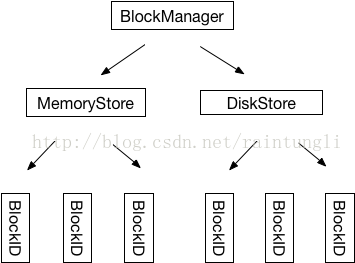
2. 集群下的架构
2.1 架构
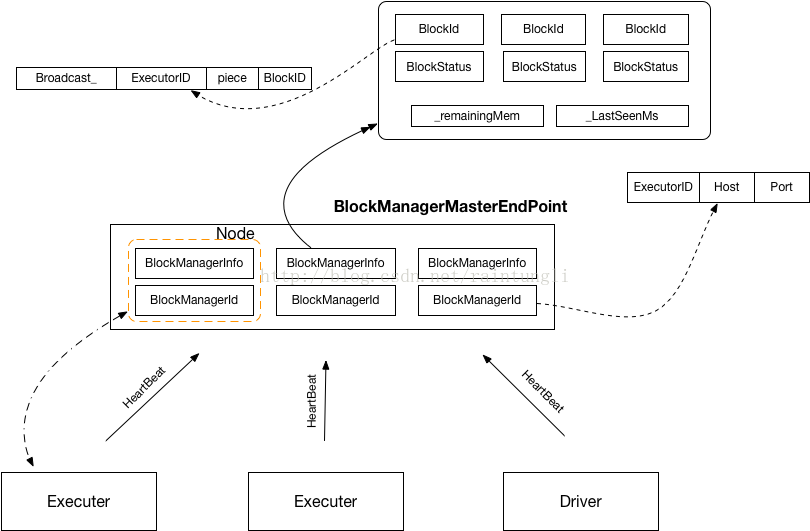
- Master : 拥有所有block的具体信息(本地和Slave节点)
- Slave : 通过master获取block的信息,并且汇报自己的信息
for (pid <- Random.shuffle(Seq.range(, numBlocks))) {

     val pieceId = BroadcastBlockId(id, "piece" + pid)

     logDebug(s"Reading piece $pieceId of $broadcastId")

     // First try getLocalBytes because there is a chance that previous attempts to fetch the

     // broadcast blocks have already fetched some of the blocks. In that case, some blocks

     // would be available locally (on this executor).

     bm.getLocalBytes(pieceId) match {

       case Some(block) =>

         blocks(pid) = block

         releaseLock(pieceId)

       case None =>

         bm.getRemoteBytes(pieceId) match {

           case Some(b) =>

             if (checksumEnabled) {

               val sum = calcChecksum(b.chunks())

               if (sum != checksums(pid)) {

                 throw new SparkException(s"corrupt remote block $pieceId of $broadcastId:" +

                   s" $sum != ${checksums(pid)}")

               }

             }

             // We found the block from remote executors/driver's BlockManager, so put the block

             // in this executor's BlockManager.

             if (!bm.putBytes(pieceId, b, StorageLevel.MEMORY_AND_DISK_SER, tellMaster = true)) {

               throw new SparkException(

                 s"Failed to store $pieceId of $broadcastId in local BlockManager")

             }

             blocks(pid) = b

           case None =>

             throw new SparkException(s"Failed to get $pieceId of $broadcastId")

         }

     }

   }
2.2 Executor获取块内容的位置
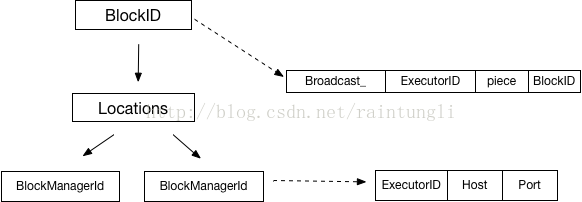
唯一的blockID:
请求Master获取该BlockID所在的 Location,也就是BlockManagerId的集合
/** Get locations of the blockId from the driver */

  def getLocations(blockId: BlockId): Seq[BlockManagerId] = {

    driverEndpoint.askWithRetry[Seq[BlockManagerId]](GetLocations(blockId))

  }
BlockManagerId(driver, 192.168.121.101, 55153, None)
Executor ID, executor ID, 对driver来说就是driver
2.3 Executor获取块的内容
def getRemoteBytes(blockId: BlockId): Option[ChunkedByteBuffer] = {

    logDebug(s"Getting remote block $blockId")

    require(blockId != null, "BlockId is null")

    var runningFailureCount =

    var totalFailureCount =

    val locations = getLocations(blockId)

    val maxFetchFailures = locations.size

    var locationIterator = locations.iterator

    while (locationIterator.hasNext) {

      val loc = locationIterator.next()

      logDebug(s"Getting remote block $blockId from $loc")

      val data = try {

        blockTransferService.fetchBlockSync(

          loc.host, loc.port, loc.executorId, blockId.toString).nioByteBuffer()

      } catch {

        case NonFatal(e) =>

          runningFailureCount +=

          totalFailureCount +=

          if (totalFailureCount >= maxFetchFailures) {

            // Give up trying anymore locations. Either we've tried all of the original locations,

            // or we've refreshed the list of locations from the master, and have still

            // hit failures after trying locations from the refreshed list.

            logWarning(s"Failed to fetch block after $totalFailureCount fetch failures. " +

              s"Most recent failure cause:", e)

            return None

          }

          logWarning(s"Failed to fetch remote block $blockId " +

            s"from $loc (failed attempt $runningFailureCount)", e)

          // If there is a large number of executors then locations list can contain a

          // large number of stale entries causing a large number of retries that may

          // take a significant amount of time. To get rid of these stale entries

          // we refresh the block locations after a certain number of fetch failures

          if (runningFailureCount >= maxFailuresBeforeLocationRefresh) {

            locationIterator = getLocations(blockId).iterator

            logDebug(s"Refreshed locations from the driver " +

              s"after ${runningFailureCount} fetch failures.")

            runningFailureCount =

          }

          // This location failed, so we retry fetch from a different one by returning null here

          null

      }

      if (data != null) {

        return Some(new ChunkedByteBuffer(data))

      }

      logDebug(s"The value of block $blockId is null")

    }

    logDebug(s"Block $blockId not found")

    None

  }
通过获取的BlockManagerId的集合列表,顺序的从列表中取出一个拥有该Block的服务器,通过
blockTransferService.fetchBlockSync(

          loc.host, loc.port, loc.executorId, blockId.toString).nioByteBuffer()
2.4 BlockManager注册
val idFromMaster = master.registerBlockManager(

      id,

      maxMemory,

      slaveEndpoint)
会通过master 注册BlockManager
def registerBlockManager(

    blockManagerId: BlockManagerId,

    maxMemSize: Long,

    slaveEndpoint: RpcEndpointRef): BlockManagerId = {

  logInfo(s"Registering BlockManager $blockManagerId")

  val updatedId = driverEndpoint.askWithRetry[BlockManagerId](

    RegisterBlockManager(blockManagerId, maxMemSize, slaveEndpoint))

  logInfo(s"Registered BlockManager $updatedId")

  updatedId

}
2.5 Driver Master的endpoint
val blockManagerMaster = new BlockManagerMaster(registerOrLookupEndpoint(

      BlockManagerMaster.DRIVER_ENDPOINT_NAME,

      new BlockManagerMasterEndpoint(rpcEnv, isLocal, conf, listenerBus)),

      conf, isDriver)
注册一个lookup的endpoint
def registerOrLookupEndpoint(

        name: String, endpointCreator: => RpcEndpoint):

      RpcEndpointRef = {

      if (isDriver) {

        logInfo("Registering " + name)

        rpcEnv.setupEndpoint(name, endpointCreator)

      } else {

        RpcUtils.makeDriverRef(name, conf, rpcEnv)

      }

    }
代码中可以看到只有isDriver的时候才会setup一个rpc的endpoint,默认是netty的rpc环境,命名为:BlockManagerMaster
spark://BlockManagerMaster@192.168.121.101:40978
2.6 Master和Executor消息格式
override def receiveAndReply(context: RpcCallContext): PartialFunction[Any, Unit] = {

    case RegisterBlockManager(blockManagerId, maxMemSize, slaveEndpoint) =>

      context.reply(register(blockManagerId, maxMemSize, slaveEndpoint))

    case _updateBlockInfo @

        UpdateBlockInfo(blockManagerId, blockId, storageLevel, deserializedSize, size) =>

      context.reply(updateBlockInfo(blockManagerId, blockId, storageLevel, deserializedSize, size))

      listenerBus.post(SparkListenerBlockUpdated(BlockUpdatedInfo(_updateBlockInfo)))

    case GetLocations(blockId) =>

      context.reply(getLocations(blockId))

    case GetLocationsMultipleBlockIds(blockIds) =>

      context.reply(getLocationsMultipleBlockIds(blockIds))

    case GetPeers(blockManagerId) =>

      context.reply(getPeers(blockManagerId))

    case GetExecutorEndpointRef(executorId) =>

      context.reply(getExecutorEndpointRef(executorId))

    case GetMemoryStatus =>

      context.reply(memoryStatus)

    case GetStorageStatus =>

      context.reply(storageStatus)

    case GetBlockStatus(blockId, askSlaves) =>

      context.reply(blockStatus(blockId, askSlaves))

    case GetMatchingBlockIds(filter, askSlaves) =>

      context.reply(getMatchingBlockIds(filter, askSlaves))

    case RemoveRdd(rddId) =>

      context.reply(removeRdd(rddId))

    case RemoveShuffle(shuffleId) =>

      context.reply(removeShuffle(shuffleId))

    case RemoveBroadcast(broadcastId, removeFromDriver) =>

      context.reply(removeBroadcast(broadcastId, removeFromDriver))

    case RemoveBlock(blockId) =>

      removeBlockFromWorkers(blockId)

      context.reply(true)

    case RemoveExecutor(execId) =>

      removeExecutor(execId)

      context.reply(true)

    case StopBlockManagerMaster =>

      context.reply(true)

      stop()

    case BlockManagerHeartbeat(blockManagerId) =>

      context.reply(heartbeatReceived(blockManagerId))

    case HasCachedBlocks(executorId) =>

      blockManagerIdByExecutor.get(executorId) match {

        case Some(bm) =>

          if (blockManagerInfo.contains(bm)) {

            val bmInfo = blockManagerInfo(bm)

            context.reply(bmInfo.cachedBlocks.nonEmpty)

          } else {

            context.reply(false)

          }

        case None => context.reply(false)

      }

  }
2.7 Master结构关系
Spark Storage(一) 集群下的区块管理的更多相关文章
- spark高可用集群搭建及运行测试
文中的所有操作都是在之前的文章spark集群的搭建基础上建立的,重复操作已经简写: 之前的配置中使用了master01.slave01.slave02.slave03: 本篇文章还要添加master0 ...
- Spark高可用集群搭建
Spark高可用集群搭建 node1 node2 node3 1.node1修改spark-env.sh,注释掉hadoop(就不用开启Hadoop集群了),添加如下语句 export ...
- Spark on Yarn 集群运行要点
实验版本:spark-1.6.0-bin-hadoop2.6 本次实验主要是想在已有的Hadoop集群上使用Spark,无需过多配置 1.下载&解压到一台使用spark的机器上即可 2.修改配 ...
- 搭建Spark高可用集群
Spark简介 官网地址:http://spark.apache.org/ Apache Spark™是用于大规模数据处理的统一分析引擎. 从右侧最后一条新闻看,Spark也用于AI人工智能 sp ...
- spark教程(一)-集群搭建
spark 简介 建议先阅读我的博客 大数据基础架构 spark 一个通用的计算引擎,专门为大规模数据处理而设计,与 mapreduce 类似,不同的是,mapreduce 把中间结果 写入 hdfs ...
- 用redis实现TOMCAT集群下的session共享
上篇实现了 LINUX中NGINX反向代理下的TOMCAT集群(http://www.cnblogs.com/yuanjava/p/6850764.html) 这次我们在上篇的基础上实现session ...
- redis入门(14)redis集群下的数据分区存储
redis入门(10)redis集群下的数据分区存储
- Java应用集群下的定时任务处理方案(mysql)
Java应用集群下的定时任务处理方案(mysql) 因为自己有csdn和博客园两个博客, 所以两边都会发一下. csdn地址: http://blog.csdn.net/u012881584/ar ...
- was集群下基于接口分布式架构和开发经验谈
版权声明:本文为博主原创文章,未经博主同意不得转载. https://blog.csdn.net/luozhonghua2014/article/details/34084935 某b项目是我首 ...
随机推荐
- JS - url相关
今天在找获取当前网址除去参数的js方式,结果自己会的竟然只有window.location.href 查到的一篇博文: http://www.cnblogs.com/weiyuxinghuacun/a ...
- 【cs229-Lecture2】Linear Regression with One Variable (Week 1)(含测试数据和源码)
从Ⅱ到Ⅳ都在讲的是线性回归,其中第Ⅱ章讲得是简单线性回归(simple linear regression, SLR)(单变量),第Ⅲ章讲的是线代基础,第Ⅳ章讲的是多元回归(大于一个自变量). 本文的 ...
- Delphi应用程序的调试(四)The Debug Inspector
调试检查器(The Debug Inspector) Debug Inspector使用户能查看诸如类和记录的数据对象,也可以用它来查看整数.字符数组等简单数据类型,但这类简单数据类型最好是用Watc ...
- mFC 橡皮线
一般都用GDI实现: void CXiangpijinView::OnMouseMove(UINT nFlags, CPoint point) { // TODO: Add your message ...
- Python Tkinter Text控件
原文地址: http://blog.csdn.net/bemorequiet/article/details/54743889 这篇博客主要是简单的说一下Tkinter中的Text控件的相关知识. T ...
- Ajax技术(WEB无刷新提交数据)
(转自:http://www.jb51.net/article/291.htm) Ajax内部交流文档一.使用Ajax的主要原因 1.通过适当的Ajax应用达到更好的用户体验: 2.把以前的一些服务器 ...
- 题目1091:棋盘游戏(DFS)
题目链接:http://ac.jobdu.com/problem.php?pid=1091 详解链接:https://github.com/zpfbuaa/JobduInCPlusPlus 参考代码: ...
- 二、Laya学习笔记 ---- Laya中如何新建一个场景UI并使用
因为我之前是用Egret的,Egret是场景皮肤HomeSceneSkin.exml,然后在场景代码HomeScene代码中为该场景赋值皮肤this.skinName = "HomeScen ...
- IOS控制系统手势返回
self.navigationController.interactivePopGestureRecognizer.enabled = YES; //手势返回的代理,如果自定义了leftButtonI ...
- JAVAORM框架之Mybatis (Ibatis) 详解
目录 Mybatis基础概念 Mybatis开放方式演进 Mybatis框架核心要点 关联查询 延迟加载(懒加载) 动态SQL Mybatis缓存 Mybatis逆向工程 PageHelper分页插件 ...