
IO—代码—基础及其用例
字节流:文件、图片、歌曲
使用字节流的应用场景:如果是读写的数据都不需要转换成字符的时候,则使用字节流。
字节流处理单元为1个字节, 操作字节和字节数组。不能直接处理Unicode字符
字节流可用于任何类型的对象,包括二进制对象,字符流只能处理字符或者字符串.
如果是 音频文件、图片、歌曲,就用字节流好点
字节流在操作的时候本身是不会用到缓冲区(内存)的,是与文件本身直接操作的
字节流在操作文件时,即使不关闭资源(close方法),文件也能输出
字符流:关系到中文
使用字符流的应用场景:如果是读写字符数据的时候则使用字符流。
字符流处理的单元为2个字节的Unicode字符,分别操作字符、字符数组或字符串。
如果是关系到中文(文本)的,用字符流好点
字符流在操作的时候是使用到缓冲区的
流不使用close方法的话,则不会输出任何内容,说明字符流用的是缓冲区,并且可以使用flush 方法强制进行刷新缓冲区,这时才能在不close的情况下输出内容
需要缓冲的流:
BufferedInputStream, BufferedOutputStream,( 字节流 )
BufferedReader, BufferedWriter( 字符流 )
需要封装基础流:
BufferedReader和BufferedWriter
ObjectInputStream 和 ObjectOutputStream
DataInputStream 和 DataOutputStream
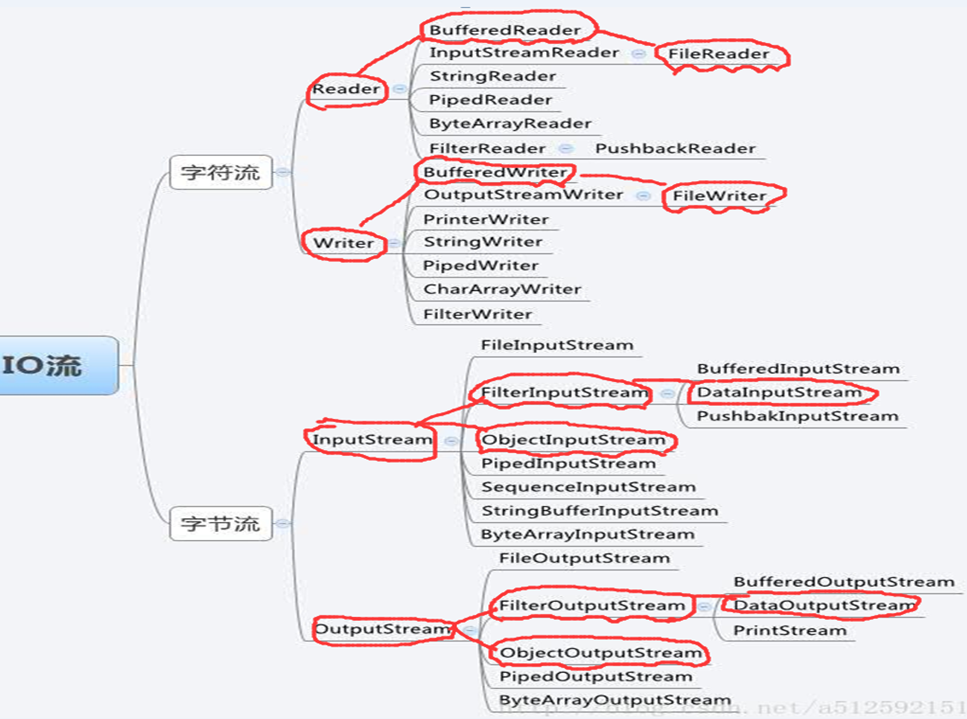
IO—对象流
---------------------------------------------------------------------------------------
public static void main(String[] args) {
//封装 一个序列化的输出流
ObjectOutputStream oos =null;
try {
oos = new ObjectOutputStream(new FileOutputStream(
"E:/Domi/txt/4.txt"));
Student st1 = new Student("张三", 32);
Student st2 = new Student("张lis", 32);
ArrayList<Student> ls = new ArrayList<Student>();
ls.add(st1);
ls.add(st2);
oos.writeObject(ls);
} catch (Exception e) {
e.printStackTrace();
}finally{
try {
oos.close();
} catch (Exception e2) {
e2.printStackTrace();
}
}
}
-----------------------------------------------------------------------------------------------
public static void main(String[] args) {
//读取对象
ObjectInputStream ois = null;
try {
ois = new ObjectInputStream(
new FileInputStream("E:/Domi/txt/4.txt"));
ArrayList<Student> lis = (ArrayList<Student>) ois.readObject();
for(Student ss:lis){
System.out.println(ss.name+","+ss.age);
}
} catch (Exception e) {
e.printStackTrace();
}finally{
try {
ois.close();
} catch (Exception e2) {
e2.printStackTrace();
}
}
}
-------------------------------------------------------------------------------------------------
IO—字符流
public static void main(String[] args) throws IOException {
BufferedReader bf =null;
BufferedWriter bw = null;
bf = new BufferedReader(new FileReader(EDomitxt1.txt));
bw = new BufferedWriter(new FileWriter(EDomitxt2.txt,true));
创建中间变量
System.out.println(bf.ready());
String line = bf.readLine();
while(line!=null){
bw.write(line);
bw.flush();
System.out.println(line);
line = bf.readLine();
}
bw.close();
bf.close();
}
IO—字节流(二进制文件)
public static void main(String[] args) {
FileInputStream fi = null;
FileOutputStream fo = null;
try {
fi = new FileInputStream("E:/Domi/txt/1.txt");
fo = new FileOutputStream("E:/Domi/txt/2.txt", true);
int a;
while ((a = fi.read()) != -1) {
//二进制a转为char输出
System.out.println((char)a);
fo.write(a);
}
} catch (Exception e) {
e.printStackTrace();
}finally{
try {
fo.close();
fi.close();
} catch (Exception e2) {
e2.printStackTrace();
}
}
}
IO—字节流(图片,音,视频)
public static void main(String[] args) throws IOException {
DataInputStream dis=null;
DataOutputStream dos = null;
dis =new DataInputStream(new FileInputStream("E:\\Domi\\txt\\music.mp3"));
dos = new DataOutputStream(new FileOutputStream("E:\\Domi\\txt\\top2.mp3"));
//创建中转站
byte[] by = new byte[1024];
//复制文件
int len = dis.read(by);
while(len!=-1){
dos.write(by);
len = dis.read(by);
}
dos.close();
dis.close();
System.out.println("复制完毕!");
}
--------------------------------------------------------------------------------------------
IO—代码—基础及其用例的更多相关文章
- Android逆向-java代码基础
作者:I春秋作家——HAI_ 0×00 前言 看这篇可以先看看之前的文章,进行一个了解.Android逆向-java代码基础(1)Android逆向-java代码基础(2) 之前看到有大佬用smali ...
- Java 中级IO流基础及主要API编程
1. IO流基础知识,流 是字节从源到目的地的运行的轨迹,次序是有意义的, 字节会按照次序进行传递, 比如Hello World 在下图中的传递的轨迹.该图形象的解释了IO中流的概念.流中全是字节.2 ...
- 003-Python3-基础语法-运行方式、代码基础要求、运算符[算数运算符、比较运算符、赋值运算符、位运算符、逻辑运算符、成员运算符、身份运算符]、运算符优先级
一.基础语法 参看地址:https://www.runoob.com/python3/python3-tutorial.html 1.1.运行方式 1.文件方式 编写一个hello.py文件, pri ...
- 零基础学习java------day8------javabean编写规范,继承,static关键字,代码块,单例设计模式
0. 今日内容提要 1. javabean书写规范 javabean:一个普通的类,用来描述事物的类,里面不包含任何的业务逻辑,只是用来存储数据. 比如:Teacher,Student,Mobile. ...
- 程序设计中的数学思维函数总结(代码以C#为例)
最近以C#为例,学习了程序设计基础,其中涉及到一些数学思维,我们可以巧妙的将这些逻辑问题转换为代码,交给计算机运算. 现将经常会使用到的基础函数做一总结,供大家分享.自己备用. 1.判断一个数是否为奇 ...
- JAVA_SE基础——38.单例设计模式
本文继续介绍23种设计模式系列之单例模式. 我们在javaSE的基础学习中,会讲到:单例设计模式.模板设计模式.装饰者设计模式.观察者设计模式.工厂设计模式 我以后随着水平的提高,我会专门开个分类写设 ...
- Java IO流基础总结
前言 好久不用Java的IO流,把好多的基础知识都忘了,昨天在写一段代码,发现好多细节都忘了.那天在组织组内代码评审的时候,发现有人在乱用IO流相关的类,所以还是写篇文章,把这个知识点总结一下. IO ...
- 精讲响应式webclient第1篇-响应式非阻塞IO与基础用法
笔者在之前已经写了一系列的关于RestTemplate的文章,如下: 精讲RestTemplate第1篇-在Spring或非Spring环境下如何使用 精讲RestTemplate第2篇-多种底层HT ...
- 【代码笔记】iOS-单例
一,工程图. 二,代码. NetManager.h #import <Foundation/Foundation.h> @interface NetManager : NSObject + ...
随机推荐
- [原]linux下将网卡设置为混杂模式
设置为混杂模式ifconfig eth2 promisc取消设置ifconfig eth2 -promisc ------------------------------------------ 下面 ...
- centos6上使用xfs文件系统
ext4目前也还没有真的支持16TB以上的单分区空间,由于工具的限制,只能创建最大为16T的单分区决定直接用xfs 安装xfs [root@ ~]$ yum install kmod-xfs xfsp ...
- ms转成00:00:00的时间格式化
毫秒转成 00:00:00的时间格式 比如1000毫秒转成00:00:01 /** * 格式化邀请的时间 * @param time ms */ public static formatTime(ti ...
- 关于kvm虚拟机的克隆方法总结
kvm虚拟机的克隆分为两种情况,第一种kvm宿主机上对虚拟机直接克隆 第二种通过复制配置文件与磁盘文件的虚拟机复制克隆(适用于异机的静态迁移). 现笔者将分别两种kvm虚拟机克隆的的详细操作过程都记录 ...
- 一个简单web系统的接口性能分析及调优过程
在测试一个简单系统接口性能压力时,压到一定数量,程序总是崩溃,查看相关机器相关数据时,CPU.内存.IO占用均不高,问题自然出现在其它地方先介绍下系统部件架构 Resin版本为:[root@local ...
- Java秒杀简单设计四:service层设计
接上一篇 https://www.cnblogs.com/taiguyiba/p/9829191.html 封装了系统传递的数据类和异常类 本文继续设计service层设计: 1.SeckillSe ...
- 阿里云服务器如何设置IPV6通过appstore的审核
苹果上架要求:要求支持IPV6only(因为阿里云主机没有IPV6only) 确认IPV6是否开启: 方式1:使用ifconfig查看自己的IP地址是否含有IPv6地址. 方式2.查看服务监听的IP中 ...
- Windows Server 2008 R2之六活动目录域服务的卸载
活动目录域服务的卸载是将DC降级为独立服务器或成员服务器的过程. 在删除活动目录之前,为了防止操作失败操作系统故障,须对系统进行备份.同时,我们还必须对待删除的域控制器进行如下检查 1.是否有操作主控 ...
- Spark2 Dataset多维度统计cube与rollup
val df6 = spark.sql("select gender,children,max(age),avg(age),count(age) from Affairs group by ...
- 关于51单片机使用printf串口调试
在51系列单片机上面使用串口的时候,有时候为了方便调试看一下输出结果,会用到printf函数输出到电脑终端,再用串口助手显示.但是单片机使用printf的时候有一点需要注意的地方. 1.首先添加头文件 ...