
Android使用OKHttp库实现视频文件的上传到服务器
目录
1 服务器接口简介
此处我使用的服务器接口是使用Flask编写,具体实现代码:
# -*- coding: utf-8 -*-

from flask import Flask, render_template, jsonify, request

import time

import os

import base64

app = Flask(__name__)

UPLOAD_FOLDER = 'E:\myupload\picture'

app.config['UPLOAD_FOLDER'] = UPLOAD_FOLDER

basedir = os.path.abspath(os.path.dirname(__file__))

ALLOWED_EXTENSIONS = set(['txt', 'png', 'jpg', 'xls', 'JPG', 'PNG', 'xlsx', 'gif', 'GIF','mp4'])

# 用于判断文件后缀

def allowed_file(filename):

    return '.' in filename and filename.rsplit('.', 1)[1] in ALLOWED_EXTENSIONS

# 上传文件

@app.route('/api/upload', methods=['POST'], strict_slashes=False)

def api_upload():

    file_dir = os.path.join(basedir, app.config['UPLOAD_FOLDER'])

    if not os.path.exists(file_dir):

        os.makedirs(file_dir)

    f = request.files['myfile']  # 从表单的file字段获取文件,myfile为该表单的name值

    if f and allowed_file(f.filename):  # 判断是否是允许上传的文件类型

        fname = f.filename

        print fname

        ext = fname.rsplit('.', 1)[1]  # 获取文件后缀

        unix_time = int(time.time())

        new_filename = str(unix_time) + '.' + ext  # 修改了上传的文件名

        f.save(os.path.join(file_dir, new_filename))  # 保存文件到upload目录

        print new_filename

        token = base64.b64encode(new_filename)

        print token

        return jsonify({"errno": 0, "errmsg": "上传成功", "token": token})

    else:

        return jsonify({"errno": 1001, "errmsg": "上传失败"})

if __name__ == '__main__':

    app.run(debug=True)
参考文章:https://www.cnblogs.com/mosson/p/6163233.html
附加使用PostMan测试上传文件的操作方法:http://blog.csdn.net/u013420865/article/details/69665180
2 Android端代码实现
代码分三部分:
分别是xml布局文件,Activity类,和Okhttp网络通信类。
2.1 xml布局文件
activity_video_upload.xml:
<LinearLayout xmlns:android="http://schemas.android.com/apk/res/android"

    android:layout_width="fill_parent"

    android:layout_height="fill_parent"

    android:orientation="vertical" >

    <LinearLayout

        android:layout_width="wrap_content"

        android:layout_marginLeft="10dp"

        android:layout_marginRight="10dp"

        android:layout_height="60dp"

        android:layout_marginTop="80dp"

        android:orientation="horizontal">

        <TextView

            android:layout_width="match_parent"

            android:layout_height="50dp"

            android:layout_gravity="center_vertical"

            android:gravity="center"

            android:text="视频名称:"

            android:textColor="@color/black2"

            android:textSize="18dp"/>

        <EditText

            android:id="@+id/upload_video_name"

            android:layout_width="280dp"

            android:layout_height="50dp"

            android:layout_gravity="center_vertical"

            android:hint="请输入上传视频名称"

            android:layout_marginLeft="5dp"

            android:textSize="18dp"

           />

    </LinearLayout>

    <Button

        android:id="@+id/video_select"

        android:layout_width="match_parent"

        android:layout_height="44dp"

        android:layout_marginLeft="100dp"

        android:layout_marginRight="100dp"

        android:layout_marginTop="80dp"

        android:background="@drawable/exit_btn_blue"

        android:text="选择视频"

        android:textStyle="bold"

        android:textColor="@android:color/white"

        android:textSize="20sp"/>

    <Button

        android:id="@+id/video_upload"

        android:layout_width="match_parent"

        android:layout_height="44dp"

        android:layout_marginLeft="100dp"

        android:layout_marginRight="100dp"

        android:layout_marginTop="40dp"

        android:background="@drawable/exit_btn_blue"

        android:text="点击上传"

        android:textStyle="bold"

        android:textColor="@android:color/white"

        android:textSize="20sp"/>

    <TextView

        android:id="@+id/post_text"

        android:layout_marginTop="40dp"

        android:layout_width="match_parent"

        android:layout_height="wrap_content"

        android:gravity="center"

        android:text="0" />

    <ProgressBar

        android:id="@+id/post_progress"

        android:layout_marginLeft="20dp"

        android:layout_marginRight="20dp"

        style="?android:attr/progressBarStyleHorizontal"

        android:layout_width="match_parent"

        android:layout_height="wrap_content"

        android:max="100" />

</LinearLayout>
2.2 Activity类
VideoUploadActivity类:
package com.liu.dance.video;

import android.app.Activity;

import android.content.ContentResolver;

import android.content.Context;

import android.content.Intent;

import android.database.Cursor;

import android.net.Uri;

import android.os.Environment;

import android.provider.MediaStore;

import android.support.v7.app.AppCompatActivity;

import android.os.Bundle;

import android.util.Log;

import android.view.MenuItem;

import android.view.View;

import android.widget.EditText;

import android.widget.ProgressBar;

import android.widget.TextView;

import android.widget.Toast;

import com.liu.dance.R;

import com.liu.dance.util.HttpUtil;

import com.liu.dance.util.ProgressListener;

import java.io.File;

import java.net.URI;

import java.io.File;

import java.io.FileOutputStream;

import java.io.IOException;

import java.io.InputStream;

import okhttp3.Call;

import okhttp3.Callback;

import okhttp3.Response;

public class VideoUploadActivity extends AppCompatActivity {

    public static final String TAG = VideoUploadActivity.class.getName();

    public  final static int VEDIO_KU = 101;

    private String path = "";//文件路径

    private ProgressBar post_progress;

    private TextView post_text;

    @Override

    protected void onCreate(Bundle savedInstanceState) {

        super.onCreate(savedInstanceState);

        setContentView(R.layout.activity_video_upload);

        getSupportActionBar().setTitle("视频上传");

        getSupportActionBar().setDisplayHomeAsUpEnabled(true);

        final EditText video_name = (EditText)findViewById(R.id.upload_video_name);

        post_progress = (ProgressBar) findViewById(R.id.post_progress);

        post_text = (TextView) findViewById(R.id.post_text);

        findViewById(R.id.video_select).setOnClickListener(new View.OnClickListener() {

            @Override

            public void onClick(View view) {

                seleteVedio();

                video_name.setText(path);

            }

        });

        findViewById(R.id.video_upload).setOnClickListener(new View.OnClickListener() {

            @Override

            public void onClick(View view) {

//                Toast.makeText(VideoUploadActivity.this, "路径:"+basePath, Toast.LENGTH_LONG).show();

                if(path.equals(""))

                    Toast.makeText(VideoUploadActivity.this, "请选择视频后,再点击上传!", Toast.LENGTH_LONG).show();

                else {

                    File file = new File( path);

                    String postUrl = "http://120.79.82.151/api/upload";

                    HttpUtil.postFile(postUrl, new ProgressListener() {

                        @Override

                        public void onProgress(long currentBytes, long contentLength, boolean done) {

                            Log.i(TAG, "currentBytes==" + currentBytes + "==contentLength==" + contentLength + "==done==" + done);

                            int progress = (int) (currentBytes * 100 / contentLength);

                            post_progress.setProgress(progress);

                            post_text.setText(progress + "%");

                        }

                    }, new Callback() {

                        @Override

                        public void onFailure(Call call, IOException e) {

                        }

                        @Override

                        public void onResponse(Call call, Response response) throws IOException {

                            if (response != null) {

                                String result = response.body().string();

                                Log.i(TAG, "result===" + result);

                            }

                        }

                    }, file);

                }

            }

        });

    }

    @Override

    public boolean onOptionsItemSelected(MenuItem item) {

        switch (item.getItemId()) {

            case android.R.id.home:

                finish();

                break;

            default:

                break;

        }

        return super.onOptionsItemSelected(item);

    }

    public void seleteVedio() {

        // TODO 启动相册

        Intent intent = new Intent();

        intent.setType("video/*");

        intent.setAction(Intent.ACTION_GET_CONTENT);

        intent.addCategory(Intent.CATEGORY_OPENABLE);

        startActivityForResult(intent,VideoUploadActivity.VEDIO_KU);

    }

    /**

     * 选择回调

     */

    @Override

    public void onActivityResult(int requestCode, int resultCode, Intent data) {

        switch (requestCode) {

            // TODO 视频

            case VideoUploadActivity.VEDIO_KU:

                if (resultCode == Activity.RESULT_OK) {

                    try {

                        Uri uri = data.getData();

                        uri = geturi(this, data);

                        File file = null;

                        if (uri.toString().indexOf("file") == 0) {

                            file = new File(new URI(uri.toString()));

                            path = file.getPath();

                        } else {

                            path = getPath(uri);

                            file = new File(path);

                        }

                        if (!file.exists()) {

                            break;

                        }

                        if (file.length() > 100 * 1024 * 1024) {

//                            "文件大于100M";

                            break;

                        }

                        //视频播放

//                        mVideoView.setVideoURI(uri);

//                        mVideoView.start();

                        //开始上传视频,

//                        submitVedio();

                    } catch (Exception e) {

                        String  a=e+"";

                    } catch (OutOfMemoryError e) {

                        String  a=e+"";

                    }

                }

                break;

        }

    }

    public static Uri geturi(Context context, android.content.Intent intent) {

        Uri uri = intent.getData();

        String type = intent.getType();

        if (uri.getScheme().equals("file") && (type.contains("image/"))) {

            String path = uri.getEncodedPath();

            if (path != null) {

                path = Uri.decode(path);

                ContentResolver cr = context.getContentResolver();

                StringBuffer buff = new StringBuffer();

                buff.append("(").append(MediaStore.Images.ImageColumns.DATA).append("=")

                        .append("'" + path + "'").append(")");

                Cursor cur = cr.query(MediaStore.Images.Media.EXTERNAL_CONTENT_URI,

                        new String[] { MediaStore.Images.ImageColumns._ID },

                        buff.toString(), null, null);

                int index = 0;

                for (cur.moveToFirst(); !cur.isAfterLast(); cur.moveToNext()) {

                    index = cur.getColumnIndex(MediaStore.Images.ImageColumns._ID);

                    // set _id value

                    index = cur.getInt(index);

                }

                if (index == 0) {

                    // do nothing

                } else {

                    Uri uri_temp = Uri

                            .parse("content://media/external/images/media/"

                                    + index);

                    if (uri_temp != null) {

                        uri = uri_temp;

                        Log.i("urishi", uri.toString());

                    }

                }

            }

        }

        return uri;

    }

    private String getPath(Uri uri) {

        String[] projection = {MediaStore.Video.Media.DATA};

        Cursor cursor = managedQuery(uri, projection, null, null, null);

        int column_index = cursor

                .getColumnIndexOrThrow(MediaStore.Video.Media.DATA);

        cursor.moveToFirst();

        return cursor.getString(column_index);

    }

}
2.3 Okhttp网络通信类
HttpUtil类:
package com.liu.dance.util;

import android.util.Log;

import java.io.File;

import java.util.concurrent.TimeUnit;

import okhttp3.MediaType;

import okhttp3.MultipartBody;

import okhttp3.OkHttpClient;

import okhttp3.Request;

import okhttp3.RequestBody;

/**

 * Created by 舞动的心 on 2018/3/5.

 */

public class HttpUtil {

    private static OkHttpClient okHttpClient = new OkHttpClient.Builder().connectTimeout(10000, TimeUnit.MILLISECONDS)

            .readTimeout(10000,TimeUnit.MILLISECONDS)

            .writeTimeout(10000, TimeUnit.MILLISECONDS).build();

    public static final MediaType JSON = MediaType.parse("application/json; charset=utf-8");

    public static final MediaType MEDIA_TYPE_MARKDOWN = MediaType.parse("text/x-markdown; charset=utf-8");public static void postFile(String url,  final ProgressListener listener, okhttp3.Callback callback, File...files){

        MultipartBody.Builder builder = new MultipartBody.Builder();

        builder.setType(MultipartBody.FORM);

        Log.i("huang","files[0].getName()=="+files[0].getName());

        //第一个参数要与Servlet中的一致

        builder.addFormDataPart("myfile",files[0].getName(), RequestBody.create(MediaType.parse("application/octet-stream"),files[0]));

        MultipartBody multipartBody = builder.build();

        Request request  = new Request.Builder().url(url).post(new ProgressRequestBody(multipartBody,listener)).build();

        okHttpClient.newCall(request).enqueue(callback);

    }

}
ProgressListener接口:
package com.liu.dance.util;

/**

 * Created by 舞动的心 on 2018/3/8.

 */

public interface ProgressListener {

    void onProgress(long currentBytes, long contentLength, boolean done);

}
ProgressModel类:
package com.liu.dance.util;

import android.os.Parcel;

import android.os.Parcelable;

/**

 * Created by 舞动的心 on 2018/3/8.

 */

public class ProgressModel implements Parcelable {

    private long currentBytes;

    private long contentLength;

    private boolean done = false;

    public ProgressModel(long currentBytes, long contentLength, boolean done) {

        this.currentBytes = currentBytes;

        this.contentLength = contentLength;

        this.done = done;

    }

    public long getCurrentBytes() {

        return currentBytes;

    }

    public void setCurrentBytes(long currentBytes) {

        this.currentBytes = currentBytes;

    }

    public long getContentLength() {

        return contentLength;

    }

    public void setContentLength(long contentLength) {

        this.contentLength = contentLength;

    }

    public boolean isDone() {

        return done;

    }

    public void setDone(boolean done) {

        this.done = done;

    }

    private static final Creator<ProgressModel> CREATOR = new Creator<ProgressModel>() {

        @Override

        public ProgressModel createFromParcel(Parcel parcel) {

            return new ProgressModel(parcel);

        }

        @Override

        public ProgressModel[] newArray(int i) {

            return new ProgressModel[i];

        }

    };

    @Override

    public int describeContents() {

        return 0;

    }

    @Override

    public void writeToParcel(Parcel parcel, int i) {

        parcel.writeLong(currentBytes);

        parcel.writeLong(contentLength);

        parcel.writeByte((byte) (done==true?1:0));

    }

    protected ProgressModel(Parcel parcel) {

        currentBytes = parcel.readLong();

        contentLength = parcel.readLong();

        done = parcel.readByte()!=0;

    }

}
ProgressRequestBody类:
package com.liu.dance.util;

import android.os.Handler;

import android.os.Looper;

import android.os.Message;

import java.io.IOException;

import okhttp3.MediaType;

import okhttp3.RequestBody;

import okio.Buffer;

import okio.BufferedSink;

import okio.ForwardingSink;

import okio.Okio;

import okio.Sink;

/**

 * Created by 舞动的心 on 2018/3/8.

 */

public class ProgressRequestBody extends RequestBody {

    public static final int UPDATE = 0x01;

    private RequestBody requestBody;

    private ProgressListener mListener;

    private BufferedSink bufferedSink;

    private MyHandler myHandler;

    public ProgressRequestBody(RequestBody body, ProgressListener listener) {

        requestBody = body;

        mListener = listener;

        if (myHandler==null){

            myHandler = new MyHandler();

        }

    }

    class MyHandler extends Handler {

        public MyHandler() {

            super(Looper.getMainLooper());

        }

        @Override

        public void handleMessage(Message msg) {

            switch (msg.what){

                case UPDATE:

                    ProgressModel progressModel = (ProgressModel) msg.obj;

                    if (mListener!=null)mListener.onProgress(progressModel.getCurrentBytes(),progressModel.getContentLength(),progressModel.isDone());

                    break;

            }

        }

    }

    @Override

    public MediaType contentType() {

        return requestBody.contentType();

    }

    @Override

    public long contentLength() throws IOException {

        return requestBody.contentLength();

    }

    @Override

    public void writeTo(BufferedSink sink) throws IOException {

        if (bufferedSink==null){

            bufferedSink = Okio.buffer(sink(sink));

        }

        //写入

        requestBody.writeTo(bufferedSink);

        //刷新

        bufferedSink.flush();

    }

    private Sink sink(BufferedSink sink) {

        return new ForwardingSink(sink) {

            long bytesWritten = 0L;

            long contentLength = 0L;

            @Override

            public void write(Buffer source, long byteCount) throws IOException {

                super.write(source, byteCount);

                if (contentLength==0){

                    contentLength = contentLength();

                }

                bytesWritten += byteCount;

                //回调

                Message msg = Message.obtain();

                msg.what = UPDATE;

                msg.obj =  new ProgressModel(bytesWritten,contentLength,bytesWritten==contentLength);

                myHandler.sendMessage(msg);

            }

        };

    }

}
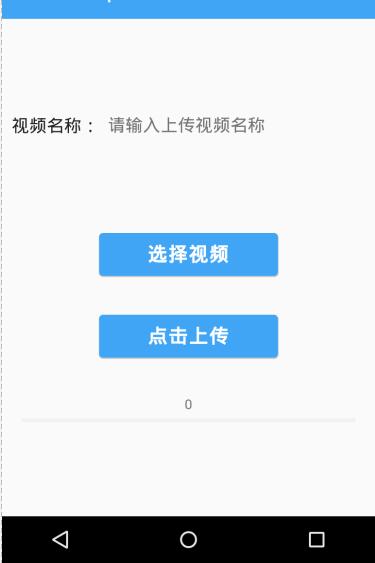
界面效果:
参考文章:http://blog.csdn.net/gary__123456/article/details/74157403
Android使用OKHttp库实现视频文件的上传到服务器的更多相关文章
- 使用Spring和JQuery实现视频文件的上传和播放
Spring MVC可以很方便用户进行WEB应用的开发,实现Model.View和Controller的分离,再结合Spring boot可以很方便.轻量级部署WEB应用,这里为大家介绍如何使用Spr ...
- 打包vue文件,上传到服务器
主要步骤: 1. npm run build生成dist文件夹 2. 将dist文件夹上传到服务器上 3. 服务器上配置nginx,访问路径指向dist文件夹下的index.html,这样当访问ngi ...
- HTML5 文件域+FileReader 分段读取文件并上传到服务器(六)
说明:使用Ajax方式上传,文件不能过大,最好小于三四百兆,因为过多的连续Ajax请求会使后台崩溃,获取InputStream中数据会为空,尤其在Google浏览器测试过程中. 1.简单分段读取文件为 ...
- HTML5 文件域+FileReader 读取文件并上传到服务器(三)
一.读取文件为blob并上传到服务器 HTML <div class="container"> <!--读取要上传的文件--> <input type ...
- web操作文件的上传到服务器 并可下载 并且读取出来
1.文件的上传-servlet实现文件上传---核心API—DiskFileItemFactory 一.文件上传概述 l 实现web开发中的文件上传功能,需完成如下二步操作: • 在web页面 ...
- 如何扫描出Android系统媒体库中视频文件
Android系统启动时会去扫描系统文件,并将系统支持的视频文件(mp4,3gp,wmv)扫描到媒体库(MediaStore)中,下面代码演示如何获得这些文件的信息: publicstatic Lis ...
- Android学习笔记_43_网络通信之文件断点上传
1.建立服务端,用于接收上传的文件.这里使用Socket,文件可能会比较大.采用多线程编程,防止并发. package com.socket.service; import java.io.File; ...
- “本地视频使用flashFXP上传虚拟服务器“的方法
一.视频转换格式 首先,想要在网页中直接嵌入视频,就得用video标签,而<video>支持的仅有的几种格式中,MP4是兼容性,通用性各方面相对友好的,所以,建议上传之前先转换格式并压缩. ...
- fastadmin后台:选择视频并允许上传到服务器
1.在对应方法的视图 “view/class/add.html" 中上传视频部分添加:data-mimetype="video/mp4" 2.在 ”applicatio ...
随机推荐
- .NET:枚举的默认值
.NET中的值类型默认都会设置为0,枚举也是如此,因此当你定义自己的枚举值类型且显式的指定了枚举值时,别忘记使用0,如果由于某种原因不能使用0,如使用了Flag标记,则别忘记在使用了枚举类型的构造方法 ...
- Javascript:自己写异步流程编程框架
背景 自从NodeJs出来以后,异步编程便更加系统化和框架话了,为了应对异步编程框架带来的深层嵌套问题,社区也出现了异步流程编程框架,本文主要对异步流程框架做一个简单的解析. 现配代码了 var As ...
- 初识安卓小程序(Android电话拨号器)
首先,先创建一个安卓项目(我的版本号是4.4.2的),名字为"电话拨号器",创建的时候点击"clipart",如图: 然后在res目录下找到layout目录,找 ...
- SharePoint 内容编辑器部件介绍
前言 在SharePoint的使用过程中,我们经常会往页面中插入一些东西,这时候很可能就需要内容编辑器部件了.比如:插HTML.插样式.插脚本.插图片,统统都拿来,用内容编辑器部件. 正文 使用内容编 ...
- Android之针对WebView的全屏播放
转载请标明转载处:http://bbs.csdn.net/topics/390839259 本人刚学android,菜鸟一个,第一次写帖子,最近因为项目要用webview加载html5的视频,开始不能 ...
- ADO与ADO.Net
在介绍ADO.Net之前先让我们回想一下在红皮书中学习的ADO的内容. ADO(ActiveX Data Objects).我们称它为一种用于数据訪问的对象模型,<VB.Net>视频中称它 ...
- Android组件化方案
Android组件化项目地址:Android组件化项目AndroidModulePattern Android组件化之终极方案地址:http://blog.csdn.net/guiying712/ar ...
- 优化算法动画演示Alec Radford's animations for optimization algorithms
Alec Radford has created some great animations comparing optimization algorithms SGD, Momentum, NAG, ...
- The "Out of socket memory" error
The "Out of socket memory" error I recently did some work on some of our frontend machines ...
- System.DllNotFoundException:“无法加载 DLL“librfc32.dll”: 找不到指定的模块。 (异常来自 HRESULT:0x8007007E)。”
System.DllNotFoundException:“无法加载 DLL“librfc32.dll”: 找不到指定的模块. (异常来自 HRESULT:0x8007007E).” 1.下载文件lib ...