
sweetalert的使用
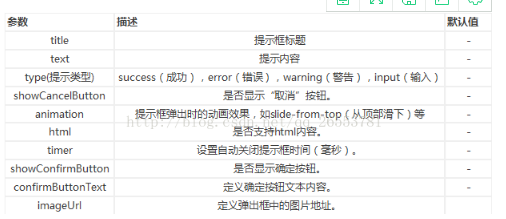
1.swal()方法中的参数:
2.引入css与js,通过cdn加速服务
<link href="https://cdnjs.cloudflare.com/ajax/libs/sweetalert/1.1.3/sweetalert.min.css" rel="stylesheet">
<script src="https://cdnjs.cloudflare.com/ajax/libs/sweetalert/1.1.3/sweetalert.min.js"></script>
3.常用
1.
swal("Pikachu fainted! You gained 500 XP!");
2.
swal({

title : "支付成功",

type : "success",

confirmButtonText : "确定",

closeOnConfirm : false

});
结果

3.
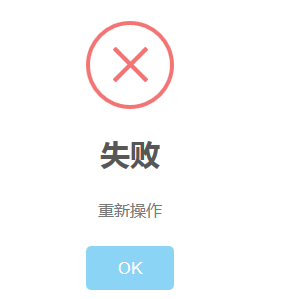
swal("删除失败","重新操作",'error');
效果:
4.
                                swal({

						title:'',

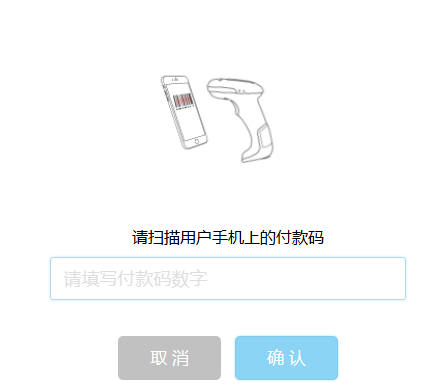
						text:"请扫描用户手机上的付款码",

						type:'input',

						showCancelButton: true,

						closeOnConfirm: false,

						cancelButtonText: "取 消",

						confirmButtonText: "确 认",

						imageUrl:'../../../../img/scancode.gif',

						inputPlaceholder:"请填写付款码数字",

						showLoaderOnConfirm:true

                                  })
运行结果
5.

swal({

			title:"是否删除",

			text:"",

			type:"warning",

			showCancelButton:true,//是否显示取消按钮

			cancelButtonText:'取 消',//按钮内容

			cancelButtonColor:'#b9b9b9',

			showConfirmButton:true,

			confirmButtonText:'确 认',

			confirmButtonColor:"#dd6b55",

			closeOnConfirm:false,//点击返回上一步操作

			closeOnCancel:true

		},function(){//正确按钮进行的操作点

			$.ajax({

				url: './test.json',

				type: 'post',

				dataType: 'json',

				data: {"id": $('#inp').val()},

			})

			.done(function(res) {

				if (!$('#inp').val()) {

					swal("输入内容哦……");

					return;

				}

				if (res.status == '000') {

					swal('删除成功','请继续操作','success');

					return;

				}else{

					swal('删除失败','','error');

				}

				// console.log("success");

			})

			.fail(function() {//连接服务器失败进行的操作

				console.log("error");

			})

			.always(function() {

				console.log("complete");

			});

		});
6.确认输入
swal({

						title:'',

						text:"请扫描用户手机上的付款码",

						type:'input',

						showCancelButton: true,

						closeOnConfirm: false,

						cancelButtonText: "取 消",

						confirmButtonText: "确 认",

						imageUrl:'../../../../img/scancode.gif',

						inputPlaceholder:"请填写付款码数字",

						showLoaderOnConfirm:true

					},function(inputValue){

						if (inputValue == '') {

							swal.showInputError('请填写付款码数字');

							return;

						}

						if (inputValue == false) {

							swal('','','success');

							return;

						}

						swal('ok');

					});
效果:

官网:http://www.dglives.com/demo/sweetalert-master/example/
sweetalert的使用的更多相关文章
- zTree和SweetAlert插件初探
1.zTree插件简介 zTree是一个依靠 jQuery实现的多功能“树插件”.优异的性能.灵活的配置.多种功能的组合是zTree最大优点.专门适合项目开发,尤其是树状菜单.树状数据的Web显示.权 ...
- sweetalert api中文开发文档和手册
官网和下载地址: http://t4t5.github.io/sweetalert/ 2016年10月30日14:10:21 废话,目前php开发越来越API话,所以php方法很多都是json返回数 ...
- 很漂亮的SweetAlert.js 弹出层
在线实例 实例演示 使用方法 swal("Here's a message!") 复制 参数详解 参数 默认值 描述 title null(required) 窗口的名称.可以通过 ...
- SweetAlert – 替代 Alert 的漂亮的提示效果
Sweet Alert 是一个替代传统的 JavaScript Alert 的漂亮提示效果.SweetAlert 自动居中对齐在页面中央,不管您使用的是台式电脑,手机或平板电脑看起来效果都很棒.另外提 ...
- 弹出框三 之 sweetalert
1下载sweetalert 2.引入到项目中 <link href="~/Content/sweetalert.css" rel="stylesheet" ...
- 推荐一款炫酷的提示框插件SweetAlert
官方网址 http://t4t5.github.io/sweetalert/ 项目地址 https://github.com/t4t5/sweetalert
- 基于jquery的响应式提示框SweetAlert
介绍款交互性非常不错的jquery弹出层插件,支持消息提示.错误提示.确认框提示等.交互式体验感非常不错,比如咱们现在体验非常不错的微信支付.支付宝等完成后的效果.不过本插件至少支持IE9+.使用方式 ...
- Android studio SweetAlert for Android
找到个开源项目.github:https://github.com/pedant/sweet-alert-dialog 效果图:https://raw.githubusercontent.com/pe ...
- 提示框插件SweetAlert
SweetAlert可以替代Javascript原生的alert和confirm等函数呈现的弹出提示框, 它将提示框进行了美化,并且允许自定义, 支持设置提示框标题.提示类型.内容展示图片.确认取消按 ...
- Ionic2中集成第三方控件Sweetalert
Ionic2混合开发,入坑系列:Ionic2中集成第三方控件Sweetalert 注:Sweetalert2已经可以直接从npm中下载安装 npm install --save sweetalert2 ...
随机推荐
- C#Enum用Tuple保存值绑定到前端的CheckBox
//把数字转成枚举 public static T[] NumStringsToEnums<T>(string enumNumString ) //where T:Enum { if (s ...
- Oracle数据库查看表空间是否为自增的
表空间是有数据文件组成的,所以看表空间是否自增即看数据文件,如下查自增的表空间: select tablespace_name,file_name,autoextensible from dba_da ...
- mysql的时间戳timestamp精确到小数点后六位
1.mysql的时间戳timestamp精确到小数点后六位. 公司业务使用到Greenplun数据库,根据查询的时间戳来不断的将每个时间段之间的数据,进行数据交换,但是今天发现,mysql的时间戳没有 ...
- .NET Core在安装(VS2015)与部署
.NET Core开发环境搭建 使用VS2015开发.NET Core项目,环境的搭建可以参考官网,大致安装步骤如下: 1.首先你得装个vs2015 并且保证已经升级至 update3及以上,下载链接 ...
- 【转】利用 selenium 的 webdrive 驱动 headless chrome
1.参考 使用 headless chrome进行测试 2.概念 Headless模式解决了什么问题: 自动化工具例如 selenium 利用有头浏览器进行测试,面临效率和稳定性的影响,所以出现了 H ...
- ASP.NET Core 2.0 新功能汇总
前言 ASP.NET Core 的变化和发展速度是飞快的,当你发现你还没有掌握 ASP.NET Core 1.0 的时候, 2.0 已经快要发布了,目前 2.0 处于 Preview 1 版本,意味着 ...
- nginx-fastcgi 反向代理
Nginx处理php页面 用fpm-server 基于fastcgi模块实现 Ngx_http_proxy_module 只能反代后端http server的主机 Ngx_fastcgi_prox ...
- Nginx的配置与部署研究,Upstream负载均衡模块
Nginx 的 HttpUpstreamModule 提供对后端(backend)服务器的简单负载均衡.一个最简单的 upstream 写法如下: upstream backend { server ...
- 51Nod1675 序列变换 数论 莫比乌斯反演
原文http://www.cnblogs.com/zhouzhendong/p/8665675.html 题目传送门 - 51Nod1675 题意 给定序列$a,b$,让你求满足$\gcd(x,y)= ...
- Python编译安装遇到的问题
1.python在make时候报错 Python build finished, but the necessary bits to build these modules were not foun ...