
使用Powershell实现计算机名称及IP地址修改
我的第一篇博客分享,写这个代码的用途是在公司Ghost完系统之后去修改本地计算机名称及IP 地址,用Powershell实现。
1. 代码第一部分,检查Powershell是否已管理员权限执行,如果不是的话,强制以管理员权限开启一个powershell窗口.
 #region Key code: force to run with administrator rights

 $currentWi = [Security.Principal.WindowsIdentity]::GetCurrent()

 $currentWp = [Security.Principal.WindowsPrincipal]$currentWi

 if( -not $currentWp.IsInRole([Security.Principal.WindowsBuiltInRole]::Administrator))

 {

   $boundPara = ($MyInvocation.BoundParameters.Keys | foreach{

      '-{0} {1}' -f  $_ ,$MyInvocation.BoundParameters[$_]} ) -join ' '

   $currentFile=(Resolve-Path $myInvocation.MyCommand.Source).Path

  $fullPara = $boundPara + ' ' + $args -join ' '

  Start-Process "$psHome\powershell.exe"   -ArgumentList "$currentFile $fullPara"   -verb runas

  return

 }

 #endregion
2. 第二部分,调用.NET Framework创建一个窗口输入新的computer name,之后重命名
 #access .NET Framework

 [System.Reflection.Assembly]::LoadWithPartialName('Microsoft.VisualBasic') | Out-Null

 # config Computer Name

 $computer=[Microsoft.VisualBasic.Interaction]::InputBox("Please enter a computer name. Standard names can contain letters (a-z, a-z), Numbers (0-9), and hyphen (-).", "Computer Name", "$env:computername")

 Rename-Computer -NewName $computer

 # end of configure Computer Name
3. 第三部分, 因为ghost后的系统网络名称不是原来的Local Area Connection,而会变成Local Area Connection #2类似这样后边跟数字的名称,所以我们需要调用gwmi组件并且正则表达式去匹配并选定网络名称包含Local Area Connection 的adapter,然后再去set ip地址.
 # Configure the local network IP address

 $IP=[Microsoft.VisualBasic.Interaction]::InputBox("Please enter the IP address, such as 192.168.1.1", "IP Address",'192.168.1.2')

 $parttern="^Local Area Connection"

 $NICs=gwmi win32_networkadapter `

 | Where {$_.NetConnectionID -match $parttern}

 foreach($NIC in $NICs) {

 $N=$NIC.NetConnectionID

 netsh interface ip set address name="$N" source=static addr=$IP

 }

 if($Error.Count -eq 0) {

 echo "Set OK!!!!"

 }

 Write-Host  'Press any key to exit ...'

 Read-Host

 # end of configure the local network IP address
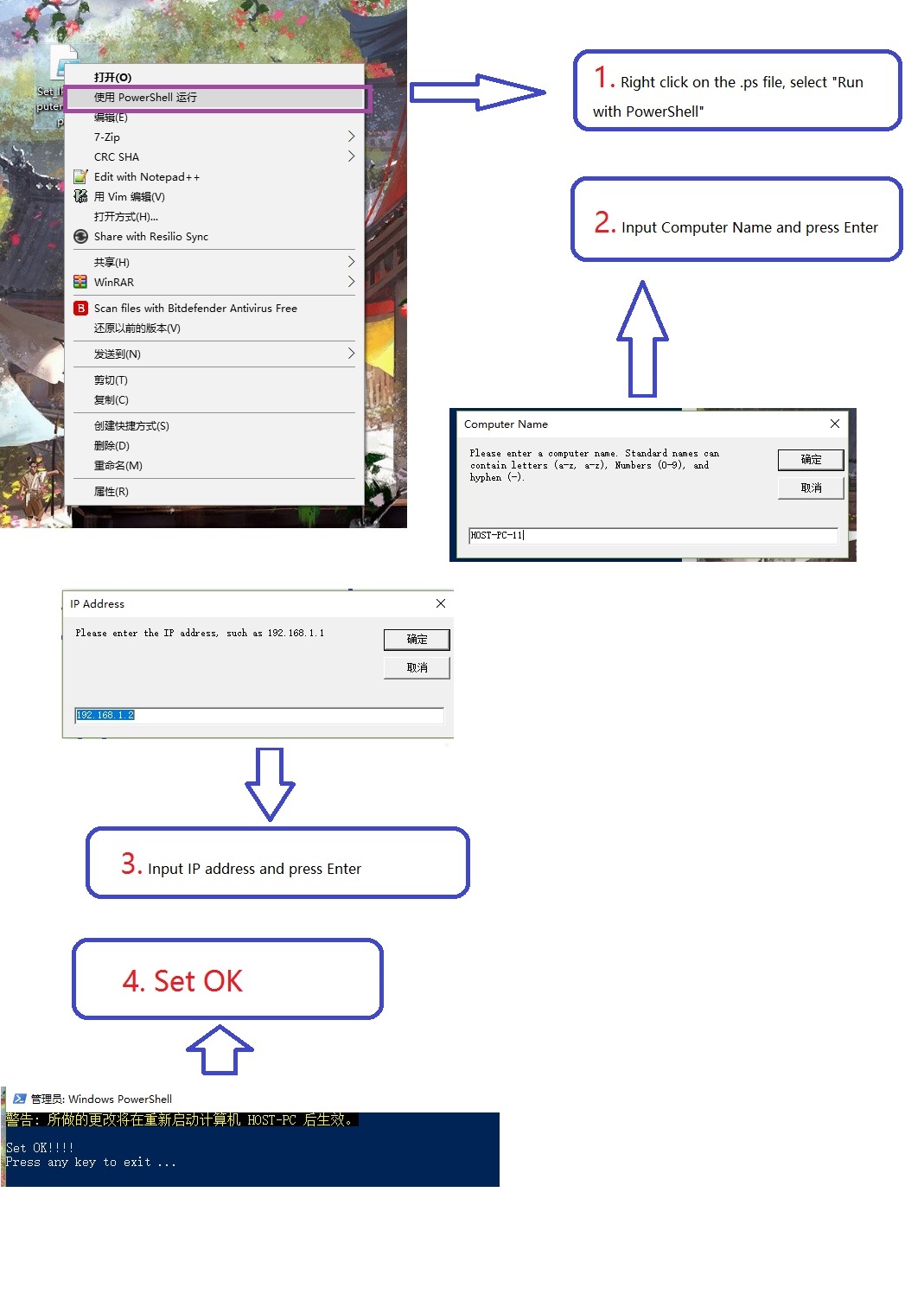
4. 最后附上代码实现截图:
使用Powershell实现计算机名称及IP地址修改的更多相关文章
- 计算机名称和IP地址
获取本地IP地址 得到远程机IP地址与描述 若仅仅是查看IP地址
- 获取本地计算机名称和Ip地址
using System.Net; Dns.GetHostName();//获取本地计算机主机名 IPAddress[] IP = Dns.GetHostAddresses(Dns.GetHostNa ...
- 获取硬件信息的delphi源码CPUID、操作系统、Mac物理地址、计算机名称、IP地址、用户名
{-----------------------------------------------------------------------------作者:sushengmiyan 2013.0 ...
- IP地址、计算机名称、MAC地址如何获取
以下的操作都在“命令提示窗口”中操作. 已知IP,如何获得计算机名称 方法(1): 使用ping -i ip地址 例如已知地址为192.168.1.168. 那么使用ping -i 192.168.1 ...
- 通过jquery 获取用户当前所在的城市名称和IP地址
下面这段JS代码是通过jquery 结合新浪IP地址库和QQip地址库接口获取用户当前所在的城市(省份)名称. 用户当前IP地址等数据.其中当前IP是通过 QQip地址库接口获取,其他数据都是通过 新 ...
- 使用Python获取计算机名,ip地址,mac地址等等
获取计算机名 # 获取计算机名,常用的方法有三种 import os import socket # method one name = socket.gethostname() print(name ...
- 获取网卡名称及其IP地址的方法
代码 # -*- coding: utf-8 -*- import psutil #获取网卡名称和其ip地址,不包括回环 def get_netcard(): netcard_info = [] in ...
- 【Azure Developer】在Azure Resource Graph Explorer中查看当前订阅下的所有资源信息列表并导出(如VM的名称,IP地址内网/公网,OS,区域等)
问题描述 通过Azure的Resource Graph Explorer(https://portal.azure.cn/#blade/HubsExtension/ArgQueryBlade),可以查 ...
- ubuntu设置IP地址&修改vi模式键盘上下键错位
解决ubuntu上面使用vi 出现方向键错乱的情况 编辑/etc/vim/vimrc.tiny 使用root权限操作:将“set compatible”改成“set nocompatible” 新增一 ...
随机推荐
- Windows 命令行解析工具(getopt)
忘记了上次在哪里找到这个功能库,只有一个 .h 和 .c 文件,再次搜索的时候发现找不到了,结果只能在之前的代码中,两个文件提出使用,顾将这两个文件备份在这里. /* Getopt for Micro ...
- 【持续更新】 | OpenCV 学习笔记
本文地址:http://www.cnblogs.com/QingHuan/p/7365732.html,转载请注明出处 ######################################## ...
- cocos2dx创建win32项目一般步奏
1.导入一个新项目步奏:解决方案:右键->添加->添加现有项目->添加依赖项目libCocoStudioD:\work\CannonDefender\cocos2d\cocos\ed ...
- es6学习日记3
函数的扩展 ES6 之前,不能直接为函数的参数指定默认值,只能采用变通的方法. function log(x, y) { y = y || 'World'; console.log(x, y); } ...
- yaf nginx 设置
#test1server { listen 80; listen [::]:80; root /vagrant_data/aaa/public; index index.html index.htm ...
- kali安装Google浏览器之后的问题
kali中,在安装完Google浏览器后会出现点击图标却打不开的问题,解决方式如下: 2019-04-10 09:46:00
- C++学习(三十七)(C语言部分)之 链式栈(推箱子实现)
用链表实现栈一开始在表头插入,就要一直在表头插入一开始在表尾插入,就要一直在表头插尾表头当栈底 也可以把表尾当栈底 实现的测试代码笔记如下: #include<stdio.h> #incl ...
- String 与 StringBuffer的差别
原文:http://blog.csdn.net/yirentianran/article/details/2871417 在Java中有3个类来负责字符的操作. 1.Character 是进行单个字符 ...
- django基础 -- 10.form , ModelForm ,modelformset
一.生成页面可用的 HTML标签 1.form 所有内置字段 Field required=True, 是否允许为空 widget=None, HTML插件 label=None, 用于生成Label ...
- Spring事务原理
Spring事务的本质是对数据库事务的封装支持,没有数据库对事务的支持,Spring本身无法提供事务管理功能.对于用JDBC操作数据库想要用到事务,必须经过获取连接——>开启事务——>执行 ...