
使用Powershell实现计算机名称及IP地址修改
我的第一篇博客分享,写这个代码的用途是在公司Ghost完系统之后去修改本地计算机名称及IP 地址,用Powershell实现。
1. 代码第一部分,检查Powershell是否已管理员权限执行,如果不是的话,强制以管理员权限开启一个powershell窗口.
 #region Key code: force to run with administrator rights

 $currentWi = [Security.Principal.WindowsIdentity]::GetCurrent()

 $currentWp = [Security.Principal.WindowsPrincipal]$currentWi

 if( -not $currentWp.IsInRole([Security.Principal.WindowsBuiltInRole]::Administrator))

 {

   $boundPara = ($MyInvocation.BoundParameters.Keys | foreach{

      '-{0} {1}' -f  $_ ,$MyInvocation.BoundParameters[$_]} ) -join ' '

   $currentFile=(Resolve-Path $myInvocation.MyCommand.Source).Path

  $fullPara = $boundPara + ' ' + $args -join ' '

  Start-Process "$psHome\powershell.exe"   -ArgumentList "$currentFile $fullPara"   -verb runas

  return

 }

 #endregion
2. 第二部分,调用.NET Framework创建一个窗口输入新的computer name,之后重命名
 #access .NET Framework

 [System.Reflection.Assembly]::LoadWithPartialName('Microsoft.VisualBasic') | Out-Null

 # config Computer Name

 $computer=[Microsoft.VisualBasic.Interaction]::InputBox("Please enter a computer name. Standard names can contain letters (a-z, a-z), Numbers (0-9), and hyphen (-).", "Computer Name", "$env:computername")

 Rename-Computer -NewName $computer

 # end of configure Computer Name
3. 第三部分, 因为ghost后的系统网络名称不是原来的Local Area Connection,而会变成Local Area Connection #2类似这样后边跟数字的名称,所以我们需要调用gwmi组件并且正则表达式去匹配并选定网络名称包含Local Area Connection 的adapter,然后再去set ip地址.
 # Configure the local network IP address

 $IP=[Microsoft.VisualBasic.Interaction]::InputBox("Please enter the IP address, such as 192.168.1.1", "IP Address",'192.168.1.2')

 $parttern="^Local Area Connection"

 $NICs=gwmi win32_networkadapter `

 | Where {$_.NetConnectionID -match $parttern}

 foreach($NIC in $NICs) {

 $N=$NIC.NetConnectionID

 netsh interface ip set address name="$N" source=static addr=$IP

 }

 if($Error.Count -eq 0) {

 echo "Set OK!!!!"

 }

 Write-Host  'Press any key to exit ...'

 Read-Host

 # end of configure the local network IP address
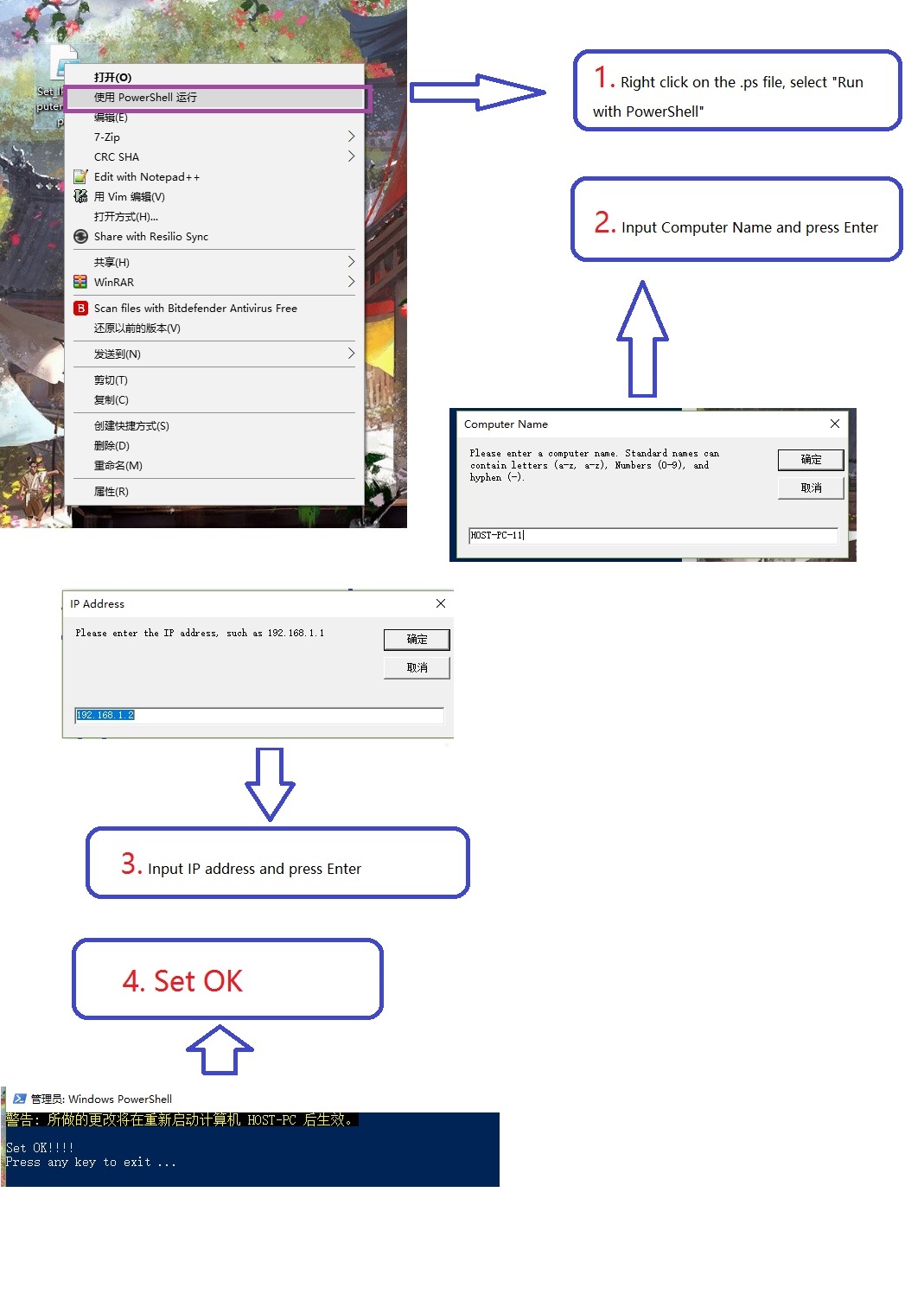
4. 最后附上代码实现截图:
使用Powershell实现计算机名称及IP地址修改的更多相关文章
- 计算机名称和IP地址
获取本地IP地址 得到远程机IP地址与描述 若仅仅是查看IP地址
- 获取本地计算机名称和Ip地址
using System.Net; Dns.GetHostName();//获取本地计算机主机名 IPAddress[] IP = Dns.GetHostAddresses(Dns.GetHostNa ...
- 获取硬件信息的delphi源码CPUID、操作系统、Mac物理地址、计算机名称、IP地址、用户名
{-----------------------------------------------------------------------------作者:sushengmiyan 2013.0 ...
- IP地址、计算机名称、MAC地址如何获取
以下的操作都在“命令提示窗口”中操作. 已知IP,如何获得计算机名称 方法(1): 使用ping -i ip地址 例如已知地址为192.168.1.168. 那么使用ping -i 192.168.1 ...
- 通过jquery 获取用户当前所在的城市名称和IP地址
下面这段JS代码是通过jquery 结合新浪IP地址库和QQip地址库接口获取用户当前所在的城市(省份)名称. 用户当前IP地址等数据.其中当前IP是通过 QQip地址库接口获取,其他数据都是通过 新 ...
- 使用Python获取计算机名,ip地址,mac地址等等
获取计算机名 # 获取计算机名,常用的方法有三种 import os import socket # method one name = socket.gethostname() print(name ...
- 获取网卡名称及其IP地址的方法
代码 # -*- coding: utf-8 -*- import psutil #获取网卡名称和其ip地址,不包括回环 def get_netcard(): netcard_info = [] in ...
- 【Azure Developer】在Azure Resource Graph Explorer中查看当前订阅下的所有资源信息列表并导出(如VM的名称,IP地址内网/公网,OS,区域等)
问题描述 通过Azure的Resource Graph Explorer(https://portal.azure.cn/#blade/HubsExtension/ArgQueryBlade),可以查 ...
- ubuntu设置IP地址&修改vi模式键盘上下键错位
解决ubuntu上面使用vi 出现方向键错乱的情况 编辑/etc/vim/vimrc.tiny 使用root权限操作:将“set compatible”改成“set nocompatible” 新增一 ...
随机推荐
- CentOS版Linux系统上运行ASP.NET应用
一.安装: 1. 安装Apache Http Server yum install httpd2. 安装Mono yum install mono3. 安装Mono插件,用来处理ASP.NET请求 y ...
- 框架tensorflow3
tensorflow3 tensorflow 可视化好帮手: tf.train.SummaryWriter报错,改为tf.summary.FileWriter 软件包安装yum install sql ...
- Spring 自动装配及其注解
一.属性自动装配 首先,准备三个类,分别是User,Cat,Dog.其中User属性拥有Cat和Dog对象. package com.hdu.autowire; public class User { ...
- Parsing with Compositional Vector Grammars--paper
这篇和2012年的区别: 1)Max-Margin Training Objective J中RNN变为了CVG 2012-两个词向量合并并打分,这个-两个(词向量,POS)合并并打分 2012年: ...
- C#词频统计 效能分析
在邹老师的效能分析的建议下对上次写过的词频统计的程序进行分析改进. 效能分析:个人很浅显的认为就是程序的运行效率,代码的执行效率 1.VS 提供了自带的分析工具:performance tool (性 ...
- js 自定义类Android吐司提示框
(function(){ var mouseX = 0; var mouseY = 0; //定义一个全局toaslist用来存在新建的吐司 var toastLsit ...
- PythonStudy——名称空间 Name space
# 名称空间:就是名字与地址的对应关系,可以被Python解释器遍历查找,采用堆栈存储方式 # 三种名称空间# Built-in:内置名称空间:系统级,一个:随解释器执行而产生,解释器停止而销毁# G ...
- PythonStudy——Python字典底层实现原理 The underlying implementation principle of Python dictionary
在Python中,字典是通过散列表或说哈希表实现的.字典也被称为关联数组,还称为哈希数组等.也就是说,字典也是一个数组,但数组的索引是键经过哈希函数处理后得到的散列值.哈希函数的目的是使键均匀地分布在 ...
- PythonStudy——汇编语言 Assembly Language
汇编语言 汇编语言(assembly language)是一种用于电子计算机.微处理器.微控制器或其他可编程器件的低级语言,亦称为符号语言.在汇编语言中,用助记符(Mnemonics)代替机器指令的操 ...
- js 函数问题
replace() is not a function 1,情景描述:做项目的时候想把内容的某些字符给替换成另外一些字符 2,replace用法:replace() 方法用于在字符串中用一些字符替换另 ...