
Canvas名侦探柯南-canvas练习
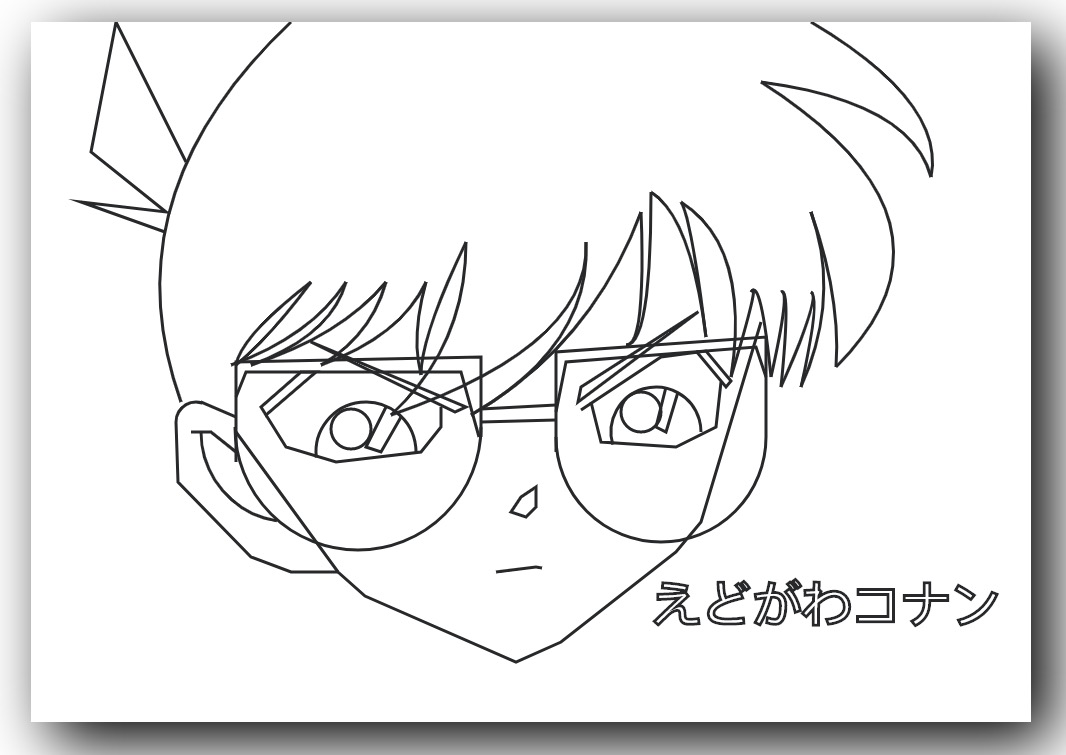
                var canvas=document.getElementById("canvas");

        var ctx=canvas.getContext("2d");

        //脸

        ctx.beginPath();

        ctx.moveTo(205,410);

        ctx.lineTo(307,550);

        ctx.lineTo(334,574);

        ctx.lineTo(485,640);

        ctx.lineTo(530,620);

        ctx.lineTo(645,530);

        ctx.lineTo(670,500);

        ctx.lineTo(730,300);

        ctx.strokeStyle="#262829";

        ctx.lineWidth=3;

        ctx.stroke();

        //眼镜

        //右边镜框

        ctx.beginPath();

        ctx.moveTo(735,415);

        ctx.lineTo(735,315);

        ctx.lineTo(525,330);

        ctx.lineTo(525,430);

        ctx.stroke();

        ctx.beginPath();

        ctx.moveTo(735,355);

        ctx.lineTo(725,325);

        ctx.lineTo(535,340);

        ctx.lineTo(525,390);

        ctx.stroke();

        ctx.beginPath();

        ctx.arc(630,415,105,0,Math.PI);

        ctx.stroke();

        //连接

        ctx.beginPath();

        ctx.moveTo(525,398);

        ctx.lineTo(450,400);

        ctx.stroke();

        ctx.beginPath();

        ctx.moveTo(525,383);

        ctx.lineTo(450,387);

        ctx.stroke();

        //左边镜框

        ctx.beginPath();

        ctx.moveTo(450,415);

        ctx.lineTo(450,335);

        ctx.lineTo(205,340);

        ctx.lineTo(205,440);

        ctx.stroke();

        ctx.beginPath();

        ctx.moveTo(448,415);

        ctx.lineTo(430,350);

        ctx.lineTo(215,350);

        ctx.lineTo(205,375);

        ctx.stroke();

        ctx.beginPath();

        ctx.arc(327,405,123,0,Math.PI);

        ctx.stroke();

        //左边眉毛

        ctx.beginPath();

        ctx.moveTo(435,385);

        ctx.lineTo(280,320);

        ctx.lineTo(424,390);

        ctx.closePath();

        ctx.stroke();

        //左边睫毛

        ctx.beginPath();

        ctx.moveTo(270,350);

        ctx.lineTo(230,385);

        ctx.lineTo(235,393);

        ctx.lineTo(285,350);

        ctx.closePath();

        ctx.stroke();

        //左眼

        ctx.beginPath();

        ctx.moveTo(235,393);

        ctx.lineTo(255,425);

        ctx.lineTo(305,440);

        ctx.lineTo(390,430);

        ctx.lineTo(410,405);

        ctx.lineTo(410,385);

        ctx.stroke();

        ctx.beginPath();

        ctx.arc(335,430,50,Math.PI*0.965,0);

        ctx.stroke();

        ctx.beginPath();

        ctx.arc(320,407,20,0,Math.PI*2);

        ctx.stroke();

        ctx.beginPath();

        ctx.moveTo(355,385);

        ctx.lineTo(335,425);

        ctx.lineTo(350,430);

        ctx.lineTo(370,395);

        ctx.stroke();

        //右眉毛

        ctx.beginPath();

        ctx.moveTo(547,380);

        ctx.lineTo(667,290);

        ctx.lineTo(550,365);

        ctx.closePath();

        ctx.stroke();

        //右睫毛

        ctx.beginPath();

        ctx.moveTo(550,388);

        ctx.lineTo(630,335);

        ctx.lineTo(675,329);

        ctx.lineTo(700,359);

        ctx.lineTo(695,365);

        ctx.lineTo(665,329);

        ctx.stroke();

        //右眼

        ctx.beginPath();

        ctx.moveTo(560,380);

        ctx.lineTo(570,420);

        ctx.lineTo(645,425);

        ctx.lineTo(685,405);

        ctx.lineTo(690,360);

        ctx.stroke();

        ctx.beginPath();

        ctx.arc(625,410,45,Math.PI*0.91,0);

        ctx.stroke();

        ctx.beginPath();

        ctx.arc(610,390,20,0,Math.PI*2);

        ctx.stroke();

        ctx.beginPath();

        ctx.moveTo(635,365);

        ctx.lineTo(625,405);

        ctx.lineTo(635,410);

        ctx.lineTo(647,370);

        ctx.stroke();

        //嘴

        ctx.beginPath();

        ctx.moveTo(465,550);

        ctx.lineTo(505,545);

        ctx.lineTo(511,546);

        ctx.stroke();

        //鼻子

        ctx.beginPath();

        ctx.moveTo(480,490);

        ctx.lineTo(495,495);

        ctx.lineTo(505,485);

        ctx.lineTo(505,465);

        ctx.lineTo(490,475);

        ctx.closePath();

        ctx.stroke();

        //左耳

        ctx.beginPath();

        ctx.moveTo(205,395);

        ctx.lineTo(170,380);

        ctx.stroke();

        ctx.beginPath();

        ctx.arc(165,400,20,1*Math.PI,1.6*Math.PI);

        ctx.stroke();

        ctx.beginPath();

        ctx.moveTo(145,400);

        ctx.lineTo(147,460);

        ctx.lineTo(220,535);

        ctx.lineTo(260,550);

        ctx.lineTo(308,550);

        ctx.stroke();

        ctx.beginPath();

        ctx.arc(260,410,90,Math.PI*0.55,Math.PI);

        ctx.stroke();

        ctx.beginPath();

        ctx.moveTo(160,410);

        ctx.lineTo(180,410);

        ctx.lineTo(205,430);

        ctx.stroke();

        //头发

        ctx.beginPath();

        ctx.moveTo(260,0);

        ctx.quadraticCurveTo(76, 174, 150, 380);

        ctx.stroke();

        ctx.beginPath();

        ctx.moveTo(155,140);

        ctx.lineTo(85,0);

        ctx.lineTo(60,130);

        ctx.lineTo(135,190);

        ctx.lineTo(50,180);

        ctx.lineTo(134,210);

        ctx.stroke();

        //刘海

        ctx.beginPath();

        ctx.moveTo(780, 0);

        ctx.quadraticCurveTo(915    , 80, 900, 155);

        ctx.stroke();

        ctx.beginPath();

        ctx.moveTo(730, 60);

        ctx.quadraticCurveTo(880    , 80, 900, 155);

        ctx.stroke();

        ctx.beginPath();

        ctx.moveTo(730, 60);

        ctx.quadraticCurveTo(950, 200, 805, 345);

        ctx.stroke();

        ctx.beginPath();

        ctx.moveTo(780, 190);

        ctx.quadraticCurveTo(810, 275, 805, 345);

        ctx.stroke();

        ctx.beginPath();

        ctx.moveTo(780, 190);

        ctx.quadraticCurveTo(810, 275, 770, 365);

        ctx.stroke();

        ctx.beginPath();

        ctx.moveTo(780, 270);

        ctx.quadraticCurveTo(790, 275, 770, 365);

        ctx.stroke();

        ctx.beginPath();

        ctx.moveTo(780, 270);

        ctx.quadraticCurveTo(790, 275, 750, 365);

        ctx.stroke();

        ctx.beginPath();

        ctx.moveTo(750, 270);

        ctx.quadraticCurveTo(760, 265, 750, 365);

        ctx.stroke();

        ctx.beginPath();

        ctx.moveTo(750, 270);

        ctx.quadraticCurveTo(760, 265, 740, 355);

        ctx.stroke();

        ctx.beginPath();

        ctx.moveTo(720, 270);

        ctx.quadraticCurveTo(730, 255, 740, 355);

        ctx.stroke();

        ctx.beginPath();

        ctx.moveTo(720, 270);

        ctx.quadraticCurveTo(730, 255, 700, 355);

        ctx.stroke();

        ctx.beginPath();

        ctx.moveTo(650, 180);

        ctx.quadraticCurveTo(720, 225, 700, 355);

        ctx.stroke();

        ctx.beginPath();

        ctx.moveTo(650, 180);

        ctx.quadraticCurveTo(660, 195, 675, 315);

        ctx.stroke();

        ctx.beginPath();

        ctx.moveTo(620, 170);

        ctx.quadraticCurveTo(660, 195, 675, 315);

        ctx.stroke();

        ctx.beginPath();

        ctx.moveTo(620, 170);

        ctx.quadraticCurveTo(620, 324, 595, 323);

        ctx.stroke();

        ctx.beginPath();

        ctx.moveTo(610, 190);

        ctx.quadraticCurveTo(615, 324, 595, 323);

        ctx.stroke();

        ctx.beginPath();

        ctx.moveTo(610, 190);

        ctx.quadraticCurveTo(560, 324, 440, 393);

        ctx.stroke();

        ctx.beginPath();

        ctx.moveTo(555, 220);

        ctx.quadraticCurveTo(560, 324, 440, 393);

        ctx.stroke();

        ctx.beginPath();

        ctx.moveTo(555, 220);

        ctx.quadraticCurveTo(560, 324, 360, 393);

        ctx.stroke();

        ctx.beginPath();

        ctx.moveTo(435, 220);

        ctx.quadraticCurveTo(435, 324, 360, 393);

        ctx.stroke();

        ctx.beginPath();

        ctx.moveTo(435, 220);

        ctx.quadraticCurveTo(390, 314, 390, 353);

        ctx.stroke();

        ctx.beginPath();

        ctx.moveTo(395, 260);

        ctx.quadraticCurveTo(380, 314, 390, 353);

        ctx.stroke();

        ctx.beginPath();

        ctx.moveTo(395, 260);

        ctx.quadraticCurveTo(370, 314, 290, 343);

        ctx.stroke();

        ctx.beginPath();

        ctx.moveTo(355, 260);

        ctx.quadraticCurveTo(340, 314, 290, 343);

        ctx.stroke();

        ctx.beginPath();

        ctx.moveTo(355, 260);

        ctx.quadraticCurveTo(310, 314, 220, 343);

        ctx.stroke();

        ctx.beginPath();

        ctx.moveTo(315, 260);

        ctx.quadraticCurveTo(300, 314, 220, 343);

        ctx.stroke();

        ctx.beginPath();

        ctx.moveTo(315, 260);

        ctx.quadraticCurveTo(280, 314, 200, 343);

        ctx.stroke();

        ctx.beginPath();

        ctx.moveTo(280, 260);

        ctx.quadraticCurveTo(240, 314, 205, 343);

        ctx.stroke();

        ctx.beginPath();

        ctx.moveTo(280, 260);

        ctx.quadraticCurveTo(210, 314, 205, 343);

        ctx.stroke();

        //名字

        ctx.font = "bold 50px Arial";

        ctx.strokeText("えどがわコナン",620,600);
Canvas名侦探柯南-canvas练习的更多相关文章
- canvas 利用canvas中的globalCompositeOperation 绘制刮奖 效果
<!DOCTYPE html> <html xmlns="http://www.w3.org/1999/xhtml"> <head> <t ...
- [Canvas] Make Canvas Responsive to Pixel Ratio
Canvas is great for high performance graphics rendering but by default the results look blocky on ph ...
- [canvas]用canvas绘制饼状图
折线图之后又来饼状图啦~\(≧▽≦)/~啦啦啦 <!DOCTYPE html> <html lang="en"> <head> <meta ...
- [canvas]利用canvas绘制自适应的折线图
前段时间学习了用canvas绘制折现图,且当画布变换大小,折现图会随之变化,现附上代码 <!DOCTYPE html> <html lang="en"> & ...
- [ html canvas putImageData ] canvas绘图属性 putImageData 属性讲解
<!DOCTYPE html> <html lang='zh-cn'> <head> <title>Insert you title</title ...
- [ html canvas globalCompositeOperation ] canvas绘图属性 设置合成图像如何显示 属性演示
<!DOCTYPE html> <html lang='zh-cn'> <head> <title>Insert you title</title ...
- canvas.clipPath canvas.clipRect() 无效的原因
今天发现有些机型不能做到像QQ 透明截图那样的功能,本来能够的.一看是部分机器所有都是灰色半透明遮挡住了,没中间的透明效果,. 并且我不是通过遮挡,我是採用 裁剪的方式,至于裁剪代码百度有相关知识,具 ...
- 简单入门canvas - 通过刮奖效果来学习
一 .前言 一直在做PC端的前端开发,从互联网到行业软件.最近发现移动端已经成为前端必备技能了,真是不能停止学习.HTML5新增的一些东西,canvas是用的比较多也比较复杂的一个,简单的入门了一下, ...
- Canvas绘图之平移translate、旋转rotate、缩放scale
画布操作介绍 画布绘图的环境通过translate(),scale(),rotate(), setTransform()和transform()来改变,它们会对画布的变换矩阵产生影响. 函数 方法 描 ...
随机推荐
- MySQL插入命令_INSERT INTO
MySQL允许将一个或多个元组插入已存在的table中. 格式:INSERT INTO 表名 (属性名1,属性名2,属性名3) VALUES (value1,value2,value3); ...
- Linux 创建自定义命令
Linux 创建自定义命令 Linux 可以创建自定义使用命令 这里我们采取使用“alias”命令.这里我们首先了解两个文件,通过这两个文件我们可以根据环境配置相应的自定义命令. 该文件内创建的自定义 ...
- C# 线程 正确使用Thread.Join()停止方式
/// <summary> /// 停下线程 /// </summary> private void MyStopTask() ...
- 如何在基于Bytom开发过程中集成IPFS
本文介绍了基于Bytom开发过程中集成IPFS. step1: 搭建bytom节点 比原相关资料:https://github.com/Bytom-Community/Bytom_Docs 搭建byt ...
- 逐步构建循环神经网络 RNN
rnn.utils.py import numpy as np def softmax(x): e_x = np.exp(x - np.max(x)) return e_x / e_x.sum(axi ...
- hduoj 1002 A + B Problem II
原题链接:http://acm.hdu.edu.cn/showproblem.php?pid=1002 题目描述如下: A + B Problem II Time Limit: 2000/1000 M ...
- LINQ之路16:LINQ Operators之集合运算符、Zip操作符、转换方法、生成器方法
本篇将是关于LINQ Operators的最后一篇,包括:集合运算符(Set Operators).Zip操作符.转换方法(Conversion Methods).生成器方法(Generation M ...
- VR外包团队—国内首家VR虚拟现实主题公园即将在北京推出
期,美国“The VOID”.澳洲“Zero Latency”两大虚拟现实主题乐园让许多爱好者兴奋至极,门票据说都已经预约到明年2月!在如此巨大的商机面前,谁将抢到国内VR虚拟现实主题公园第一块蛋糕? ...
- CentOS7.4安装和配置zabbix4.0
一.安装zabbix前,需要搭建好LAMP环境 二.下载zabbix 进入官网:https://www.zabbix.com/ 更多详细内容请参考官方说明文档,详细的安装要求不贴出来了. https: ...
- IDEA去除自动检测bean是否存在
操作步骤如下图所示: