
用python写MapReduce函数——以WordCount为例
尽管Hadoop框架是用java写的,但是Hadoop程序不限于java,可以用python、C++、ruby等。本例子中直接用python写一个MapReduce实例,而不是用Jython把python代码转化成jar文件。
例子的目的是统计输入文件的单词的词频。
- 输入:文本文件
- 输出:文本(每行包括单词和单词的词频,两者之间用'\t'隔开)
1. Python MapReduce 代码
使用python写MapReduce的“诀窍”是利用Hadoop流的API,通过STDIN(标准输入)、STDOUT(标准输出)在Map函数和Reduce函数之间传递数据。
我们唯一需要做的是利用Python的sys.stdin读取输入数据,并把我们的输出传送给sys.stdout。Hadoop流将会帮助我们处理别的任何事情。
1.1 Map阶段:mapper.py
在这里,我们假设把文件保存到hadoop-0.20.2/test/code/mapper.py
#!/usr/bin/env python

import sys

for line in sys.stdin:

    line = line.strip()

    words = line.split()

    for word in words:

        print "%s\t%s" % (word, 1)
文件从STDIN读取文件。把单词切开,并把单词和词频输出STDOUT。Map脚本不会计算单词的总数,而是输出<word> 1。在我们的例子中,我们让随后的Reduce阶段做统计工作。
为了是脚本可执行,增加mapper.py的可执行权限
chmod +x hadoop-0.20.2/test/code/mapper.py
1.2 Reduce阶段:reducer.py
在这里,我们假设把文件保存到hadoop-0.20.2/test/code/reducer.py
#!/usr/bin/env python

from operator import itemgetter

import sys

current_word = None

current_count = 0

word = None

for line in sys.stdin:

    line = line.strip()

    word, count = line.split('\t', 1)

    try:

        count = int(count)

    except ValueError:  #count如果不是数字的话,直接忽略掉

        continue

    if current_word == word:

        current_count += count

    else:

        if current_word:

            print "%s\t%s" % (current_word, current_count)

        current_count = count

        current_word = word

if word == current_word:  #不要忘记最后的输出

    print "%s\t%s" % (current_word, current_count)
文件会读取mapper.py 的结果作为reducer.py 的输入,并统计每个单词出现的总的次数,把最终的结果输出到STDOUT。
为了是脚本可执行,增加reducer.py的可执行权限
chmod +x hadoop-0.20.2/test/code/reducer.py
细节:split(chara, m),第二个参数的作用,下面的例子很给力
str = 'server=mpilgrim&ip=10.10.10.10&port=8080'

print str.split('=', 1)[0]  #1表示=只截一次

print str.split('=', 1)[1]

print str.split('=')[0]

print str.split('=')[1]
输出
server

mpilgrim&ip=10.10.10.10&port=8080

server

mpilgrim&ip
1.3 测试代码(cat data | map | sort | reduce)
这里建议大家在提交给MapReduce job之前在本地测试mapper.py 和reducer.py脚本。否则jobs可能会成功执行,但是结果并非自己想要的。
功能性测试mapper.py 和 reducer.py
[rte@hadoop-0.20.2]$cd test/code

[rte@code]$echo "foo foo quux labs foo bar quux" | ./mapper.py

foo	1

foo	1

quux	1

labs	1

foo	1

bar	1

quux	1

[rte@code]$echo "foo foo quux labs foo bar quux" | ./mapper.py | sort -k1,1 | ./reducer.py

bar	1

foo	3

labs	1

quux	2
细节:sort -k1,1 参数何意?
-k, -key=POS1[,POS2] 键以pos1开始,以pos2结束
有时候经常使用sort来排序,需要预处理把需要排序的field语言在最前面。实际上这是
完全没有必要的,利用-k参数就足够了。
比如sort all
1 4

2 3

3 2

4 1

5 0
如果sort -k 2的话,那么执行结果就是
5 0

4 1

3 2

2 3

1 4
2. 在Hadoop上运行python代码
2.1 数据准备
下载以下三个文件的
我把上面三个文件放到hadoop-0.20.2/test/datas/目录下
2.2 运行
把本地的数据文件拷贝到分布式文件系统HDFS中。
bin/hadoop dfs -copyFromLocal /test/datas hdfs_in
查看
bin/hadoop dfs -ls
结果
drwxr-xr-x - rte supergroup 0 2014-07-05 15:40 /user/rte/hdfs_in
查看具体的文件
bin/hadoop dfs -ls /user/rte/hdfs_in
执行MapReduce job
bin/hadoop jar contrib/streaming/hadoop-*streaming*.jar \

-file test/code/mapper.py     -mapper test/code/mapper.py \

-file test/code/reducer.py    -reducer test/code/reducer.py \

-input /user/rte/hdfs_in/*    -output /user/rte/hdfs_out
实例输出
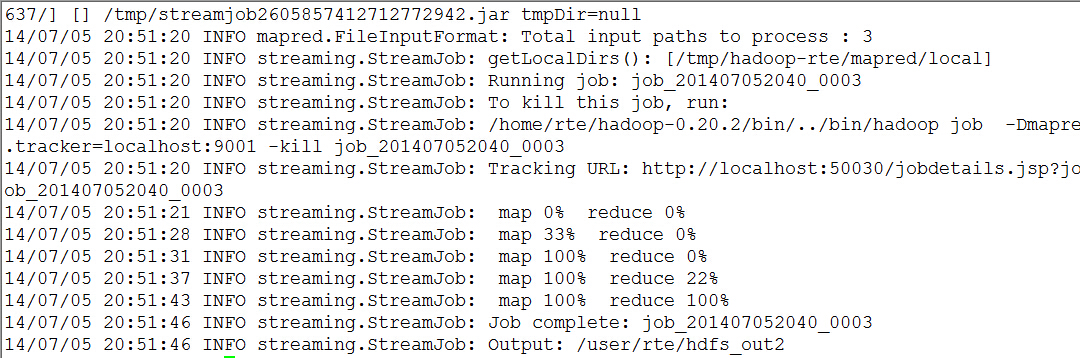
查看输出结果是否在目标目录/user/rte/hdfs_out
bin/hadoop dfs -ls /user/rte/hdfs_out
输出
Found 2 items

drwxr-xr-x   - rte supergroup          0 2014-07-05 20:51 /user/rte/hdfs_out2/_logs

-rw-r--r--   2 rte supergroup     880829 2014-07-05 20:51 /user/rte/hdfs_out2/part-00000
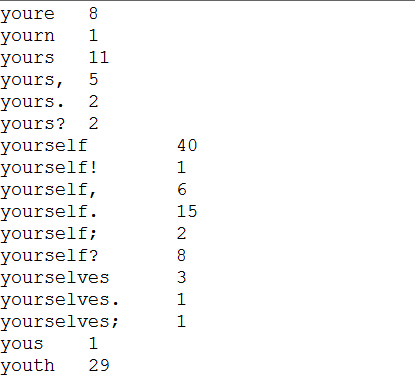
查看结果
bin/hadoop dfs -cat /user/rte/hdfs_out2/part-
输出
以上已经达成目的了,但是可以利用python迭代器和生成器优化
3. 利用python的迭代器和生成器优化Mapper 和 Reducer代码
3.1 python中的迭代器和生成器
3.2 优化Mapper 和 Reducer代码
mapper.py
#!/usr/bin/env python

import sys

def read_input(file):

    for line in file:

        yield line.split()

def main(separator='\t'):

    data = read_input(sys.stdin)

    for words in data:

        for word in words:

            print "%s%s%d" % (word, separator, 1)

if __name__ == "__main__":

    main()
reducer.py
#!/usr/bin/env python

from operator import itemgetter

from itertools import groupby

import sys

def read_mapper_output(file, separator = '\t'):

    for line in file:

        yield line.rstrip().split(separator, 1)

def main(separator = '\t'):

    data = read_mapper_output(sys.stdin, separator = separator)

    for current_word, group in groupby(data, itemgetter(0)):

        try:

            total_count = sum(int(count) for current_word, count in group)

            print "%s%s%d" % (current_word, separator, total_count)

        except valueError:

            pass

if __name__ == "__main__":

    main()
细节:groupby
from itertools import groupby

from operator import itemgetter

things = [('2009-09-02', 11),

          ('2009-09-02', 3),

          ('2009-09-03', 10),

          ('2009-09-03', 4),

          ('2009-09-03', 22),

          ('2009-09-06', 33)]

sss = groupby(things, itemgetter(0))

for key, items in sss:

    print key

    for subitem in items:

        print subitem

    print '-' * 20
结果
>>>

2009-09-02

('2009-09-02', 11)

('2009-09-02', 3)

--------------------

2009-09-03

('2009-09-03', 10)

('2009-09-03', 4)

('2009-09-03', 22)

--------------------

2009-09-06

('2009-09-06', 33)

--------------------
注
- groupby(things, itemgetter(0)) 以第0列为排序目标
- groupby(things, itemgetter(1))以第1列为排序目标
- groupby(things)以整行为排序目标
4. 参考
Writing an Hadoop MapReduce Program in Python
用python写MapReduce函数——以WordCount为例的更多相关文章
- 自动化测试(三)如何用python写一个函数,这个函数的功能是,传入一个数字,产生N条邮箱,产生的邮箱不能重复。
写一个函数,这个函数的功能是,传入一个数字,产生N条邮箱,产生的邮箱不能重复.邮箱前面的长度是6-12之间,产生的邮箱必须包含大写字母.小写字母.数字和特殊字符 和上一期一样 代码中间有段比较混沌 有 ...
- python写mapReduce初步
最近在学了python了,从mapReduce开始 ,话不多说了,直接上代码了哈 map阶段,map.py文件 import sys # 标准输入 # 在终端的话,就需要这样了 cat a.txt | ...
- Python实现MapReduce,wordcount实例,MapReduce实现两表的Join
Python实现MapReduce 下面使用mapreduce模式实现了一个简单的统计日志中单词出现次数的程序: from functools import reduce from multiproc ...
- hadoop学习笔记——用python写wordcount程序
尝试着用3台虚拟机搭建了伪分布式系统,完整的搭建步骤等熟悉了整个分布式框架之后再写,今天写一下用python写wordcount程序(MapReduce任务)的具体步骤. MapReduce任务以来H ...
- 用Python写了一个postgresql函数,感觉很爽
用Python写了一个postgresql函数,感觉很爽 CREATE LANGUAGE plpythonu; postgresql函数 CREATE OR REPLACE FUNCTION myfu ...
- Python 为什么没有 main 函数?为什么我不推荐写 main 函数?
毫无疑问 Python 中没有所谓的 main 入口函数,但是网上经常看到一些文章提"Python 的 main 函数"."建议写 main 函数"-- 有些人 ...
- python递归练习:生成一个n级深度的字典,例如:[1,2,3,4,5,6] 可以生成{1: {2: {3: {4: {6: 5}}}}},写一个函数定义n级
结果#encoding = utf-8#题目:#生成一个n级深度的字典,例如:[1,2,3,4,5,6] 可以生成{1: {2: {3: {4: {6: 5}}}}},写一个函数定义n级a=[1,2, ...
- Python高阶函数_map/reduce/filter函数
本篇将开始介绍python高阶函数map/reduce/filter的用法,更多内容请参考:Python学习指南 map/reduce Python内建了map()和reduce()函数. 如果你读过 ...
- 快速掌握用python写并行程序
目录 一.大数据时代的现状 二.面对挑战的方法 2.1 并行计算 2.2 改用GPU处理计算密集型程序 3.3 分布式计算 三.用python写并行程序 3.1 进程与线程 3.2 全局解释器锁GIL ...
随机推荐
- Javascript中只能在 HTML 输出流中使用 document.write,在文档已加载后使用它(比如在函数中),会覆盖整个文档。
意思就是说,初次加载时如果没有加载document.write,那么再次加载的时候回覆盖掉原来的内容,只显示新加载的内容. <!DOCTYPE html> <html> < ...
- SQLSERVER 检查内容
巡检内容: 1系统信息A. 机器名称:B. 硬件配置:Intel(R) CPU E5-2630 2.3GHz(2处理器),24核,16G内存C. 操作系统版本:Windows Server 2008 ...
- linux crontab详解 php开发相关
vi vi /etc/crontab 注意不是这么直接干的! 下面是内容 SHELL=/bin/bash PATH=/sbin:/bin:/usr/sbin:/usr/bin MAILTO=root ...
- Gym 101981I - Magic Potion - [最大流][2018-2019 ACM-ICPC Asia Nanjing Regional Contest Problem I]
题目链接:http://codeforces.com/gym/101981/attachments There are n heroes and m monsters living in an isl ...
- androidj基础:从网上下载图片
一.布局文件 设置界面,添加一个ImageView,和两个Button按钮,设置其属性及id <ImageView android:id="@+id/ImageView" a ...
- 更新node的版本,node没有安装到c盘,安装到了D盘
百度的很久,只有这一个实用,记录一下 https://www.cnblogs.com/xinjie-just/p/7061619.html
- java之beanutils使用
介绍 BeanUtils是Apache Commons组件的成员之一, 主要用于简化JavaBean封装数据的操作. 点击下载依赖 jar 包 使用 有如下 javabean : package ...
- FastDFS的单点部署
1 安装libfastcommon 注意:在Centos7下和在Ubuntu下安装FastDFS是不同的,在Ubuntu上安装FastDFS需要安装libevent,而外Centos上安装FastD ...
- [LeetCode] 62. Unique Paths_ Medium tag: Dynamic Programming
A robot is located at the top-left corner of a m x n grid (marked 'Start' in the diagram below). The ...
- MySQL Backup myloader
之前的博文当中提到备份工具mydumper的使用,而软件包中还包含了与之对应的恢复工具myloader,本文就总结下myloader的用法.关于mydumper的安装与使用可以参考之前的博文:MySQ ...