
Learn the shell
learn the shell
what is the shell?
when we speak of the command line,we are really to the shell.Actually the shell is a program that takes keyboard commands and passes them to the opreating system to carry out.
Now I start the virtualizer, I use the Ubuntu ,its version number is 14.04.2.I get in a graphical user interface,press ctrl + alt + F1(To switch from one virtual console to another, press Alt and F1-F6. To return to the graphical desktop, press Alt-F7.)
Now you can see
ubnutu login:
Password
Enter your user name,and your password. you should know that the password input will not be displayed
And you can see
user_name@ubnutu:~$
this is called a shell prompt
here are some knowledge points:
- If we press the up-arrow key ,we can see the command history
- we cannot use
Ctrl-candCtrl-vto perform copy and paste inside a terminal window.But when we choose something,we can press the middle mouse button ,which will cause the text to be pasted at the cursor location - a few simple commands:
date:to display the current time and date.
username@ubuntu:~$ date
Tue Mar 27 21:43:03 PDT 2018- cal:to display a calendar of the current month.
- df:to see the current amount of free space on your disk drives
- free:to display the amount of free memory.
- We can end a terminal session by either closing the terminal emulator window, or by entering the exit command at the shell prompt
文件系统中跳转
首先我们先了解几个概念
- pwd-打印出当前工作目录名
- cd -更改目录
- ls - 列出目录内容
Linux,以分层目录结构来组织所有文件。 这就意味着所有文件组成了一棵树型目录(有时候在其它系统中叫做文件夹), 这个目录树可能包含文件和其它的目录。文件系统中的第一级目录称为根目录。 根目录包含文件和子目录,子目录包含更多的文件和子目录
绝对路径
绝对路径开始于根目录,紧跟着目录树的一个个分支,一直到达所期望的目录或文件。
相对路径
相对路径开始于工作目录。 为了做到这个(用相对路径表示), 我们在文件系统树中用一对特殊符号来表示相对位置。 这对特殊符号是 “.” (点) 和 “..” (点点)。
符号 “.” 指的是工作目录,”..” 指的是工作目录的父目录
在几乎所有的经情况下,我们都可以省略./ 例如:
cd /usr/bin //绝对路径
cd ./bin //相对路径
cd bin //相对路径省略./
这些的效果都是一样的
有用的快捷键
cd 更改工作目录到家目录
cd - 更改工作目录到先前的工作目录
cd ~user_name 更改工作目录到用户家目录
ls -a 显示以“.” 字符开头的隐藏文件
一些注意事项:
- 文件名和命令名是大小写敏感的
- 文件名的标点符号仅限用
.,-,_。不要在文件名中是用空格,如果想表达词语的空格,用下划线字符来替代
探究操作系统
选项和参数
大多数命令是按照以下格式
command -options arguments
命令名 + 更正命令行为的选项 + 参数
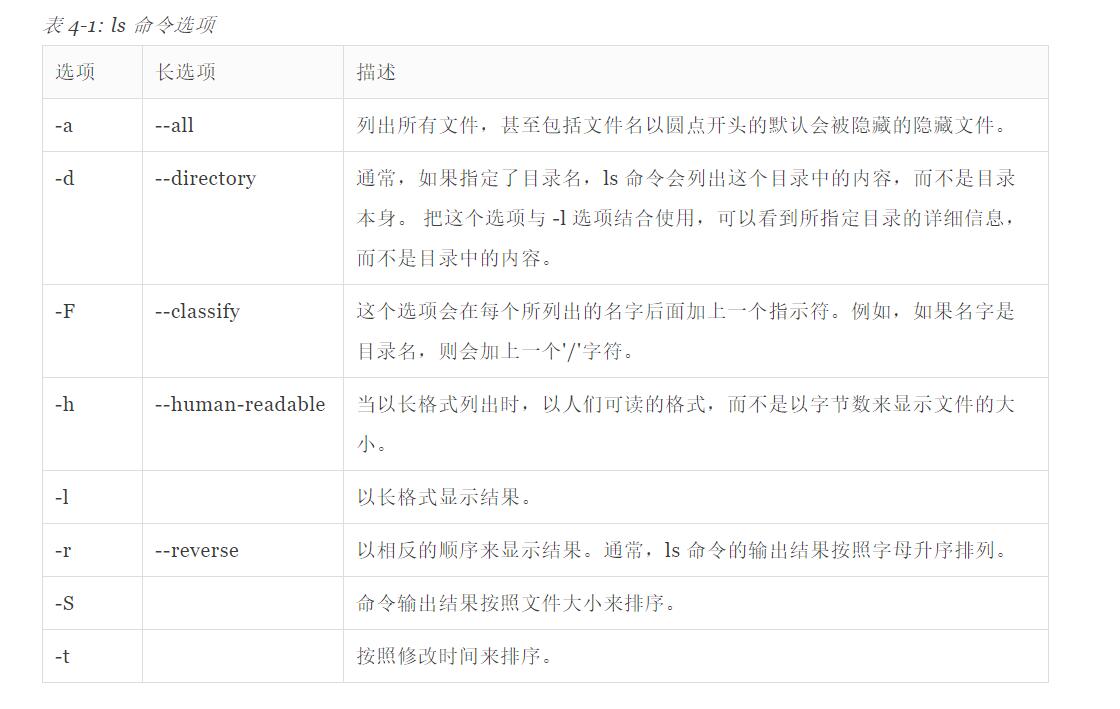
下面我们给出ls命令的选项
长格式输出
当我们在在某个目录下输入
ls -l
我们可以看到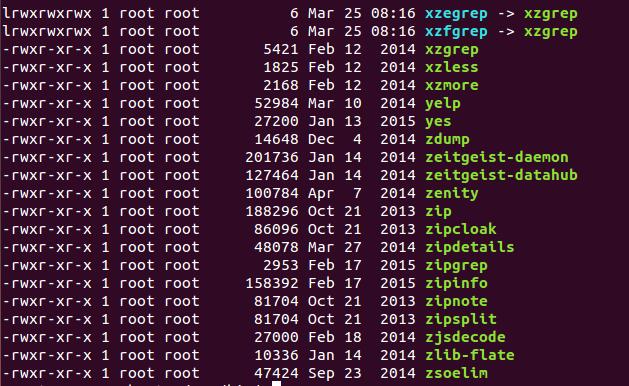
(ls -l)
依次表达的意思是
对于文件的访问权限
文件的硬链接数目
文件所有者的用户名
文件所属用户组的名字
字节数表示文件大小
最新修改日期
文件名
这些具体的含义我们会在之后的章节中学到
确定文件类型
我们调用
file filename
命令去确定文件的类型
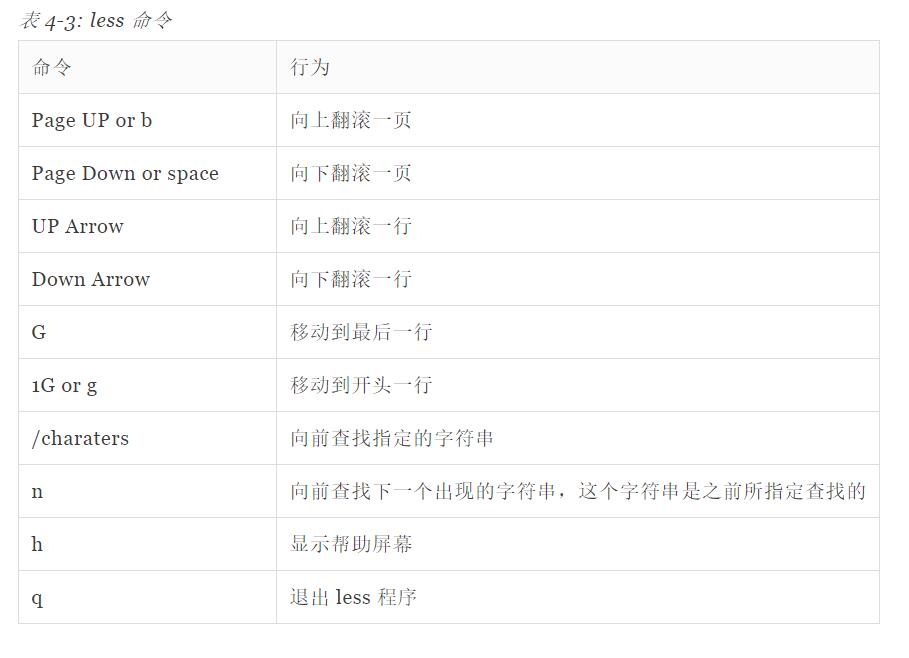
用 less 浏览文件内容
less 命令是一个用来浏览文本文件的程序。
通过less filename来使用
当我们查看文件系统的时候 我们可以使用一下的命令
Learn the shell的更多相关文章
- Spring Shell入门介绍
目录 Spring Shell是什么 入门实践 基础配置 简单示例 注解@ShellMethod 注解@ShellOption 自定义参数名称 设置参数默认值 为一个参数传递多个值 对布尔参数的特殊处 ...
- MongDB篇,第三章:数据库知识3
MongDB 数据库知识3 修改器 $inc 对某个域的值进行加减修改 $mul 对某个域的值进行乘法修改 $min 如果筛选的文档指定的值小于min则不修改,如果大于min 给定的值则修改为m ...
- learn shell
the basic shell skills. Bourne shell sh ksh Bash psh zsh C shell csh tcsh [root@bogon temp]# cat ...
- (copy) Top Ten Reasons not to use the C shell
http://www.grymoire.com/Unix/CshTop10.txt ========================================================== ...
- Shell脚本语法
索引 1. 第一行必须是"#!/bin/sh" 2. 注释:一行开头为 # 3. 定义变量 4. 逻辑符号 5. 接收参数 6. 控制流:if/then/elif/else/f ...
- 提高神经网络的学习方式Improving the way neural networks learn
When a golf player is first learning to play golf, they usually spend most of their time developing ...
- 终端执行python shell的方法
假设有一个Py文件,放在下PycharmProjects/learn下,文件名是 myfile.py. 1.打开终端输入python3进入2.在shell下 输入import sys 回车3.输入 s ...
- Managing linux Shell Jobs
Managing Shell Jobs When moving jobs between the foreground and background, it may be useful to ha ...
- 转:linux执行shell脚本的方式及一些区别
假设shell脚本文件为hello.sh放在/root目录下.下面介绍几种在终端执行shell脚本的方法: [root@localhost home]# cd /root/ [root@localho ...
随机推荐
- 【洛谷P1064】[NOIP2006] 金明的预算方案
金明的预算方案 显然是个背包问题 把每个主件和它对应的附件放在一组,枚举每一组,有以下几种选法: 1.都不选 2.只选主件 3.一个主件+一个附件 4.一个主件+两个附件 于是就成了01背包.. #i ...
- rabbitmq安装使用
使用 http://www.open-open.com/lib/view/open1325131828249.html ubuntu:apt-get install erlang-noxsudo ap ...
- 读取当前路径,列出xls文件
import java.io.File; public class GetCurrentDirectory { public String GetDirectory() { File director ...
- UVa新汉诺塔问题(A Different Task,Uva 10795)
主要需要理递归函数计算 #define MAXN 60+10 #include<iostream> using namespace std; int n,k,S[MAXN],F[MAXN] ...
- ssm整合-错误2
1 警告: No mapping found for HTTP request with URI [/management] in DispatcherServlet with name 'dispa ...
- idea中使用逆向工程----三部曲
逆向工程小伙伴可能都知道,可以根据公司大佬的数据库简单创建实体类和dao接口以及mapper的映射文件,逆向工程可能在数据库字段比较少的时候体现不会方便,但是当参与到数据库字段比较多的时候,我们不可能 ...
- 微信公众号支付java版本
回调函数 @RequestMapping("/toPay") public String toPay(HttpServletRequest request, HttpServlet ...
- vue学习--Props
Props: props用以从父组件接收数据: 使用: Vue.component('child',{ ...
- python基础之正则表达式爬虫应用,configparser模块和subprocess模块
正则表达式爬虫应用(校花网) 1 import requests 2 import re 3 import json 4 #定义函数返回网页的字符串信息 5 def getPage_str(url): ...
- javascript的js调用
本来从一开始接触编程开始,自己就一直写后端,但是对于前端真的不会,但是没办法呀,公司要做,所以,好吧,开始了写一写简单的javascript的内容其中,在xxx.jsp页面中出现了这个 <a c ...