
Firebase Cloud Function 编写与部署
1、设置和初始化 Firebase SDK for Cloud Functions
  (1)、Cloud Functions 运行的是 Node v6.14.0,因此需要安装nodejs:   https://nodejs.org/    (2)、安装CLI工具:
npm install -g firebase-tools
(3)、初始化配置,请执行以下操作:
运行 firebase login,通过浏览器登录并对 Firebase 工具进行身份验证。

转到 Firebase 项目目录。

运行 firebase init functions。该工具会为您提供使用 npm 安装依赖项的选项。如果要以其他方式管理依赖项,您可以放心地拒绝。

该工具支持两种语言:

    JavaScript

    TypeScript。 如需了解详情,请参阅使用 TypeScript 编写函数。
完成后本地文件目录看起来就像这样
myproject

 +- .firebaserc    # Hidden file that helps you quickly switch between

 |                 # projects with `firebase use`

 |

 +- firebase.json  # Describes properties for your project

 |

 +- functions/     # Directory containing all your functions code

      |

      +- .eslintrc.json  # Optional file containing rules for JavaScript linting.

      |

      +- package.json  # npm package file describing your Cloud Functions code

      |

      +- index.js      # main source file for your Cloud Functions code

      |

      +- node_modules/ # directory where your dependencies (declared in

                       # package.json) are installed
2、修改函数
您的项目必须使用 Node require 语句导入 Cloud Functions 和 Admin SDK 模块。请将如下代码行添加到您的 index.js 文件中
const functions = require('firebase-functions');

const admin = require('firebase-admin');

admin.initializeApp();
添加函数
exports.addMessage = functions.https.onRequest((req, res) => {

  const original = req.query.text;  //接收函数传递的参数

  return admin.database().ref('/messages').push({original: original}).then((snapshot) => {

    return res.redirect(303, snapshot.ref.toString());

  });

});
3、部署和执行 addMessage()
(1)在ssh终端运行以下命令部署您的函数
firebase deploy --only functions //部署index.js中的所以函数
       如果只部署其中一个函数(加上函数名)

     firebase deploy --only functions:addMessage
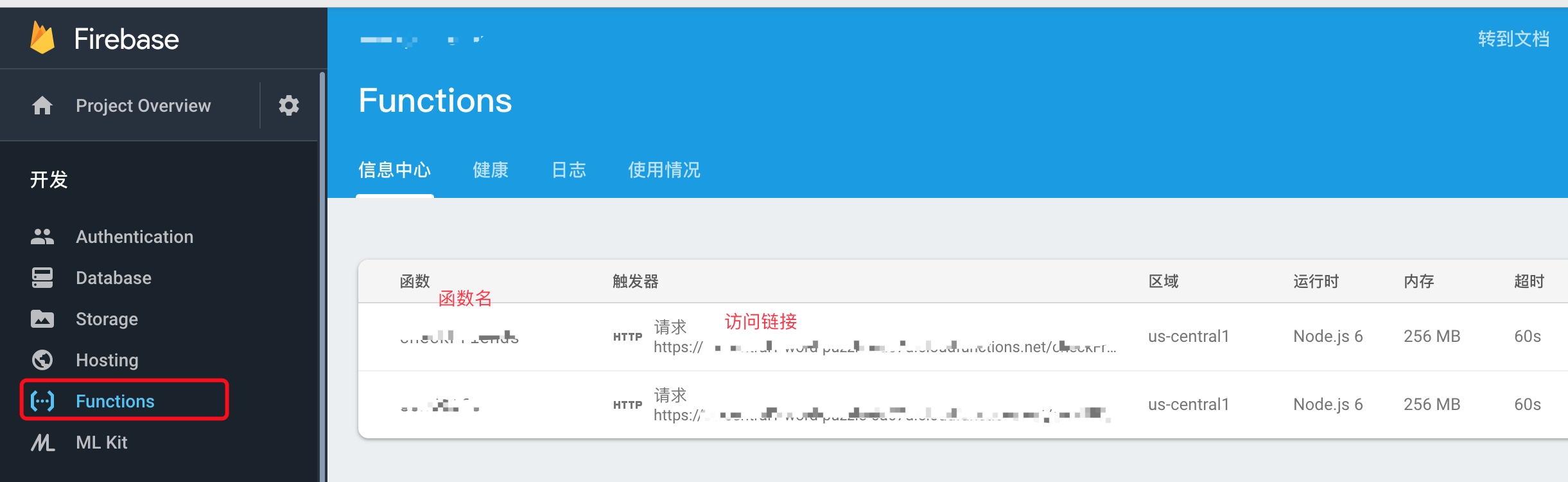
4、访问函数
https://us-central1-MY_PROJECT.cloudfunctions.net/addMessage?text=uppercaseme
Firebase Cloud Function 编写与部署的更多相关文章
- Error: errCode: -404011 cloud function execution error | errMsg: clou……错误
在开通了云开发之后,无论点击小程序获取openid按钮报,Error: errCode: -404011 cloud function execution error | errMsg: clou…… ...
- [login] 调用失败 Error: errCode: -404011 cloud function execution error | errMsg: cloud.callFunction:fail requestID , cloud function service error code -501000, error message Environment not found;
按照微信开放文档,创建完云开发项目,运行,点击获取openid,报如下错: [login] 调用失败 Error: errCode: -404011 cloud function execution ...
- Windows Azure NotificationHub+Firebase Cloud Message 实现消息推动(付源码)
前期项目一直用的是Windows azure NotificationHub+Google Cloud Message 实现消息推送, 但是GCM google已经不再推荐使用,慢慢就不再维护了, 现 ...
- Linux shell编写脚本部署pxe网络装机
Linux shell编写脚本部署pxe网络装机 人工安装配置,Linux PXE无人值守网络装机 https://www.cnblogs.com/yuzly/p/10582254.html 脚本实 ...
- [Firebase] Firebase Cloud Functions
Firebase cloud functions is similar to AWS lambda or serverless. You can deploy you code which wrote ...
- 微信小程序调用云函数出错 Error: errCode: -404011 cloud function execution error | errMsg: cloud.callFunction:fail cloud function service error code -501005, error message Environment not found;
错误异常: Error: errCode: -404011 cloud function execution error | errMsg: cloud.callFunction:fail cloud ...
- 超实用!!!使用IDEA插件Alibaba Cloud Toolkit工具一键部署本地应用到ECS服务器
最近看到阿里云发布了一款名为 Alibaba Cloud Toolkit 的插件,可以帮助开发者高效开发并部署适合在云端运行的应用,瞬间击中了我的小心脏,这个对于个人开发者来说超级棒啊,终于不需要再手 ...
- shell脚本编写-自动部署及监控
1.编写脚本自动部署反向代理.web.nfs: I.部署nginx反向代理两个web服务,调度算法使用加权轮询 II.所有web服务使用共享存储nfs,保证所有web都对其有读写权限,保证数据一致性: ...
- 编写、部署、应用JavaBean
编写javabean 编写javabean实质上就是编写一个java类.设计javabean类就是要设计这个javabean的属性和方法,类的方法的命名遵循以下规则: 1)如果成员变量的名字是xx ...
随机推荐
- Unity Gizmos可视化辅助工具
所有gizmo绘制需要在脚本的OnDrawGizmos或OnDrawGizmosSelected里函数完成. OnDrawGizmos在每帧调用.所有在OnDrawGizmos中渲染的gizmos都是 ...
- Murano PTL&Core
PTL: Serg Melikyan Core: Ekaterina Chernova efedorova@mirantis.com Kirill Zaitsev kzaitsev@mirantis. ...
- c/c++ socket发送http请求访问网站
这几天课比较少,校园网上网要认证才能上网,每次必须输入学号密码,为了方便,写了一个自动登录以及如果在线,登录自服务系统强制下线的小工具. 强制下线思路:获取sessionID----------> ...
- 3 - Selenium元素定位和操作
3.1定位 <button id="gbqfba" aria-label="Google Search" name="btnK" cl ...
- java获得文件扩展名
java获得文件扩展名: public static void main(String[] args) throws Exception { String name = ""; S ...
- Lambda动态排序分页通用方法
using System; using System.Collections.Generic; using System.Linq; using System.Linq.Expressions; us ...
- java 读取环境变量和系统变量的方法
在web开发的过程中不免需要读取一些自定义的jvm系统变量或者环境变量.比如定义一些通用的log文件.或者数据库访问路径. 我们可以使用System.getProperties()读取所有的系统变量. ...
- 命名空间namespace、smarty使用(视图分离,MVC)、smarty模板语法、smarty缓存、MVC模式
一.命名空间:namespace 命名空间 可以理解为逻辑上的使用,为了防止重名 namespace :关键字 加载:require_once();//加载一次 include_once() 申明命名 ...
- 在浏览器地址栏按回车、F5、ctrl+F5刷新页面的区别
url地址栏里敲击enter:这样的刷新,大家可以在firebug里看一下,只有少数的请求会发送出去,而且几乎没有图片的请求,这是因为请求时会先检查本地是不是缓存了请求的图片,如果有缓存而且没有过期( ...
- python 多线程 生产者消费者
import threading import time import logging import random import Queue logging.basicConfig(level=log ...