
DataSet强类型、TableAdapter的使用
简答使用可以看https://www.cnblogs.com/namejr/p/10411920.html中的“先来简单介绍dataset和datatable”
DataSet强类型:
WebForm1.aspx:

<%@ Page Language="C#" AutoEventWireup="true" CodeBehind="WebForm1.aspx.cs" Inherits="WebApplication2.WebForm1" %>

<!DOCTYPE html>

<html xmlns="http://www.w3.org/1999/xhtml">

<head runat="server">

<meta http-equiv="Content-Type" content="text/html; charset=utf-8"/>

    <title></title>

</head>

<body>

    <form id="form1" runat="server">

    <div>

        <asp:Button ID="Button1" runat="server" Text="Button" OnClick="Button1_Click" />

    </div>

        <asp:GridView ID="GridView1" runat="server">

        </asp:GridView>

        <asp:GridView ID="GridView2" runat="server">

        </asp:GridView>

        <asp:Button ID="Button2" runat="server" OnClick="Button2_Click" Text="Button" />

        <asp:Button ID="Button3" runat="server" OnClick="Button3_Click" Text="Button" />
     <asp:Label ID="Label1" runat="server" Text="Label"></asp:Label><asp:Button ID="Button4" runat="server" Text="Button" OnClick="Button4_Click" />
     <asp:Label ID="Label2" runat="server" Text="Label"></asp:Label><asp:Button ID="Button5" runat="server" Text="Button" />

    </form>

</body>

</html>

、、、、、、、、、、、、、、、、、、、、、、、、、、、、、、、、、、、、、、、、、、、、、、、、、

WebForm1.aspx.cs

protected void Button1_Click(object sender, EventArgs e)

        {

            // 数据查询

            ProductDataSet ds = new ProductDataSet();

            var daProduct = new ProductDataSetTableAdapters.ProductTableAdapter();  // 默认使用了getDate()方法

            var daCategory = new ProductDataSetTableAdapters.CategoryTableAdapter();

            daProduct.Fill(ds.Product);

            daCategory.Fill(ds.Category);

            // 数据绑定显示

            this.GridView1.DataSource = ds.Product;

            this.GridView2.DataSource = ds.Category;

            this.DataBind();

        }

        protected void Button2_Click(object sender, EventArgs e)

        {

            // 插入数据

            new ProductDataSetTableAdapters.CategoryTableAdapter().Insert(, "平板");

            // 同理,还有delete、Update

        }

        protected void Button3_Click(object sender, EventArgs e)

        {

            // 除了上面的Button2里面的增删改查操作,还有下面这些方法

            ProductDataSet ds = new ProductDataSet();

            var daCategory = new ProductDataSetTableAdapters.CategoryTableAdapter();

            daCategory.Fill(ds.Category);

            /* 删除

            ds.Category.FindByCategoryID(2).Delete();  // 根据CategoryID进行删除

            ds.Category.RemoveCategoryRow(ds.Category.FindByCategoryID(2));  // 进行先查找row在根据ID进行删除

            */

            /* 添加

            ds.Category.AddCategoryRow(4, "图书");

            var newRow = ds.Category.NewCategoryRow();

            newRow.CategoryID = 5;

            //newRow.CategoryName = "视频";

            newRow["CategoryName"] = "视频";

            ds.Category.AddCategoryRow(newRow);

            */

            var oldRow = ds.Category.FindByCategoryID();

            oldRow.CategoryName = "cellPhone";

            daCategory.Update(ds.Category);

        }
protected void Button4_Click(object sender, EventArgs e)
{
// 显示自定义的配置
this.Label1.Text = string.Format("{0}", new ProductDataSetTableAdapters.CategoryTableAdapter().ScalarQueryCount().Value);
}
protected void Button5_Click(object sender, EventArgs e)
{
// 关联配置的显示(外键)
ProductDataSet ds = new ProductDataSet();
var daProduct = new ProductDataSetTableAdapters.ProductTableAdapter();
var daCategory = new ProductDataSetTableAdapters.CategoryTableAdapter();
daProduct.Fill(ds.Product);
daCategory.Fill(ds.Category);
var Product = ds.Product.FindByProductID(2); // 获取对应的product的对应的索引
var category = Product.CategoryRow; // 进行关联
this.Label2.Text = string.Format("商品:{0}的类别是{1}", Product.ProductNAME, category.CategoryName);
}
、、、、、、、、、、、、、、、、、、、、、、、、、、、、、、、、、、、、、、、、、、、、、、、、、、

ProcudtDataSet1.xsd

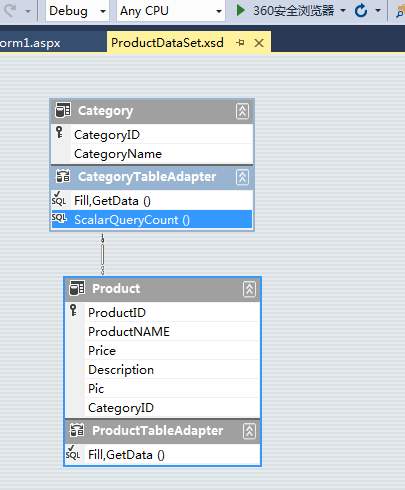
构建这个东西只需要进行右键添加“数据集(DataSet1.xsd)”,将名字修改为对应数据库表的前缀即可。

关于构建的两种方法:一种是使用tableAdapter进行配置;另一种是直接将数据库表直接拖拽过来即可(拖拽过来的好处是会直接显示对应的关联关系)
如果自己有需要,可以根据用户的需求进行配置SQL查询语句,例如本例子中,可以进行右键“CategoryTableAdapter”进行添加(如添加查询)或者配置设计
DataSet强类型、TableAdapter的使用的更多相关文章
- LINQ(LINQ to DataSet)
http://www.cnblogs.com/SkySoot/archive/2012/08/21/2649471.html DataTable.Select()方法使用和 SQL 相似的过滤语法从 ...
- 自学_数据库<三>
数据库 数据库概述 DBMS(DataBase Management System,数据库管理系统)和数据库.平时谈到"数据库"可能有两种含义:MSSQLServer.Oracle ...
- .NET常见面试题
面试题 1 什么是 CTS.CLS 和CLR 公共语言运行库(CLR)是一个CLI 的一个实现,包含了.NET 运行引擎和符合 CLI 的类库. 通用类型系统(CTS)包含在微软公司提交的 CLI ...
- SQL数据库相关
数据库相关知识点 SQL, 对表的理解, 对表的主键, 外键的理解, 视图, 为什么要有视图, 视图有什么功能, 视图与表有什么区别 主键是唯一标识的一条记录,不能重复,不能为空. 表的外键是另一个表 ...
- DataGridView控件绑定数据源
前言: 近期听说DataGridView控件能直接绑定数据源.而不用穿越这层那层的忍辱负重.获取数据.真是高兴的屁颠屁颠的.后来一想二狗肯定不会弄.特意写了一个笨蛋版的教程--也算记录生活.欢度端午了 ...
- 强类型Dataset使用事务(改进原有方法)
以下部份转自:http://blog.csdn.net/nfbing/article/details/5803980 关于强类型Dataset的用法和好处,我就不再多说,网上关于这方面的资料很多 , ...
- 使用强类型DataSet增加数据并获取自动增长的ID
使用强类型的DataSet可以方便的操作数据库:有时候我们会对表的ID设置为自动增长,并且需要在插入数据后获取新插入数据的ID,按以下方法即可达到目的: 一. 首先建立一个表,id为自动增加, ...
- 强类型DataSet的使用简明教程
关于弱类型 DataSet的缺点: 无论何时从 DataSet检索值都是以Object类型返回,需要对它进行类型转换: 给其它开发者使用 时无法知道哪些列可用: 运行时才能知道所 有列名,数据绑定麻烦 ...
- 2强类型DataSet (2011-12-30 23:16:59)转载▼ 标签: 杂谈 分类: Asp.Net练习笔记 http://blog.sina.com.cn/s/blog_9d90c4140101214w.html
强类型DataSet (2011-12-30 23:16:59) 转载▼ 标签: 杂谈 分类: Asp.Net练习笔记 using System; using System.Collections.G ...
随机推荐
- How to Enabling and Diabling VxDMP devices for use with Oracle ASM
Enable DMP support for ASM to make DMP devices visible to ASM as available disks To make DMP devices ...
- leetcode661
vector<vector<int>> imageSmoother(vector<vector<int>>& M) { ; vector< ...
- centos7虚拟机桥接上网(DHCP)
centos设置成自动获取ip地址方式(DHCP) 1.打开终端查看网卡信息 #ifconfigifcfg-enp0s3lovirbro 2.编辑文件#vim /etc/sysconfig/netwo ...
- valgrind详解
调不尽的内存泄漏,用不完的Valgrind Valgrind 安装 1.valgrind 安装包下载地址:http://valgrind.org/downloads/repository.html(使 ...
- Java线程池拒绝策略
Java线程池拒绝策略 相关资料: 线程池的RejectedExecutionHandler(拒绝策略):http://blog.csdn.net/jgteng/article/details/544 ...
- google浏览器:Ignored call to 'confirm()'. The document is sandboxed, and the 'allow-modals' keyword is not set
最近做一个功能,测试环境测试没问题,google浏览器测试也没问题,结果上生产发现google浏览器竟然用不了.查看控制台发现控制台报错: Ignored call to 'confirm()'. T ...
- cakephp静态资源404
location ~ /\.(css|js|woff|ttf|gif|jpg|jpeg|png|bmp|swf) { rewrite ^/$/(.*)$ /$/app/webroot/$ last; ...
- review backpropagation
The goal of backpropagation is to compute the partial derivatives ∂C/∂w and ∂C/∂b of the cost functi ...
- Fast Scatter-Gather I/O
Some applications may need to read or write data to multiple buffers, which are separated in memory. ...
- Linux文件概念
大多数资源,Linux都是以文件的方式来访问. Linux系统上的文件部分类型说明 –普通文件. •就是储存到磁盘上大家所操作的各种数据文件: –管道文件. •是一个从一端发送数据,从另一端接收数据的 ...