
配置dubbo架构的maven项目
1. 拆分工程
1)将表现层工程独立出来:
e3-manager-web
2)将原来的e3-manager改为如下结构
e3-manager
|--e3-manager-dao
|--e3-manager-interface
|--e3-manager-pojo
|--e3-manager-service(打包方式改为war)
1.1. 服务层工程
第一步:把e3-manager的pom文件中删除e3-manager-web模块。
第二步:把e3-manager-web文件夹移动到e3-manager同一级目录。
第三步:e3-manager-service的pom文件修改打包方式
<packaging>war</packaging>
第四步:在e3-manager-service工程中添加web.xml文件
第五步:把e3-manager-web的配置文件复制到e3-manager-service中。
删除springmvc.xml
第六步:web.xml 中只配置spring容器。删除前端控制器
第七步:发布服务
1、在e3-manager-Service工程中添加dubbo依赖的jar包。
<!-- dubbo相关 -->

        <dependency>

            <groupId>com.alibaba</groupId>

            <artifactId>dubbo</artifactId>

            <exclusions>

                <exclusion>

                    <groupId>org.springframework</groupId>

                    <artifactId>spring</artifactId>

                </exclusion>

                <exclusion>

                    <groupId>org.jboss.netty</groupId>

                    <artifactId>netty</artifactId>

                </exclusion>

            </exclusions>

        </dependency>

        <dependency>

            <groupId>org.apache.zookeeper</groupId>

            <artifactId>zookeeper</artifactId>

        </dependency>

        <dependency>

            <groupId>com.github.sgroschupf</groupId>

            <artifactId>zkclient</artifactId>

        </dependency>
2、在spring的配置文件中添加dubbo的约束,然后使用dubbo:service发布服务。
<?xml version="1.0" encoding="UTF-8"?>

<beans xmlns="http://www.springframework.org/schema/beans"

    xmlns:context="http://www.springframework.org/schema/context" xmlns:p="http://www.springframework.org/schema/p"

    xmlns:aop="http://www.springframework.org/schema/aop" xmlns:tx="http://www.springframework.org/schema/tx"

    xmlns:dubbo="http://code.alibabatech.com/schema/dubbo" xmlns:xsi="http://www.w3.org/2001/XMLSchema-instance"

    xsi:schemaLocation="http://www.springframework.org/schema/beans http://www.springframework.org/schema/beans/spring-beans-4.2.xsd

    http://www.springframework.org/schema/context http://www.springframework.org/schema/context/spring-context-4.2.xsd

    http://www.springframework.org/schema/aop http://www.springframework.org/schema/aop/spring-aop-4.2.xsd http://www.springframework.org/schema/tx http://www.springframework.org/schema/tx/spring-tx-4.2.xsd

    http://code.alibabatech.com/schema/dubbo http://code.alibabatech.com/schema/dubbo/dubbo.xsd

    http://www.springframework.org/schema/util http://www.springframework.org/schema/util/spring-util-4.2.xsd">

    <context:component-scan base-package="cn.e3mall.service"></context:component-scan>

    <!-- 使用dubbo发布服务 -->

    <!-- 提供方应用信息,用于计算依赖关系 -->

    <dubbo:application name="e3-manager" />

    <dubbo:registry protocol="zookeeper"

        address="192.168.25.154:2181,192.168.25.154:2182,192.168.25.154:2183" />

    <!-- 用dubbo协议在20880端口暴露服务 -->

    <dubbo:protocol name="dubbo" port="20880" />

    <!-- 声明需要暴露的服务接口 -->

    <dubbo:service interface="cn.e3mall.service.ItemService" ref="itemServiceImpl" />

</beans>
1.1.2. 表现层工程
改造e3-manager-web工程。
第一步:删除mybatis、和spring的配置文件。只保留springmvc.xml
第二步:修改e3-manager-web的pom文件,
1、修改parent为e3-parent
2、添加spring和springmvc的jar包的依赖
3、删除e3-mangager-service的依赖
4、添加dubbo的依赖
<!-- dubbo相关 -->

        <dependency>

            <groupId>com.alibaba</groupId>

            <artifactId>dubbo</artifactId>

            <exclusions>

                <exclusion>

                    <groupId>org.springframework</groupId>

                    <artifactId>spring</artifactId>

                </exclusion>

                <exclusion>

                    <groupId>org.jboss.netty</groupId>

                    <artifactId>netty</artifactId>

                </exclusion>

            </exclusions>

        </dependency>

        <dependency>

            <groupId>org.apache.zookeeper</groupId>

            <artifactId>zookeeper</artifactId>

        </dependency>

        <dependency>

            <groupId>com.github.sgroschupf</groupId>

            <artifactId>zkclient</artifactId>

        </dependency>
5、e3-mangager-web添加对e3-manager-Interface的依赖。
第三步:修改springmvc.xml,在springmvc的配置文件中添加服务的引用。
<?xml version="1.0" encoding="UTF-8"?>

<beans xmlns="http://www.springframework.org/schema/beans"

    xmlns:xsi="http://www.w3.org/2001/XMLSchema-instance" xmlns:p="http://www.springframework.org/schema/p"

    xmlns:context="http://www.springframework.org/schema/context"

    xmlns:dubbo="http://code.alibabatech.com/schema/dubbo"

    xmlns:mvc="http://www.springframework.org/schema/mvc"

    xsi:schemaLocation="http://www.springframework.org/schema/beans http://www.springframework.org/schema/beans/spring-beans-4.2.xsd

        http://www.springframework.org/schema/mvc http://www.springframework.org/schema/mvc/spring-mvc-4.2.xsd

        http://code.alibabatech.com/schema/dubbo http://code.alibabatech.com/schema/dubbo/dubbo.xsd

        http://www.springframework.org/schema/context http://www.springframework.org/schema/context/spring-context-4.2.xsd">

    <context:component-scan base-package="cn.e3mall.controller" />

    <mvc:annotation-driven />

    <bean

        class="org.springframework.web.servlet.view.InternalResourceViewResolver">

        <property name="prefix" value="/WEB-INF/jsp/" />

        <property name="suffix" value=".jsp" />

    </bean>

    <!-- 引用dubbo服务 -->

    <dubbo:application name="e3-manager-web"/>

    <dubbo:registry protocol="zookeeper" address="192.168.25.154:2181,192.168.25.154:2182,192.168.25.154:2183"/>

    <dubbo:reference interface="cn.e3mall.service.ItemService" id="itemService" />

</beans>
第四步:在e3-manager-web工程中添加tomcat插件配置。
(需要在e3-manager-service的pom文件中也加入一个tomcat的配置,只是两个的端口号不能相同)
<build>

        <plugins>

            <!-- 配置Tomcat插件 -->

            <plugin>

                <groupId>org.apache.tomcat.maven</groupId>

                <artifactId>tomcat7-maven-plugin</artifactId>

                <configuration>

                    <path>/</path>

                    <port>8081</port>

                </configuration>

            </plugin>

        </plugins>

    </build>
在完成上面所有配置后,需要对e3-manager分别工程进行maven install,然后对e3-manager和e3-manager-web分别进行maven build
本博客针对我个人搭建的maven项目进行工程的拆分,但是基本的dubbo搭建,基本都是这样。
如果要启动该项目,先需要在linux系统上安装好zookeeper,并且启动,这样dubbo服务才能进行注册
2.dubbo监控中心
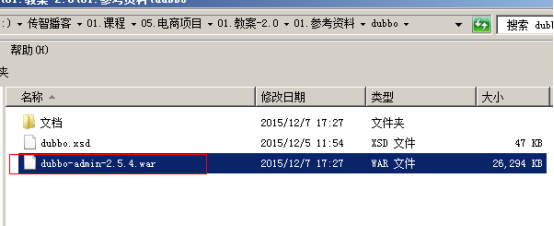
需要安装tomcat,然后部署监控中心即可。
1、部署监控中心:
[root@localhost ~]# cp dubbo-admin-2.5.4.war apache-tomcat-7.0.47/webapps/dubbo-admin.war
2、启动tomcat
3、访问http://192.168.25.167:8080/dubbo-admin/
用户名:root
密码:root
如果监控中心和注册中心在同一台服务器上,可以不需要任何配置。
如果不在同一台服务器,需要修改配置文件:
/root/apache-tomcat-7.0.47/webapps/dubbo-admin/WEB-INF/dubbo.properties

配置dubbo架构的maven项目的更多相关文章
- Intellij IDEA创建的Web项目配置Tomcat并启动Maven项目
本篇博客讲解IDEA如何配置Tomcat. 大部分是直接上图哦. 点击如图所示的地方,进行添加Tomcat配置页面 弹出页面后,按照如图顺序找到,点击+号 tomcat Service -> L ...
- SpringMVC框架入门配置 IDEA下搭建Maven项目(zz)
SpringMVC框架入门配置 IDEA下搭建Maven项目 这个不错哦 http://www.cnblogs.com/qixiaoyizhan/p/5819392.html
- idea-----Intellij IDEA配置tomcat(非maven项目)
Intellij IDEA配置tomcat(非maven项目) 引用: https://blog.csdn.net/springlovejava/article/details/78570241 ID ...
- 0.从零开始搭建spring mvc + mybatis + memcached+ dubbo\zookper的maven项目
1.首先创建maven 项目,配置相关pom信息 2.配置spring mvc 4, 测试,提交代码 3.引入配置mybatis3,测试,提交代码 4.配置事务,测试,提交代码 5.配置memcach ...
- Maven安装配置和IDEA创建Maven项目
maven 一个项目架构管理工具(约定大于配置) 1.配置 M2_HOME:指向maven bin目录 以后bootstrop要用 MAVEN_HOME:指向maven目录 path:指向maven ...
- SpringMVC框架入门配置 IDEA下搭建Maven项目
初衷:本人初学SpringMVC的时候遇到各种稀奇古怪的问题,网上各种技术论坛上的帖子又参差不齐,难以一步到位达到配置好的效果,这里我将我配置的总结写到这里供大家初学SpringMVC的同僚们共同学习 ...
- Maven安装和配置,eclipse创建Maven项目
提示:使用Maven需要先安装jdk. 下载安装Maven 一.下载最新版的Maven,下载地址:http://maven.apache.org/download.cgi 二.将Maven下载到E:\ ...
- Maven配置 和创建一个Maven项目
Maven的好处: maven的两大核心: **依赖管理:对jar包管理过程 **项目构建:项目在编码完成后,对项目进行编译.测试.打包.部署等一系列的操作都通过命令来实现 maven项目的生命周期( ...
- [转]SpringMVC框架入门配置 IDEA下搭建Maven项目
初衷:本人初学SpringMVC的时候遇到各种稀奇古怪的问题,网上各种技术论坛上的帖子又参差不齐,难以一步到位达到配置好的效果,这里我将我配置的总结写到这里供大家初学SpringMVC的同僚们共同学习 ...
随机推荐
- 我的省选 Day -14
Day -14 07:43:27 到机房了,不知道早上要做什么题,要不去选一题NOI原题来试试水好了 (因为NOI的原题质量比较有保证吧..) 09:11:22 正在做NOI2016的网格 开始写自己 ...
- À peu près là 技术支持
À peu près là 技术支持 技术支持网址:有问题或建议请留言. 邮箱地址: metlersaiddqr@zoho.com Program design & system cons ...
- PAT甲级——1101 Quick Sort (快速排序)
本文同步发布在CSDN:https://blog.csdn.net/weixin_44385565/article/details/90613846 1101 Quick Sort (25 分) ...
- string类型的方法
var str1 = ' this is string1 '; var str2 = 'this is string2'; str1.indexOf('s'); //args:string retur ...
- "微信戴圣诞帽"的一个简易实现程序
准备安装 由于是利用别人写的人脸识别的一个库,所以需要在import之前安装好相应的环境.如果直接安装face_recognition库的时候就会直接提示缺少的相应的dlib库.而dlib库本身需要c ...
- UVa11093
//当汽车从第i个加油站到第j个加油站无法继续走下去的时候,这时候[i,j]区间的所有加油站都无法作为起点,因为当我们到第k个加油站的时候,起码是带着>=0的油去的,现在不带油直接从第k个开始肯 ...
- (转)linux 中使用ls指定输出时间格式
linux 中使用ls指定输出时间格式 原文:http://blog.csdn.net/chaofanwei/article/details/13018753 ls -l --time-style=x ...
- yum 和 rpm安装mysql彻底删除
1.yum方式安装的MySQL $ yum remove mysql mysql-server mysql-libs compat-mysql51 $ rm -rf /var/lib/mysq $ r ...
- 1269 匈牙利游戏 2012年CCC加拿大高中生信息学奥赛
1269 匈牙利游戏 2012年CCC加拿大高中生信息学奥赛 时间限制: 1 s 空间限制: 128000 KB 题目等级 : 钻石 Diamond 题目描述 Description ...
- Jackson使用手册
引用jar:jackson-core,jackson-databind,jackson-annotations http://central.maven.org/maven2/com/fasterxm ...