
layout layout_alignLeft跟layout_toLeftOf
今天调布局的时候 想把界面做成横屏竖屏都可以的 突然发现之前理解的android:布局参数都是有问题的 今天贴出来 下次自己也记得
以下大部为用在RelativeLayout中的一些参数:
android:layout_above 将该控件的底部至于给定ID的控件之上,但不会左对齐,默认置于父窗口最左边,会覆盖最左边的控件
android:layout_below 将该控件的顶部至于给定ID的控件之下,但不会左对齐,默认置于父窗口最左边,会覆盖最左边的控件
android:layout_toLeftOf 将该控件的右边缘和给定ID的控件的左边缘对齐,默认置于父窗口最上面,会覆盖最上面的控件
android:layout_toRightOf 将该控件的左边缘和给定ID的控件的右边缘对齐,默认置于父窗口最上面,会覆盖最上面的控件
android:alignParentBottom 如果该值为true,则将该控件的底部和父控件的底部对齐,默认置于父窗口最左下,会覆盖最左下的控件
android:layout_alignParentLeft 如果该值为true,则将该控件的左边与父控件的左边对齐,默认置于父窗口最左上,会覆盖最左上的控件
android:layout_alignParentRight 如果该值为true,则将该控件的右边与父控件的右边对齐,默认置于父窗口最右上,会覆盖最右上的控件
android:layout_alignParentTop 如果该值为true,则将控件的顶部与父控件的顶部对齐,默认置于父窗口最左上,会覆盖最左上的控件
android:layout_alignBaseline该控件的baseline和给定ID的控件的baseline对齐,并置于父窗口最左边,会覆盖最左边的控件
android:layout_alignBottom 将该控件的底部边缘与给定ID控件的底部边缘对齐,并置于父窗口最左边,会覆盖最左边的控件
android:layout_alignLeft 将该控件的左边缘与给定ID控件的左边缘对齐,并置于父窗口最上边,会覆盖最上边的控件
android:layout_alignRight 将该控件的右边缘与给定ID控件的右边缘对齐,并置于父窗口最上边,会覆盖最上边的控件
android:layout_alignTop 将给定控件的顶部边缘与给定ID控件的顶部对齐,并置于父窗口最左边,会覆盖最左边的控件
原文:http://my.oschina.net/honeyming/blog/130761
实例1介绍: -- 未加入对齐方式
<RelativeLayout xmlns:android="http://schemas.android.com/apk/res/android"

    xmlns:tools="http://schemas.android.com/tools"

    android:layout_width="match_parent"

    android:layout_height="match_parent"

    android:paddingBottom="@dimen/activity_vertical_margin"

    android:paddingLeft="@dimen/activity_horizontal_margin"

    android:paddingRight="@dimen/activity_horizontal_margin"

    android:paddingTop="@dimen/activity_vertical_margin"

    tools:context="com.example.relativelayoutdemo.MainActivity" >

    <TextView

        android:id="@+id/tv1"

        android:layout_width="wrap_content"

        android:layout_height="wrap_content"

        android:layout_centerInParent="true"

        android:text="@string/hello_world" />

    <TextView

        android:id="@+id/tv2"

        android:layout_width="wrap_content"

        android:layout_height="wrap_content"

        android:layout_below="@id/tv1"

        android:text="@string/hello_world" />

    <TextView

        android:layout_width="wrap_content"

        android:layout_height="wrap_content"

        android:layout_toRightOf="@id/tv1"

        android:text="@string/hello_world" />

</RelativeLayout>
效果:
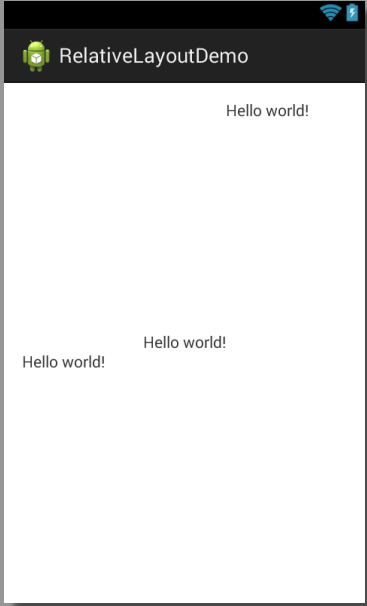
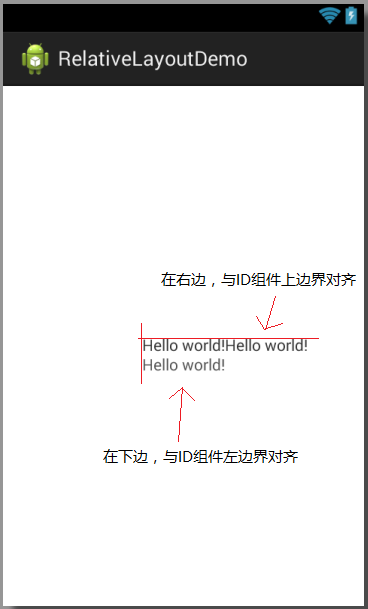
实例2介绍: -- 加入对齐方式 。在tv1下面的对齐方式是左边界对齐。在tv1右边的对齐方式是上边界对齐。
<RelativeLayout xmlns:android="http://schemas.android.com/apk/res/android"

    xmlns:tools="http://schemas.android.com/tools"

    android:layout_width="match_parent"

    android:layout_height="match_parent"

    android:paddingBottom="@dimen/activity_vertical_margin"

    android:paddingLeft="@dimen/activity_horizontal_margin"

    android:paddingRight="@dimen/activity_horizontal_margin"

    android:paddingTop="@dimen/activity_vertical_margin"

    tools:context="com.example.relativelayoutdemo.MainActivity" >

    <TextView

        android:id="@+id/tv1"

        android:layout_width="wrap_content"

        android:layout_height="wrap_content"

        android:layout_centerInParent="true"

        android:text="@string/hello_world" />

    <TextView

        android:id="@+id/tv2"

        android:layout_width="wrap_content"

        android:layout_height="wrap_content"

        android:layout_below="@id/tv1"

        android:layout_alignLeft="@id/tv1"

        android:text="@string/hello_world" />

    <TextView

        android:layout_width="wrap_content"

        android:layout_height="wrap_content"

        android:layout_toRightOf="@id/tv1"

        android:layout_alignTop="@id/tv1"

        android:text="@string/hello_world" />

</RelativeLayout>
结果:
layout layout_alignLeft跟layout_toLeftOf的更多相关文章
- android:layout_alignleft layout_toleftof区别,详解RelativeLayout布局属性
转载请注明博客地址. 最近看博客看到有关于RelativeLayout布局的解释,有的解释很多是错误的.因此有必要对每一个常见的布局属性进行描述.以下解释全部都是逐行进行测试的. 首先把常用的布局分组 ...
- 【Android UI】Android Layout XML属性
Layout对于迅速的搭建界面和提高界面在不同分辨率的屏幕上的适应性具有很大的作用.这里简要介绍Android的Layout和研究一下它的实现. Android有Layout:FrameLayout, ...
- Android Layout XML属性
转载自并做少量添加:http://www.cnblogs.com/playing/archive/2011/04/07/2008620.html Layout对于迅速的搭建界面和提高界面在不同分辨率的 ...
- 14.Android之Layout布局学习
Android布局主要有5种,接下来学习总结下. 1) 最常见的线性布局 LinearLayout 线性布局是Android布局中最简单的布局,也是最常用,最实用的布局. android:orient ...
- layout相关
大致看了看布局大致有5种(approximately) 1. LinearLayout 2. RelativeLayout 3. FrameLayout 4. TableLayout 5. GridL ...
- [置顶] Android系统五大布局详解Layout
我们知道Android系统应用程序一般是由多个Activity组成,而这些Activity以视图的形式展现在我们面前,视图都是由一个一个的组件构成的.组件就是我们常见的Button.TextEdit等 ...
- Android--应用开发3(Android layout XML属性)
Android layout XML属性 转载:http://www.cnblogs.com/playing/archive/2011/04/07/2008620.html Layout对于迅速的搭建 ...
- Android系统五大布局详解Layout
我们知道Android系统应用程序一般是由多个Activity组成,而这些Activity以视图的形式展现在我们面前, 视图都是由一个一个的组件构成的.组件就是我们常见的Button.TextEdit ...
- Layout基本属性总结
在Android中,共有五种布局方式,分别是:FrameLayout(框架布局),LinearLayout (线性布局),GridLayout(网格布局),RelativeLayout(相对布局),T ...
随机推荐
- RelativeLayout布局属性
Android RelativeLayout属性 // 相对于给定ID控件 android:layout_above 将该控件的底部置于给定ID的控件之上; android:layout_below ...
- 聊聊、Mybatis XML
引入相应的依赖包 <dependency><groupId>org.mybatis</groupId><artifactId>mybatis-sprin ...
- hdu 1714 RedField
RedField Time Limit: 1000/1000 MS (Java/Others) Memory Limit: 32768/32768 K (Java/Others) Total S ...
- Axure+SVN——实现多人团队开发
最近进行考试系统重构,一个小组十几个人,这么多人要同时搞需求画原型.这样原本的合作开发工具SVN已经不能满足现在的需求了,这是就找到了一个新的方法--Axure+SVN. 在SVN服务器端建立一个空的 ...
- CSS绘制三角形的原理剖析
今天学习Bootstrap时候,看到按钮的向下三角形源码: .caret { display: inline-block; ; ; margin-left: 2px; vertical-align: ...
- hdu 1811 Rank of Tetris (拓扑 & 并查集)
Rank of Tetris Time Limit: 1000/1000 MS (Java/Others) Memory Limit: 32768/32768 K (Java/Others)To ...
- div样式
DIV样式汇总 一.常用属性: 1.Height:设置DIV的高度. 2.Width:设置DIV的宽度. 例: <div style="width:200px;height:200px ...
- margin-top影响父元素定位
写样式时无意中发现margin-top会影响到父元素的定位,下面是示例: HTML代码: <div class="demo"> <div class=" ...
- select函数详解
网络编程中一个很重要的函数,没有整理,直接转过来,讲的还是蛮详细的. 转自:http://blog.csdn.net/zhw888888/archive/2009/03/29/4034515.aspx ...
- shell脚本——项目1
案例名称:系统初始化 背景:10台已装有linux系统的服务器 需求: 1.设置时区同步 2.禁用selinux 3.清空防火墙策略 4.历史命令显示操作时间 5.禁止root远程登录 6.禁止定时任 ...