
OpenCV——黑白调整
参考算法:
// define head function

#ifndef PS_ALGORITHM_H_INCLUDED

#define PS_ALGORITHM_H_INCLUDED

#include <iostream>

#include <string>

#include "cv.h"

#include "highgui.h"

#include "cxmat.hpp"

#include "cxcore.hpp"

using namespace std;

using namespace cv;

void Show_Image(Mat&, const string &);

#endif // PS_ALGORITHM_H_INCLUDED

/*

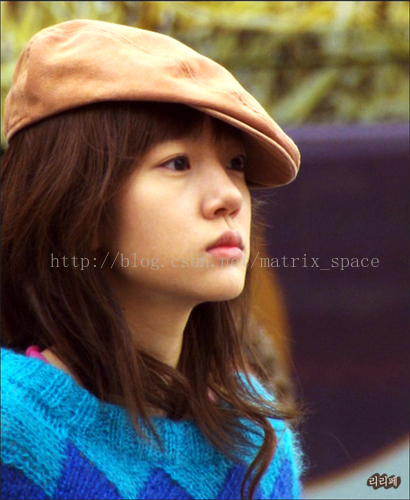
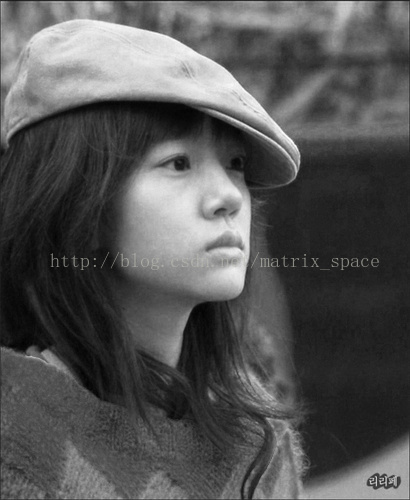
This program will transform

the color image to Black-whithe

image.

*/

#include "PS_Algorithm.h"

#include <time.h>

using namespace std;

using namespace cv;

int main(void)

{

    string Img_name("9.jpg");

    Mat Img_in;

    Img_in=imread(Img_name);

    Show_Image(Img_in, Img_name);

    Mat Img_out(Img_in.size(), CV_32FC3);

    Img_in.convertTo(Img_out, CV_32FC3);

    Mat R(Img_in.size(),CV_32FC1);

    Mat G(Img_in.size(),CV_32FC1);

    Mat B(Img_in.size(),CV_32FC1);

    Mat I(Img_in.size(),CV_32FC1);

    Mat BW_out(Img_in.size(), CV_32FC1);

    Mat rgb[]={B, G, R};

    cv::split(Img_out, rgb);

    I=B+G+R;

    float maxVal, minVal, midVal;

    float color_ratio[6]={0.4,0.6,0.4,0.6,0.2,0.8};

    float r_max_mid, r_max;

    int Ind;

    for(int i=0; i<I.rows; i++)

    {

        for(int j=0; j<I.cols; j++)

        {

            maxVal=std::max(R.at<float>(i,j), std::max(G.at<float>(i,j),

                                                       B.at<float>(i,j)));

            minVal=std::min(R.at<float>(i,j), std::min(G.at<float>(i,j),

                                                       B.at<float>(i,j)));

            midVal=I.at<float>(i,j)-maxVal-minVal;

            if(minVal==R.at<float>(i,j))

            {

                Ind=0;

            }

            else if(minVal==G.at<float>(i,j))

            {

                Ind=2;

            }

            else

            {

                Ind=4;

            }

            r_max_mid=color_ratio[(Ind+3)%6+1];

            if(maxVal==R.at<float>(i,j))

            {

                Ind=1;

            }

            else if(maxVal==G.at<float>(i,j))

            {

                Ind=3;

            }

            else

            {

                Ind=5;

            }

            r_max=color_ratio[Ind];

            BW_out.at<float>(i,j)=(maxVal-midVal)*r_max+(midVal-minVal)

                      *r_max_mid+minVal;

        }

    }

    BW_out=BW_out/255;

    Show_Image(BW_out, "out");

    imwrite("out.jpg", BW_out*255);

    waitKey();

    cout<<"All is well."<<endl;

}

// define the show image

#include "PS_Algorithm.h"

#include <iostream>

#include <string>

using namespace std;

using namespace cv;

void Show_Image(Mat& Image, const string& str)

{

    namedWindow(str.c_str(),CV_WINDOW_AUTOSIZE);

    imshow(str.c_str(), Image);

}
原图
效果图
OpenCV——黑白调整的更多相关文章
- Opencv学习笔记4:Opencv处理调整图片亮度和对比度
一.理论基础 在数学中我们学过线性理论,在图像亮度和对比度调节中同样适用,看下面这个公式: 在图像像素中其中: 参数f(x)表示源图像像素. 参数g(x) 表示输出图像像素. 参数a(需要满足a> ...
- OpenCV尺寸调整
#include<cv.h> #include<highgui.h> int main(int argc, char** argv) { IplImage* img = cvL ...
- OpenCV——饱和度调整
参考: 闲人阿发伯的博客 // define head function #ifndef PS_ALGORITHM_H_INCLUDED #define PS_ALGORITHM_H_INCLUDED ...
- PS 图像调整算法——黑白
这个算法是参考自 阿发伯 的博客: http://blog.csdn.net/maozefa 黑白调整 Photoshop CS的图像黑白调整功能,是通过对红.黄.绿.青.蓝和洋红等6种颜色的比例调节 ...
- UI设计师需要熟记的45个快捷键Windows、Mac
大家都知道PS快捷键很多,其实没必要都记住,今天为大家整理了45个比较实用的,别忘了收藏. 图层 填充图层 MAC: Alt+Backspace (前景) or Cmd+Backspace (背景) ...
- Delphi图像处理 -- 文章索引
转载:http://blog.csdn.net/maozefa/article/details/7188354 本文对已发布<Delphi图像处理>系列文章进行索引链接,以方便阅读和查找. ...
- qt使用中的一些问题(linux)
ui_xxx.h的问题 工程中(工作空间)中包含的ui_xxx.h文件是系统自动生成的.这个是xxx.ui的创建文件来的,xxx.ui界面上的都是ui_xxx.h在控制的,在项目里是不显示这个头文件的 ...
- OpenCV-Python 直方图-2:直方图均衡 | 二十七
目标 在本节中, 我们将学习直方图均衡化的概念,并利用它来提高图像的对比度. 理论 考虑这样一个图像,它的像素值仅局限于某个特定的值范围.例如,较亮的图像将把所有像素限制在高值上.但是一幅好的图像会有 ...
- 用OpenCV实现Photoshop算法(三): 曲线调整
http://blog.csdn.net/c80486/article/details/52499919 系列文章: 用OpenCV实现Photoshop算法(一): 图像旋转 用OpenCV实现Ph ...
随机推荐
- Angular1.0 在Directive中调用Controller的方法
Controller中定义了$scope.method = function(){} Directive中需要引入$scope http://stackoverflow.com/questions/2 ...
- BEGINNING SHAREPOINT® 2013 DEVELOPMENT 第11章节--为Office和SP解决方式开发集成Apps Office新的App模型
BEGINNING SHAREPOINT® 2013 DEVELOPMENT 第11章节--为Office和SP解决方式开发集成Apps Office新的App模型 Office 2 ...
- git使用命令行方式提交代码到github或gitlab上
(1)使用命令行(Git Bash)在gitlab上新建项目的流程 //进入项目目录下: C:\Users\wuwy>cd D:\workspace\eclipse\H5Patient\// ...
- iOS中获取系统相册中的图片
一.获取单张图片 思路: 1.利用UIImagePickerController可以从系统自带的App(照片\相机)中获得图片 2.设置代理,遵守代理协议 注意这个UIImagePickerContr ...
- 安装Hadoop 1.1.2 (一 安装JDK)
1 下载jdk1.7 xxx .rpm 2 以Root权限登陆 3 修改文件权限 chmod +x jdk-7u25-linux-x64.rpm 4 安装 JDK rpm -ivh jdk-7u2 ...
- Android-BroadcastReceiver具体解释
什么是Broadcast Broadcast即广播,在Android广播是很重要的功能.比如我们想在系统开机之后做某些事情.监控手机的电量.监控手机的网络状态等等.这些功能都须要用到广播.当然我们也能 ...
- docker笔记一
docker概念介绍: docker 是一个装在linux上的普通的软件.利用docker的命令,可以创建一个带有linux操作系统的镜像文件,docker命令运行这个带的linux操作系的镜像文件, ...
- unity里standard pbr(一)
关注forwardbase下的 standard.shader #pragma vertex vertBase #pragma fragment fragBase #include "Uni ...
- java基础入门1到100的奇数求和
/* Name:1-100所有奇数求和的程序 Power by Stuart Date:2015-4-23 */ public class DateTest01{ public static void ...
- 11.2.3 Redis的启动停止
11.2.3 Redis的启动停止 Redis安装配置完成后,启动过程非常简单,执行命令/usr/local/redis/bin/redis-server /usr/local/redis/etc/ ...