
OpenCV——黑白调整
参考算法:
// define head function

#ifndef PS_ALGORITHM_H_INCLUDED

#define PS_ALGORITHM_H_INCLUDED

#include <iostream>

#include <string>

#include "cv.h"

#include "highgui.h"

#include "cxmat.hpp"

#include "cxcore.hpp"

using namespace std;

using namespace cv;

void Show_Image(Mat&, const string &);

#endif // PS_ALGORITHM_H_INCLUDED

/*

This program will transform

the color image to Black-whithe

image.

*/

#include "PS_Algorithm.h"

#include <time.h>

using namespace std;

using namespace cv;

int main(void)

{

    string Img_name("9.jpg");

    Mat Img_in;

    Img_in=imread(Img_name);

    Show_Image(Img_in, Img_name);

    Mat Img_out(Img_in.size(), CV_32FC3);

    Img_in.convertTo(Img_out, CV_32FC3);

    Mat R(Img_in.size(),CV_32FC1);

    Mat G(Img_in.size(),CV_32FC1);

    Mat B(Img_in.size(),CV_32FC1);

    Mat I(Img_in.size(),CV_32FC1);

    Mat BW_out(Img_in.size(), CV_32FC1);

    Mat rgb[]={B, G, R};

    cv::split(Img_out, rgb);

    I=B+G+R;

    float maxVal, minVal, midVal;

    float color_ratio[6]={0.4,0.6,0.4,0.6,0.2,0.8};

    float r_max_mid, r_max;

    int Ind;

    for(int i=0; i<I.rows; i++)

    {

        for(int j=0; j<I.cols; j++)

        {

            maxVal=std::max(R.at<float>(i,j), std::max(G.at<float>(i,j),

                                                       B.at<float>(i,j)));

            minVal=std::min(R.at<float>(i,j), std::min(G.at<float>(i,j),

                                                       B.at<float>(i,j)));

            midVal=I.at<float>(i,j)-maxVal-minVal;

            if(minVal==R.at<float>(i,j))

            {

                Ind=0;

            }

            else if(minVal==G.at<float>(i,j))

            {

                Ind=2;

            }

            else

            {

                Ind=4;

            }

            r_max_mid=color_ratio[(Ind+3)%6+1];

            if(maxVal==R.at<float>(i,j))

            {

                Ind=1;

            }

            else if(maxVal==G.at<float>(i,j))

            {

                Ind=3;

            }

            else

            {

                Ind=5;

            }

            r_max=color_ratio[Ind];

            BW_out.at<float>(i,j)=(maxVal-midVal)*r_max+(midVal-minVal)

                      *r_max_mid+minVal;

        }

    }

    BW_out=BW_out/255;

    Show_Image(BW_out, "out");

    imwrite("out.jpg", BW_out*255);

    waitKey();

    cout<<"All is well."<<endl;

}

// define the show image

#include "PS_Algorithm.h"

#include <iostream>

#include <string>

using namespace std;

using namespace cv;

void Show_Image(Mat& Image, const string& str)

{

    namedWindow(str.c_str(),CV_WINDOW_AUTOSIZE);

    imshow(str.c_str(), Image);

}
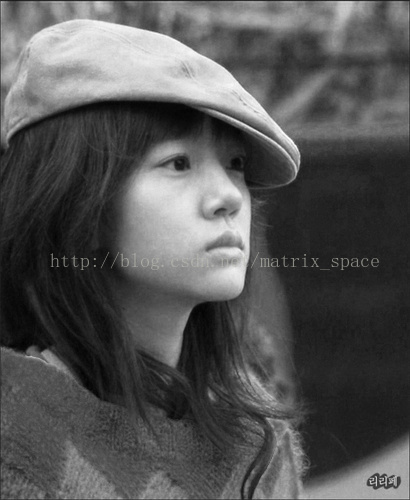
原图
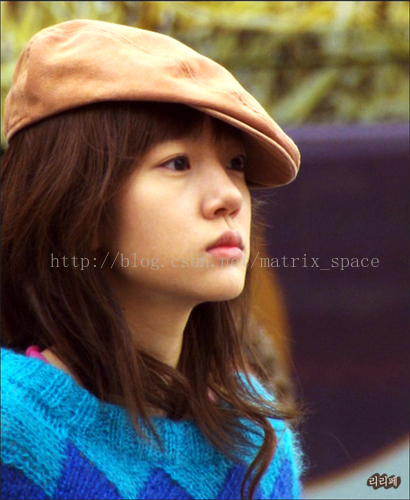
效果图
OpenCV——黑白调整的更多相关文章
- Opencv学习笔记4:Opencv处理调整图片亮度和对比度
一.理论基础 在数学中我们学过线性理论,在图像亮度和对比度调节中同样适用,看下面这个公式: 在图像像素中其中: 参数f(x)表示源图像像素. 参数g(x) 表示输出图像像素. 参数a(需要满足a> ...
- OpenCV尺寸调整
#include<cv.h> #include<highgui.h> int main(int argc, char** argv) { IplImage* img = cvL ...
- OpenCV——饱和度调整
参考: 闲人阿发伯的博客 // define head function #ifndef PS_ALGORITHM_H_INCLUDED #define PS_ALGORITHM_H_INCLUDED ...
- PS 图像调整算法——黑白
这个算法是参考自 阿发伯 的博客: http://blog.csdn.net/maozefa 黑白调整 Photoshop CS的图像黑白调整功能,是通过对红.黄.绿.青.蓝和洋红等6种颜色的比例调节 ...
- UI设计师需要熟记的45个快捷键Windows、Mac
大家都知道PS快捷键很多,其实没必要都记住,今天为大家整理了45个比较实用的,别忘了收藏. 图层 填充图层 MAC: Alt+Backspace (前景) or Cmd+Backspace (背景) ...
- Delphi图像处理 -- 文章索引
转载:http://blog.csdn.net/maozefa/article/details/7188354 本文对已发布<Delphi图像处理>系列文章进行索引链接,以方便阅读和查找. ...
- qt使用中的一些问题(linux)
ui_xxx.h的问题 工程中(工作空间)中包含的ui_xxx.h文件是系统自动生成的.这个是xxx.ui的创建文件来的,xxx.ui界面上的都是ui_xxx.h在控制的,在项目里是不显示这个头文件的 ...
- OpenCV-Python 直方图-2:直方图均衡 | 二十七
目标 在本节中, 我们将学习直方图均衡化的概念,并利用它来提高图像的对比度. 理论 考虑这样一个图像,它的像素值仅局限于某个特定的值范围.例如,较亮的图像将把所有像素限制在高值上.但是一幅好的图像会有 ...
- 用OpenCV实现Photoshop算法(三): 曲线调整
http://blog.csdn.net/c80486/article/details/52499919 系列文章: 用OpenCV实现Photoshop算法(一): 图像旋转 用OpenCV实现Ph ...
随机推荐
- How can I detect multiple logins into a Django web application from different locations?
1) Install django-tracking (thankyou for that tip Van Gale Google Maps + GeoIP is amazing!) 2) Add t ...
- G - 湫湫系列故事——减肥记I
G - 湫湫系列故事——减肥记I Time Limit:1000MS Memory Limit:32768KB 64bit IO Format:%I64d & %I64u De ...
- 【python】-- RabbitMQ RPC模型
RabbitMQ RPC模型 RPC(remote procedure call)模型说通俗一点就是客户端发一个请求给远程服务端,让它去执行,然后服务端端再把执行的结果再返回给客户端. 1.服务端 i ...
- [note]一类位运算求最值问题
[note]一类位运算求最值问题 给定一些数,让你从中选出两个数a,b,每次询问下列中的一个 1.a and b的最大值 2.a xor b的最大值 3.a or b的最大值 神仙们都是FWT,小蒟蒻 ...
- ICCV 2015 B-CNN细粒度分类
哈哈,好久没写博客了....最近懒癌发作~~主要是因为心情不太好啊,做什么事情都不太顺心,不过已经过去啦.最近一直忙着公司的项目,想用这个网络,就给大家带来了的这篇文章.可能比较老,来自ICCV 20 ...
- python基础12 ---函数模块2
函数模块 一.sys函数模块详解 1.sys.argv[x] 功能:从程序外部接受参数,接收的参数个数可以是多个,在程序内部sys.argv吧这些外部参数转换成元组的形式,然后以索引x的方式在内部取出 ...
- 查看mysql支持的存储引擎
查看mysql支持的存储引擎 show engines\G;
- php......房屋租赁练习
多条件查询搜索页面,提交到当前页面处理 <?php include("../DB.class.php"); $db = new DB(); /*var_dump($_POST ...
- redis于spring整合之RedisTemplate
原文地址: http://www.jianshu.com/p/7bf5dc61ca06
- python字符串格式和编码与解码问题
%c 转换成字符(ASCII码值,长度为一的字符串) %r 有线使用repr()函数进行字符串转换 %s 有线使用str()函数进行字符串转换 %d or %i 转换成有符号十进制数 %u 转换成无符 ...